当前位置:网站首页>Form form
Form form
2022-07-26 08:54:00 【Eucalyptus globulus eliauk】
FORM
List of articles
meaning : Represents an area in a document , This area contains interactive controls , Used to direct to Web The server submits information
attribute
| attribute | value | describe |
|---|---|---|
| action | URL # To refresh the current page | Where to send form data when submitting a form .( I.e. path ) |
| accept-charset | UTF-8( Default )ISO-8859 | Specify the form data character set that the server can handle . |
| methed | get and post | Used to send form data HTTP Method |
| name | text | Specify the name of the form |
| target | _blank_self_parent_top | Where to open action URL |
| novalidate | novalidate( Boolean properties ) | If you use this property , Then submit the form without verification and pass novalidate Attribute is placed in |
| autocomplete | on off | Specifies whether the autocomplete function of the form is enabled |
autocomplete Detailed explanation
off: It means that the browser is not allowed to automatically enter or select the value of this field . Documents or applications may provide their own autocompletion , Or the security problem requires that the value of the field is not automatically entered .
Be careful : In most modern browsers , Set up autocomplete by "off" It will not prevent the password manager from asking the user whether to save the user name and password information , Or whether to automatically fill in these values in the login form of the site .
on: Allow the browser to automatically complete the input . There is no guidance on the types of data expected in this area , So browsers can use their own judgment
example :
<form action="#" method="get" autocomplete="on">
   user name :<input type="text" name="fname" /><br />
   password :<input type="text" name="iname" autocomplete="off" /><br />
  <input type="submit" />
</form>

get and post The difference between
1、Get Set the data in the form according to variable=value In the form of , Add to action The point is URL Back , And both use “?” Connect , And the variables use “&” Connect ;Post Put the data in the form form In the data body of , In the way that variables and values correspond , Pass on to action Points to URL.
The following form :
http://www.imooc.com/test.asp?name=lilian&password=12345678
2、Get It's not safe , Because in the transmission process , The data is stored in the requested URL In the address , In this way, some private information may be seen by a third party .
3、Get The amount of data transmitted by this mode is very small , The general limit is 2KB about , But it's more efficient than Post Good method ; and Post The amount of data transferred by this method is relatively large
form Common labels in
input
attribute
1.type Properties,
| type | describe | Basic examples | Collocation properties |
|---|---|---|---|
| text | The default value is . Single line text area , Line breaks in input are automatically removed | minlength(maxlength) value Minimum ( Big ) length ( Minimum number of characters ) placeholder When the form control is empty , Displayed text size The size of the control | |
| button | Button |  | value |
| checkbox | Check box , Can be set to checked or unchecked |  | checked Used to control whether the control is selected |
| color | The control used to specify the color ; In supported browsers , When activated, the color Finder will be turned on |  | |
| date | A control for entering a date ( year 、 month 、 Japan , Not including time ). Open the date selector or the number wheel of month, year and day when the supported browser is activated |  | |
| datetime-local | Control for entering date and time Include specific time |  | |
| Edit the area of the email address . similar text Input , However, there will be confirmation parameters and corresponding keyboards on supported browsers and devices with dynamic keyboards . |  | multiple Boolean value . size The size value of the control | |
| file | Controls that let users select files | 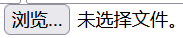 | Use accept Property specifies the file type that the control can select . multiple Boolean value . Whether multiple values are allowed |
| image | With images submit Button |  | src and alt formaction For submitting forms URL height and width |
| number | A control for entering numbers . If you support it , Scroll buttons are displayed and default validation is provided ( That is, you can only enter numbers ) | 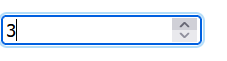 | |
| range | This control does not require precise input of numbers . Control is a scope component , The default value is the value in the middle |  | |
| password | Single line text area , Its value will be masked . If the site is not secure , Will warn the user . |  | minlength(maxlength) value Minimum ( Big ) length ( Minimum number of characters )size The size of the control |
| radio | Radio button , It is allowed to have the same... In multiple name Select one of the options of value . |  | checked Used to control whether the control is selected |
| reset | This button resets all the contents of the form to the default values |  | |
| submit | Button for submitting form |  | formaction For submitting forms URL |
| tel | Control for entering a phone number No validation parameters |  | minlength(maxlength) value Minimum ( Big ) length ( Minimum number of characters ) placeholder When the form control is empty , Control size The size of the control |
| url | For input URL Control for , Be similar to text Input , But there are validation parameters | 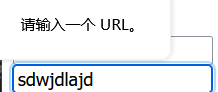 | minlength(maxlength) value Minimum ( Big ) length ( Minimum number of characters ) placeholder When the form control is empty , Control |
2. General properties
| attribute | describe |
|---|---|
| value | Value of the form control . By name / The form of value pairs is submitted with the form |
| readonly | Boolean value . When it exists, the value of the control cannot be edited |
| required | Boolean value . Indicates that this value is required or must be checked before submitting the form |
| name | input The name of the form control . By name / The form of value pairs is submitted with the form |
| list | Of auto fill options < datalist > Of id value |
| autocomplete | Auto fill function for forms . When the user starts typing in the field , The browser is based on the previously typed values , The options to fill in the fields should be shown . |
Example :
<!-- multiple attribute  -->
<input placeholder=" Please select a file " type="file" name="files" multiple />
Click to select a file , After selecting a file , You can hold down the Ctrl Key and then select another file , The upper limit of the number is not specifically tested for the time being 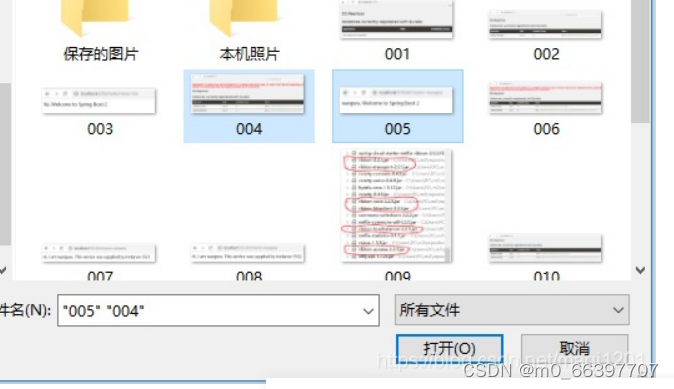
After choosing , Click on the open , You can see , Several files selected this time will be displayed on the page 
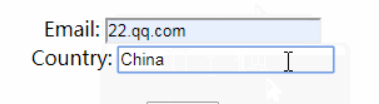
<!-- readonly attribute  -->
<form action="#">
  Email:<input type="text" name="email" /><br />
  Country:<input type="text" name="country" value="china" readonly />
</form>
<!-- required attribute  -->
<form action="#">
   account number :<input type="text" name="email" /><br />
   password :<input type="text" name="country" value="china" required />
</form>

label
< label > The label is input Element definition annotation ( Mark )
label The element does not present any special effects to the user . however , It improves usability for mouse users .
If you are in label Click on the text... In the element , Will trigger this control . That is to say , When the user selects the label , The browser will automatically focus on the form controls associated with the tags .
Tips and notes :
notes :“for” Attributes can be used to label Bind to another element . Please put “for” Property is set to the value of the related element id The value of the property
Multiple and i n p u t \color{red}{input} input and t e x t a r e a \color{red}{textarea} textarea Use
<div class="preference">
  <label for="cheese">Do you like cheese?</label>
  <input type="checkbox" name="cheese" id="cheese" />
</div>

<div class="preference">
  <label>
    Do you like peas?
    <input type="checkbox" name="peas" />
  </label>
</div>

datalist
meaning : Contains a set of < option > Elements , These elements represent optional values for other form controls
Tips : More than i n p u t \color{red}{input} input Medium l i s t \color{red}{list} list Attribute connection uses ,
Its id Attribute should be the same as list Same property value
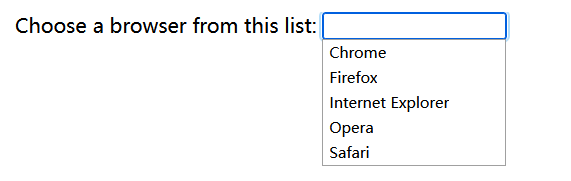
Example :
<label for="ice-cream-choice">Choose a flavor:</label>
<input list="ice-cream-flavors" id="ice-cream-choice" name="ice-cream-choice" />

<datalist id="ice-cream-flavors">
  <option value="Chocolate"></option>
  <option value="Coconut"></option>
  <option value="Mint"></option>
  <option value="Strawberry"></option>
  <option value="Vanilla"></option>
</datalist>
select
meaning : Represents a control that provides an option menu :
option
meaning : Used to define in < select >, < optgroup > or < datalist > The items contained in the element .< option > It can be displayed in pop-up windows and HTML Other items in the document represent menu items in the list .
Example :
<label for="pet-select">Choose a pet:</label>

<select id="pet-select">
  <option value="">--Please choose an option--</option>
  <option value="dog">Dog</option>
  <option value="cat">Cat</option>
  <option value="hamster">Hamster</option>
  <option value="parrot">Parrot</option>
  <option value="spider">Spider</option>
  <option value="goldfish">Goldfish</option>
</select>

optgroup
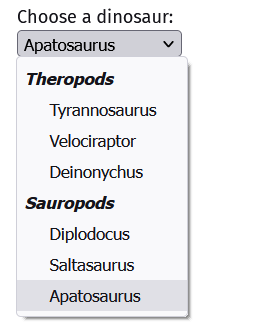
meaning :< select > Element to create a group .
<label for="dino-select">Choose a dinosaur:</label>
<select id="dino-select">
  <optgroup label="Theropods">
    <option>Tyrannosaurus</option>
    <option>Velociraptor</option>
    <option>Deinonychus</option>
  </optgroup>
  <optgroup label="Sauropods">
    <option>Diplodocus</option>
    <option>Saltasaurus</option>
    <option>Apatosaurus</option>
  </optgroup>
</select>
fieldset
meaning : Used to group the control elements in the form ( Also include label Elements )
legend
meaning : Used to represent its parent element < fieldset > Content title
Example :
<form action="#">
  <fieldset>
    <legend>Simple fieldset</legend>
    <input type="radio" id="radio" />
    <label for="radio">Spirit of radio</label>
  </fieldset>
</form>

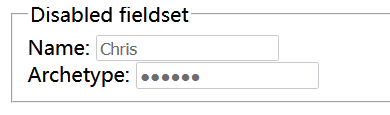
<!--  Forbidden  <fieldset> -->
<form action="#">
  <fieldset disabled>
    <legend>Disabled fieldset</legend>
    <div>
      <label for="name">Name: </label>
      <input type="text" id="name" value="Chris" />
    </div>
    <div>
      <label for="pwd">Archetype: </label>
      <input type="password" id="pwd" value="Wookie" />
    </div>
  </fieldset>
</form>
textarea
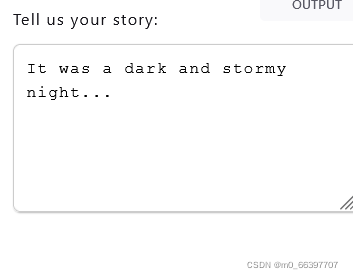
meaning : Represents a multiline plain text editing control , When you want users to enter a fairly long 、 Unformatted text , for example review On \color{red}{ Comment on } review On or back Feed surface single \color{red}{ Feedback form } back Feed surface single A paragraph of opinion in , It's very useful
<label for="story">Tell us your story:</label>

<textarea id="story" name="story"rows="5" cols="33">
It was a dark and stormy night...
</textarea>
边栏推荐
- 2022年收益率最高的理财产品是哪个?
- [untitled]
- 2000年的教训。web3是否=第三次工业革命?
- 数据库操作技能7
- The effective condition of MySQL joint index and the invalid condition of index
- Arbitrum launched the anytrust chain to meet the diverse needs of ecological projects
- MySQL 8.0 OCP 1z0-908 certification examination question bank 1
- day06 作业--技能题2
- Cve-2021-21975 VMware SSRF vulnerability recurrence
- Oracle 19C OCP 1z0-083 question bank (1-6)
猜你喜欢
CSDN TOP1“一个处女座的程序猿“如何通过写作成为百万粉丝博主?

Web概述和B/S架构

Okaleido launched the fusion mining mode, which is the only way for Oka to verify the current output

day06 作业--技能题6

合工大苍穹战队视觉组培训Day5——机器学习,图像识别项目
Deploy prometheus+grafana monitoring platform
【数据库 】GBase 8a MPP Cluster V95 安装和卸载

Dynamic SQL and exceptions of pl/sql

Learning notes of automatic control principle --- linear discrete system

TCP solves the problem of short write
随机推荐
海内外媒体宣发自媒体发稿要严格把握内容关
The largest number of statistical absolute values --- assembly language
Arbitrum launched the anytrust chain to meet the diverse needs of ecological projects
Using the primitive root of module m to judge and solve
Hegong sky team vision training Day6 - traditional vision, image processing
Store a group of positive and negative numbers respectively, and count the number of 0 -- assembly language implementation
Oracle 19C OCP certification examination software list
Pxe原理和概念
tcp 解决short write问题
Excel find duplicate lines
at、crontab
day06 作业--技能题2
Media at home and abroad publicize that we should strictly grasp the content
Transfer guide printing system based on C language design
ES6模块化导入导出)(实现页面嵌套)
[recommended collection] MySQL 30000 word essence summary - query and transaction (III)
What are the contents of Oracle OCP and MySQL OCP certification exams?
Ueditot_ JSP SSRF vulnerability recurrence
Web overview and b/s architecture
Day06 operation -- addition, deletion, modification and query