当前位置:网站首页>Gaussdb (DWS), the first benchmarking MySQL command collection article in the whole network
Gaussdb (DWS), the first benchmarking MySQL command collection article in the whole network
2022-07-18 04:18:00 【Dream eraser】
Create Gaussian database gaussDB(DWS)
You need to create it before you start VPC, The location entry is shown below .

Configure the following information on the open page , Then create it .

The first of these changes is Basic name and Subnet name
The results after creation are as follows :

Next, you can configure the Gaussian database DWS 了 , The function entry address is big data -> Data warehouse services GaussDB(DWS)

Here, follow the prompts of Huawei cloud , Please pay attention to purchasing a public network IP, Otherwise, the follow-up practice is not easy to operate .
The virtual private cloud can be configured as described above .

Wait after creation 10 Minutes of all initialization practices , Then appear You can use Post state , Indicates that the creation was successful .

Connect gaussDB(DWS)
First download the link tool , Download completed in Download Directory to decompress and link files .

unzip dws_client_8.1.x_redhat_x64.zip
source gsql_env.sh
 Copy code
Go to DWS Get the details page to the Internet IP, Then you can use the following command line to connect .
gsql -d gaussdb -h <DWS The public IP> -U dbadmin -p 8000 -r -W < user dbadmin password >;
 Copy code
Use the public network IP And password login , Enter into DWS interface .
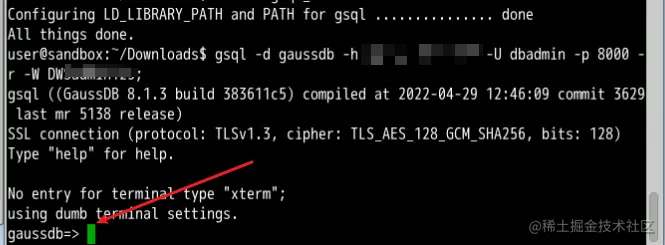
with gaussdb=> There's another one gaussdb->, Expressed as a newline , Usually when your command has no end , That is, there is no semicolon (;), The input status... Will appear .
Connect to DWS after , You can learn commands .
GaussDB (DWS) Command learning
First use the omnipotent command help, Get what's shown in the figure below .

A lot of key information has emerged
You are using gsql, the command-line interface to gaussdb.
Type:  \copyright for distribution terms
       \h for help with SQL commands
       \? for help with gsql commands
       \g or terminate with semicolon to execute query
       \q to quit

 Copy code
Use \h obtain SQL command , As follows , Some results are omitted , The contents involved are similar to MySQL The keywords are basically the same , for example Alter,Create,Drop The content such as .
ABORT            CREATE TEXT SEARCH CONFIGURATION
  ALTER APP WORKLOAD GROUP          CREATE TEXT SEARCH DICTIONARY
  ALTER APP WORKLOAD GROUP MAPPING  CREATE TRIGGER
  ALTER DATA SOURCE                 CREATE TYPE
  ALTER DATABASE                    CREATE USER
  ALTER DEFAULT PRIVILEGES          CREATE VIEW
  ALTER DIRECTORY                   CREATE WORKLOAD GROUP
...skipping 1 line
  ALTER SESSION                     DROP NODE GROUP
  ALTER SYNONYM                     DROP OWNED
  ALTER SYSTEM KILL SESSION         DROP PROCEDURE
  ALTER TABLE                       DROP REDACTION POLICY
  ALTER TABLE PARTITION             DROP RESOURCE POOL
...skipping 1 line
  CREATE TABLE                      TRUNCATE
  CREATE TABLE AS                   UPDATE
  CREATE TABLE PARTITION            VACUUM
  CREATE TABLESPACE                 VALUES
 Copy code
Use \? Get is gsql command , These are the contents that we need to study carefully .
\copyright What you get is copyright information , The results are as follows :
GaussDB Database Management System
Copyright (c) Huawei Technologies Co., Ltd. 2018. All rights reserved.`
 Copy code
First of all to remember \q Is out of , But it is impossible to remember all the commands at once , Because programming is a kind of technical work that practice makes perfect , So rote memorization has little effect .
Let's take a look at the basic gsql command .
\l: List all databases

\c Database name : Switch database
Use \c You can switch databases , For example, the following command :
\c postgres
 Copy code
After use, you will be asked to enter the password again :
assword for user dbadmin:
SSL connection (protocol: TLSv1.3, cipher: TLS_AES_128_GCM_SHA256, bits: 128)
You are now connected to database "postgres" as user "dbadmin".

 Copy code
After successful switching , You will find that the input status prompt location has been switched to the new database .
postgres=> \d
 Copy code
Now we can use \d see Tables under the current database .

If there is no table under the database , Then it will prompt that the following is irrelevant .
No relations found.
 Copy code
Create a table
For subsequent testing , We need to create a data table , Use commands and MySQL Agreement , As follows :
CREATE TABLE customer_t1
(
    c_customer_sk             integer,
    c_customer_id             char(5),
    c_first_name              char(6),
    c_last_name               char(8)
)
with (orientation = column,compression=middle)
distribute by hash (c_last_name);
 Copy code
After the code is copied, the result is as follows , Be careful => and ->:

Then press enter to run the table creation script , Get the following , Indicates that the table has been created .
CREATE TABLE
 Copy code
Use it again \d You can get the data table just created .

The field name of the table :c_customer_sk 、c_customer_id、c_first_name and c_last_name yes ,integer、char(5)、char(6) and char(8) Is the type of these four field names .
Table created , You can manage the data , A common operation is to insert , to update , Delete .
Maintain data
insert data
INSERT INTO customer_t1(c_customer_sk, c_customer_id, c_first_name) VALUES (5566, 'hello', ' Eraser ');
 Copy code
Insert the above data , because Eraser Data length exceeded , Therefore, the following exceptions occur .
ERROR:  value too long for type character(6)
CONTEXT:  referenced column: c_first_name
 Copy code
After the modification , Insert the success :
INSERT INTO customer_t1(c_customer_sk, c_customer_id, c_first_name) VALUES (5566, 'hello', '???');
 Copy code
Prompt information :
INSERT 0 1
 Copy code
You can use \d+ Command to view the properties of a table
\d+ customer_t1;
 Copy code
The results are as follows :

Query command
select * from customer_t1;
Copy code 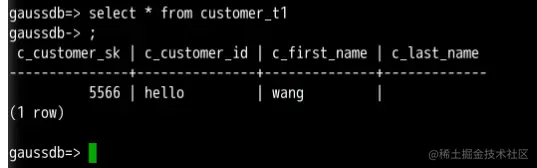
The rest of the query statements refer to MySQL Of SELECT Grammar is fine .
Update and delete table data Update and delete statements MySQL Agreement , We can refer to each other and learn from each other .
Create and manage schema
stay GaussDB DWS There is a new concept in , be called Schema , That's the pattern .
Through management schema, Allow multiple users to use the same database without interfering with each other , You can organize database objects into logical groups that are easy to manage , At the same time, it is convenient to add third-party applications to the corresponding schema Without causing conflict .
There are a few caveats , Copied from the official website manual :
- A database cluster contains one or more named databases . Users and user groups are shared across the cluster , But its data is not shared . Any user connected to the server can only access the database declared in the connection request .
- A database can contain one or more named schema,schema It also contains tables and other database objects , Including data types 、 function 、 Operators, etc. . The same object name can be used in different schema Without conflict . for example ,schema1 and schema2 Can contain a name called mytable Table of .
Use \dn You can see all schema:

Use SHOW search_path;, Can be displayed Currently in use schema, The effect is as follows :

Mode related commands
View the current database schema
select current_schema;
Copy code 
Set the current database schema
set current_schema=my_schema;
 Copy code
establish schema And designate owner
create schema my_schema authorization dlpuser;
 Copy code
About schema More orders , You can continue to learn in practice .
The rest of the orders
Use show server_encoding; You can view the database code .

View database users
select * from pg_user;
Copy code 
View the tables owned by the current database
select * from pg_tables;
Copy code 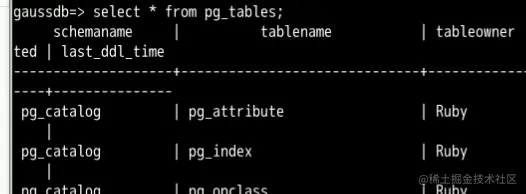
summary
This blog is from DWS Start with initialization , The most commonly used Gaussdb command , among SQL Partial reference MySQL Knowledge points are enough ,gsql You can focus on learning , Of course DWS There are more skill stacks , for example Partition , Indexes , View , Sequence , Timing task , I'll see you on our next blog ~
- I am participating in the recruitment of nuggets technology community creator signing program , Click the link to sign up for submission .
边栏推荐
- Source code analysis (personal collection, not standard)
- Flowable end eventendevent custom attribute
- 好消息|该地考生的二建成绩能查询了
- 技术分享 | 抓包分析 TCP 协议
- StarRocks 社区架构出炉,等你通关升级!
- Technology sharing | packet capturing analysis TCP protocol
- My creation anniversary
- Mysql8.0 learning records 18 - tablespaces
- ThreadLocal原理及源码解析(一步一步点进去,不要背了,学思想)
- 面上大厂需要准备的面试题
猜你喜欢
Xinhuicheng passed the registration: the annual revenue was 800million, and Zheng Ruijun, the actual controller, had more than 300million liabilities

Open source data quality solution -- Apache Griffin primer

tinymce5.0.8编辑器最新版本中文版

创意丝带样式登录页面

flink的yarn集群方式(2)

Among the top 50 intelligent operation and maintenance enterprises in 2022, Borui data strength was selected

The relationship between reinforcement learning (Q-learning) and path search (a*)

Fade the background registration + login form page

在 Polkadot 中进行创建的三种方式 —— 平行链、平行线程、智能合约

T40n intelligent video application processor battery camera SOC
随机推荐
flink的yarn集群方式(1)
js图片裁剪及压缩整合插件
leetcode 301. 删除无效的括号
MIMX8MD6CVAHZAB I.MX 8MDUAL Cortex-A53 - 微处理器
vulnhub Funbox: Easy (funbox3)
ThreadLocal原理及源码解析(一步一步点进去,不要背了,学思想)
[Voforia] 通过识自己设定图片,显示特定AR模型
Maximum sub segment and + segment tree one
Should database be used in interface test
Zcmu--1099: find Element II
[chart component kit development] Shanghai daoning provides developers with steema download, trial and tutorial
Blue Bridge Cup VIP question bank
关于hash和history的区别和使用
MGRE环境下的OSPF实验
MGRE and OSPF
JGG (if 5.733) special issue solicitation: Human Microbiome
Seven suggestions on knowledge management in the construction of enterprises and institutions
新汇成通过注册:年营收8亿 实控人郑瑞俊有超3亿负债
ReentranLock及源码解析(学思想,一步一步点进源码)
scroll-view 固定高度 实现触底效果