当前位置:网站首页>How to configure multiple SSH keys for novices (easy to understand hand-in-hand teaching)
How to configure multiple SSH keys for novices (easy to understand hand-in-hand teaching)
2022-07-19 02:22:00 【yulamz】
How can a novice configure multiple SSH Key( Easy to understand hand-in-hand teaching )
One 、 Understand the background
One Github There can be multiple accounts SSH-Key It's related to .
Simply speaking , You use your home computer to generate a SSH-Key Set to account , meanwhile , You can also generate a SSH-Key Set to the same account . here , You can submit the code to the warehouse at home or in the company ~
A computer ( terminal ) You can configure multiple SSH-Key For more than one Git account number .
for instance , You need to use Gitlab Do internal development , But sometimes I want to use my own Github Account for personal development . here , Don't learn to configure multiple SSH-Key Can't do anything !Github stay 2021 year 8 month 13 The day begins , Will be right in Git The account password is no longer accepted when the operation is authenticated , And will require the use of token based (token) Authentication of .
good heavens , No match SSH Key, Even the code commit No !
Two 、 Quick start
Now I want to be in Github To configure SSH keys For example .
1. Check if there is SSH-Key
Open your Git bash, Get into ~/.ssh Catalog , adopt ll Command to see if there is SSH-Key There are no relevant documents !
$ cd ~/.ssh
$ ls
If it shows id_rsa and id_rsa.pub file , It shows that there is already SSH Key 了 . without , Then follow the steps 2 Generate a !
2. Generate a ( Or more )SSH-Key
Generate a Github With SSH-Key, among github_id_rsa Is the file name of the key ,~/.ssh/github_id_rsa Is the key directory location :
$ ssh-keygen -t rsa -C '[ mailbox ]' -f ~/.ssh/github_id_rsa
Generate a Gitlab With SSH-Key, among gitlab_id_rsa Is the file name of the key ,~/.ssh/gitlab_id_rsa Is the key directory location :
$ ssh-keygen -t rsa -C '[ mailbox ]' -f ~/.ssh/gitlab_id_rsa
3. newly build config And configuration
stay ~/.ssh Under the table of contents , adopt touch Command NEW config file , And use vim Editor open config file .
#  newly build  config  file
$ touch config
#  use  vim  Editor open  config  file
$ vim config
stay config file in , Add the following :
# github
Host github.com
HostName github.com
PreferredAuthentications publickey
IdentityFile ~/.ssh/github_id_rsa

# gitlab
Host gitlab.com
HostName gitlab.com
PreferredAuthentications publickey
IdentityFile ~/.ssh/gitlab_id_rsa

#  If multiple  SSH-Key ,  Then continue to write down according to the above format
among Host and HostName Fill in Git Domain name of the server ,IdentityFile Specifies the path to the private key ( In the second step, generate SSH-Key when , We have specified the path , Just copy it ).
4. obtain SSH Key
Go to ~/.ssh/ View the generated files in the directory :
Generated files to [xxx]_rsa start , [xxx]_rsa It's the private key , [xxx]_rsa.pub It's the public key .
adopt cat Command to view the contents of the public key file , Copy content to Github It can be used normally on .
$ cat [xxx]_rsa.pub
5. stay Github Or others Git New server SSH Key
stay Github Personal settings page , Click on “New SSH Key” . Take a name , Take what you got in the last step SSH Key Copy in .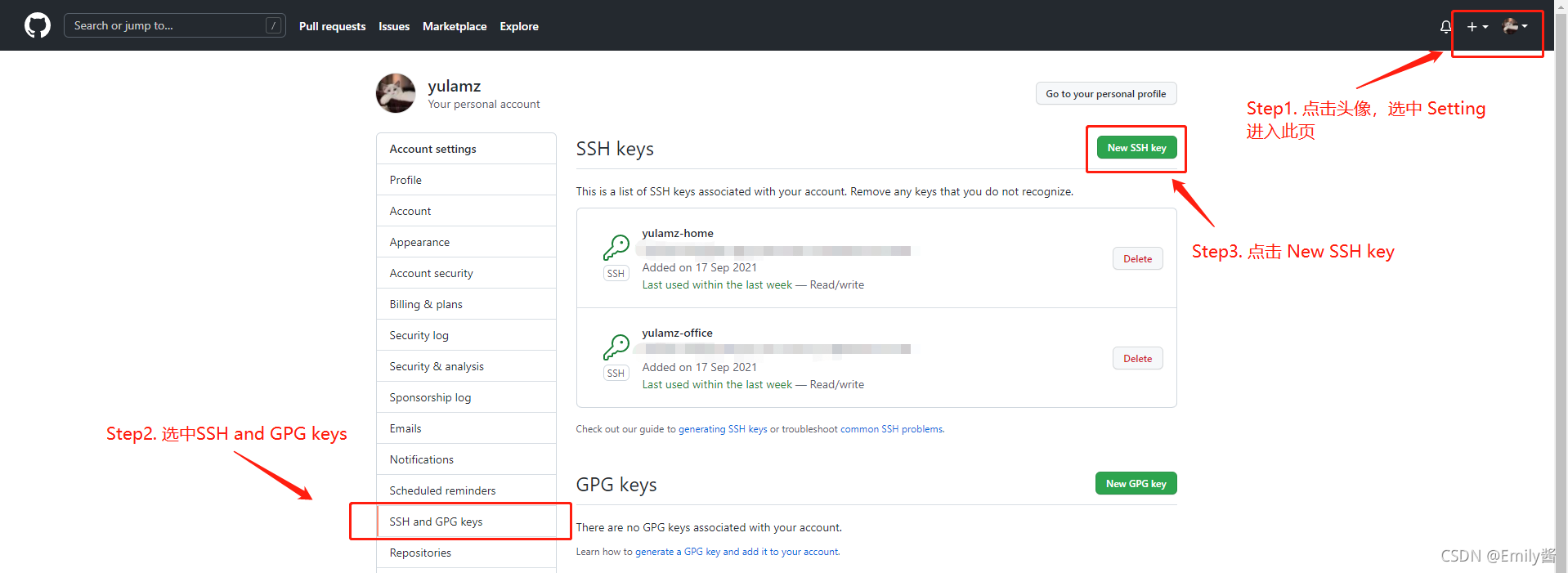

6. use ssh Command test whether the configuration is successful SSH Key( If there are more than one, test them separately )
$ ssh -T [email protected]
Here we use Github For example , Success will return to Hi [ user name ]!You've successfully authenticated, but GitHub does not provide shell access.
3、 ... and 、 Other questions
- SSH The configuration. , The project needs to be switched to SSH Cloning .

- My project passed HTTPS The way of cloning , Now I want to use SSH How to submit by ?
In the project.gitFolder , findconfigFile and open , Modify the url.

- ssh-keygen Description of common parameters :
- -t : Key type , You can choose dsa | ecdsa | ed25519 | rsa ;
- -f : Key directory location , Default to current user home The next path .ssh Hide directory , That is to say ~/.ssh/ , At the same time, the default key file name is id_rsa start . If it is root user , It's in /root/.ssh/id_rsa , For other users , It's in /home/username/.ssh/id_rsa;
- -C : Specify the comment information for this key , When multiple password free logins need to be configured , It is recommended to carry ;
thank
This paper refers to https://gitee.com/help/articles/4229#article-header Wait for the article , Comprehensive summary .
边栏推荐
猜你喜欢

Gdb+vscode for debugging 3 - vscode and GDB remote debugging
![[unity panel attribute literacy] set texture import settings after importing textures](/img/c6/4a50bb848560e1e5c72e714d367109.png)
[unity panel attribute literacy] set texture import settings after importing textures
新手如何配置多个 SSH Key(通俗易懂手把手教学)
Signal and system experiment

剑指 Offer 48. 最长不含重复字符的子字符串

Gdb+vscode for debugging 0 - environment configuration

【Unity编辑器扩展】查找场景和资源内挂载某脚本的所有对象

DoubleDQN的理论基础及其代码实现【Pytorch + Pendulum-v0】

ENVI_ Idl: batch process the re projection of MODIS swath data and output it to GeoTIFF format + detailed analysis

30分钟搞懂 HTTP 缓存
随机推荐
Dueling DQN的理论基础及其代码实现【Pytorch + Pendulum-v0】
ENVI_ Idl: average calculation + analysis of MODIS swath products in batches
ENVI_ Idl: batch splice the daily data of MODIS swath and output it in GeoTIFF format
各种开发工具
ENVI_ Idl: reading of text files (mainly txt and CSV files)
基于蒙特卡洛的强化学习方法【附带代码实现】
ENVI_ Idl: batch Reproject MODIS swath products and specify the range output as GeoTIFF format + parsing
[unity Editor Extension] unity publishes resources to the store process unity asset store publish
Gdb+vscode for debugging 2 - GDB breakpoint related
STL--stack容器
STL--deque容器
英文商务邮件常用语
【AntV G2】如何解决 G2 造成的内存泄露
图像质量评估指标:SNR、PSNR、MSE和SSIM
DQN理论基础及其代码实现【Pytorch + CartPole-v0】
Summary of tree and heap knowledge points
STL -- vector container
STL -- deque container
【Unity编辑器扩展】查找场景和资源内挂载某脚本的所有对象
第二讲 BTC-密码学原理(笔记)