当前位置:网站首页>新手如何配置多个 SSH Key(通俗易懂手把手教学)
新手如何配置多个 SSH Key(通俗易懂手把手教学)
2022-07-17 00:14:00 【yulamz】
新手如何配置多个 SSH Key(通俗易懂手把手教学)
一、了解背景
一个 Github 账户可以有多个 SSH-Key 与其关联。
简单来说,你用家里的电脑生成了一个 SSH-Key 设置到账户上,与此同时,你用公司的电脑也可以生成一个 SSH-Key 设置到同一个账户上。此时,你在家或者在公司都可以提交代码到仓库啦~
一台电脑(终端)可以配置多个 SSH-Key 用于多个 Git 账号。
比如说,你在公司需要用 Gitlab 做内部的开发,但是偶尔也会想用自己的 Github 账户做些个人的开发。此时,不学会配置多个 SSH-Key 寸步难行!Github 在 2021 年 8 月 13 日开始,将在对 Git 操作进行身份验证时不再接受帐户密码,并将要求使用基于令牌(token)的身份验证。
好家伙,不会配 SSH Key,连代码都 commit 不了哦!
二、快速上手
下面以我要在 Github 配置 SSH keys 为例。
1. 检查是否已经有 SSH-Key
打开您的Git bash,进入 ~/.ssh 目录,通过 ll 命令看看自个儿的电脑上有 SSH-Key 的相关文件没!
$ cd ~/.ssh
$ ls
如果显示 id_rsa 和 id_rsa.pub 文件,说明已经有SSH Key了。如果没有,那么根据步骤2生成一个!
2. 生成一个(或多个)SSH-Key
生成一个 Github 用的 SSH-Key,其中 github_id_rsa 为密钥的文件名,~/.ssh/github_id_rsa 为密钥目录位置:
$ ssh-keygen -t rsa -C '[邮箱]' -f ~/.ssh/github_id_rsa
生成一个 Gitlab 用的 SSH-Key,其中 gitlab_id_rsa 为密钥的文件名,~/.ssh/gitlab_id_rsa 为密钥目录位置:
$ ssh-keygen -t rsa -C '[邮箱]' -f ~/.ssh/gitlab_id_rsa
3. 新建config并配置
在 ~/.ssh 目录下,通过 touch 命令新建 config 文件,并用 vim 编辑器打开 config 文件。
# 新建 config 文件
$ touch config
# 用 vim 编辑器打开 config 文件
$ vim config
在 config 文件 中,添加如下内容:
# github
Host github.com
HostName github.com
PreferredAuthentications publickey
IdentityFile ~/.ssh/github_id_rsa

# gitlab
Host gitlab.com
HostName gitlab.com
PreferredAuthentications publickey
IdentityFile ~/.ssh/gitlab_id_rsa

# 如果生成多个 SSH-Key , 则按上面的格式继续往下写
其中 Host 和 HostName 填写 Git 服务器的域名,IdentityFile 指定私钥的路径(在第二步生成 SSH-Key 时,我们已经指定该路径,拷贝过来即可)。
4. 获取 SSH Key
前往 ~/.ssh/ 目录下查看生成的文件:
生成的文件以 [xxx]_rsa 开头, [xxx]_rsa 是私钥, [xxx]_rsa.pub 是公钥。
通过 cat 命令查看公钥文件里的内容,拷贝内容放到 Github 上就可以正常使用了。
$ cat [xxx]_rsa.pub
5. 在 Github 或其他 Git 服务器新建 SSH Key
在 Github 个人的设置页,点击 “New SSH Key” 。取个名字,把上一步获取到的 SSH Key 拷贝进去。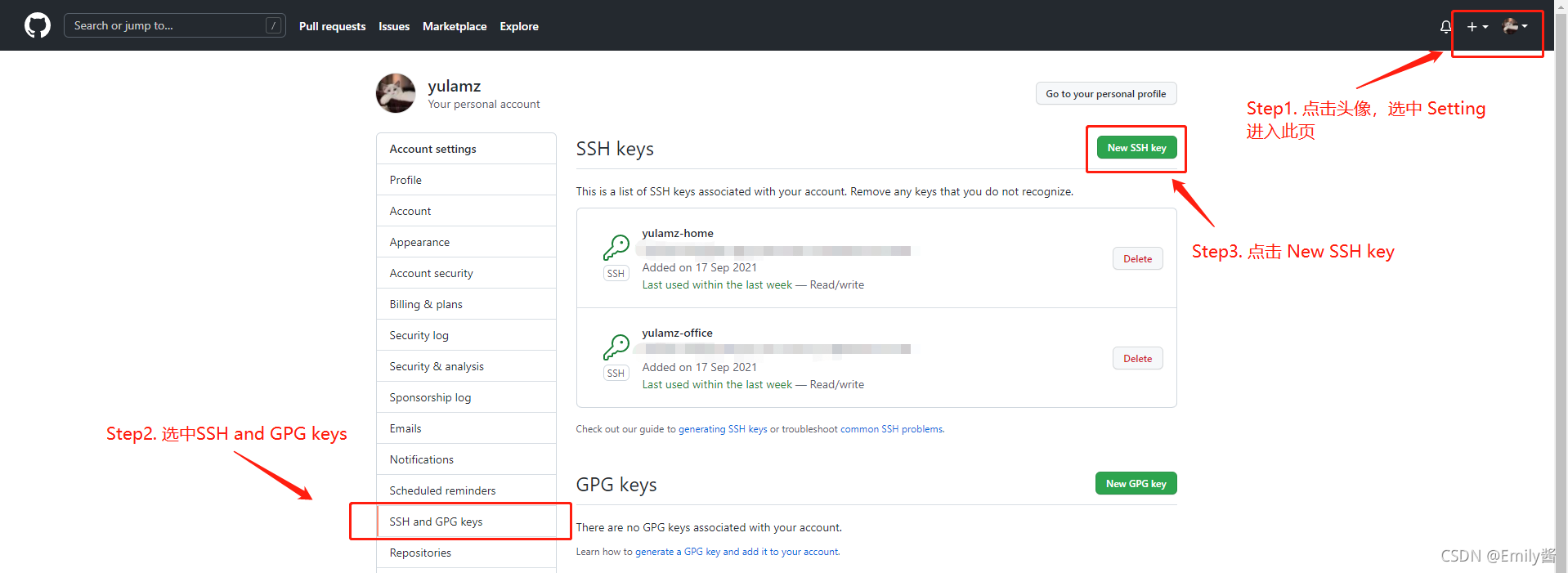

6. 用 ssh 命令测试是否成功配置 SSH Key(若有多个则分别进行测试)
$ ssh -T [email protected]
这里以 Github 为例,成功会返回 Hi [用户名]!You've successfully authenticated, but GitHub does not provide shell access.
三、其他问题
- SSH配置好了,项目需要切换成用 SSH 进行克隆。

- 我的项目之前是通过 HTTPS 的方式克隆的,现在想改用 SSH 的方式提交该怎么做呢?
在项目的.git文件夹里,找到config文件并打开,修改里面的url。

- ssh-keygen 常用参数说明:
- -t : 密钥类型, 可以选择 dsa | ecdsa | ed25519 | rsa ;
- -f : 密钥目录位置, 默认为当前用户home路径下的 .ssh 隐藏目录, 也就是 ~/.ssh/ , 同时默认密钥文件名以 id_rsa 开头. 如果是 root 用户, 则在 /root/.ssh/id_rsa , 若为其他用户, 则在/home/username/.ssh/id_rsa;
- -C : 指定此密钥的备注信息, 需要配置多个免密登录时, 建议携带;
感谢
本文参考了 https://gitee.com/help/articles/4229#article-header 等文章,综合做了总结。
边栏推荐
- STL--map容器
- Prohibit smart Safari from playing automatically when opening a web page
- Nacos configuration management
- Leetcode 70:Climbing Stairs
- BUAAOS-Lab0实验报告
- leetcode力扣经典题目——82.柱形图中的最大矩形
- ENVI_IDL:读取OMI数据(HDF5)并输出为Geotiff文件+详细解析
- [unity Editor Extension] scriptableobject for internal asset configuration of unity
- 【Unity编辑器扩展】查找场景和资源内挂载某脚本的所有对象
- STL--queue容器
猜你喜欢
软件测试技术期中测试小结|软件测试基础&执行测试&测试设计和开发

Recursive and recursive learning notes

Hash table, bloom filter, distributed consistency hash
![[hdrp HD rendering pipeline] create hdrp project and upgrade the built-in pipeline project to hdrp project](/img/40/d3b2bb62db88c7b18a3c3df4df5609.png)
[hdrp HD rendering pipeline] create hdrp project and upgrade the built-in pipeline project to hdrp project

【Unity开发小技巧】Unity打包PC端exe,压缩打包为一个exe文件

【Unity开发小技巧】Unity混音器Mixer控制全局音量
![[vernacular analog 1] PN junction and diode](/img/a8/26d3dc49eb74b7c8c5970ddbd31b65.png)
[vernacular analog 1] PN junction and diode

Opengauss Developer Day 2022 dongfangtong sincerely invites you to visit the "dongfangtong ecological tools sub forum"

Chengxin University envi_ IDL third week class content 1: reading OMI data (HDF5 file) and output + parsing

ENVI_IDL:批量处理Modis Swath数据的重投影并输出为Geotiff格式+详细解析
随机推荐
gdb+vscode进行调试6——gdb调试多线程命令札记
Gdb+vscode for debugging 7 - how to debug when there is a segmentation default/ segment error in the program?
STL--list容器(链表)
ENVI_IDL:读取所有OMI产品的NO2柱含量并计算月均值、季均值、年均值+解析
动态规划问题 - 小兵向前冲
leetcode力扣经典问题——42.接雨水
[unity Editor Extension] the pre-processing and post-processing pictures of unity assets are automatically transferred to sprite2d
VS Code 问题:launch:program‘...\.vscode\launch.exe‘ dose not exist
第2章-系统控制原理 -> 经典控制理论
Build map reduce development environment
ENVI_ Idl: read the text file and output it in GeoTIFF format + simple mean interpolation
Build spark on yarn environment
gdb+vscode进行调试3——vscode以及gdb远程调试
UE4 笔记
测试知识准备
ENVI_IDL:批量处理Modis Swath数据的重投影并输出为Geotiff格式+详细解析
Installing MySQL and JDBC on Windows
散列表、布隆过滤器、分布式一致性hash
STL--string容器
软件测试技术期中测试小结|软件测试基础&执行测试&测试设计和开发