当前位置:网站首页>How to deal with common errors in MySQL installation
How to deal with common errors in MySQL installation
2022-07-18 23:44:00 【Yisu cloud】
MySQL How to deal with common installation errors
This article introduces “MySQL How to deal with common installation errors ” Knowledge about , During the operation of the actual case , Many people will encounter such difficulties , Next, let Xiaobian lead you to learn how to deal with these situations ! I hope you will read carefully , Be able to learn !

1. Unable to start processing , error 1053
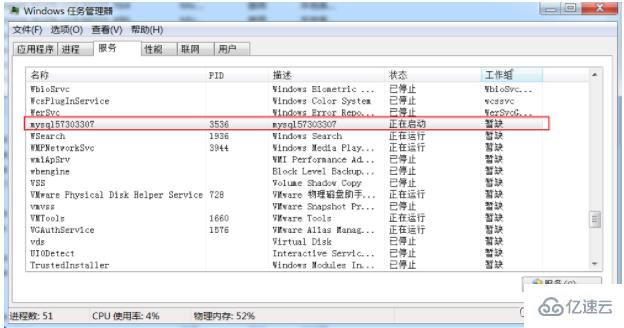
Windows Can't start Mysql service error 1053: The service did not respond promptly to startup or control requests 
1.1 The end of the process
processing method :
1、 Type... On the command line tasklist Check the process
2、 Kill a process according to its name
taskkill /f /t /im Process name

1.2 Change network service
Server2012 Location

other win7 And win10 operating system
1)、 Computer -> management -> Local users and groups -> Group double-click , The renderings are as follows :

(2)、 double-click Administrators, And click Add , Then click Advanced
(3)、 hold NETWORK SERVICE Add to Administrators Group

1.3 Delete service
sc delete mysql57303307

Remember here , reinstall Mysql Can ,2 Repeat the following operation ( Delete old Mysql file , Just reinstall them all )
There's another hole , If you still can't start , Remember to start this service Windows Installer
Windows Installer It is a general way of software distribution , For software installation .
By default , The service is started manually , You need to enter the service management to open .
Right click to start —— function —— Input “services.msc”——Windows Installer—— start-up


2.Winwods Installation initialization error

Beginning configuration step: Writing configuration fileSaving my.ini configuration file...Saved my.ini configuration file.Ended configuration step: Writing configuration fileBeginning configuration step: Updating Windows Firewall rulesAdding a Windows Firewall rule for MySQL80 on port 3306.Attempting to add a Windows Firewall rule with command: netsh.exe advfirewall firewall add rule name="Port 3306" protocol=TCP localport=3306 dir=in action=allow determine .Successfully added the Windows Firewall rule.Adding a Windows Firewall rule for MySQL80 on port 33060.Attempting to add a Windows Firewall rule with command: netsh.exe advfirewall firewall add rule name="Port 33060" protocol=TCP localport=33060 dir=in action=allow determine .Successfully added the Windows Firewall rule.Ended configuration step: Updating Windows Firewall rulesBeginning configuration step: Adjusting Windows serviceAttempting to grant Network Service require filesystem permissions.Granted permissions.Adding new serviceNew service addedEnded configuration step: Adjusting Windows serviceBeginning configuration step: Initializing database (may take a long time)Attempting to run MySQL Server with --initialize-insecure option...Starting process for MySQL Server 8.0.24...Starting process with command: C:\Program Files\MySQL\MySQL Server 8.0\bin\mysqld.exe --defaults-file="C:\ProgramData\MySQL\MySQL Server 8.0\my.ini" --console --initialize-insecure=on --lower-case-table-names=1...Process for mysqld, with ID 2572, was run successfully and exited with code -1073741515.Failed to start process for MySQL Server 8.0.24.Database initialization failed.Ended configuration step: Initializing database (may take a long time)
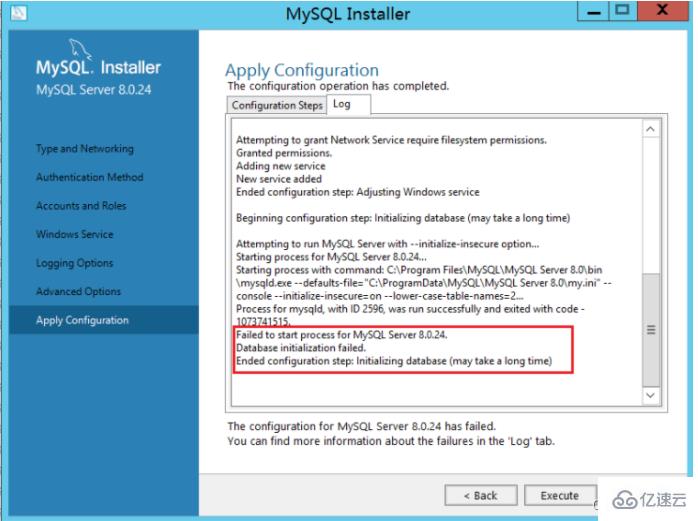
install VC_redist.x86 You can execute both OK

Input gpedit.msc, Open policy management

After enabling certificate update, it works normally
Because some system images are built earlier , And the system cannot be updated , You need to install a system patch to complete vc++ install
4.Centos Environmental Science rpm initialization MySQL Report errors
Centos7 Provided by default openssl The version is 1.0.2 Of , some php Extensions or other software dependencies 1.1 Above version , If it is too low, an error will be reported
libssl.so.1.1: cannot open shared object file: No such file or directory
There is also implementation openssl version The times error is consistent with the above , This is because openssl The location of the library is incorrect or not installed 1.1 The problem with the above version
Want to upgrade openssl Version needs to be compiled manually , The error reporting solution is very simple , Install correctly ,
Now let's say that I use Centos7 For example , Let's talk about the specific compilation and installation steps
–openssl Version confirmation
[[email protected] ~]# openssl version
OpenSSL 1.0.1e-fips 11 Feb 2013
– compile openssl
tar -xvf openssl-1.1.1g.tar.gz
cd openssl-1.1.1g
./config shared --openssldir=/usr/local/openssl --prefix=/usr/local/openssl
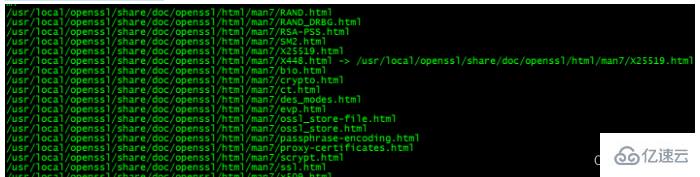
make && make install
– To configure
After compilation , Use openssl version, Let's take a look at the current situation openssl Version number ,
You will find out whether it is 1.0.2, So here we need to do some additional configuration work .
[[email protected] openssl-1.1.1g]# more /etc/ld.so.conf
include ld.so.conf.d/*.conf
[[email protected] openssl-1.1.1g]# echo “/usr/local/lib64/” >> /etc/ld.so.conf
[[email protected] openssl-1.1.1g]# ldconfig
Again using openssl version Just verify the version ,
If it doesn't , Try the following ,
Execute sequentially ( Back up the old version first , Then create a soft connection from the installation location of the new version )
mv /usr/bin/openssl /usr/bin/openssl.old
ln -s /usr/local/openssl/bin/openssl /usr/bin/openssl
ln -s /usr/local/openssl/include/openssl /usr/include/openssl
echo “/usr/local/openssl/lib” >> /etc/ld.so.conf
ldconfig -v
4.MySQL8 Unable to log in after installation
First method :
1. Edit with command /etc/my.cnf The configuration file , namely :vim /etc/my.cnf perhaps vi /etc/my.cnf
2. stay [mysqld] Add below skip-grant-tables, Then save and exit
3. restart mysql service :service mysqld restart
4. change root user name
After the restart , perform mysql Order to enter mysql Command line
5. modify root User password , Note here , Sometimes it will be reported that modification is not allowed , First flush privileges You can do it again
update mysql.user set authentication_string=password(‘root’) where user=‘root’; --5.7 edition
flush privileges;
6. hold /etc/my.cnf Medium skip-grant-tables Comment out , And then restart mysql, namely :service mysqld restart
Okay , You can use root New password login !

The second way :
stay mysql8 Under the system , The following method is applicable ( The full path )
G:\mysql-8.0.23-winx64\bin\mysqld --datadir=G:\mysql-8.0.23-winx64\data80323308 --console --skip-grant-tables --shared-memory

Then open another window , Execute the following command
cd G:\mysql-8.0.23-winx64\bin

mysql> select user,host,authentication_string from mysql.user;
mysql> delete from mysql.user where user=‘root’ ;
mysql> flush privileges; -- Remember to refresh , If the prompt cannot be created
mysql> create user [email protected]‘%’ identified with mysql_native_password by ‘root’;
mysql> grant all on . to [email protected]‘%’ with grant option;
mysql> flush privileges;
mysql> drop user ‘root’@‘localhost’;
mysql> flush privileges;
mysql> create user [email protected]‘localhost’ identified with mysql_native_password by ‘root’;
mysql> grant all on . to [email protected]‘localhost’ with grant option;
mysql> flush privileges;
“MySQL How to deal with common installation errors ” That's all for , Thanks for reading . If you want to know more about the industry, you can pay attention to Yisu cloud website , Xiaobian will output more high-quality practical articles for you !
边栏推荐
- Verify that the two strings are consistent
- Pytest interface automated testing framework | confitest Py and @pytest Fixture() combination
- [white box test] design method of logic coverage and path test
- Under dynamic memory management (C language) -- common errors and written examination questions of large factories
- Programming examples of stm32f1 and stm32cubeide-w25q-spi-flash and FatFs migration
- Common password regular expressions
- Reproduce pytorch version from zero (2)
- Mysql事务隔离机制
- Jedi survive eating chicken 98K does not automatically close the mirror
- 5.< tag-动态规划和完全背包问题>lt.70. 爬楼梯 || 进阶版 + lt.322. 零钱兑换 + lt.139. 单词拆分 + lt.279.完全平方数 dbc
猜你喜欢

yarn /nmp全局安装后,命令不生效

Chapter IV instruction system
Mysql的锁机制

Compose uses coil to load network pictures

10.10:VectorDraw C# VS VectorDraw WEB/Crack-VectorDraw

Pay attention to using yyyy-mm-dd in the code!

Yiwen teaches you how to design test cases

HiBench生成基准数据集【WordCount为例】

账号创建+登录+联系表单代码

MySQL internal architecture
随机推荐
Pay attention to using yyyy-mm-dd in the code!
最大子数组异或和
Build Nightingale cluster monitoring system
每日一题:最近请求次数(剑指offer042)
Install Apple CMS and its resource collection and page code from 0
Programming examples of stm32f1 and stm32cube ide-w25q-spi-flash and SPIFs porting
[STL] simulation implementation vector
Pytest interface automation test framework | @pytest Fixture () decorator
Summary of this week 2
一组简单多用途表单小部件代码
res.cc的使用
Mysql的锁机制
Applet: the picker view selector scrolls quickly. When confirming, the "value displays an error."“
leetcode-两数之和
每日一题:有效的变位词(剑指offer032)
Programming examples of stm32f1 and stm32cubeide-w25q-spi-flash driver
Verify that the two strings are consistent
單行文本 超出部分省略號,多行文本超出部分省略號,指定多行
canvas无数个三角形动画js特效
Buffer pool production practice