当前位置:网站首页>Tasking 新建 AURIX TC37X demo 工程
Tasking 新建 AURIX TC37X demo 工程
2022-07-17 04:41:00 【大橙子疯】
前言
AURIX TriCore 开发的 IDE 软件较多,常用就有 Tasking 和 HighTec,本篇介绍通过 Tasking 新建 AURIX TC37X demo 工程,同时讲述如何编译、调试等。
从 HighTec 工程移植也可以参考该篇。
使用步骤
首先规划一下工程和源码的路径关系,尽量工程和源码尽量保证独立,方便后续使用不同的 IDE,进行移植。

创建工程
1、打开 Tasking 后,右击创建 Tasking 工程(选择)。

2、工程命名,同时选择 Tasking 工程路径。

3、选择芯片型号TC37x,同时取消勾选添加启动文件和链接文件等(源码里有)
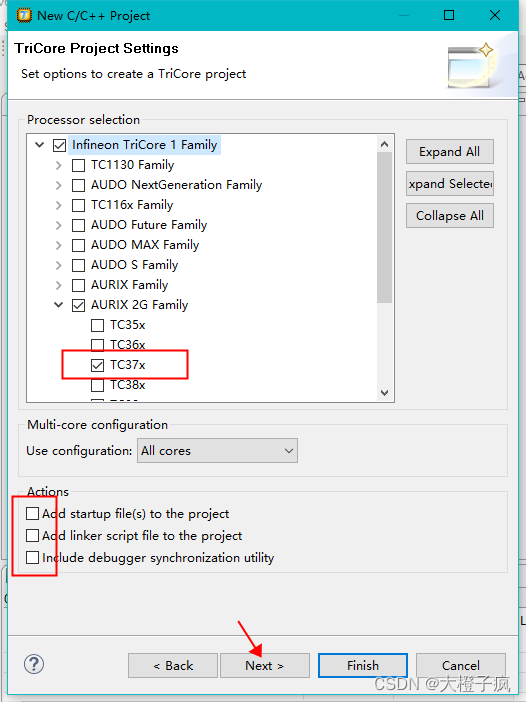
4、不需要导入板载设置,完成工程的创建。

代码编译
工程创建完成后发现里面只有 “Includes”等几个文件,此时需要我们将源码添加进来。
1、首先在文件管理器将源码拷贝到我们创建的目录 src 下。

2、 在工程中添加代码路径。

3、点击高级,通过路径链接的方式添加(这里采用相对路径便于工程路径变化也不受影响)。

4、准备添加头文件:右击工程,点击"Properties"。

5、弹出框后点击选择“Workspace...”,在新弹出的工程点击需要添加的头文件工程,按组合键 “Alt+*” 展开,然后再按组合键“Ctrl+A”全选(没反应多按几次),一次性全部添加(适用于首次创建全选,后面单独添加即可)。

6、添加完成后,保存并关闭。

7、反勾选不包含“.sfr”文件(源码有定义,否则编译会重复定义)。

8、添加链接文件路径(相对路径,链接文件选择的是适用于 Tasking 工程的文件:src\ToolEnv\0_Build\1_Config\Config_Tricore_Tasking\Lcf_Tasking_Tricore_Tc.lsl)。

9、右击工程选择编译,或者工具栏的编译图标。

下载调试
1、使用 Tasking 集成的调试器下载调试。

2、连接设备并下载成功后,会弹出框提示,点击“yes”即可。

3、点击core0(有时候会在其它核),点击开始调试即可。

边栏推荐
- Static attributes and static methods of class in JS
- AutoJs学习-实现极乐净土
- 百度地图技术概述,及基本API与WebApi的应用开发
- Delete the file unable to find or create trash directory
- MySQL InnoDB transaction related records
- PY3 redis general call
- Sphinx遇到的问题
- RK1126实现画中画功能 picture in picture for RK 1126
- [pits]packets go:428: busy buffer invalid connection
- 深度学习中的标量、向量、矩阵和张量的区别
猜你喜欢

物业小区高校水电抄表充值管理系统

安全第三天iptables防止nmap扫描以及binlog

Gin framework principle

Problems encountered by Sphinx

Sg90 actuator experiment based on STM32, including code (HAL Library)

MySQL中判断和向下取整的使用场景和用法

OSPF的优化和配置

CAD video course recommendation station B
Pytorch image models (Timm) library

Time frequency diagram classification challenge of intelligent hardware voice control 2.0 (ideas and results, currently top5)
随机推荐
'ionic' is not an internal or external command, nor is it a runnable program or batch file.
RK1126实现画中画功能 picture in picture for RK 1126
HCR Huichen is walking on the north slope, a giant beast swimming into digital marketing services
README. MD add directory
Impersonate the server for requests
minio安装部署及使用
Pytorch image models (Timm) library
物业小区高校水电抄表充值管理系统
删除文件 unable to find or create trash dirctory
ospf防环
51 single chip microcomputer to find out the input mode
VB. Net plug-in development - extract files
iptables防止nmap扫描以及binlog详解
TCP/IP 协议
Problems encountered by Sphinx
T+0变T+1!快赎金额降至1万!又有银行调整现金理财产品申赎规则
【每日一题】剑指 Offer II 041. 滑动窗口的平均值
Practice and improvement of children's network protection industry based on mobile Internet application
[Unity] 交互之双击
一款好用的网络骗子举报系统无加密版本源码