当前位置:网站首页>Huawei wireless device configuration dynamic load balancing
Huawei wireless device configuration dynamic load balancing
2022-07-19 10:01:00 【51CTO】

1. To configure LSW and AC, send AP And AC Can transmit between CAPWAP message
[LSW1]vlan batch 10
[LSW1-GigabitEthernet0/0/1]port link-type trunk
[LSW1-GigabitEthernet0/0/1]port trunk allow-pass vlan 10
[LSW1-GigabitEthernet0/0/2]port link-type trunk
[LSW1-GigabitEthernet0/0/2]port trunk allow-pass vlan 10
[LSW1-GigabitEthernet0/0/2]port trunk pvid vlan 10
[LSW1-GigabitEthernet0/0/2]port-isolate enable
[LSW1-GigabitEthernet0/0/3]port link-type trunk
[LSW1-GigabitEthernet0/0/3]port trunk allow-pass vlan 10
[LSW1-GigabitEthernet0/0/3]port trunk pvid vlan 10
[LSW1-GigabitEthernet0/0/3]port-isolate enable
[AC1]vlan batch 10
[AC1-GigabitEthernet0/0/1]port link-type trunk
[AC1-GigabitEthernet0/0/1]port trunk allow-pass vlan 10
2. To configure AC Interworking with the upper network equipment
[AC1]vlan batch 20 30 40
[AC1-Vlanif20]ip add 10.1.2.1 24
[AC1-Vlanif30]ip add 10.1.3.1 24
[AC1-Vlanif40]ip add 10.1.4.1 24
[AC1]ip route-static 0.0.0.0 0.0.0.0 10.1.4.2
[AC1-GigabitEthernet0/0/2]port link-type trunk
[AC1-GigabitEthernet0/0/2]port trunk allow-pass vlan 40
[AC1-GigabitEthernet0/0/2]port trunk pvid vlan 40
3. To configure AC to AP Distribute IP Address ,AR to STA Distribute IP Address
[AC1]dhcp enable
[AC1]int Vlanif 10
[AC1-Vlanif10]ip add 10.1.1.1 24
[AC1-Vlanif10]dhcp select interface // To configure AC Through the interface address pool for AP Distribute IP Address
[AC1-Vlanif20]dhcp select relay // To configure AC As DHCP Relay and enable DHCP Relay detect user table entry function
[AC1-Vlanif20]dhcp relay server-ip 10.1.4.2
[AC1-Vlanif30]dhcp select relay
[AC1-Vlanif30]dhcp relay server-ip 10.1.4.2
[AR1]dhcp enable // To configure AR As DHCP The server is STA Distribute IP Address
[AR1]ip pool sta-ip-pool1
[AR1-ip-pool-sta-ip-pool1]gateway-list 10.1.2.1
[AR1-ip-pool-sta-ip-pool1]network 10.1.2.0 mask 24
[AR1]ip pool sta-ip-pool2
[AR1-ip-pool-sta-ip-pool2]gateway-list 10.1.3.1
[AR1-ip-pool-sta-ip-pool2]network 10.1.3.0 mask 24
[AR1-GigabitEthernet0/0/0]ip add 10.1.4.2 24
[AR1-GigabitEthernet0/0/0]dhcp select global
[AR1]ip route-static 10.1.2.0 24 10.1.4.1
[AR1]ip route-static 10.1.3.0 24 10.1.4.1
4. To configure VLAN pool, Used as a business VLAN
[AC1]vlan pool sta-pool
[AC1-vlan-pool-sta-pool]vlan 20 30
[AC1-vlan-pool-sta-pool]assignment hash
5. To configure AP go online
[AC1]wlan
[AC1-wlan-view]ap-group name ap-group1 // establish AP Group
[AC1-wlan-view]regulatory-domain-profile name domain1 // Create domain management template , Configure... Under the domain management template AC Country code and in AP Reference domain management template under group
[AC1-wlan-regulate-domain-domain1]country-code cn
[AC1-wlan-view]ap-group name ap-group1
[AC1-wlan-ap-group-ap-group1]regulatory-domain-profile domain1
[AC1]capwap source interface Vlanif 10 // To configure AC Source interface of
[AC1]wlan
[AC1-wlan-view]ap auth-mode mac-auth
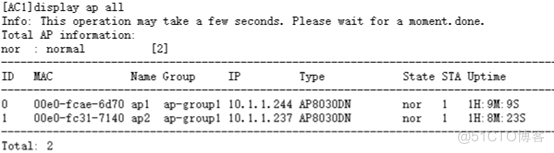
[AC1-wlan-view]ap-id 0 ap-mac 00e0-fcae-6d70 // stay AC Import online and offline AP
[AC1-wlan-ap-0]ap-name ap1
[AC1-wlan-ap-0]ap-group ap-group1
[AC1-wlan-view]ap-id 1 ap-mac 00e0-fc31-7140
[AC1-wlan-ap-1]ap-name ap2
[AC1-wlan-ap-1]ap-group ap-group1
6. To configure WLAN Business parameters
[AC1-wlan-view]security-profile name wlan-security // Create a security template , And configure the security policy
[AC1-wlan-sec-prof-wlan-security]security wpa2 psk pass-phrase [email protected] aes
[AC1-wlan-view]ssid-profile name wlan-ssid // Create name SSID Templates , And configuration SSID name
[AC1-wlan-ssid-prof-wlan-ssid]ssid wlan-net
[AC1-wlan-view]vap-profile name wlan-vap // establish VAP Templates , Configure business data forwarding mode 、 Business VLAN, And reference security templates and SSID Templates
[AC1-wlan-vap-prof-wlan-vap]forward-mode tunnel
[AC1-wlan-vap-prof-wlan-vap]service-vlan vlan-pool sta-pool
[AC1-wlan-vap-prof-wlan-vap]security-profile wlan-security
[AC1-wlan-vap-prof-wlan-vap]ssid-profile wlan-ssid
[AC1-wlan-view]ap-group name ap-group1 // To configure AP Group reference VAP Templates ,AP RF on 0 And RF 1 All use VAP Template configuration
[AC1-wlan-ap-group-ap-group1]vap-profile wlan-vap wlan 1 radio all
7. To configure AP RF channel and power
[AC1-wlan-view]rrm-profile name default
[AC1-wlan-rrm-prof-default]calibrate auto-channel-select disable // Turn off the automatic channel tuning function of RF
[AC1-wlan-rrm-prof-default]calibrate auto-txpower-select disable // Turn off the automatic power tuning function of RF
[AC1-wlan-view]ap-id 0 // To configure AP radio frequency 0 Channel and power
[AC1-wlan-ap-0]radio 0
[AC1-wlan-radio-0/0]channel 20mhz 6
[AC1-wlan-radio-0/0]eirp 127
[AC1-wlan-ap-0]radio 1
[AC1-wlan-radio-0/1]channel 20mhz 149
[AC1-wlan-radio-0/1]eirp 127
8. Configure the dynamic load balancing function
[AC1-wlan-view]rrm-profile name loadbalance-dynamic // establish RRM Templates
[AC1-wlan-rrm-prof-loadbalance-dynamic]sta-load-balance dynamic enable // Enable dynamic load balancing
[AC1-wlan-rrm-prof-loadbalance-dynamic]sta-load-balance dynamic start-threshold 15 // The specified starting threshold is 15 individual
[AC1-wlan-rrm-prof-loadbalance-dynamic]sta-load-balance dynamic gap-threshold 25 // The specified difference threshold is 25%
[AC1-wlan-view]radio-2g-profile name radio2g // establish 2G RF template , And reference RRM Templates
[AC1-wlan-radio-2g-prof-radio2g]rrm-profile loadbalance-dynamic
[AC1-wlan-view]radio-5g-profile name radio5g // establish 5G RF template , And reference RRM Templates
[AC1-wlan-radio-5g-prof-radio5g]rrm-profile loadbalance-dynamic
[AC1-wlan-view]ap-group name ap-group1 // stay AP Group reference 5G RF template and 2G RF template
[AC1-wlan-ap-group-ap-group1]radio-2g-profile radio2g radio all
[AC1-wlan-ap-group-ap-group1]radio-5g-profile radio5g radio all
9. Verify configuration


边栏推荐
- 第4章-一阶多智体系统一致性 -> 切换拓扑系统一致性
- 硫化铜纳米粒/ZIF-8复合材料([email protected]载体)|UiO-66/CoSO复合材料|ZIF-67纳米晶表面修饰六咪唑环三磷腈
- fastadmin with 和 filed 合用导致field失效
- 【C语言】浅涉选择、循环语句、函数及数组
- Chapter 4 - first order multi-agent system consistency - > switching topology system consistency
- 在华为ModelArts运行YOLOV3_coco_detection_dynamic_AIPP样例
- TP5 judgment request mode
- Chapter 4 - first order multi-agent system consistency - > pilot follow system consistency [program code]
- [C language] string, escape character and comment
- Talking about the informatization planning of industrial enterprises
猜你喜欢

Clwy permission management (III) -- user group module
![[C language] void type and void* pointer type](/img/4c/3643d850bfcb57db93496ec9bba06e.png)
[C language] void type and void* pointer type

第4章-一阶多智体系统一致性 -> 连续时间含时延系统一致性

Experiment 1: camera calibration experiment using Matlab toolbox

UiO-66-(COOH)2改性聚酰胺纳滤膜|ZIF-8/PVP复合纳米纤维膜|UiO-66-NH2改性聚酰胺纳滤膜

Chapter 4 - first order multi-agent system consistency - > switching topology system consistency

对文本实现分词以及绘制词云

网络安全学习(千锋网络安全笔记)1--搭建虚拟机

氨基的金属-有机骨架材料Fe-MOF,Fe-MIL-88NH2|Zr基金属-有机骨架催化剂(Pt-UiO-66)|齐岳生物
Have you learned the database design pattern of multi tenant SaaS?
随机推荐
FAW Toyota Asia lion's first product refresh
[C language] summary of array knowledge points
Build a server environment with node+express
镧系金属有机骨架([email protected])|罗丹明6G修饰MOF材料|过氧化氢酶@ZIF复合材料|mof材料
565. Array nesting / Sword finger offer II 001 Integer division
网络安全学习(千锋网络安全笔记)1--搭建虚拟机
水下机器人ROV和AUV
[C language] data type and meaning
npm使用
Series operation of vector container (detailed explanation)
how to use culasLt
node+express搭建服务器环境
Chapter 4 - first order multi-agent system consistency - > pilot follower system consistency
Rhcsa the next day 7.15
硫化镉负载MIL-125(Ti)|链霉亲和素(SA)-锆基卟啉MOF复合材料([email protected])|壳核结构
Mux256to1v,Hadd,Fadd
[C language] shallow selection, circular statements, functions and arrays
mof定制材料|双金属CuNi-MOF纳米材料|核—壳结构[email protected]纳米复合材料|ZIF-8/聚偏氟乙烯复合纳米纤维膜PVDF
VIM details
R language data Table import data practice: data Table uses dcast data. The table function implements pivot table