当前位置:网站首页>The manual is not complete. How to manually dig out the monitoring information of tongweb?
The manual is not complete. How to manually dig out the monitoring information of tongweb?
2022-07-19 14:20:00 【Radish and cabbage.】
Preface
TongWeb Provide several types of monitoring interfaces , How to get information through these interfaces ? We go through TongWeb7.0.4.2 How to get the version . notes : Changing the version is not necessarily right .
One 、 adopt JMX Interface acquisition Mbean Information
TongWeb Of JMX Default on , adopt server.log obtain JMX url, See more :https://blog.csdn.net/realwangpu/article/details/109506744
[INFO] [main] [systemout] [tuserport:0;jcport:0]
[INFO] [main] [admin] [URL for the Standard JMXConnectorServer : (service:jmx:rmi:///jndi/rmi://192.168.163.1:7200/jmxrmi)]
[INFO] [main] [core] [Starting service TONGWEB]
[INFO] [main] [core] [Starting Servlet Engine: TongWeb]
To write JMX Program , The main information obtained can often be :JVM Memory 、 Thread pool 、 Data source connection pool 、 application session Count 、 Number of application requests ,demo as follows :
package com.tong;
import java.util.HashMap;
import java.util.Map;
import javax.management.MBeanServerConnection;
import javax.management.ObjectName;
import javax.management.remote.JMXConnector;
import javax.management.remote.JMXConnectorFactory;
import javax.management.remote.JMXServiceURL;

public class TestJMX {
	public static void main(String[] args) {
		// TODO Auto-generated method stub
		try {
			//  establish JMX  Of URL
			JMXServiceURL url = new JMXServiceURL("service:jmx:rmi:///jndi/rmi://127.0.0.1:7200/jmxrmi");
			//  Construct the authentication information used to obtain the connection , Users using the security domain .
			Map env = new HashMap();
			env.put("jmx.remote.credentials", new String[] { "thanos", "thanos123.com" });
			JMXConnector connector = JMXConnectorFactory.connect(url, env);
			MBeanServerConnection mbsc = connector.getMBeanServerConnection();
			// Appoint ObjectName
			ObjectName mbeanName = new ObjectName("TONGWEB:type=ThreadPool,name=\"http-nio2-0.0.0.0-8088\"");
			Object obj = mbsc.getAttribute(mbeanName, "maxThreads");
			System.out.println("8088 maxThreads Attribute is " + obj.toString());
		} catch (Exception e) {
			e.printStackTrace();
		}
	}
}
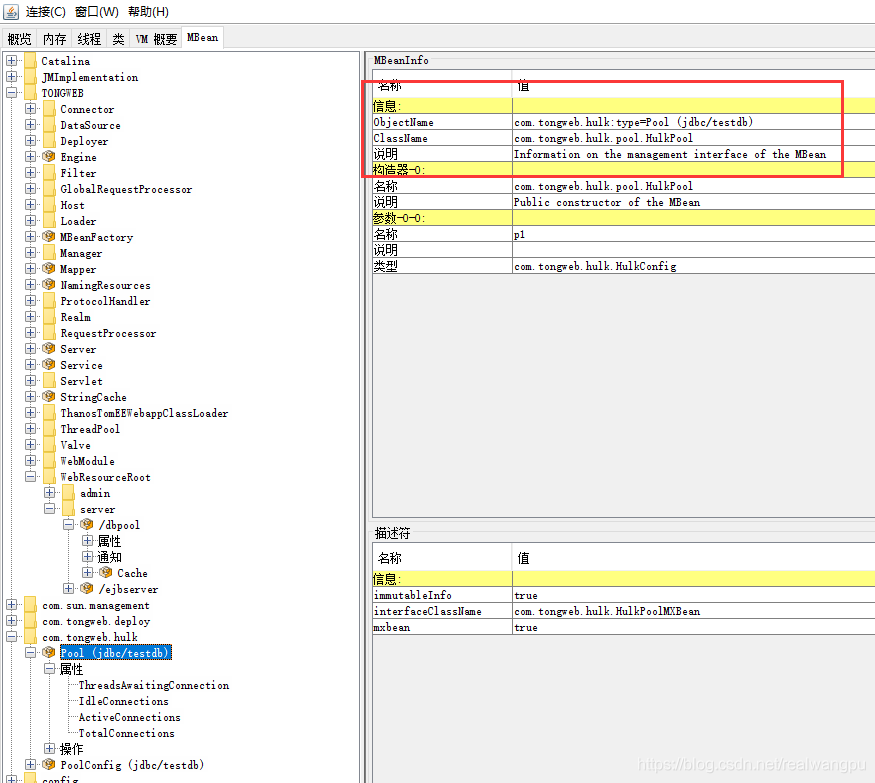
Want to get relevant monitoring values , The main problem is ObjectName Acquisition . because TongWeb The manual is incomplete 、 Different TongWeb Small version of ObjectName Are not the same as , So I want to get the real ObjectName There's only one way : By opening the jconsole Manually find the corresponding monitoring value , One word formula : Planing .
Be careful : Be sure to pay attention to TongWeb Small version number of , such as : yes , we have TongWeb edition 8088 Port of ObjectName by : TONGWEB:type=ThreadPool,name="http-nio2-0.0.0.0-8088" , Others TongWeb edition 8088 Port of ObjectName by : TONGWEB:type=ThreadPool,name="http-nio2-8088" ; As shown in the figure below, it is replaced by invincible hawk Hulk After data source , The monitoring value is even different .
Two 、 adopt rest Interface acquisition TongWeb Information
Import... In the application HttpClient4 what is needed jar package httpclient-4.x.jar、 httpcore-4.x.jar、commons-logging.jar,${TW_HOME}/lib/agent In the catalog common-7.0.jar file .demo as follows :
package com.tong;

import com.tongweb.httpclient.utils.HttpClient4Util;

public class TestRest {

	public static void main(String[] args) {
		String result = null;
		try {
            // Notice to use a thanos Users outside , Otherwise, the logged in console will be kicked out thanos user
			result = HttpClient4Util.execute("/rest/api/listener_detail", "GET", "thanos", "thanos123.com", "127.0.0.1",
					"9060", null);
			System.out.println(result);
		} catch (Exception e) {
			e.printStackTrace();
		}
	}
}
Be careful : This rest Only some interfaces provided by the manual , The manual provides , I don't know what I haven't provided , Can not be like jconsole Do the same .
3、 ... and 、 Get the monitoring values of all nodes through centralized management
Adopt centralized management , adopt heimdall management TongWeb Each node , And then visit http://127.0.0.1:9060/heimdall/notinrealm/rest/monitor/ibm/view You can get each TongWeb The running state of the node 、 Memory 、JDBC data source 、 Thread pool 、 Application monitoring information json data .
{
    "nodes": [
        {
            "monitorList": [
                {
                    "appname": "",
                    "dbname": "",
                    "monitorName": "nodestatus",
                    "monitorType": "warn",
                    "monitorValue": "stopped",
                    "servletName": "",
                    "threadPoolName": ""
                },
                {
                    "appname": "",
                    "dbname": "",
                    "monitorName": "OOM",
                    "monitorType": "warn",
                    "monitorValue": "",
                    "servletName": "",
                    "threadPoolName": ""
                }
            ],
            "nodeHome": "D:\\TongWeb7042\\TW7E\\domains\\aa",
            "nodeIp": "192.168.163.1",
            "nodeStatus": "stopped"
        }
    ]
}边栏推荐
- 函數初認識-下
- Redis源码与设计剖析 -- 3.字典
- Use of Google browser developer tools (Master!)
- [Flink] Flink will report an error if it fails to set checkpoints once. Setlerablecheckpointfailurenumber does not work
- 研二非科班研究生如何备战秋招
- 数据库的增删改查
- Take a look at try{}catch{}
- Analyze and hook sshd to hijack password
- [dynamic programming] - longest ascending subsequence model
- Ranking of top ten ERP software systems at home and abroad!
猜你喜欢

ShanDong Multi-University Training #3

全面解析C语言多媒体开源框架GStreamer

Interview with Android development companies, make these three preparations and plan yourself

贝塞尔曲线简单介绍

Notes with a face value of 10exp (303)

坐标模拟矩阵旋转的公式
Manuel incomplet, comment tracer manuellement l'information de surveillance de tongweb?

华为无线设备配置用户CAC
![[Flink] Flink will report an error if it fails to set checkpoints once. Setlerablecheckpointfailurenumber does not work](/img/62/5761d8d7b2d8ea1bc74b609b6aa3c7.jpg)
[Flink] Flink will report an error if it fails to set checkpoints once. Setlerablecheckpointfailurenumber does not work

No.4 bits, bytes, information storage
随机推荐
Logu: p4516 [jsoi2018] stealth action (tree DP, tree grouping knapsack statistical scheme number)
谷歌浏览器开发者工具的使用(掌握!)
BiShe - online reservation and registration system based on SSM
C. Watto and mechanism (hash | dictionary tree + DFS (DFS on tree))
暑期rhcsa培训第一天作业
4某公司在6个城市c1,c2,c3…c6中有分公司,已知城市ci到cj(I,j=1,2,3,…6)的联通情况下及费用的大小列于以下带权邻接矩阵中C中
华为无线设备配置动态负载均衡
负载均衡有哪几种实现方式?
Analyze and hook sshd to hijack password
手册不全,如何手工刨出TongWeb的监控信息?
No.4 bits, bytes, information storage
unity 实现UI-背包装备拖拽功能
Run through caffe resnet-50 network to realize image classification -- Based on Huawei cloud ai1s
Codeforces Round #808 (Div. 1)(A~C)
通达信开户是真的吗?通达信开户安全吗?
华为无线设备配置静态负载均衡
微服务调用组件feign实战
Comprehensive analysis of C language multimedia open source framework GStreamer
Some puzzles about data dictionary
Microservice calling component feign practice