当前位置:网站首页>项目性能优化实战:解决首页白屏问题,自定义 loading 动画优化首屏效果
项目性能优化实战:解决首页白屏问题,自定义 loading 动画优化首屏效果
2022-07-17 00:14:00 【yulamz】
需求
初次打开项目的某个页面时,因为网络等原因,可能会导致包体积过大。
解决方案
准备工作(使用 gka 把 gif 转化成 svg)
需要借助 gka 这个工具。这个工具是一键快速图片优化、生成动画文件的。只需要全局安装,配合一些命令,即可将图片转成 canvas/css/svg 动画。
首先,让 UI 把 .gif 动图转换成一系列的图片,每张图片都表示此动画的单帧。然后通过命令gka <文件夹路径> -m true -t svg --minirate 0-20 -s,将动画的单帧合并成一张雪碧图,按一定的压缩比率进行压缩,最后生成 svg 格式的动画文件。
由于文章内容需要脱敏,下面放一个 gka 文档里的图。左边的表示 loading gif 的所有单帧,用 gka 工具后,能压缩成一张雪碧图合配套的 .css 文件,.html 文件为演示这个动画要如何使用。
生成的文件:
单帧 → svg / canvas 动效: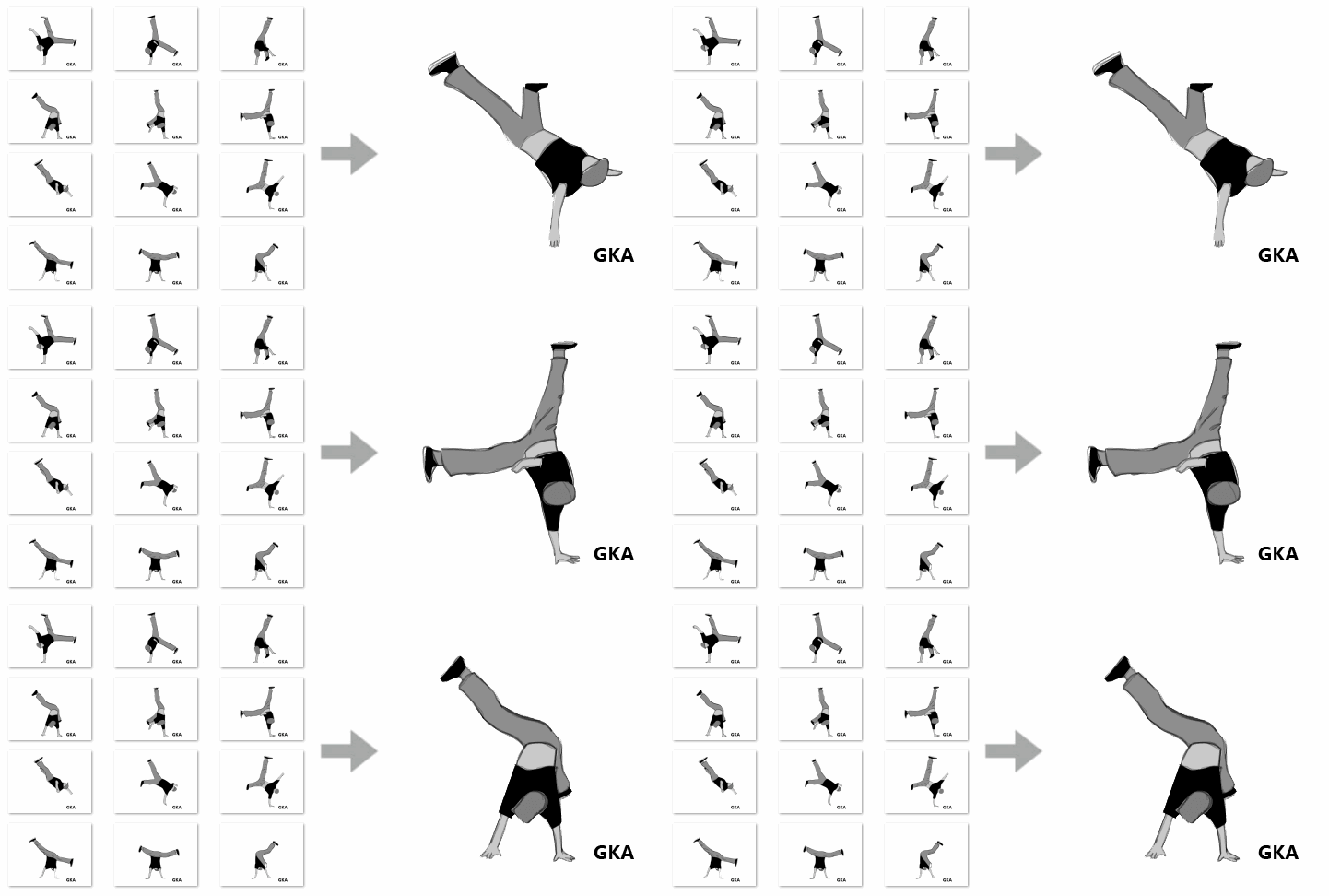
在项目中使用 svg 动画
首先,需要将 gka 生成的雪碧图和 css 文件,都放在项目的public文件夹下。这次我将雪碧图放在了public\img\loading-sprites.png,css 文件放在了public\static\css\loading.css下。并对 css 文件里的命名做了优化。
.loading-animation {

  width: 640px;
  height: 307px;
  background-image: url("/img/loading-sprites.png");
  background-repeat: no-repeat;
  animation-name: keyframes-loading;
  animation-duration: 2.88s;
  animation-delay: 0s;
  animation-iteration-count: infinite;
  animation-fill-mode: forwards;
  animation-timing-function: steps(1);
}

@keyframes keyframes-loading {

  0% {

    width: 640px;
    height: 307px;
    background-image: url("/img/loading-sprites.png");
  }

  1.39% {

    background-position: -640px 0px;
  }

  2.78% {

    background-position: -1280px 0px;
  }

  4.17% {

    background-position: -1920px 0px;
  }

  5.56% {

    background-position: -2560px 0px;
  }

  /* 此处省略了一些代码 */

  97.22% {

    background-position: -44800px 0px;
  }

  98.61%, 100% {

    background-position: -45440px 0px;
  }
}
然后,在入口页 index.html 引入上面提到的 css 文件。
之后,参考 gka 生成的 .html 文件,在页面 body 下添加 svg 元素。让页面一打开,就展示出 loading 的效果,取代原来的白屏。可以通过 svg 标签的 style 属性,指定 width 的值,改变 svg 的大小。
<!DOCTYPE html>
<html lang="zh">
  <head>
    <!-- 此处省略了其他代码 -->
    <link rel="stylesheet" href="/static/css/loading.css">
  </head>
  <body>
   <div id="first-loading-wrap" style="display: flex; justify-content: center; align-items: center; height:96vh; z-index: 999;">
        <svg id="first-loading-svg" viewBox="0, 0, 640, 307" style="width: 320px">
            <foreignObject id="first-loading-foreignobject" width="640" height="307">
                <div id="first-loading-content" class="loading-animation"></div>
            </foreignObject>
        </svg>
    </div>
    <div id="app">
    </div>
    <!-- built files will be auto injected -->
    </body>
  </html>
最后,在路由的afterEach钩子函数里,移除 loading 效果相关的元素即可。
router.afterEach(to => {

  // 判断是否需要去除 loading 效果
  document.getElementById('first-loading-wrap')?.remove()
  document.getElementById('first-loading-svg')?.remove()
  document.getElementById('first-loading-foreignobject')?.remove()
  document.getElementById('first-loading-content')?.remove()
  // 省略其他逻辑
})
边栏推荐
- (附word操作以及视频讲解)使用ARCGIS进行地图配准_投影变换_普通地图制作_专题地图制作
- Chapter 2 - system control principle - > classical control theory
- LeetCode:动态规划中的多重背包问题【一个模板解决所有~】
- Recursive and recursive learning notes
- ENVI_IDL:批量重投影Modis Swath产品并指定范围输出为Geotiff格式+解析
- gdb+vscode进行调试——release版本如何调试
- Foo bar what the hell?
- Zeno paradox 2 Achilles and tortoise
- 搭建Ozzie环境
- ENVI_IDL:读取所有OMI产品的NO2柱含量并计算月均值、季均值、年均值+解析
猜你喜欢

(附word操作以及视频讲解)使用ARCGIS进行地图配准_投影变换_普通地图制作_专题地图制作

工程编译那点事:Makefile和cmake(一)

Opengauss Developer Day 2022 dongfangtong sincerely invites you to visit the "dongfangtong ecological tools sub forum"
软件测试技术期中测试小结|软件测试基础&执行测试&测试设计和开发

成信大ENVI_IDL第一周实验测试:数组的简单运算+详细解析
Labelme正常启动,但无法打开

vscode+ros2环境配置

gdb+vscode进行调试4——gdb执行相关命令

STL--queue容器

Line process of pool components
随机推荐
Configure map reduce workflow in oozie
gdb+vscode进行调试2——gdb断点相关
【Unity编辑器扩展】快速定位资源和脚本的指定文件和路径
Envi IDL: lire la teneur en colonne de NO2 de tous les produits OMI et calculer la moyenne mensuelle, la moyenne trimestrielle, la moyenne annuelle + résolution
gdb+vscode进行调试6——gdb调试多线程命令札记
ENVI_IDL:批量处理Modis Swath数据的重投影并输出为Geotiff格式+详细解析
Unity导入fbx模型后,运行时物体的旋转和位置自动改变的问题解决方法
Oozie integrated shell
LeetCode:动态规划中的多重背包问题【一个模板解决所有~】
YYDS! The latest distributed core technology notes summarized by Alibaba technical officers have been launched, which can be regarded as a blessing
MATLAB :Warning: the font “Times” is not available
Engineering compilation: makefile and cmake (I)
STL--list容器(链表)
软件测试技术期中测试小结|软件测试基础&执行测试&测试设计和开发
DoubleDQN的理论基础及其代码实现【Pytorch + Pendulum-v0】
Set up sqoop environment
池式组件之线程池篇
ENVI_IDL:讀取所有OMI產品的NO2柱含量並計算月均值、季均值、年均值+解析
Gdb+vscode for debugging 4 - GDB executes relevant commands
毕业论文word技巧集合