当前位置:网站首页>Qt随手笔记(三)在vs中使用QtCharts画折线图
Qt随手笔记(三)在vs中使用QtCharts画折线图
2022-07-26 09:28:00 【飞扬123_123】
本文配置环境:vs2015+qt5.13.1
注:
在vs中使用QtChart需要在安装时候勾选
1、选取显示窗口
首先在vs中创建一个qt程序,进入ui编辑界面,将widget添加到主界面上
然后将widget进行提升为QChartView
2、配置QtChart环境
包含目录下添加 D:\Qt\Qt5.13.1\5.13.1\msvc2015_64\include\QtCharts
库目录下添加 D:\Qt\Qt5.13.1\5.13.1\msvc2015_64\lib
连接器->输入->附加依赖项添加 Qt5Chartsd.lib(debug)/ Qt5Charts.lib(release)


3、测试例子
首先在头文件中添加
#include <QtCharts>
QT_CHARTS_USE_NAMESPACE
然后再次添加画线所需的头文件
#include <QChartView>
#include <QLineSeries>
using namespace QtCharts;
然后再主程序中添加如下测试代码
QtChartTest01::QtChartTest01(QWidget *parent)
    : QMainWindow(parent)
{

    ui.setupUi(this);
	//实例化画线的对象
	QSplineSeries *series = new QSplineSeries();
	series->setName("spline");
	//添加数据,两种方式
	series->append(0, 6);
	series->append(2, 4);
	series->append(3, 8);
	series->append(7, 4);
	series->append(10, 5);
	*series << QPointF(11, 1) << QPointF(13, 3) << QPointF(17, 6) << QPointF(18, 3) << QPointF(20, 2);

	QChart *chart = new QChart();
	chart->legend()->hide();//隐藏图例
	chart->addSeries(series);//添加数据
	chart->setTitle("Simple spline chart example");//标题
	chart->createDefaultAxes();//坐标系
	chart->axes(Qt::Vertical).first()->setRange(0, 10);//坐标系范围

	ui.widget->setChart(chart);//添加到显示widget
}
结果图: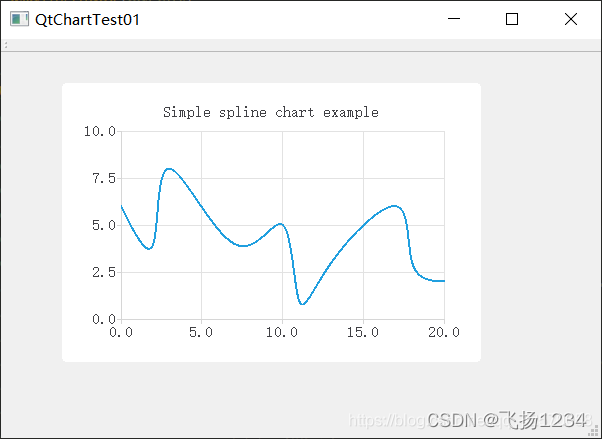
————————————————
版权声明:本文为CSDN博主「BOO2018」的原创文章,遵循CC 4.0 BY-SA版权协议,转载请附上原文出处链接及本声明。
原文链接:https://blog.csdn.net/qq_42570058/article/details/113184986
边栏推荐
猜你喜欢

Exception handling mechanism II

mysql5.7.25主从复制(单向)

Windows backs up the database locally by command

服务器、客户端双认证(2)

js中树与数组的相互转化(树的子节点若为空隐藏children字段)

Basic use of ArcGIS 1
volatile 靠的是MESI协议解决可见性问题?(上)
![[shutter -- layout] detailed explanation of the use of align, center and padding](/img/01/c588f75313580063cf32cc01677600.jpg)
[shutter -- layout] detailed explanation of the use of align, center and padding

2022 chemical automation control instrument operation certificate test question simulation test platform operation
![[MySQL] how to execute an SQL statement (2)](/img/7b/53f8756458cc318e2f417b1cc0c3f8.png)
[MySQL] how to execute an SQL statement (2)
随机推荐
大二上第一周学习笔记
设置视图动态图片
异常处理机制二
Exception handling mechanism II
v-for动态设置img的src
Basic use of ArcGIS 4
Source code analysis of object wait notify notifyAll
IIS网站配置
Zipkin installation and use
What is asynchronous operation
大二上第五周学习笔记
Process32first returns false, error x message 24
Bloom filter
dll中的全局变量
Wechat applet avatarcropper avatar clipping
What are CSDN spaces represented by
WARNING: [pool www] server reached pm.max_children setting (5), consider raising it
2022 mobile crane driver test question simulation test question bank simulation test platform operation
会议OA项目(三)---我的会议(会议排座、送审)
The provincial government held a teleconference on safety precautions against high temperature weather across the province