当前位置:网站首页>Quickly learn to use cut command and uniq command
Quickly learn to use cut command and uniq command
2022-07-19 07:02:00 【I'm Zha Zha Hui】
List of articles
cut Command to use

for example :
Given the file cut_data.txt And the content is :
  No Name    Score
  1 zhang 20
  2 li  80
  3 wang 90
  4 sun  60
1、 Use the default delimiter to cut the contents of the file , And output the first field after cutting
[[email protected] ~]# cut -f 1 cut_data.txt
No Name Score
1 zhang 20
2 li  80
3 wang 90
4 sun  60
2、 Cut file content , And output the first field and the third field after cutting
[[email protected] ~]# cut -d' ' -f 1,3 cut_data.txt
No Score
1 20
2
3 90
4
[[email protected] ~]#
3、 Cut by byte : Output the first byte to the second byte of the cut 10 Bytes of content
[[email protected] ~]# cut -b -10 cut_data.txt
No Name Sc
1 zhang 20
2 li  80
3 wang 90
4 sun  60
[[email protected] ~]#
4、 Cut by character : Output the first character and the second character after cutting 5 The content of a character
 [[email protected] ~]# cut -c 1,5 cut_data.txt
Na
1a
2
3n
4n
[[email protected] ~]#
5、 Cut according to the specified delimiter : The contents are as follows , Output the contents of the first field and the third field
  No|Name|Score
  1|zhang|20
  2|li|80
  3|wang|90
  4|sun|60
[[email protected] ~]# cut -d'|' -f 1,3 cut_data.txt
No|Score
1|20
2|80
3|90
4|60
[[email protected] ~]#
uniq Command to use
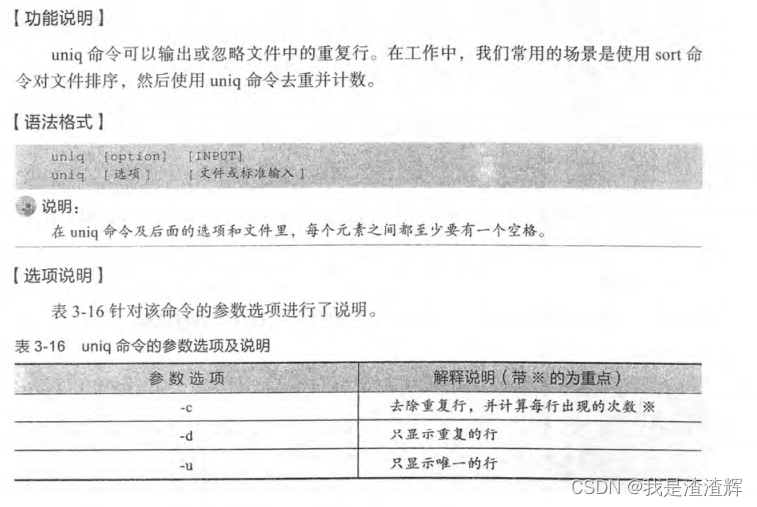
New file uniq_data.txt, The content of the document is
Welcome to Linux
Windows
Windows
Mac
Mac
Linux
1、 Use uniq The command outputs the result after de duplication
[[email protected] ~]# uniq -i uniq_data.txt
Welcome to Linux
Windows
Mac
Linux
2、 Use uniqmingl Output only duplicate lines
[[email protected] ~]# uniq --all-repeated uniq_data.txt
Windows
Windows
Mac
Mac
3、 Use uniq The command outputs non repeating lines
[[email protected] ~]# uniq -u uniq_data.txt
Welcome to Linux
Linux
4、 Use uniq The command counts the number of repetitions
[[email protected] ~]# uniq -c uniq_data.txt
  1 Welcome to Linux
  2 Windows
  2 Mac
  1 Linux
边栏推荐
猜你喜欢

F5 GTM (I): DNS parameters

银河麒麟桌面操作系统V10SP1(X86)安装SQL Developer

阿里云 杭州 ARM 云服务器性能评测
高防服务器是如何确认哪些是恶意IP/流量?ip:103.88.32.XXX

天翼云 杭州 云主机(VPS) 性能评测

What is tsd/qsd? What is CS Genesis SD NAND?
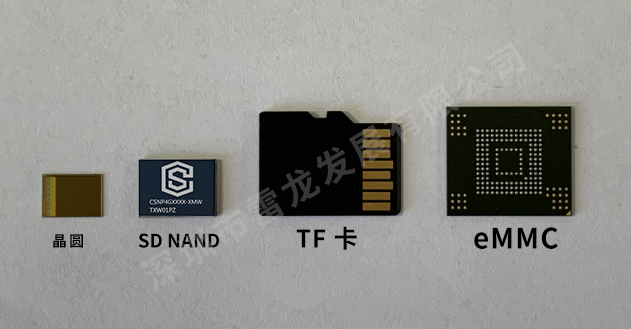
Comparison of advantages and disadvantages between SD NAND and EMMC

我的世界 1.18.1 Forge版 开服教程,可装MOD,带面板

银河麒麟服务器系统搭建本地和局域网yum源

Good partner of single chip microcomputer - CS Genesis SD NAND flash
随机推荐
Good partner of single chip microcomputer - CS Genesis SD NAND flash
剑指Offer刷题记录——Offer 05. 替换空格
【自动化测试】——robotframework实战(一)搭建环境
Minecraft基岩版BDS开服教程
PyTorch学习日记(四)
[untitled]
Xiaodi network security - Notes (4)
类与super、继承
ArraysList方法
Steam游戏服务器配置选择 IP
搭建一个网站都需要那些东西
快速学会cut命令,uniq命令的使用
How to set primary key self growth in PostgreSQL database
传奇怎么开服?开传奇私服需要准备什么呢?
Text three swordsman's awk command -- interception
渊子赛马。
天翼云 杭州 云主机(VPS) 性能评测
About file upload and download
Ucloud Shanghai arm cloud server evaluation
中国知网论文free下载的方法