当前位置:网站首页>Bash shell learning notes (I)
Bash shell learning notes (I)
2022-07-26 10:52:00 【71 elder brother】
- The goal is
- Have a good command of shell Definition and acquisition of variables
- Be able to carry on shell Four simple operations
Disk related commands Review :
| Disk related commands | explain |
|---|---|
| fdisk | branch msdos Partition depends on the system hard disk and partition |
| lsblk | Check the block device and its mounting |
| df -h | Check the mounted file system |
| mount | Also check the mounting , You can also see the attached parameters (ro or rw etc. ) |
| iostat | Need to install sysstat software package , Dynamically view disk read and write |
| parted | Advanced partition commands , Can be divided into msdos Zoning and gpt Partition |
| free -m | Check memory and swap |
Programming language classification introduction
Computers can only recognize machine language ( Such as :01010101001 such ), Programmers can't write directly 01 This code , Therefore, the program language written by the programmer should be translated into machine language . A tool for translating other languages into machine languages , be called ** Compiler or interpreter **.
Such as : Chinese —( translate )---- foreigners
There are two ways of compiler translation , One is compile , One is explain . The difference between the following :

- Compiler language :
The program needs a special compilation process before execution , Compiling programs into machine language files , No retranslation is required at runtime , Just use the results of the compilation . High efficiency of program execution , Dependent compiler , Poor cross platform performance . Such as C、C++
- Explanatory language :
The program does not need to be compiled , The program is run by ** Interpreter ** Translate into machine language , Translate every time you execute . So it's less efficient . such as Python/JavaScript/ Perl /ruby/Shell And so on are all explanatory languages .

- summary :
Compiled languages are better than interpreted languages Faster , But it's not as good as explanatory language Good cross platform . If you do the underlying development or large-scale application or operating system development i They use compiled languages ; If it's some server scripts and some auxiliary interfaces , The speed requirement is not high 、 For each platform Compatibility is required In general, I use Explanatory language .
shell Introduce

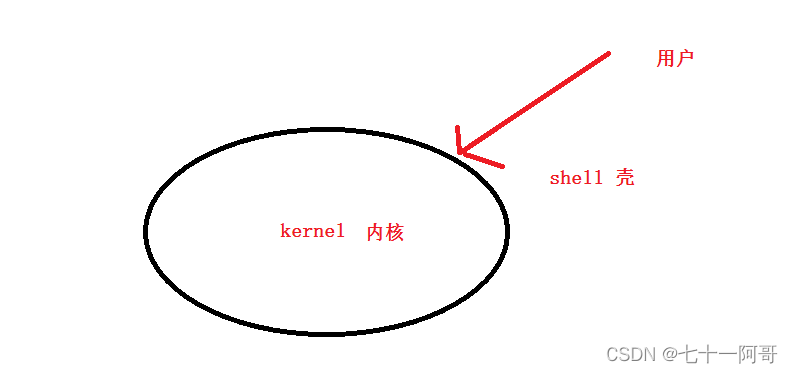
summary :
- shell It's a bridge of human-computer interaction
- shell The type of
# cat /etc/shells
/bin/sh			 yes bash shell A shortcut to
/bin/bash		bash shell It's most Linux default shell, The included functions can almost cover shell All functions
/sbin/nologin	 Means non interactive , Can't log in to the operating system
/bin/dash		 small , Efficient , Less features
- /bin/bash or /bin/sh Is the most commonly used shell The interpreter of the program
What is? shell Script ?
The programming of interpretive languages is generally called script Programming , That is what script means .shell script Namely shell Script .
Several orders + The basic format + Specific grammar + thought = shell Script
When to use scripts ?
Repetition 、 Complicated work , By scripting work orders , In the future, you only need to execute scripts to complete these tasks .
① Automated analytical processing
② Automated backup
③ Automate batch deployment installation
④ wait …
How to learn shell Script ?
Be familiar with as many commands as possible
Master the standard format of script ( Declaration type 、 Run the script using the standard execution method )
Be familiar with the basic syntax of scripts
See more ( understand )——> Imitate more ( More practice )——> Think more
shell Script
first shell Script
[[email protected] ~]# mkdir /shell/shell01 -p
[[email protected] ~]# vim /shell/shell01/1.sh

#!/bin/bash
 Interpretive language declaration type , Express /bin/bash For the interpreter ( use /bin/sh It's fine too )

echo "hello world"
Script execution method :
Method 1: ( The script does not need execution permission , Declaring types doesn't work , Because it is directly designated sh To execute this script )
[[email protected] ~]# cd /shell/shell01/
[[email protected] shell01]# sh 1.sh
hello world

 Add :sh -x 1.sh Executing the script in this way has certain debugging function , You can view the script execution process
Method 2:( The script does not need execution permission , Declaring types doesn't work , Because it is directly designated bash To execute this script )
[[email protected] shell01]# bash 1.sh
hello world
Method 3: ( The script needs execution permission , Declaration types work )
[[email protected] shell01]# ./1.sh
-bash: ./1.sh: Permission denied
[[email protected] shell01]# chmod a+x 1.sh
[[email protected] shell01]# ./1.sh
hello world
Pure command shell Script
That is, you don't need to learn any other programming syntax ( But you need to be proficient in commands ), Arrange the commands in order from top to bottom . When executing, it will be executed from top to bottom .
Example : Print 1,2,3
#!/bin/bash

echo 1
echo 2
echo 3
Example : Delete other yum The configuration file , Configure local yum( Suppose the image is mounted to /mnt Catalog )
#!/bin/bash

rm /etc/yum.repos.d/* -rf
cat > /etc/yum.repos.d/local.repo <<EOF
[local]
name=local
baseurl=file:///mnt
enabled=1
gpgcheck=0
EOF
review
# Notice the following two differences
cat > /tmp/abc <<EOF				# > Symbol , It means to cover the original content
 Hello
EOF

cat >> /tmp/abc <<EOF				# >> Symbol , It means adding
 ha-ha
EOF
key word : Programming code translate ( Interpreter /bin/bash or /bin/sh) Write multiple commands into the program in sequence , It can help us execute in batch at one time , Increase of efficiency .
practice : use shell Realization httpd Access logs rotate every day (/var/log/httpd/access_log)
requirement :
- take /var/log/httpd/access_log Rotate to /backup/ year / month / year - month - date .access_log
- Create a new one after rotation /var/log/httpd/access_log
- After each log rotation , All in /var/log/message Record a message that the log has been rotated ( Information customization )
- Put the written script into crond In the service
preparation :
# yum install httpd httpd-devel elinks -y
# /etc/init.d/httpd restart
# elinks -dump 127.0.0.1

# cat /var/log/httpd/access_log
127.0.0.1 - - [12/Apr/2019:14:55:15 +0800] "GET / HTTP/1.1" 403 4961 "-" "ELinks/0.12pre5 (textmode; Linux; -)"
#!/bin/bash
mkdir /backup/$(date +%Y)/$(date +%m)/   -p

mv /var/log/httpd/access_log /backup/$(date +%Y)/$(date +%m)/$(date +%F).access_log
touch /var/log/httpd/access_log
/etc/init.d/httpd reload  &> /dev/null
logger -t " log rotation " "$(date +%F) success "
59 23 * * * sh /path/xxx.sh
Variable
What is a variable ?
Popular said , Variables are used to temporarily store data .( notes : learn python Variables will be discussed more deeply )
Format of variable definition
Variable name = A variable's value
Want to get the value of the variable , Add... Before the variable $ Symbol
# a=1
# echo $a
1
When do I need to define variables ?
- If a content needs to be used more than once , And in the code Recurring , Then we can use variables to represent the content . In this way, when modifying the content , You just need to change the value of the variable .
- In the process of code operation , The execution result of some commands may be saved , Subsequent code needs to use these results , You can use this variable directly .
#!/bin/bash

year=$(date +%Y)
month=$(date +%m)

mkdir /backup/$year/$month/   -p

mv /var/log/httpd/access_log /backup/$year/$month/$(date +%F).access_log
touch /var/log/httpd/access_log
/etc/init.d/httpd reload  &> /dev/null
logger -t " log rotation " "$(date +%F) success "
Definition rules and methods of variables ( a key )
Basic rules of variable definition
- Case sensitive , Variable names with the same name but different case are different variables
# a=2
# A=3
# echo $a
2
# echo $A
3
- Pay attention to the format when defining , There can be no spaces on either side of the equal sign , When assigning a value to a string with spaces , Put it in quotation marks
 B="hello world"
 B='hello world haha'
  Single quotation marks and double quotation marks are OK here , The latter assignment will overwrite the previous assignment
- The difference between single quotation marks and double quotation marks : Variables or special characters in single quotation marks are only general characters , But variables or special characters in double quotation marks can maintain their variable characteristics
# echo '$B'
$B
# echo "$B"
hello world haha
- The variable name can be a combination of letters or numbers or underscores , But it can't start with a number
# c123=aaa
# echo $c123
aaa											 correct

# 123c=aaa
bash: 123c=aaa: command not found			 error

# _abc11122=aaa
# echo $_abc11122
aaa											 correct
- Variable names should be known as well as possible ( Don't let all the variables in a script be a,b,c,d And so on. , Not easy to read )
Basic method of variable definition
- Assign values directly to variables
a=1
- The execution result of the command can be assigned to the variable as the value of the variable
| Symbol | explain |
|---|---|
| ` ` Apostrophe ( On the keyboard ESC Under key ,TAB The key above the key ) | Execution symbols , Used to execute commands within symbols |
| $( ) | Execution symbols , Used to execute commands within symbols ( Suggest ) |
 You can use multiple times in a command $(), But use it many times `` The execution symbol will report an error
# a=`rpm -qf `which mount``  Report errors

# a=$(rpm -qf `which mount`)  correct
# a=$(rpm -qf $(which mount))  correct
- adopt read Define variables interactively
# read -p " Type in your name :" name
 Type in your name : Zhang San
# echo $name
 Zhang San
| read Common parameters of commands | explain |
|---|---|
| -p | Interactive dialogue prompt information |
| -s | Hide input |
| -n Take the numbers | Specify that the interaction can only enter a few characters at most |
| -t Take the numbers | The time of batch interaction can only be a few seconds at most |
Example :
#!/bin/bash

read -p " Type in your name :" name

echo " Hello ,$name"

read -s -p " Enter your mobile number :" num
echo											#  direct echo Means line break
echo " Your mobile number is $num"

read -n 2 -p " Enter your age :" age
echo
echo " you $age Year old "

read -t 3 -p "214546+23446+46645-126456=?" result
echo
echo " Mental arithmetic is not fast enough "
Variable acquisition
adopt $ Variable name or ${ Variable name } To get the value of a variable
# num=12345
# echo $num
12345
# echo ${num}
12345
What's the difference between enlarging brackets and not enlarging brackets ?
answer : Enlarging parentheses can realize interception ( section ) Or other operations .
 The first 1 The number represents the starting position ,0 On behalf of the 1 position ,1 On behalf of the second , And so on
 The first 2 The number represents how many digits are intercepted
# echo ${num:0:3}
123
# echo ${num:1:2}
23
# echo ${num:2:2}
34
# echo ${num:2:3}
345
Example :
read -s -p " Enter your mobile number :" num
echo
echo " Your mobile number has a mantissa of ${num:7:4}"
After class development ( Understanding can , Don't remember , Learn later awk,sed There's a better way )
file=/dir1/dir2/dir3/my.file.txt
 We can use  ${
     }  Replace them separately to get different values :
${
    file#*/}: Take off the first one  /  And the string to the left of it :dir1/dir2/dir3/my.file.txt
${
    file#*1/}: Remove the second  /  And the string to the left of it :dir2/dir3/my.file.txt
${
    file##*/}: Take off the last one  /  And the string to the left of it :my.file.txt
${
    file#*.}: Take off the first one  .  And the string to the left of it :file.txt
${
    file##*.}: Take off the last one  .  And the string to the left of it :txt
${
    file%/*}: Take off the last one  /  And the string to the right of it :/dir1/dir2/dir3
${
    file%%/*}: Take off the first one  /  And the string to the right of it :( Null value )
${
    file%.*}: Take off the last one  .  And the string to the right of it :/dir1/dir2/dir3/my.file
${
    file%%.*}: Take off the first one  .  And the string to the right of it :/dir1/dir2/dir3/my

 We can also replace the string in the variable value :
${
    file/dir/path}: The first one. dir Replace with  path:/path1/dir2/dir3/my.file.txt
${
    file//dir/path}: Will all dir Replace with  path:/path1/path2/path3/my.file.txt
The elimination of variables
Use unset Variable name You can cancel the variable ( Be careful : After a script is executed , Variable auto release , Not every variable unset Cancel )
# aaa=haha
# echo $aaa
haha
# unset aaa
# echo $aaa
linux Classification of variables
- Local temporary variables : Variables temporarily customized by the current user . Effective in the current process , Invalid in other processes and child processes .
- environment variable : The current process works , And can be called by child process .
- View the current user's environment variables env
- Query all variables of the current user ( Local temporary variables and environment variables ) set
- export The command can change the current local temporary variable into an environment variable
Example : Local temporary variables
# bbb=haha

# env |grep bbb env I can't find it in the library , Because it's not an environment variable
# set |grep bbb set We can find out
bbb=haha

# echo $bbb
haha
# bash  Intron bash( Subprocesses )
# echo $bbb  In the child bash( Subprocesses ) Invalid in

# exit  Quitters bash( Subprocesses )
exit
# echo $bbb
haha
Example : environment variable
# export ccc=haha

# env |grep ccc env We can find out
ccc=haha
# set |grep ccc
ccc=haha

# echo $ccc
haha
# bash  Intron bash( Subprocesses )
# echo $ccc  In the child bash( Subprocesses ) Effective in
haha
# exit
exit
- Global environment variable : All users and programs can call , And inherit , New users can also call by default . Such as
$HOME,$PATH,$USERetc.
| File path | explain |
|---|---|
| $HOME/.bashrc | Current user's bash Information (alias、umask etc. ), user Sign in When reading |
| $HOME/.bash_profile | Current user's environment variables , user Sign in When reading |
| $HOME/.bash_logout | user sign out The last file read when ( It can be used to trigger the action when the user exits ) |
| /etc/bashrc | Overall bash Information , Effective for all users , After modifying it, you need to use source The order comes into effect |
| /etc/profile | Global environment variable information , Effective for all users , After modifying it, you need to use source The order comes into effect |
Example : Custom global environment variables
# vim /etc/profile
export abc=haha					 Add this sentence in the blank space at the end of the document , And save exit

# source /etc/profile
 perhaps
# . /etc/profile

 Use source or . Let it take effect , Any terminal and sub terminal of the operating system bash Can call this variable ( Other terminals that have been opened need to log in again )
- System variables ( built-in bash Medium variable ): shell Its name and function have been fixed , Can be directly in shell Call in script .
| Built-in variables | explain |
|---|---|
| $? ( a key ) | The status returned after the last command is executed , When to return to 0 It means the execution is normal , Not 0 Indicates execution exception or error |
| $$ | The process number of the current process (pid) Such as : # kill -9 $$ Will exit the current session |
| $0 | The name of the currently executing program Such as : In the script sh $0 On behalf of re executing this script ( Will produce child processes ) |
$1 -$9 ( a key ) | Position parameter variable . Such as : /etc/init.d/sshd restart This restart It's corresponding to $1 |
${10}-${n} | Extended location parameter variable , The first 10 Position variables must use {} Enclosed in braces ( Understanding can , Hardly use ) |
| $# | The number of parameters followed by the script |
$* or [email protected] | All the parameters behind the script |
Example :
[[email protected] shell01]# vim 5.sh
#!/bin/bash

echo '$0' yes "$0"
echo '$1' yes "$1"
echo '$2' yes "$2"
echo '$3' yes "$3"
echo '$$' yes "$$"
echo '$#' yes "$#"
echo '$*' yes "$*"
echo '[email protected]' yes "[email protected]"


[[email protected] shell01]# sh 5.sh a b c
$0 yes 5.sh
$1 yes a
$2 yes b
$3 yes c
$$ yes 2183
$# yes 3
$* yes a b c
[email protected] yes a b c
Four simple operations
Arithmetic operations : By default ,shell We can only support simple Integers operation
| Four operators | explain |
|---|---|
| + | Add |
| - | reduce |
| * | ride |
| / | except |
| % | modulus , Mod |
| ** | power |
Bash shell The way of arithmetic operation :
- Use $[ ] ( It is recommended to use this type mainly , Others can be understood )
- Use $(( ))
- Use expr External programs
- Use let command
- With the help of bc command
#!/bin/bash

a=1
let a++                         #  Use let Perform an operation , There is no need to add $
b=$[$a-1]
c=$(($a**3))
d=`expr $a + 3`                 # + There should be a space on both sides of the sign

echo $a
echo $b
echo $c
echo $d
With the help of bc Command to realize decimal operation
# echo 1.1+2.2 | bc
3.3

# echo "sqrt(100)" | bc
10							 take a square root
Example : When an ordinary user logs out , Show how long you have logged in
Such as abc When the user logs out , It will automatically display " Hello ,abc, You have logged in xx when xx branch xx second ,bye bye"
# vim /home/abc/.bash_profile
export logintime=$(date +%s)

# vim /home/abc/.bash_logout

clear
logouttime=$(date +%s)
alltime=$[$logouttime-$logintime]
hours=$[$alltime/3600]
minutes=$[$alltime%3600/60]
seconds=$[$alltime%60]
echo " Hello ,$USER, As soon as you log in $hours when $minutes branch $seconds second ,bye bye"
The order added
wc
Statistical orders
| Parameters | explain |
|---|---|
| -l | The statistical number of rows |
| -c | Check the number of characters in all lines of the file ( The newline character is also a character ) |
| -m | Check the number of characters in all lines of the file ( The newline character is also a character ) |
| -L | Check how many characters are in the longest line of the file ( Line breaks are not characters ) It can be used to calculate the length of a single line |
# echo 1234 |wc -c
5
# echo 1234 |wc -L
4
# cat /etc/passwd |wc -l
 Count the number of users
cut
Intercept order , characteristic : Only a single character can be used as a separator . Later on awk and sed In many aspects of interception, it is better than cut Have more advantages .
| Parameters | explain |
|---|---|
| -d | Specify the separator |
| -f | Specify the columns |
| -c | Intercept the first few characters |
# head -1 /etc/passwd | cut -d: -f7
/bin/bash
# head -1 /etc/passwd | cut -d: -f2
x

# echo 12345 |cut -c2-4
234
# echo 12345 |cut -c2-
2345
sort
Sort order
| Parameters | explain |
|---|---|
| -r | Reverse sorting |
| -n | Arrange in numbers |
| -f | Case insensitive |
| -t | Separator |
| -k | The next number represents the column |
# cat /etc/passwd |sort -t: -k3 -n

# cat /etc/passwd |sort -t: -k3 -n -r
uniq
To repeat the order
| Parameters | explain |
|---|---|
| -c | Statistics after weight removal |
# cut -d: -f7 /etc/passwd |sort |uniq -c
grep
Line find command ( Later, regular expressions will focus on )
| Parameters | explain |
|---|---|
| -n | According to the line Numbers |
| -v | Reverse lookup |
| -i | Case insensitive |
| -E or egrep | Extended mode |
| -o | Display all the keywords found , Convenient for counting times |
| -f | It is suitable for finding duplicate lines of two files |
| -A | Subsequent number n, The line indicating that you can search will also display the following n That's ok |
 Show the line number of the original document plus n Parameters 	grep -n root /etc/passwd
 Reverse lookup plus v Parameters   grep -v bin /etc/passwd
 Case insensitive plus i Parameters   grep -ni root grep.txt

 Find yes root and ftp Keyword line
# grep root /etc/passwd | grep ftp

 Find yes root or ftp Keyword line
# egrep "root|ftp" /etc/passwd
# grep -E "root|ftp" /etc/passwd


 Statistics root stay /etc/passwd There are several times in
grep -o root /etc/passwd |wc -l


[[email protected] shell03]# cat 1.txt
111
222
333
444
555
666
[[email protected] shell03]# cat 2.txt
aaa
bbb
333
ccc
ddd
555

 Method 1 :
# grep -f 1.txt 2.txt -- Find the duplicate lines in the two files
333
555

 Method 2 :
# sort 1.txt 2.txt -o 3.txt
cat 3.txt | uniq -c |awk '$1>1 {print $2}'

 Method 3 :
 Put a line in a file , Take it out line by line , Compare circularly in another file , If there is , It means that both files have .


# ifconfig |grep -A 1 vmnet
vmnet1    Link encap:Ethernet  HWaddr 00:50:56:C0:00:01
          inet addr:1.1.1.1  Bcast:1.1.1.255  Mask:255.255.255.0
--
vmnet8    Link encap:Ethernet  HWaddr 00:50:56:C0:00:08
          inet addr:192.168.56.1  Bcast:192.168.56.255  Mask:255.255.255.0
Exercises :
 Operate on the following files
# cat 1.txt
http://a.domain.com/1.html
http://b.domain.com/1.html
http://c.domain.com/1.html
http://a.domain.com/2.html
http://a.domain.com/3.html
http://b.domain.com/3.html
http://c.domain.com/2.html
http://c.domain.com/3.html
http://a.domain.com/1.html
 Here are the results

	4 a.domain.com
	3 c.domain.com
	2 b.domain.com
边栏推荐
- 按二进制数中1的个数分类
- C#halcon用户控件崩溃的一种处理方法
- 27.移除元素
- 使用Selenium抓取zabbix性能监控图
- The problem of formatting IAR sprintf floating point to 0.0 in UCOS assembly
- Sword finger offer (52): regularization expression
- Sql Server 之SQL语句对基本表及其中的数据的创建和修改
- 解决:无法加载文件 C:\Users\user\AppData\Roaming\npm\npx.ps1,因为在此系统上禁止运行脚本 。
- RT thread learning notes (I) -- configure RT thread development environment
- 35. 搜索插入位置
猜你喜欢

在神州IV开发板上成功移植STemWin V5.22

20210807 1 c language program structure
![[paper after dinner] deep mining external perfect data for chestx ray disease screening](/img/d6/41c75d292c26b2e7e116767a51eb5e.png)
[paper after dinner] deep mining external perfect data for chestx ray disease screening

How to assemble a registry?

菜鸟看源码之ArrayDeque

【小程序】onReachBottom 事件为什么不能触发 ?(一秒搞定)

菜鸟看源码之HashTable

很多人都不清楚自己找的是Kanban软件还是看板软件

二叉树的遍历 递归+迭代

解决:无法加载文件 C:\Users\user\AppData\Roaming\npm\npx.ps1,因为在此系统上禁止运行脚本 。
随机推荐
How to assemble a registry?
构建ARM嵌入式开发环境
LIst和Dictionary实例应用(※)
如何组装一个注册中心?
Flutter集成极光推送
使用Selenium抓取zabbix性能监控图
BigDecimal's addition, subtraction, multiplication and division, size comparison, rounding up and down, and BigDecimal's set accumulation, judge whether BigDecimal has decimal
菜鸟看源码之HashTable
35. Search the insertion position
232.用栈实现队列
面试知识点
Happens-Before原则深入解读
企鹅龙(DRBL)无盘启动+再生龙(clonezilla)网络备份与还原系统
微信公众号消息通知 “errcode“:40164,“errmsg“:“invalid ip
IAR sprintf 浮点 在UCOS 总格式化成0.0的问题
MySQL quick learning notes-2021-08-31
Sql Server之查询总结
list升序和降序
Pengge C language 20210811 program structure operation
Error[pe147]: declaration is incompatible with 'error problem