当前位置:网站首页>Chapter 3 performance platform godeye source code analysis - memory module
Chapter 3 performance platform godeye source code analysis - memory module
2022-07-19 04:05:00 【Handsome Xu】
3. Memory module
3.1 Heap

Heap It refers to the heap memory information of the monitoring application , It is mainly provided through the system Api obtain , Simple to use
Source code analysis
1、 start-up Heap Monitoring of
Heap By starting the timer , Press xml Configure the time to collect , adopt MemoryUtil.getAppHeapInfo() Get heap memory information
public class HeapEngine implements Engine {

    private Producer<HeapInfo> mProducer;
    private long mIntervalMillis;
    private CompositeDisposable mCompositeDisposable;

    HeapEngine(Producer<HeapInfo> producer, long intervalMillis) {

        mProducer = producer;
        mIntervalMillis = intervalMillis;
        mCompositeDisposable = new CompositeDisposable();
    }

    @Override
    public void work() {

        mCompositeDisposable.add(Observable.interval(mIntervalMillis, TimeUnit.MILLISECONDS).map(new Function<Long, HeapInfo>() {

            @Override
            public HeapInfo apply(Long aLong) throws Exception {

                ThreadUtil.ensureWorkThread("HeapEngine apply");
                return MemoryUtil.getAppHeapInfo();
            }
        }).subscribeOn(ThreadUtil.computationScheduler())
                .observeOn(ThreadUtil.computationScheduler())
                .subscribe(new Consumer<HeapInfo>() {

                    @Override
                    public void accept(HeapInfo food) throws Exception {

                        ThreadUtil.ensureWorkThread("HeapEngine accept");
                        mProducer.produce(food);
                    }
                }));
    }
}
2、 collection Heap Information
To obtain parameters
- freeMemKb: Allocable memory
- maxMemKb: Maximum memory
- allocatedKb: Memory allocated
public static HeapInfo getAppHeapInfo() {

    Runtime runtime = Runtime.getRuntime();
    HeapInfo heapInfo = new HeapInfo();
    heapInfo.freeMemKb = runtime.freeMemory() / 1024;
    heapInfo.maxMemKb = Runtime.getRuntime().maxMemory() / 1024;
    heapInfo.allocatedKb = (Runtime.getRuntime().totalMemory() - runtime.freeMemory()) / 1024;
    return heapInfo;
}
3、 summary
Heap memory acquisition is relatively simple , Provided by the system Api Subject to
3.2 Pss
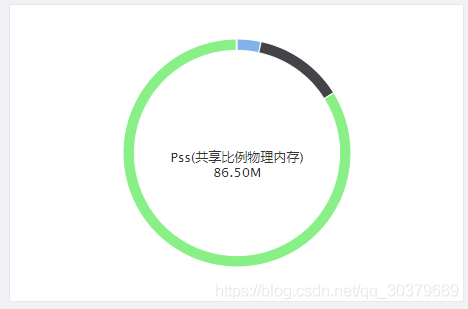
PSS It refers to the physical memory of the monitoring application ,PSS = The process actually uses physical memory (USS) + Allocate the memory occupied by the shared library in proportion , It was first recommended by the government PSS A graph to measure App Physical memory usage , and Android 4.4 After that USS. however PSS, There's a big problem , Namely ” Shared memory “, Consider a situation , If A Process and B All processes use a share so library , that so The memory used for initialization in the library will be divided equally into A And B The head of the . however A Is in B After that , So for B Of PSS In terms of curve , stay A The moment it started , Even if B Not doing anything , There will also be a relatively large step-by-step decline
Source code analysis
1、 start-up PSS Monitoring of
PSS By starting the timer , Press xml Configure the time to collect , adopt MemoryUtil.getAppPssInfo() obtain PSS Information
public class PssEngine implements Engine {

    private Context mContext;
    private Producer<PssInfo> mProducer;
    private long mIntervalMillis;
    private CompositeDisposable mCompositeDisposable;

    PssEngine(Context context, Producer<PssInfo> producer, long intervalMillis) {

        mContext = context;
        mProducer = producer;
        mIntervalMillis = intervalMillis;
        mCompositeDisposable = new CompositeDisposable();
    }

    @Override
    public void work() {

        mCompositeDisposable.add(Observable.interval(mIntervalMillis, TimeUnit.MILLISECONDS).map(aLong -> {

            ThreadUtil.ensureWorkThread("PssEngine accept");
            return MemoryUtil.getAppPssInfo(mContext);
        }).subscribeOn(ThreadUtil.computationScheduler())
                .observeOn(ThreadUtil.computationScheduler())
                .subscribe(food -> {

                    ThreadUtil.ensureWorkThread("PssEngine accept");
                    mProducer.produce(food);
                }));
    }
}
2、 collection PSS Information
To obtain parameters
- totalPssKb: Of the current process PSS
- dalvikPssKb:dalvik virtual machine (java layer ) Of PSS
- nativePssKb:native Layer of PSS
- otherPssKb:native and dalvik Outside part PSS
public static PssInfo getAppPssInfo(Context context) {

    final int pid = ProcessUtils.getCurrentPid();
    if (sActivityManager == null) {

        sActivityManager = (ActivityManager) context.getSystemService(Context.ACTIVITY_SERVICE);
    }
    Debug.MemoryInfo memoryInfo = sActivityManager.getProcessMemoryInfo(new int[]{
    pid})[0];
    PssInfo pssInfo = new PssInfo();
    pssInfo.totalPssKb = memoryInfo.getTotalPss();
    pssInfo.dalvikPssKb = memoryInfo.dalvikPss;
    pssInfo.nativePssKb = memoryInfo.nativePss;
    pssInfo.otherPssKb = memoryInfo.otherPss;
    return pssInfo;
}

public static int getCurrentPid() {

    return android.os.Process.myPid();
}
3、 summary
PSS The acquisition of is relatively simple , Provided by the system Api Subject to , But it is difficult to come into use in practical application
3.3 Ram

RAM For the running memory of the current mobile device , such as ,360 Floating window of mobile assistant , The running memory often prompted exceeds 80% And so on , It is mainly provided through the system Api obtain , Simple to use
Source code analysis
1、 start-up Ram Monitoring of
Ram By starting the timer , Press xml Configure the time to collect , adopt MemoryUtil.getRamInfo(mContext) obtain Ram Information
public class RamEngine implements Engine {

    private Context mContext;
    private Producer<RamInfo> mProducer;
    private long mIntervalMillis;
    private CompositeDisposable mCompositeDisposable;

    RamEngine(Context context, Producer<RamInfo> producer, long intervalMillis) {

        mContext = context;
        mProducer = producer;
        mIntervalMillis = intervalMillis;
        mCompositeDisposable = new CompositeDisposable();
    }

    @Override
    public void work() {

        mCompositeDisposable.add(Observable.interval(mIntervalMillis, TimeUnit.MILLISECONDS).map(new Function<Long, RamInfo>() {

            @Override
            public RamInfo apply(Long aLong) throws Exception {

                ThreadUtil.ensureWorkThread("RamEngine apply");
                return MemoryUtil.getRamInfo(mContext);
            }
        })
                .subscribeOn(ThreadUtil.computationScheduler())
                .observeOn(ThreadUtil.computationScheduler())
                .subscribe(new Consumer<RamInfo>() {

                    @Override
                    public void accept(RamInfo food) throws Exception {

                        ThreadUtil.ensureWorkThread("RamEngine accept");
                        mProducer.produce(food);
                    }
                }));
    }
}
2、 collection Ram Information
To obtain parameters
- availMemKb: You can use RAM
- totalMemKb: Mobile phone total RAM
- lowMemThresholdKb: The threshold of full memory , If it exceeds, it is considered as a low memory running state , May be Kill process
- isLowMemory: Whether the low memory state is running
public static RamInfo getRamInfo(Context context) {

    if (sActivityManager == null) {

        sActivityManager = (ActivityManager) context.getSystemService(Context.ACTIVITY_SERVICE);
    }
    final ActivityManager.MemoryInfo mi = new ActivityManager.MemoryInfo();
    sActivityManager.getMemoryInfo(mi);
    final RamInfo ramMemoryInfo = new RamInfo();
    ramMemoryInfo.availMemKb = mi.availMem / 1024;
    ramMemoryInfo.isLowMemory = mi.lowMemory;
    ramMemoryInfo.lowMemThresholdKb = mi.threshold / 1024;
    ramMemoryInfo.totalMemKb = getRamTotalMem(sActivityManager);
    return ramMemoryInfo;
}

/** *  Get the total of the system synchronously ram size  * * @param activityManager * @return */
private static long getRamTotalMem(ActivityManager activityManager) {

    if (Build.VERSION.SDK_INT >= Build.VERSION_CODES.JELLY_BEAN) {

        ActivityManager.MemoryInfo mi = new ActivityManager.MemoryInfo();
        activityManager.getMemoryInfo(mi);
        return mi.totalMem / 1024;
    } else if (sTotalMem.get() > 0L) {
    // If the value has been obtained from the file , You don't need to get it again
        return sTotalMem.get();
    } else {

        final long tm = getRamTotalMemByFile();
        sTotalMem.set(tm);
        return tm;
    }
}

/** *  Get a cell phone RAM Capacity , Actually sum activityManager.getMemoryInfo(mi).totalMem The effect is the same , in other words , stay API16 The above uses the system API obtain , The lower version adopts this file reading method  * * @return  Capacity KB */
private static long getRamTotalMemByFile() {

    final String dir = "/proc/meminfo";
    try {

        FileReader fr = new FileReader(dir);
        BufferedReader br = new BufferedReader(fr, 2048);
        String memoryLine = br.readLine();
        String subMemoryLine = memoryLine.substring(memoryLine
                .indexOf("MemTotal:"));
        br.close();
        return (long) Integer.parseInt(subMemoryLine.replaceAll(
                "\\D+", ""));
    } catch (IOException e) {

        e.printStackTrace();
    }
    return 0L;
}
3、 summary
at present Ram It's easy to get , Through the system APi obtain
3.4 AppSize

AppSize It refers to getting the total size of the application , obtain AppSize Need authority
<uses-permission android:name="android.permission.GET_PACKAGE_SIZE"></uses-permission>
Source code analysis
1、 start-up AppSize Monitoring of
AppSize By starting the timer , Press xml Configure the time to collect , adopt AppSizeUtil.getAppSize() obtain AppSize Information
public class AppSize extends ProduceableSubject<AppSizeInfo> implements Install<AppSizeConfig> {

    private Disposable disposable;
    private boolean mInstalled = false;
    private AppSizeConfig mConfig;

    @Override
    public synchronized boolean install(AppSizeConfig config) {

        if (mInstalled) {

            L.d("AppSize already installed, ignore.");
            return true;
        }
        mInstalled = true;
        mConfig = config;
        disposable = ThreadUtil.computationScheduler().scheduleDirect(() -> AppSizeUtil.getAppSize(GodEye.instance().getApplication(), new AppSizeUtil.OnGetSizeListener() {

            @Override
            public void onGetSize(AppSizeInfo appSizeInfo) {

                L.d("AppSize onGetSize: cache size: %s, data size: %s, codeSize: %s", AppSizeUtil.formatSize(appSizeInfo.cacheSize),
                        AppSizeUtil.formatSize(appSizeInfo.dataSize), AppSizeUtil.formatSize(appSizeInfo.codeSize));
                produce(appSizeInfo);
            }

            @Override
            public void onError(Throwable t) {

                L.d("AppSize onGetError: %s", String.valueOf(t));
                produce(AppSizeInfo.INVALID);
            }
        }), config.delayMillis(), TimeUnit.MILLISECONDS);
        L.d("AppSize installed.");
        return true;
    }
}
2、 collection AppSize Information
AppSize Get by version
static void getAppSize(Context context, OnGetSizeListener listener) {

    if (listener == null) {

        return;
    }
    try {

        if (Build.VERSION.SDK_INT >= Build.VERSION_CODES.O) {

            getAppSizeAboveO(context, listener);
        } else {

            getAppSizeLowerO(context, listener);
        }
    } catch (Exception e) {

        listener.onError(e);
    }
}
stay AndroidO The above is through system services StorageManager Find the corresponding application to get
/** *  Get the size of the application  */
@RequiresApi(api = Build.VERSION_CODES.O)
private static void getAppSizeAboveO(Context context, @NonNull OnGetSizeListener listener) {

    StorageStatsManager storageStatsManager = (StorageStatsManager) context
            .getSystemService(Context.STORAGE_STATS_SERVICE);
    StorageManager storageManager = (StorageManager) context.getSystemService(Context.STORAGE_SERVICE);
    //  Get all apps StorageVolume list
    List<StorageVolume> storageVolumes = storageManager.getStorageVolumes();
    for (StorageVolume item : storageVolumes) {

        String uuidStr = item.getUuid();
        UUID uuid;
        if (uuidStr == null) {

            uuid = StorageManager.UUID_DEFAULT;
        } else {

            uuid = UUID.fromString(uuidStr);
        }
        int uid = getUid(context, context.getPackageName());
        //  Get by package name uid
        StorageStats storageStats;
        try {

            storageStats = storageStatsManager.queryStatsForUid(uuid, uid);
            AppSizeInfo ctAppSizeInfo = new AppSizeInfo();
            ctAppSizeInfo.cacheSize = storageStats.getCacheBytes();
            ctAppSizeInfo.dataSize = storageStats.getDataBytes();
            ctAppSizeInfo.codeSize = storageStats.getAppBytes();
            listener.onGetSize(ctAppSizeInfo);
        } catch (IOException e) {

            listener.onError(e);
        }
    }
}

/** *  Get the corresponding according to the application package name uid */
private static int getUid(Context context, String pakName) {

    try {

        return context.getPackageManager().getApplicationInfo(pakName, PackageManager.GET_META_DATA).uid;
    } catch (PackageManager.NameNotFoundException e) {

        e.printStackTrace();
    }
    return -1;
}
stay AndroidO following , adopt aidl Way to call getPackageSizeInfo To get the size , among IPackageStatsObserver Because the parameter requires aidl The interface of , We created IPackageStatsObserver.aidl File to aidl Under the table of contents
// IPackageStatsObserver.aidl
package android.content.pm;

//  The package name must be android.content.pm
import android.content.pm.PackageStats;
interface IPackageStatsObserver {

    oneway void onGetStatsCompleted(in PackageStats pStats, boolean succeeded);
}
Get the current application size in the form of reflection
/** *  Get app size 8.0 following  */
@SuppressWarnings("JavaReflectionMemberAccess")
private static void getAppSizeLowerO(Context context, @NonNull final OnGetSizeListener listener) {

    try {

        Method method = PackageManager.class.getMethod("getPackageSizeInfo", String.class,
                IPackageStatsObserver.class);
        //  call  getPackageSizeInfo  Method , Two parameters are required :1、 Name of application package to be detected ;2、 Callback
        method.invoke(context.getPackageManager(), context.getPackageName(), new IPackageStatsObserver.Stub() {

            @Override
            public void onGetStatsCompleted(PackageStats pStats, boolean succeeded) {

                AppSizeInfo ctAppSizeInfo = new AppSizeInfo();
                ctAppSizeInfo.cacheSize = pStats.cacheSize;
                ctAppSizeInfo.dataSize = pStats.dataSize;
                ctAppSizeInfo.codeSize = pStats.codeSize;
                listener.onGetSize(ctAppSizeInfo);
            }
        });
    } catch (Throwable e) {

        listener.onError(e);
    }
}
To obtain parameters
- cacheSize: The cache size of the application , such as
/data/data/<app>/cache - dataSize: Size of application internal data , such as
/data/data/<app> - codeSize: Size of application code , namely APK Size
3、 summary
AppSize The acquisition of needs to be compatible with the acquisition methods of various versions , It will be a little more troublesome to obtain , In terms of performance index , Application size is also a point
边栏推荐
- 关于数据库的问题,唯一和非重复的概念
- 英特尔助力开立医疗推动超声产检智能化
- sql界面切换不能获取焦点
- Use case of TS - Snake Eater
- Common functions of JMeter - parametric introduction
- 论文精读系列文章
- donet framework4.X==windows窗体应用新建项目,通过System.Data.SqlClient连接sqlserver进行查询
- 劍指 Offer 59 - II. 隊列的最大值
- Hcip day 8 notes
- I'm 25 years old, but I still can't do anything. What if I can't find a way out? How about we media?
猜你喜欢

IN Tech 2022|英特尔技术产品创新速览
Hcip seventh day notes

Use flink1.14 to operate iceberg0.13

Sword finger offer 60 Points of N dice

Chapter 2 - create and maintain MySQL database

多元统计分析 主成分分析 - 01

The software supply chain security risk that makes enterprise digitalization and it executives bear the brunt of the cauldron points to the north

Unity - 如何修改一个 Package 或是如何将 Package Local化
![[Paper Abstract] screenshots of methods for recording abstracts of interest and papers in special fields.](/img/61/aeda90fd5c5a055ea8032027aa7a98.png)
[Paper Abstract] screenshots of methods for recording abstracts of interest and papers in special fields.

Unity Shader - “快速“ 次散射 (Fast SSS : Fast Subsurface Scattering)
随机推荐
Laradock restart MySQL found
2022 Yangtze River Delta mathematical modeling: Gearbox Fault Diagnosis
Workload-Aware Performance Tuning for Autonomous DBMSs
Enterprises love hybrid app development, and applet container technology can improve efficiency by 100%
string扩展方法使用
Hcip day 6 notes
Assembly line technology
Unity Shader - “快速“ 次散射 (Fast SSS : Fast Subsurface Scattering)
Common herbs and ingredients for kidney conditioning
Multivariate statistical analysis principal component analysis - 01
Vision Transformer(1):Self-attention Multi-head Self-attention
Redis数据迁移:方法二AOF
【RuoYi-Vue-Plus】学习笔记 30 - Redisson(六) 有界阻塞队列 Bounded Blocking Queue(Redisson 源码 + Lua 脚本)
【Try to Hack】NTLM身份验证过程
Digital twinning - Chapter 2, digital twinning Technology
IDEA及控制台 设置管理员权限
《云智面对面》直播等你来: 算力重新定义生产力
IDEA配置SFTP,SSH非常方便的部署以及定位错误日志
Chapter 4 performance platform godeye source code analysis - monitoring module
How session and cookies work