当前位置:网站首页>QT listview add controls and pictures
QT listview add controls and pictures
2022-07-26 07:36:00 【__ unhappy】
Qt listView add controls 、 picture
First , First on the renderings :
Click on listView Button in , There were :clicked row index = 0 and clicked row index = 1 Printing of , That is to say, we can judge item Which button in is pressed .
How do you do it? ?
First step
Of course, create one first widget Of project, Go back to ui Drag a listView,
Click grid layout , Pictured :
The second step
Customize a delegate class , This class is mainly used in listView Draw the elements you want in , You can see from the renderings ,listView There are mainly buttons and text in , Then we only need each item Draw a text and a button in , Look at the code :
.h
#ifndef LISTVIEWDELEGATE_H
#define LISTVIEWDELEGATE_H

#include <QStyledItemDelegate>
#include <QPainter>

typedef struct {

  // written words
  QString titleText;
  // Switch status
  QString state;
  // Button
  QWidget *widget;
} itemProperty;
Q_DECLARE_METATYPE(itemProperty)

class listViewDelegate : public QStyledItemDelegate
{

public:
    explicit listViewDelegate(QObject *parent = nullptr);
    void paint(QPainter *painter,
               const QStyleOptionViewItem &option,
               const QModelIndex &index)
               const override;
    QSize sizeHint(const QStyleOptionViewItem &option,
                   const QModelIndex &index)
                   const override;
};

#endif // LISTVIEWDELEGATE_H
.cpp
#include "listviewdelegate.h"

// The height of the button 、 Width and coordinate points
#define WIDGET_LEFT_MARGIN 270
#define WIDGET_TOP_MARGIN 20
#define WIDGET_WIDTH 80
#define WIDGET_HEIGHT 50
// Every item Height
#define LISTVIEW_ITEM_HEIGHT 100
// Division item The color of the line
#define LINE_COLOR "#CECECE"
// Color of text
#define TEXT_COLOR "#130c0e"
// Size of text
#define TEXT_SIZE 15

listViewDelegate::listViewDelegate(QObject *parent) :
  QStyledItemDelegate(parent) {

}

void listViewDelegate::paint(QPainter *painter,
  const QStyleOptionViewItem &option,
  const QModelIndex &index)
  const {

    if (index.isValid()) {

      QVariant dataVar = index.data(Qt::UserRole + 1);
      itemProperty itemData = dataVar.value<itemProperty>();
      painter->save();

      // Every item Region
      QRectF rect;
      rect.setX(option.rect.x());
      rect.setY(option.rect.y());
      rect.setWidth(option.rect.width() - 1);
      rect.setHeight(option.rect.height() - 1);

      //text Region
      QRect textRect = QRect(
        0 + 10, rect.top() + WIDGET_TOP_MARGIN, 100, WIDGET_HEIGHT);
      painter->setPen(QPen(TEXT_COLOR));
      painter->setFont(QFont("SourceHanSansCN-Normal", TEXT_SIZE));
      painter->drawText(textRect, itemData.titleText);

      //widget Region
      QRect widgetRect = QRect(
        WIDGET_LEFT_MARGIN, rect.top() + WIDGET_TOP_MARGIN, WIDGET_WIDTH, WIDGET_HEIGHT);
      if (itemData.widget) {

        itemData.widget->setGeometry(widgetRect);
        itemData.widget->show();
      }

      // Set the color of the line
      painter->setPen(QPen(QColor(LINE_COLOR)));
      // Two points make a straight line
      // The starting point of the line :x It must be 0, And every line x It's the same ,y Is each item The top coordinates of  + 1
      // The end of the line :y It must be with the starting point y It's the same , Then just give x The length of , The length of the line is each item Width
      painter->drawLine(QPointF(0, rect.bottom() - 1), QPointF(rect.width(), rect.bottom() - 1));
    }

    painter->restore();
}

QSize listViewDelegate::sizeHint(
    const QStyleOptionViewItem &option,
    const QModelIndex &index)
    const {

  Q_UNUSED(index)
  return QSize(option.rect.width(), LISTVIEW_ITEM_HEIGHT);
}
The third step
The delegate class has been written , The rest is the Lord UI The logical part of . In the main UI The header file of contains the following custom delegate classes :
#include "listviewdelegate.h"
A struct has just been defined in the delegate class , This structure contains all the elements we need , Then define a in the header file :
// Because a listView Generally, there is not only one item,
// A structure only corresponds to one item,
// Many item There are many structures ,
// So make it a list
QList<itemProperty> listItems;
// Remember to include header files
QStandardItemModel *listModel;
listViewDelegate *listItemDelegate;
Last , In the main UI Of .cpp in
#define STYLE_OFF_STR "QPushButton{border-image: url(:/myIcon/switch/off-.png)};"
#define STYLE_ON_STR "QPushButton{border-image: url(:/myIcon/switch/on-.png)};"

 Add... To the constructor :
    listModel = NULL;
    listItemDelegate = NULL;
    listItems = {

        {
    " Button 0", NULL},
        {
    " Button 1", NULL},
    };

    listModel = new QStandardItemModel(this);
    for(int listRow=0; listRow<listItems.count(); listRow++) {

        QStandardItem *pItem = new QStandardItem;
        // Define a button ( Different controls can be defined according to different requirements )
        QPushButton *widget = new QPushButton("");
        // Set the properties of the button , Button is set here id,
        // You can use the... Of this button in the slot function id Distinguish which button is pressed
        widget->setProperty("BtnID", QString("%1").arg(listRow));
        // Set parent
        widget->setParent(ui->listView);
        listItems[listRow].widget = widget;
        // Set style
        widget->setStyleSheet(STYLE_OFF_STR);
        // Next switch state
        listItems[listRow].state = "1";
        // Correlation slot function , Several buttons can be associated with the same slot function ,
        // In the slot function, according to BtnID Distinguish which button is pressed , Then execute the corresponding code
        connect(widget, SIGNAL(clicked()), this, SLOT(slotListviewBtnCheckin()));
        pItem->setData(QVariant::fromValue(listItems.at(listRow)), Qt::UserRole + 1);
        listModel->appendRow(pItem);
    }
    listItemDelegate = new listViewDelegate(this);
    ui->listView->setItemDelegate(listItemDelegate);
    ui->listView->setModel(listModel);
    connect(ui->listView, SIGNAL(clicked(QModelIndex)),
            this, SLOT(slotlistViewForCheckin(QModelIndex)));
    // No editing
    ui->listView->setEditTriggers(QAbstractItemView::NoEditTriggers);

/*************************** Button associated slot function ************************************/
void listViewWidget::slotListviewBtnCheckin()
{

    QPushButton *btn = dynamic_cast<QPushButton*> (sender());
    if(btn != Q_NULLPTR) {

        // Take out the button id attribute
        int index = btn->property("BtnID").toInt();
        switch(index) {

        // according to BtnID Different , Execute the corresponding code
            case 0:
                break;
            case 1:
                break;
            default:
                break;
        }
        // Button image update
        if(listItems[index].state.compare("0") == 0) {

            listItems[index].widget->setStyleSheet(STYLE_OFF_STR);
            listItems[index].state = "1";
        } else {

            listItems[index].widget->setStyleSheet(STYLE_ON_STR);
            listItems[index].state = "0";
        }
        qDebug() << "clicked row index = " << index;
    }
}
Click on the run :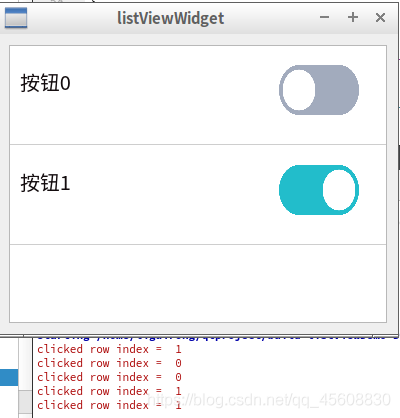
Nice, Crooked auspicious virtue
边栏推荐
- 2022.7.22DAY612
- 如何保证缓存和数据库的双写一致性?
- Download and install the free version of typora
- Dynamic performance view overview
- Quantitative perception training in tensorflow2.x and x86 end evaluation of tflite
- Simulation of transfer function step response output of botu PLC first-order lag system (SCL)
- Audio and video learning (10) -- PS streaming
- 2022.7.22DAY612
- WCF 入门教程二
- [C language] do you really know printf? (printf is typically error prone, and collection is strongly recommended)
猜你喜欢

KDD2022 | 揭秘快手短视频推荐Re-ranking之谜,相关推荐新SOTA

Configure flask

NLP natural language processing - Introduction to machine learning and natural language processing (3)

HCIP---BGP综合实验

PXE高效批量网络装机

Wrong Addition

Apache dolphin scheduler 2.x nanny level source code analysis, China Mobile engineers uncover the whole process of service scheduling and start
从Boosting谈到LamdaMART

DevExpress.XtraEditors.DataNavigator用法

NFT digital collection development: Six differences between digital collections and NFT
随机推荐
Come across the sea to see you
C# 使用Log4Net记录日志(基础篇)
1.MySQL架构篇【mysql高级】
Deep learning model deployment
PyTorch
Vscode cannot start the problem solving idea
KDD2022 | 揭秘快手短视频推荐Re-ranking之谜,相关推荐新SOTA
NFT digital collection development: Six differences between digital collections and NFT
This section is for Supplement 2
hot100 哈希
Selenium: detailed explanation of browser crawler use (I)
以太网交换安全
依赖和关联的对比和区别
Crawler data analysis
爬虫->TpImgspider
Idea shortcut key
Jmeter性能测试之命令行执行和生成测试报告
Simulation of transfer function step response output of botu PLC first-order lag system (SCL)
Learning Efficient Convolutional Networks Through Network Slimming
Dynamic performance view overview