当前位置:网站首页>Interface automated testing: postman practical tutorial
Interface automated testing: postman practical tutorial
2022-07-18 12:20:00 【The elegance of testing】
01 The interface test
(1) Server side (server): Using someone else's server , For example, wechat APP client , The server is on the server of Tencent , Account information on wechat , Chat records are stored on the server ; user A send out 1 Messages to the server , The server then forwards this message to the user B On .
The languages used by the server are :Java、Python、PHP、Go、C、C++ wait
(2) client (client): On the phone APP, Website
The languages used by the client are :object-c(IOS)、Android、HTML、CSS、JS wait
(3) Interface : Interacting with the server through the client
(4) So many languages , Cause unrecognizable , Common data types are needed for parsing :json{}, No, json Previously used XML Format
XML : Common data types
<title> The interface test

<content> The server and the client need interfaces to interact </content>
JSON : Common data types , Show as a key value pair :
{
"title" : " The interface test ",
"content" : " The server and the client need interfaces to communicate
}
02 How to test the interface
1、 Interface : The client and server interact , And the data returned by the interface is generally json The data type of the format .
2、 The basic steps of interface test are as follows :
In the interface documentation or elsewhere , Get the interface URL Address
See how the interface requests ( for example :get and post request )
Add request header , Request body
Send to see the returned results , Check whether the returned result is correct
3、 Open the interface document ( Reference resources :doc.nnzhp.cn)
(1)URL
(2) Request mode
(3) Request parameters
(4)get request
On the browser , Directly enter the request in the interface document URL:http://api.nnzhp.cn/api/user/stu_info, Page error prompt “ Required parameters are not filled in ! Please check the interface documentation !”( As shown in the figure )
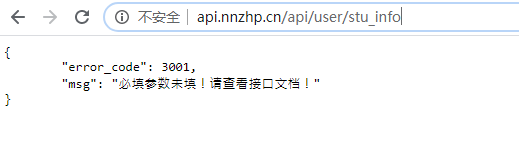
Based on url An error is reported if the link does not contain required parameters , Therefore, it is necessary to URL Fill in the required parameters :http://api.nnzhp.cn/api/user/stu_info?stu_name=%E5%B0%8F%E6%98%8E

When there are multiple required parameters , Need to be in URL Add other required parameters in “&” Splicing , for example :http://api.nnzhp.cn/api/user/stu_info?stu_name=%E5%B0%8F%E6%98%8E&age=25
machine learning PAI Console :https://pai.data.aliyun.com/console?regionId=ap-southeast-1&commodityId=&projectId=&deployFrom=&modelPath=&type=#/eas
(5)post request
Copy URL Open in browser , Report errors “ Wrong way to request ! Please check the interface documentation ”, For example, as shown in the figure

At this time, we need the help of postman Interface tools for testing , Prerequisite : Need to install locally postman Application software ( Be careful : If it is POST request , choice Params Fill in the parameters , At this time URL The parameter information will be automatically carried in , This request method should be GET Request mode instead of POST request , Pictured :)

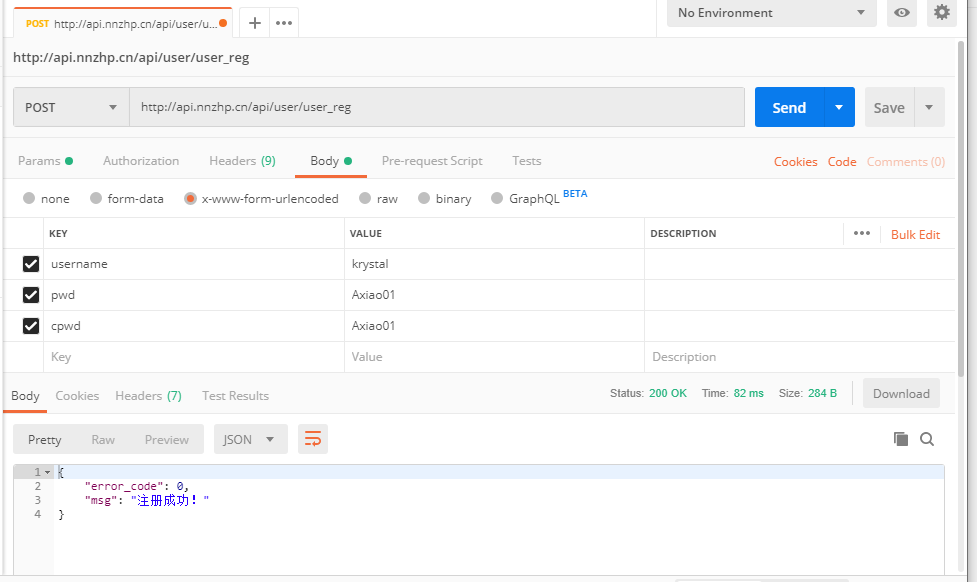
POST request , You should choose Body Options , Check “form-data” perhaps “x-www-form-urlencoded” Fill in the required parameters , As shown in the figure :

POST request , User registration , Pictured :
POST request , The parameter for json type , Pictured :

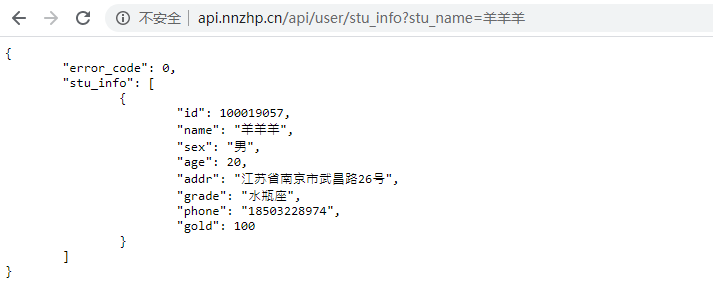
Query whether the student information exists :
POST request ,Body choice form-data,Key from Text Switch File Format , Upload files ,( Be careful :x-www-form-urlencoded No, File Format , Only Text Options , Cannot upload multimedia files ) Pictured :

4、 The browser captures packets
(1) Browser open check or developer tools , Or check the console for elements
(2) Generally, view the calling interface Network( The Internet ) Below XHR Which interfaces are called
(3) request url:https://qun.qq.com/cgi-bin/qunwelcome/myinfo?callback=?&bkn=682554596

(4) utilize Postman The interface tool calls the interface :get_group_list

(5) Interface search_group_members , Interface test with multiple parameters :

(6)cookie and session
cookie: A key value pair that stores its own local information data in the browser (key-value) The place of
Storage time : Set as required
Save the location : client
session: A key value pair stored in the server
Storage time : User activity time + A delay time ( Prompt the user to save time when logging in 7 Days time )
Save the location : Server side
5、GET Request mode and POST Difference in request mode :
(1)GET The request has no body , Just request the header and URL:host/api/xxx?name=xxx
(2)POST A request has a request header 、 Request body
(3)GET The request did not POST Request security
(4)GET The request has a parameter length limit ,POST No,
03 postman Interface automation
1、 Test the bank project 、 Financial projects will encounter encryption parameters , need :
(1) Parameter remove encryption
(2) Provide a tool , Generate encrypted parameters
(3) Know the encryption algorithm by yourself , Then encrypt by yourself
2、Postman Manually configure the environment variables in the :
(1) stay Postman in , Yes Environment and Environment, For the management of different environments , Different server environments are :
Production Production environment
Development development environment
Local Local LAN environment
(2) Environment quick view , Pictured 1 Shown :
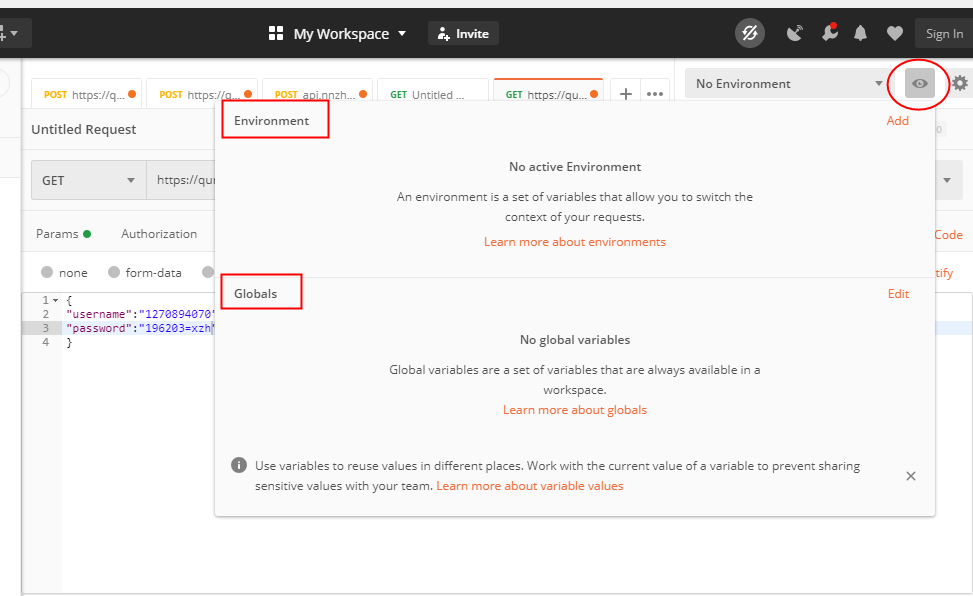
(3) Use Environment Implement multi service version management , Click on the settings in the upper right corner , Click on 【Manage Environments】, Sum graph 2 Shown :

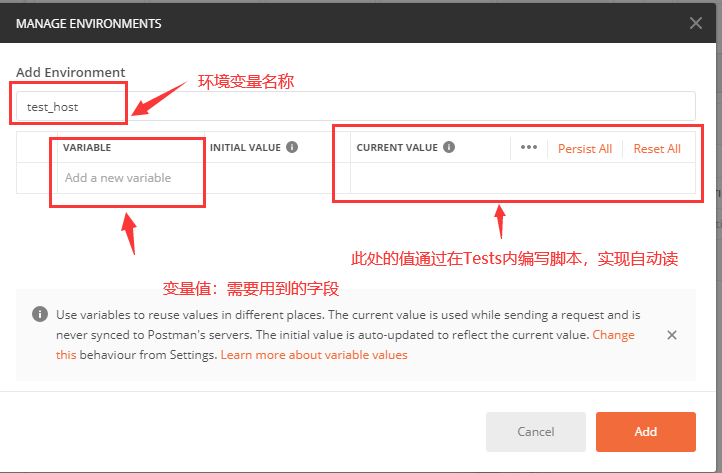
(4) In the pop-up window 【MANAGE ENVIRONMENTS】 In the interface , In the lower right corner, click “Add”, Pictured :

(5) stay “Add Environment” in , Fill in the variable name and value , Pictured :
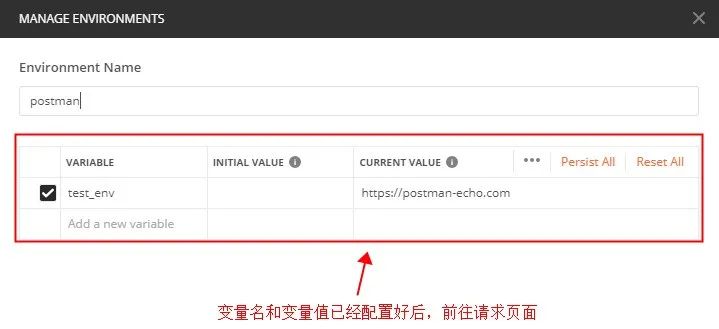
(6) After configuring the variable name and value , You can ask for URL Parameterization in :

(6) Write a script , Script parameterization , Like

(7) Click on runner, Configure operating parameters , Like :

(8) View the final running results , Status code for 200 ok, Indicates successful operation , Pictured :

There is a field in the figure that is :“This requests does not have any tests.”
Need to check :
First step : Check whether the variable name corresponds to ;
The second step : Whether you clicked save , Click again Runner
The third step : Whether verification has been added
(9) Add validation , Setup check

(10) postman Assertion :
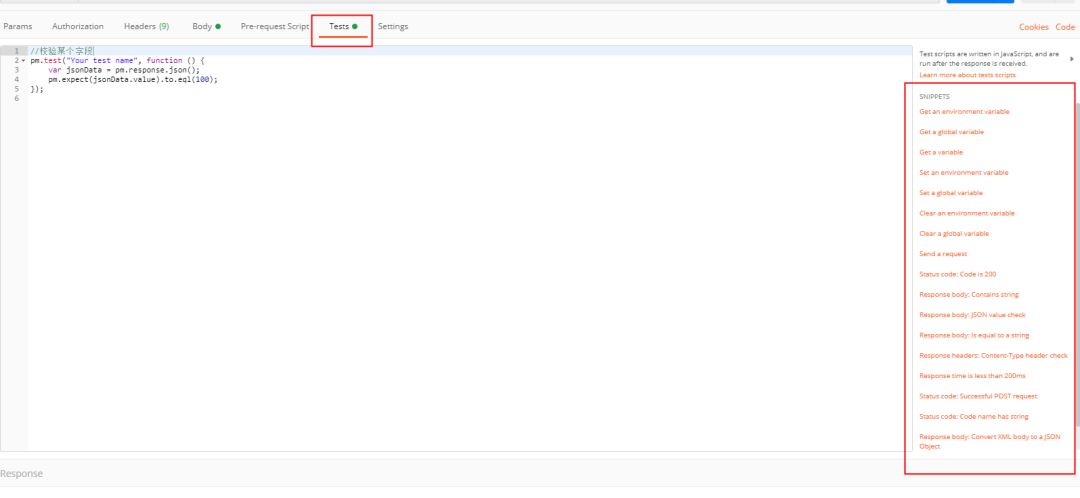
(11) Click on 【Tests】 Button , There is one in the right column snippets bar , Inside is postman Built in test script , Auxiliary interface test :
A: Judge status code
Status code : Code is 200
The corresponding script :
pm.test("Status code is 200", function () {
 pm.response.to.have.status(200);
  );
B: Back to response Include content
Response body : Containing string
The corresponding script :
 pm.test("Body matches string", function () {
  pm.expect(pm.response.text()).to.include("string_you_want_to_search");
     });
C: Back to json The value in the data
Response body : JSON value check
The corresponding script is :
pm.test("Your test name", function () {
       var jsonData = pm.response.json();
       pm.expect(jsonData.value).to.eql(100);
       });
D: The content of the response is equal to a string
Response body : is equal to a string
The corresponding script :
   pm.test("Body is correct", function () {
   pm.response.to.have.body("response_body_string");
   });
E: Check whether there is... In the response header Content-Type Field
Response headers : Content-Type header check
The corresponding script :
   pm.test("Content-Type is present", function () {
   pm.response.to.have.header("Content-Type");
    });
F: Judge that the response time is less than 200MS
Response time is less than 200ms
The corresponding script :
   pm.test("Response time is less than 200ms", function () {
   pm.expect(pm.response.responseTime).to.be.below(200);
    });
(12) Creating a new collection makes it easy to group individual requests , Pictured :

04 HTTP
1、http and https The difference :
Different security :
http: ordinary http request ,, Message plaintext transmission message , unsafe ;
https: Having security ssl Encrypted transport protocol , Encrypt communication between browser and server , Ensure the security of data transmission ;
The connection is different :
http The connection is simple , It's stateless ;
https By SSL+HTTP The protocol is built for encrypted transmission 、 Network protocol for identity authentication ;
Different ports :
http agreement : The port used is 80;
https agreement : The port used is 443;
Certificate application is different :
http agreement : Free application ;
https agreement : Need to ca Apply for a certificate , Generally there are few free certificates , You need to pay a fee .
2、 Generally complete URL by :http://192.168.13.3:80 host/ip:port/api/user/add_stu uri

3、 Interface HTTP Parameters
http Request mode :
get — By request URL Get resources
POST — For adding new content
PUT — Used to modify something
DELETE— Delete something
CONNECT— For proxy transmission , If you use SSL
OPTIONS— Ask what you can do
PATCH— Some document changes
PROPFIND(WebDAV)— View the properties
PROPPATCH(WebDAV)— Set properties
MKCOL(WebDAV)— Create set ( Folder )
COPY(WebDAV)— Copy
MOVE(WebDAV)— Move
LOCK(WebDAV)— Lock
UNLOCK(WebDAV)— Unlock
TRACE — For remote diagnostic server
HEAD — Be similar to GET, But not back body Information , Used to check whether an object exists , And get the metadata of the object
http Request header (headers)
The request header contains a lot of useful information about the client environment and the request body . As shown in the figure : For example, language category and status code

http Request body (body): The request body is the body of the request .
json Format
xml Format
html Format
Binary format ( Mostly used for pictures )
String format
4、 The user interface can be through the following 4 Two different ways of asking to do different things :
(1) get data , use “GET” The way , Successfully returned HTTP Status code :200
(2) Create data , use “POST” The way , Successfully returned HTTP Status code :201
(3) Modifying data , use “PUT” The way , Successfully returned HTTP Status code :203
(4) Delete data , use “DELETE” The way , Successfully returned HTTP Status code :204
5、HTTP State :
(1) The request message (1 initial ) for example :100 Continue( Please continue to )
(2) The request is successful (2 initial ) for example :200 OK( Request succeeded )
(3) Redirect (3 initial ) for example :300 Multiple Choice( Multiple choice , A list of options is returned )
(4) Client request error (4 initial ) for example :400 Bad Request ( Wrong request ) 403 Forbidden( prohibit ) 404 Not Found( Can't find )
(5) Server error (5、6 The beginning of a word ) for example :500 Internal Server( internal error ) 502 Bad Gateway( The agent or gateway does not respond to the next link )
Detailed view HTTP Status code 、HTTP Status Code、HTTP Common status code queries :https://tool.oschina.net/commons?type=5
Software Test Engineer self-study tutorial :
Interface performance test — Software testers will 618 Analysis of actual combat scenes
Jmeter Explain the case in practice — Software testers will
Last : It can be in the official account : Sad spicy bar ! Get one by yourself 216 Page software testing engineer interview guide document information 【 Free of charge 】. And the corresponding video learning tutorial is free to share !, It includes basic knowledge 、Linux necessary 、Shell、 The principles of the Internet 、Mysql database 、 Special topic of bag capturing tools 、 Interface testing tool 、 Test advanced -Python Programming 、Web automated testing 、APP automated testing 、 Interface automation testing 、 Testing advanced continuous integration 、 Test architecture development test framework 、 Performance testing 、 Safety test, etc. .
Now I invite you to join our software testing learning exchange group :【746506216】, remarks “ The group of ”, We can discuss communication software testing together , Learn software testing together 、 Interview and other aspects of software testing , There will also be free live classes , Gain more testing skills , Let's advance together Python automated testing / Test Development , On the road to high pay .
Friends who like software testing , If my blog helps you 、 If you like my blog content , please “ give the thumbs-up ” “ Comment on ” “ Collection ” One Key triple connection !
边栏推荐
猜你喜欢

ThinkPHP code execution (cnvd-2018-24942)

2022年7月16日CDGA/CDGP数据治理认证考试成绩出来啦!

UE4_ Ue5 play audio (play, stop function) (attached project)

En trois étapes, j'ai terminé MySQL en une journée, ce qui m'a permis d'obtenir l'offre de tmall en douceur.

【MOCO基础】Attention, learn to solve routing problems(Wouter Kool, 2018)

汉字风格迁移篇--基于生成对抗网络的无监督字体风格转换模型
Power Bi ---- what is a measure?

【idea】idea添加vm options
Web programming interview question (2022)

迅为龙芯开发板国产双核64位Loognix系统双千兆以太网更多接口
随机推荐
Terraform命令行工具介紹、安裝、使用
WebRTC系列-Turn协议实现
图片格式解析
Excel-VBA 快速上手(七、获取单元格对象)
Xunwei Godson development board domestic dual core 64 bit loognix system dual Gigabit Ethernet more interfaces
[pyGame game] no admittance for disabled hands. The latest sadistic game "stitching" - a game you have to play.
Detailed explanation of assembly language programming skills (with examples)
Web 编程面试题(2022)
ThinkPHP code execution (cnvd-2018-24942)
Rust语言——小小白的入门学习10
Database system probability -- relational database
Kettle【实践 02】txt类型文件分类导入后执行SQL进行数据类型转换并入库(完整流程实例云资源分享:包含sql+kjb+ktr+测试文件)
C# 使用JObject解析嵌套json
谷歌 | 图神经网络预训练帮助了分子表征吗
PDB common commands
数据库定时备份linux篇
Four reasons for programmers' headaches | daily anecdotes
面试高频:MySQL是怎么保证高可用的?
Rebuild binary tree
openSource 知:嵌入式软件列表