当前位置:网站首页>Flask framework beginner-03-template
Flask framework beginner-03-template
2022-07-26 10:03:00 【Flowing ink fragrance】
Templates
One 、 Template Introduction
Templates : ( Webpage , namely template Under the html file )
- A template is actually a file that contains the response text , It's a place holder ( Variable ) Represents the dynamic part , Tell the template engine that its specific value needs to be obtained from the data used
- Replace variables with real values , And then return the final string , This process is called ’ Rendering ’
- Flask It's using Jinja2 This template engine is used to render templates
Advantages of using templates :
- View functions are only responsible for business logic and data processing ( Business logic )
- The template takes the data result of the view function for display ( View presentation )
- The code structure is clear , Low coupling
Syntax of template :
1、 Get... In the template view Variable value passed in :{ { Variable name key }}
render_template(‘ Template file name ’,keyvalue,keyvalue,…)
@app.route('/register')
def register():
    #  The default from the templates Query in the folder
    r = render_template('register2.html')
    print(r)
    return r
Two 、 Receive value in template
| Type of reception | Handle |
|---|---|
| Receive list values | { { list.0 }} or { { list[0] }} |
| Receive dictionary value | { { dict.key }} or { { dict.get(key) }} |
| Receive object value | { { girl.name }} |
| Apply external file name | url_for(‘static’,filename = ‘css/style.css’) |
| Declare variables for use 1 | {% set username = ‘zhangsan’ %} { { username }} |
| Declare variables for use 2 | {% with num=1— %} { { num }} {% endwith %} |
example:
app1.py
from flask import Flask,request,render_template

import settings

app = Flask(__name__)
app.config.from_object(settings)


class Girl:
    def __init__(self,name,addr):
        self.name = name
        self.gender = ' Woman '
        self.addr = addr

@app.route('/show')
def show():
    name = 'haha'
    age = 18
    friends = ['haha', 'hehe', 'xixi', 'qiaqia']
    dicts = {
    'gift1':' The necklace ','gift2':' flower ','gift3':' ring '}
    #  Create objects
    girlfriend = Girl(' Cui Hua ',' jiangxi ')
    return render_template('show.html',name=name,age=age,friends=friends,dicts=dicts,girl=girlfriend)

if __name__ == '__main__':
    app.run()
show.html
<!DOCTYPE html>
<html lang="en">
<head>
    <meta charset="UTF-8">
    <title>Title</title>
</head>
<body>
<div> User information display </div>
<p>
     User name is :{
   {name}} ---- {
   {age}} --- {
   {gender}}
    <br>
    {
   {friends[0]}}
    {
   {friends.1}}
    {
   {friends[2]}}
    {
   {friends[3]}}
    <br>
    {
   {dicts.gift1}}
    {
   {dicts.get('gift2'}}
    <br>
    {
   {girl.name}} --- {
   {girl.gender}} --- {
   {girl.age}}
</p>

<table>
  {# Dynamically create #}
    <tr>
      <td></td>
    </tr>
</table>

<script> </script>
</body>
</html>
result :
3、 ... and 、 Template control block
| Control block | grammar |
|---|---|
| if Judge | {% if Conditions %} Condition is True Statements executed after {% else %} Condition is False Statements executed after {% endif %} |
| for loop | {% for Variable in Iteratable object %} for Statement to execute {% endfor %} |
| loop Variable cycle | loop.index The serial number from 1 Start loop.index0 The serial number from 0 Start loop.revindex The serial number is reversed loop.revindex0 loop.first Whether the first Boolean type loop.last Whether the last one Boolean type |
example:
app2.py
from flask import Flask,request,render_template

import settings

app = Flask(__name__)
app.config.from_object(settings)


@app.route('/show')
def show1():
    girls = [' Sun Yizhen ',' Song Yun ',' Li-ying zhao ',' Andy ',' Hu Bingqing ',' Sun Wen ']
    users = [
        {
    'username': 'haha1', 'password': '123', 'addr': ' Zhejiang ', 'phone': '10000000000'},
        {
    'username': 'haha2', 'password': '124', 'addr': ' Zhejiang ', 'phone': '10000000001'},
        {
    'username': 'haha3', 'password': '125', 'addr': ' Shanghai ', 'phone': '10000000002'},
        {
    'username': 'haha4', 'password': '126', 'addr': ' Beijing ', 'phone': '10000000003'},
        {
    'username': 'haha5', 'password': '127', 'addr': ' jiangsu ', 'phone': '10000000004'},
        {
    'username': 'haha6', 'password': '128', 'addr': ' jiangxi ', 'phone': '10000000005'},
    ]
    return render_template('show_controlblock.html',girls=girls,users=users)

if __name__ == '__main__':
    app.run()
show_controlblock.html
<!DOCTYPE html>
<html lang="en">
<head>
    <meta charset="UTF-8">
    <title> Demo control block </title>
    <style> .a {
       color: red; font-weight: bold; } </style>
</head>
<body>
{# ul...li #}
{# ol...li #}
<!-- html notes  -->
{# {
   {girls}} #}

<ul>
    {% for girl in girls %}
        <li> {
   { girl }} </li>
    {% endfor %}

</ul>

<hr>

<ul>
    {% for girl in girls %}
        {% if girl|length >= 3 %}
            <li class="a"> {
   { girl }} </li>
        {% else %}
            <li> {
   { girl }} </li>
        {% endif %}
    {% endfor %}
</ul>

<hr>

<table border="1" cellpadding="0" cellspacing="0" width="50%">
    {% for user in users %}
        <tr>
            <td>{
   { user.username }}</td>
            <td>{
   { user.password }}</td>
            <td>{
   { user.addr }}</td>
            <td>{
   { user.phone }}</td>
        </tr>
    {% endfor %}


</table>

<hr>


<table border="1" cellpadding="0" cellspacing="0" width="50%">
    {% for user in users %}
        <tr {% if loop.last %} style="background-color: deeppink" {% endif %}>
            <td>{
   { loop.index0 }}</td>
            <td>{
   { loop.index }}</td>
            <td>{
   { user.username }}</td>
            <td>{
   { user.password }}</td>
            <td>{
   { user.addr }}</td>
            <td>{
   { user.phone }}</td>
        </tr>
    {% endfor %}


</table>

</body>
</html>
result :
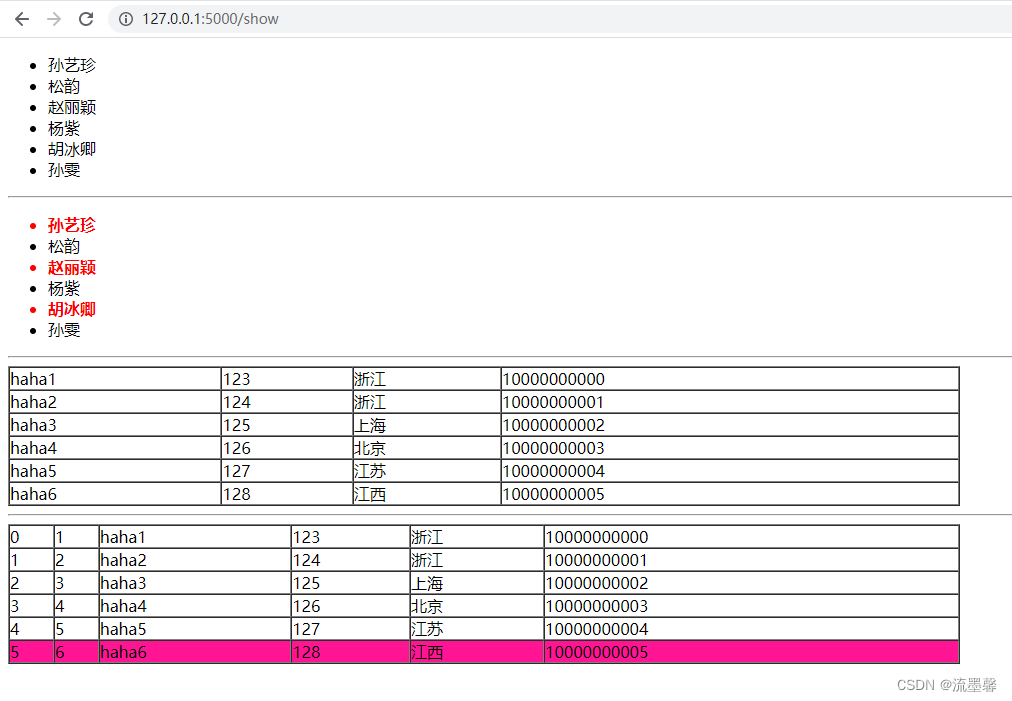
Four 、 Template filter
The essence of filter is function
Filter in template syntax :
{ { Variable name | filter }}
{ { Variable name | filter (*args) }}
Common filters :
1、safe : escape Keep the style , Don't escape tags , Let it still show the style
2、capitalize : Capitalize the first letter of a word
3、lower/upper: Word case conversion
4、title : The first letter of each word in a sentence is capitalized
5、reverse : Reverse spelling of words and letters
6、format : format conversion
7、truncate : Returns a truncated length string
8、 Filters that exist in the list :
{ { girls | first }}
{ { girls | last }}
{ { girl | length }}
{ { [1,3,5,7,9] | sum }}
{ { [2,0,1,5.8,3] | sort }}
9、tojson() : Convert the given object to JSON Express
<script type=text/javascript>
    doSomethingWith({
   { user.username|tojson|safe }});
</script>
10、 Filters that exist in the dictionary :
Get value :
 {% for v in users.0.values() %}
	 <p>{
   { v }} </p>
 {% endfor %}
Get key :
{% for v in users.0.keys() %}
     <p>{
   { v }} </p>
{% endfor %}
Get key value pairs :
{% for k,v in users.0.items() %}
   <p>{
   { k }}---{
   { v }}</p>
{% endfor %}
11、 Custom filter
1、 adopt flask Module add_template_filter Method
def  replace_hello(value):
    print('---->',value)
    value = value.replace('hello','')
    print('=======>',value)
    return value.strip()
app.add_template_filter(replace_hello,'replace')
2、 Use the decorator to complete
@app.template_filter('listreverse')
def reverse_list(li):
    temp_li = list(li)
    temp_li.reverse()
    return temp_li
3、 Add to app manually jinja_env
def reverse_filter(s):
    return s[::-1]
app.jinja_env.filters['reverse'] = reverse_filter
example:
app3.py
from flask import Flask,request,render_template

import settings

#  Contains filters 、 Judge the condition if、 The loop condition for

app = Flask(__name__)
app.config.from_object(settings)

@app.route('/show')
def show1():
    girls = [' Sun Yizhen ',' Song Yun ',' Li-ying zhao ',' Andy ',' Hu Bingqing ',' Sun Wen ']
    users = [
        {
    'username': 'haha1', 'password': '123', 'addr': ' Zhejiang ', 'phone': '10000000000'},
        {
    'username': 'haha2', 'password': '124', 'addr': ' Zhejiang ', 'phone': '10000000001'},
        {
    'username': 'haha3', 'password': '125', 'addr': ' Shanghai ', 'phone': '10000000002'},
        {
    'username': 'haha4', 'password': '126', 'addr': ' Beijing ', 'phone': '10000000003'},
        {
    'username': 'haha5', 'password': '127', 'addr': ' jiangsu ', 'phone': '10000000004'},
        {
    'username': 'haha6', 'password': '128', 'addr': ' jiangxi ', 'phone': '10000000005'},
    ]
    girls.append('zhangsan')
    msg = '<h1>520 happy !</h1>'
    n1 = 'hello'
    return render_template('show_controlblock.html',girls=girls,users=users,msg=msg,n1=n1)


@app.route('/')
def hello_word():
    msg = 'hello everyone hello world'
    li = [3,4,5]
    return render_template('define_filter.html',msg=msg,li=li)

#  The first way
#  Filters are essentially functions
def  replace_hello(value):
    print('---->',value)
    value = value.replace('hello','')
    print('=======>',value)
    return value.strip()

app.add_template_filter(replace_hello,'replace')

#  The second way   Decorator
@app.template_filter('listreverse')
def reverse_list(li):
    temp_li = list(li)
    temp_li.reverse()
    return temp_li

if __name__ == '__main__':
    app.run()
show_controlblock.html
<!DOCTYPE html>
<html lang="en">
<head>
    <meta charset="UTF-8">
    <title> Demo control block </title>
    <style> .a {
       color: red; font-weight: bold; } </style>
</head>
<body>
{# ul...li #}
{# ol...li #}
<!-- html notes  -->
{# {
   {girls}} #}

<ul>
    {% for girl in girls %}
        <li> {
   { girl }} </li>
    {% endfor %}

</ul>

<hr>

<ul>
    {% for girl in girls %}
        {% if girl|length >= 3 %}
            <li class="a"> {
   { girl }} </li>
        {% else %}
            <li> {
   { girl }} </li>
        {% endif %}
    {% endfor %}
</ul>

<hr>

<table border="1" cellpadding="0" cellspacing="0" width="50%">
    {% for user in users %}
        <tr>
            <td>{
   { user.username }}</td>
            <td>{
   { user.password }}</td>
            <td>{
   { user.addr }}</td>
            <td>{
   { user.phone }}</td>
        </tr>
    {% endfor %}


</table>

<hr>


<table border="1" cellpadding="0" cellspacing="0" width="50%">
    {% for user in users %}
        <tr {% if loop.last %} style="background-color: deeppink" {% endif %}>
            <td>{
   { loop.index0 }}</td>
            <td>{
   { loop.index }}</td>
            <td>{
   { user.username }}</td>
            <td>{
   { user.password }}</td>
            <td>{
   { user.addr }}</td>
            <td>{
   { user.phone }}</td>
        </tr>
    {% endfor %}


</table>

</body>
</html>
define_filter.html
<!DOCTYPE html>
<html lang="en">
<head>
    <meta charset="UTF-8">
    <title> Use of filters </title>
</head>
<body>
 The current user is :{
   { girls | length }}  people
<br>
{#  Filter escape  #}
{
   { len(girls) }}
<br>
{
   { msg | safe }}
<br>
{
   { n1 | capitalize }}
<br>
{
   { n1 | upper }}
<br>
{
   { n2 | lower }}
<br>
{
   { n1 | reverse }}
<br>
{
   { '%s id %d' | format('lili',18 }}
<br>
{
   { 'hello world' | truncate(7) }}

{#  Use of list filters  #}
{
   { girls | first }}
<br>
{
   { girls | last }}
<br>
{
   { girl | length }}
<br>
{
   { [1,3,5,7,9] | sum }}
<br>
{
   { [2,0,1,5.8,3] | sort }}
<br>

<p>
   {
   { users.0 }}
    <br>
    {% for v in users.0.values() %}
        <p>{
   { v }} </p>
    {% endfor %}
    <hr>
    {% for k,v in users.0.items() %}
        <p>{
   { k }}---{
   { v }}</p>
    {% endfor %}

</p>


</body>
</html>
result :

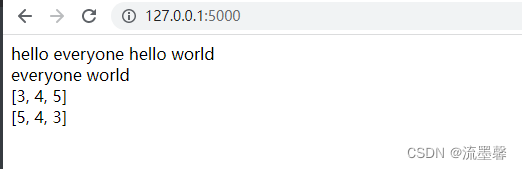
5、 ... and 、 Template reuse
Template inheritance :
Cases requiring template inheritance :
1、 Multiple templates have exactly the same top and bottom
2、 Multiple templates have the same template content , But part of the content is different
3、 Multiple templates have identical templates label :
{% block name %}
{% endblock %}
- step :
1、 First use the label in the parent template to leave a change area ( Be careful : Styles and scripts need to be reserved in advance )
{% block name %}
{% endblock %}
2、 The child template inherits the parent template
{% extends ' Parent template name ' %}
3、 Then in the child template, the variable name of the response name in the parent template , Fill in
 {% block name %}
 	 Change content
 {% endblock %}
The child template introduces the parent template
| include: contain | Use scenarios : stay A,B,C Pages have common parts , But other pages don't have this part step : 1、 First define a common template part :.html 2、 Use include Import the files you need to use ( Be careful : The folder must be in template Inside ) {% include ‘ Folder /.html’ %} |
| macro :macro | 1、 Think of it as jinja2 A function of , This function returns a HTML character string 2、 Purpose : Code can be reused , Avoid code redundancy Two ways to define : 1、 Define directly in the template : similar :macro1.html How to define 2、 Extract all macros into one template :macro.html Import when using : {% import ‘macro.html’ as Call name %} { { Call name . macro ( Parameter values ) }} |
| { { url_for(‘static’,filename=‘’) }}: load static The following static file | Use scenarios : Load e.g javaScript or css Wait for the documents |
example:
app4.py
from flask import Flask,request,render_template

import settings

app = Flask(__name__)
app.config.from_object(settings)

@app.route('/base')
def load_inherit():
    return render_template('inherit.html')

@app.route('/')
def index():
    return render_template('inherit2.html')

@app.route('/welcome')
def welcome():
    return render_template('include.html')

@app.route('/macro')
def use_macro():
    return render_template('macro/macro1.html')

@app.route('/macro1')
def use_macro1():
    return render_template("macro/macro2.html")

@app.route('/index')
def welcome():
    return render_template('index.html')

if __name__ == '__main__':
    app.run()
inherit.html
<!DOCTYPE html>
<html lang="en">
<head>
    <meta charset="UTF-8">
    <title>
      {% block title %} Of parent template title{% endblock %}
    </title>
    <style> #head{
       height : 50px; background-color : bisque; } #head ul{
       list-style: none; } #head ul li{
       float : left; width : 100px; text-align : center; font-size : 50px; line-height: 50px; } #middle{
       height : 900px; background-color : azure; } #foot{
       height : 50px; line-height : 50px; background-color : darkseagreen; } </style>
    {% block mycss %}
    {% endblock %}
</head>
<body>
  <div id="head">
    <ul>
      <li> home page </li>
      <li> seckill </li>
      <li> The supermarket </li>
      <li> The book </li>
      <li> members </li>
    </ul>

  </div>
  <div id="middle" >
    {% block middle %}
      <button> I'm the middle part </button>
    {% endblock %}

  </div>
  <div id="foot">
         I'm the bottom part
  </div>
{% block myjs %}
{% endblock %}
</body>
</html>
inherit2.html
{% extends 'base.html' %}
{% block title %}
     home page
{% endblock %}
{% block mycss %}
    <style> #middle{
       background-color : deeppink; } .div1{
       width: 33%; height: 500px; float: left; border: 1px solid red; } </style>
    <# link rel="stylesheet" href="../static/css/style.css" #>
    <link rel="stylesheet" href="{
     { url_for('static',filename = 'css/style.css') }}">
{% endblock %}
{% block myjs %}
    <script> btn = document.getElementById('btn') btn.onclick(function(){
       alert(' Don't order me !') }) </script>
{% endblock %}

{% block middle %}
    <div class="div1" id="d1"></div>
    <div class="div1"></div>
    <div class="div1"></div>
    <img src="{
     { url_for('static',filename='images/a.png')}}" alt="" >
{% endblock %}
header.html
<!DOCTYPE html>
<html lang="en">
<head>
    <meta charset="UTF-8">
    <title> Head </title>
</head>
<body>
<div style="heigh: 50px;background-color: deeppink"></div>

</body>
</html>
include.html
<!DOCTYPE html>
<html lang="en">
<head>
    <meta charset="UTF-8">
    <title> The welcome page </title>
</head>
<body>
{% include 'common/header.html' %}
<div style="background-color: darkseagreen; width: 100px; "></div>
</body>
</html>
macro/macro1.html
<!DOCTYPE html>
<html lang="en">
<head>
    <meta charset="UTF-8">
    <title> macro </title>
</head>
<body>
{#  Defining macro  #}
{% macro form(action,value=' Sign in ',method='post') %}
  <form action="{
     { action }}" method="{
     { method }}">
      <input type="text" value="" placeholder=" user name " name="username">
      <br>
      <input type="password" placeholder=" password " name="password">
      <br>
      <input type="submit" value="{
     { value }}">
  </form>
{% endmacro %}

{#  Call the macro  #}
{
   { form('/') }}
</body>
</html>
macro/macro.html
{#  Defining macro  #}
{% macro form(action,value=' Sign in ',method='post') %}
  <form action="{
     { action }}" method="{
     { method }}">
      <input type="text" value="" placeholder=" user name " name="username">
      <br>
      <input type="password" placeholder=" password " name="password">
      <br>
      <input type="submit" value="{
     { value }}">
  </form>
{% endmacro %}
macro/macro2.html
<!DOCTYPE html>
<html lang="en">
<head>
    <meta charset="UTF-8">
    <title> Use of macros 2</title>
</head>
<body>
{% import 'macro/macro.html' as f %}
{
   { f.form('welcome',value=' register ')   }}

{#  Declare variables for use  #}}
{% set username = 'zhangsan' %}
{
   { username }}

{% with num=1--- %}
    {
   { num }}
{% endwith %}

</body>
</html>
hello.js
function sayHello() {

   alert("Hello World")
}
index.html
<html>

   <head>
      <script type = "text/javascript" src = "{
     { url_for('static', filename = 'hello.js') }}" ></script>
   </head>

   <body>
      <input type = "button" onclick = "sayHello()" value = "Say Hello" />
   </body>

</html>
6、 ... and 、 summary
| type | Method |
|---|---|
| Variable | { { name }} |
| block | {% if Conditions %} …{% endif %} {% for Conditions %} …{% endfor %} {% block Conditions %} …{% endblock %} {% macro Conditions %} …{% endmacro % |
| {% include ‘’ %} contain {% import ‘’ %} Import {% extends ‘’ %} Inherit | |
| { { url_for(‘static’,filename=‘’) }} { { macro name(***) }} |
边栏推荐
- Principle analysis and source code interpretation of service discovery
- 反射机制的原理是什么?
- In the same CONDA environment, install pytroch first and then tensorflow
- R语言ggplot2可视化: 将图例标题(legend title)对齐到ggplot2中图例框的中间(默认左对齐、align legend title to middle of legend)
- Fuzzy PID control of motor speed
- EOJ 2020 January race E-number transformation
- JS table auto cycle scrolling, mouse move in pause
- 2022年中科磐云——服务器内部信息获取 解析flag
- Rocky basic exercise -shell script 2
- Customize permission validation in blazor
猜你喜欢

Spolicy request case
Alibaba cloud technology expert haochendong: cloud observability - problem discovery and positioning practice

Server memory failure prediction can actually do this!

2022年中科磐云——服务器内部信息获取 解析flag

Uniapp "no mobile phone or simulator detected, please try again later" and uniapp custom components and communication
阿里云技术专家郝晨栋:云上可观测能力——问题的发现与定位实践
开发转测试:从0开始的6年自动化之路...
![Sqoop [environment setup 01] CentOS Linux release 7.5 installation configuration sqoop-1.4.7 resolve warnings and verify (attach sqoop 1 + sqoop 2 Latest installation package +mysql driver package res](/img/8e/265af6b20f79b21c3eadcd70cfbdf7.png)
Sqoop [environment setup 01] CentOS Linux release 7.5 installation configuration sqoop-1.4.7 resolve warnings and verify (attach sqoop 1 + sqoop 2 Latest installation package +mysql driver package res

R语言ggplot2可视化: 将图例标题(legend title)对齐到ggplot2中图例框的中间(默认左对齐、align legend title to middle of legend)
Flask框架初学-03-模板
随机推荐
R language ggpubr package ggsummarystats function visualizes the grouping box diagram (custom grouping color) and adds the statistical values corresponding to the grouping under the x-axis label (samp
Docker configuring MySQL Cluster
Force deduction DFS
面试突击68:为什么 TCP 需要 3 次握手?
Sqoop [environment setup 01] CentOS Linux release 7.5 installation configuration sqoop-1.4.7 resolve warnings and verify (attach sqoop 1 + sqoop 2 Latest installation package +mysql driver package res
Explain automatic packing and unpacking?
Leetcode 504. 七进制数
在Blazor 中自定义权限验证
What is the principle of reflection mechanism?
Fuzzy PID control of motor speed
Interpretation of the standard of software programming level examination for teenagers_ second level
Phpexcel export Emoji symbol error
I finished watching this video on my knees at station B
Interview shock 68: why does TCP need three handshakes?
在.NET 6.0中配置WebHostBuilder
云原生(三十六) | Kubernetes篇之Harbor入门和安装
Use of selectors
万字详解“用知识图谱驱动企业业绩增长”
分布式网络通信框架:本地服务怎么发布成RPC服务
A new paradigm of distributed deep learning programming: Global tensor