当前位置:网站首页>02、RestTemplate学习笔记
02、RestTemplate学习笔记
2022-07-15 23:43:00 【长路 ㅤ 】
前言
所有博客文件目录索引:博客目录索引(持续更新)
学习视频:动力节点最新SpringCloud视频教程|最适合自学的springcloud+springcloudAlibaba
PS:本章节中部分图片是直接引用学习课程课件,如有侵权,请联系删除。
一、RestTemplate
RestTemplate是Spring提供的用于访问Rest服务的客户端,RestTemplate提供了多种便捷访问远程Http服务的方法,能够大大提高客户端的编写效率。
之前的HTTP开发是用apache的HttpClient开发,代码复杂,还得操心资源回收等。代码很复杂,冗余代码多。
二、快速使用
SpringBoot依赖2.7.1版本:我们只需要导入web启动器即可
<dependency>
    <groupId>org.springframework.boot</groupId>
    <artifactId>spring-boot-starter-web</artifactId>
</dependency>
我们来进行编写三种案例:①GET。②POST JSON。③POST 表单。
package com.changlu.resttemplate.controller;

import com.changlu.resttemplate.domain.User;
import org.springframework.web.bind.annotation.GetMapping;
import org.springframework.web.bind.annotation.PostMapping;
import org.springframework.web.bind.annotation.RequestBody;
import org.springframework.web.bind.annotation.RestController;

/** * @Description: 测试控制器 * @Author: changlu * @Date: 4:04 PM */
@RestController
public class TestController {


    @GetMapping("/testGet")
    public String get(String name) {

        System.out.println(name);
        return "ok";
    }

    /** * post传参 两种 * json参数的核心 header content-type = application/json;charset=utf-8 * * @return */
    @PostMapping("/testPost1")
    public String testPost1(@RequestBody User user) {

        System.out.println(user);
        return "ok";
    }

    /** * 接收表单参数 * <form action=/testPost2 * <input name=ccc value=ssss * header content-type = application/x-www-form-urlencoded * @param user * @return */
    @PostMapping("/testPost2")
    public String testPost2(User user) {

        System.out.println(user);
        return "ok";
    }

}
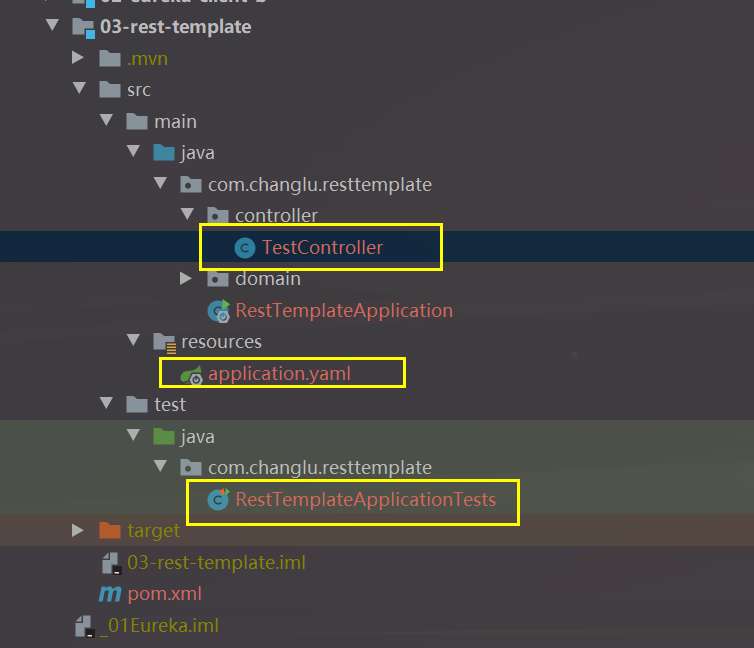
接着我们来使用测试类RestTemplate来进行测试:分别对应三个请求
package com.changlu.resttemplate;

import com.changlu.resttemplate.domain.User;
import org.junit.jupiter.api.Test;
import org.springframework.boot.test.context.SpringBootTest;
import org.springframework.http.ResponseEntity;
import org.springframework.util.LinkedMultiValueMap;
import org.springframework.web.client.RestTemplate;

@SpringBootTest
class RestTemplateApplicationTests {


    @Test
    void contextLoads() {

        RestTemplate restTemplate = new RestTemplate();
        //访问百度页面
        String url = "https://www.baidu.com";
        String content = restTemplate.getForObject(url, String.class);
        System.out.println(content);
    }

    @Test
    void testGet() {

        RestTemplate restTemplate = new RestTemplate();
        String url = "http://localhost:8080/testGet?name=cxs";
        // String result = restTemplate.getForObject(url, String.class);
        ResponseEntity<String> responseEntity = restTemplate.getForEntity(url, String.class);
        // http:// 协议 (规范 接头暗号)
        // 请求头 请求参数 .. 响应头 响应状态码 报文 ....
        System.out.println(responseEntity);
    }

    @Test
    void testPostJson() {

        RestTemplate restTemplate = new RestTemplate();
        String url = "http://localhost:8080/testPost1";
        //封装对象
        User user = new User("changlu", 22, 1000D);
        //发送POST,而且是JSON参数,在web里面默认会使用jackson,会将对象转为字符串
        String content = restTemplate.postForObject(url, user, String.class);
        System.out.println(content);
    }

    @Test
    void testPost() {

        RestTemplate restTemplate = new RestTemplate();
        String url = "http://localhost:8080/testPost2";
        //对于表单参数,使用LinkedMultiValueMap来进行封装
        LinkedMultiValueMap<String, Object> map = new LinkedMultiValueMap<>();
        map.add("name", "changlu");
        map.add("age", 26);
        map.add("price", 80080);
        String content = restTemplate.postForObject(url, map, String.class);
        System.out.println(content);
    }

}
我是长路,感谢你的耐心阅读。如有问题请指出,我会积极采纳!
欢迎关注我的公众号【长路Java】,分享Java学习文章及相关资料
Q群:851968786 我们可以一起探讨学习
注明:转载可,需要附带上文章链接
边栏推荐
- TCmalloc学习
- 静态库和动态库
- Course design of traffic light single chip microcomputer
- mysql 查询时过滤 html
- 幹貨解析 | 公有雲時代,如何上好雲、管好雲?點擊報名,解答全部疑問!
- Ping message and ICMP message header
- Valgrind
- Power system unit commitment (realized by matlab code)
- Wireshark packet capturing debugging (three-way handshake, four-way disconnection)
- 伦敦银行情走势怎样产生
猜你喜欢

JVM briefly introduces GC garbage collection mechanism

喜事乐,一场蓄谋已久的购物新时代
![Registration form practical skills [continuous update]](/img/30/7a1701fc25d5a91d3b7ef275c0700f.png)
Registration form practical skills [continuous update]
![[development tutorial 6] crazy shell · open source Bluetooth smart health watch - touch](/img/0f/b3062c14deda3500339bd08e0e7b05.png)
[development tutorial 6] crazy shell · open source Bluetooth smart health watch - touch

Flink(一)概述

Flink(五)状态编程
【开发教程6】疯壳·开源蓝牙智能健康手表-触摸

MQTT.fx和EMQX的连接、测试、抓包

subset sum problem

wireshark使用
随机推荐
I think software project management
伦敦银规则有哪一些?
Static library and dynamic library
英特尔助力开立医疗推动超声产检智能化
The relationship between loss function and maximum likelihood estimation | understanding of cross entropy
没有sudo权限的情况下,如何在Ubuntu安装sqlite
Envoy monitoring management
Flink (II) time and window
Reading the pointpillar code of openpcdet -- Part 1: data enhancement and data processing
Forco:全球首发,暴力增值,年度最佳币圈风口
Flink (V) status programming
Experiment 3 servlet related technology
LCD1602 display key position
Registration form practical skills [continuous update]
note
Tcmalloc learning
Precautions for using stoi function
MGRE and GRE comprehensive experiment
【JVM】垃圾收集器
Low code rendering