当前位置:网站首页>Using the idea shortcut key, you can know your technical level?
Using the idea shortcut key, you can know your technical level?
2022-07-17 23:43:00 【Ashes collector】
Today I want to share something about Idea Shortcut keys , These are commonly used functions , Come and see if you can do it ?
If not , After reading the article, remember to master it quickly ~( More basic content )
01. Show context operations (Alt Enter)
in many instances ,IntelliJ IDEA You can guess your intention or provide you with warning or error correction keys to invoke one of the most useful operations .

02. Search operations
1️⃣ Search operation (Ctrl Shift A)
This is one of the most useful shortcuts , Through it, you can search all available operations , Without knowing the shortcuts .

2️⃣ search everywhere ( Press two Shift)
You can press twice Shift To call search everywhere , Search everywhere by using , You can find both project code entities and others IDE object . How to use it is up to you .

03. Basically complete (Ctrl Space )
To activate basic completion , Please press Ctrl Space , We will see the search menu , Press Enter Key to select Random class ;

Go through the above steps , The cursor falls on Random Brackets ;

How to complete this sentence , We can use Ctrl Shift Enter Complete semicolon , The cursor naturally reaches the end of the line ;

As for the above shortcut, it is used every day Idea For programming apes , It's really too superficial , But it is very basic , Also very common .
Believe in 100% All apes can successfully pass the program , Next, our difficulty will be increased , See if you have everything ?
04. Expand and narrow code selection (Ctrl W)
Press Ctrl W You can select the word at the text cursor ;

Press again Ctrl W You can select the entire string ;

Press for the third time Ctrl W You can add quotation marks to the selection ;

Press again Ctrl W You can select the entire row twice ;

And sometimes , We just want to select a complete row of data , So how to narrow the selection area ?Ctrl Shift W

Of course, you can also position the cursor to if front , Press Ctrl W To select the entire code block .

05. Moving code snippets (Alt Shift /)
Rearranging rows usually involves two operations : Cut and paste . While using IntelliJ IDEA, Just do one thing .

Move current row down (Alt Shift )

Move the current line up (Alt Shift )

06. Retract (Ctrl minus sign )
Sometimes you need to put away a piece of code to improve readability , For example, the following classes :

Try to use Ctrl minus sign Retract test1 Code segment .

If you want to collapse all the region code snippets in the class , have access to Ctrl Shift minus sign

Again , Press Ctrl Equal sign You can expand a single available area .Ctrl Shift Equal sign You can expand all available areas .
07. Surround and unravel
1️⃣ around (Ctrl Alt T)
Wrap some template code around the selected code segment :

choice try/catch/finally

2️⃣ Untie
Untie try entry , adopt Ctrl Shift Delete Return to the original state .

08. multi-select
In a class , There may be many variables with the same name , How to quickly modify variable names , We need to learn to use multi-select Shortcut key .

Position the cursor at the position shown below , Press Alt J, Select the variable .

Press again Alt J You can select the next match and deselect the previous match Alt Shift J.

Deselect the previous match Alt Shift J.

Select all matches in the class Ctrl Alt Shift J.
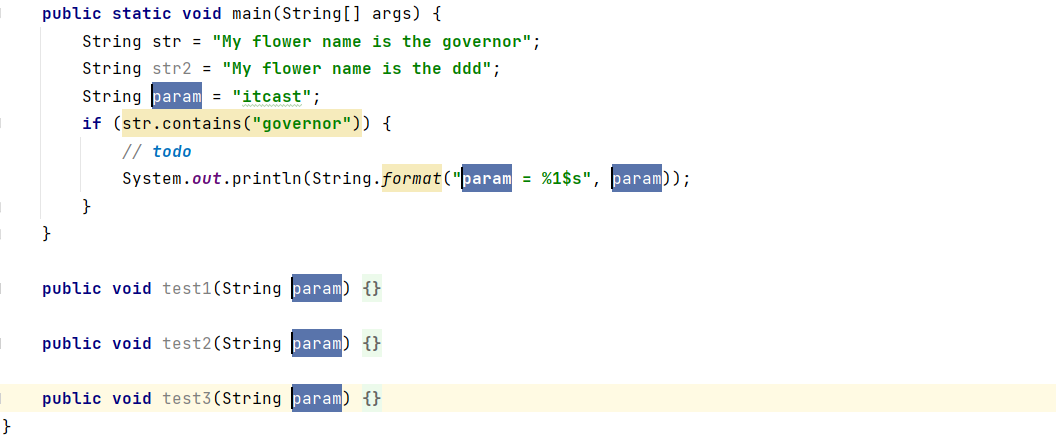
take param The variable name is uniformly modified to parameter.

thus , Let's talk about some commonly used Idea The shortcut keys are introduced , Do you know all these ?
If you can only (1) and (2) Two shortcuts , Then you will be a primary Java Development Engineer ;
If you come out (1)、(2) outside , Also often use (3)、(4), Then you are a intermediate Java Development Engineer ;
If you know all the shortcuts , So congratulations , You are a person who loves life , Be very careful about your work , Sense of responsibility 、 Curious senior Java Development Engineer .

therefore , Dear programmers , These shortcut keys above , Do you use it everyday ? Welcome to comment in the message area ~
边栏推荐
- pytest+request+allure+excel接口自动化搭建 从0到1【二 读取Excel Case信息】
- Smart breeding scheme based on Lora gateway
- Go语言指针
- Dedecms dream weaving system website link TXT format website map making tutorial
- 数据湖(十七):Flink与Iceberg整合DataStream API操作
- The security optimization settings after the installation of Zhimeng CMS effectively protect Trojans
- Problems and solutions of wechat applet related knowledge points and cloud music project production
- OSPF experiment in mGRE environment
- 【有用的SQL】查Greenplum的数据字典
- [C language] analog address book (array version, dynamic version, linked list version)
猜你喜欢

使用 docker 搭建 grafana+prometheus 监控数据库资源(贰)

OSPF experiment in mGRE environment
关于DP中完全背包的遍历次序探讨

leecode17电话号码的字母组合

Accuracy of Yolo series papers & yolov2 and yolo9000
Wechat official account development - Custom Menu
JMeter regular expression gets login token

The problem of idea configuring NPM to jump to 0.0.0.0 after startup is solved

1688 API interface for all goods in the store (API interface for querying all goods in the whole store)

Nvisual secondary development - Chapter 1 Introduction
随机推荐
R language basic function assign function
mysql中对于数据库的基本操作
Shadow plug-in framework design -- replugin principle (Advanced journey of Architects)
Locust performance test 1 (understanding)
Detailed explanation of pointer and array written test questions
Introduction to Kali system use of hping3
oracledb_ Exporter monitors Oracle, a very low intrusive monitoring scheme.
Understand explicit and implicit in C #
拼多多关键词搜索接口,商品分类ID搜索商品列表接口,关键词搜索商品销量接口,拼多多销量API接口
小工具(读取Excel数据并存入数据库表)
[introduction to C language] - pointer (elementary level)
Tree array explanation
Taobao official goods, transactions, orders, logistics interface list (Taobao oauth2.0 interface)
Bool type and related operators
七大排序(二)
dlvm-netcore 开源框架
用IP的SSL证书申请
数据湖(十七):Flink与Iceberg整合DataStream API操作
Pytest+request+allure+excel interface automation from 0 to 1 [four allure test reports]
Smart breeding scheme based on Lora gateway