当前位置:网站首页>Idea settings set shortcut keys to convert English letters to case in strings
Idea settings set shortcut keys to convert English letters to case in strings
2022-07-26 07:42:00 【Stephen·You】
Problem phenomenon :
As the title , How to be in IDEA Of settings Properties of the , By setting shortcut keys, English letters in strings can be converted to upper and lower case ?
Problem analysis :
Just briefly , Why is there such an idea !
Have used pg(postgresql) and Oracle Database people will know , The former uses the lowercase rule , The latter is the capitalization rule , So I'm writing code , There will be operations that require case conversion !!!
besides , Usually we are in the development process , There will also be operations that require immediate case conversion of some strings .
IDEA Very powerful , Because this tool comes with a shortcut key for case conversion !
However , What's disappointing is , If you go online to search for information , Basically, all the articles you can search will tell you that the shortcut key is ctrl+shift+u, Then you may press it and find it useless , At least I am ! This is also where I am disappointed , because I don't need you to tell me directly what the key pressing rules are , What I want is how to configure ! As the saying goes : Teaching a man to fish is better than giving him a fish !
This is because not all IDEA All users use the default shortcut configuration , For example, I set myself to eclipse style ; Although it is not a hard requirement , But I personally strongly recommend that you use , Very practical , It conforms to the shortcut keys commonly used by developers ; Because many shortcut keys are the same in other software tools .
So don't say much , Directly above !
resolvent :
hold Shortcut key rules configure eclipse style :
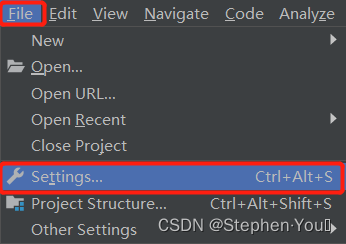
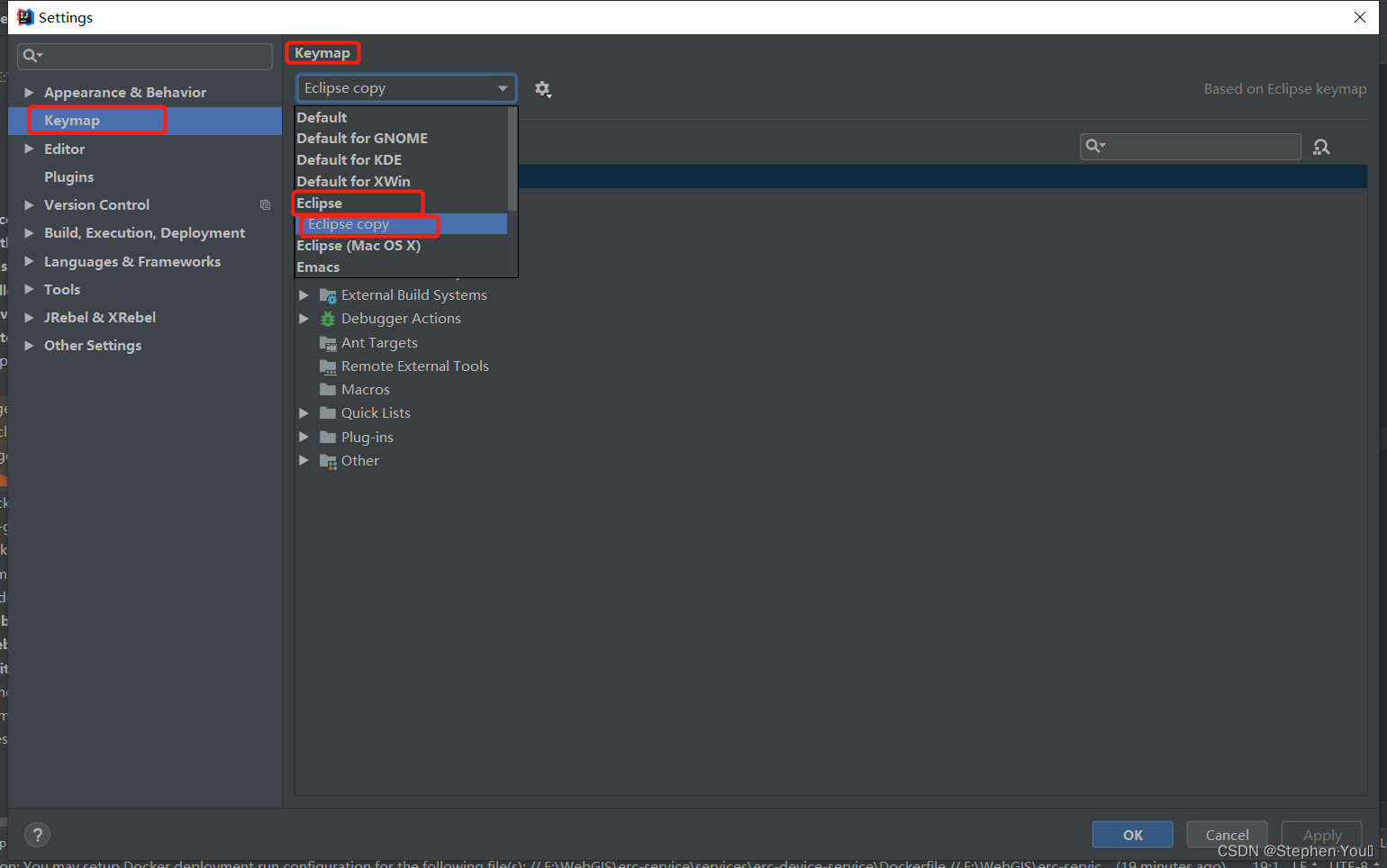
open IDEA Of Settings window (File-Settings), stay Keymap In the tab , In the drop-down list , find Eclipse And click on... In the lower right corner OK that will do . I chose Eclipse copy, This is because I am choosing Eclipse after , There have been some of them Shortcut key rules It's been done Custom modification , Because everyone always has their own habit of pressing buttons .
Set the case conversion shortcut :
open File-Settings-Keymap tab , It's in the top right corner Search box in , Input toggle, Find the summary shown in the red box below Toggle Case attribute , There are two , For consistency , It's best to change both to the same shortcut rule :

Double clicking will pop up the operation tab , You can see that there are already three shortcut key rules here , But for some unknown reasons ( For example, shortcut key conflicts and so on ) It doesn't take effect after I press , So here I suggest remove The following three shortcut key rules , And then again Add Keyboard Shrotcut Customize new shortcut rules , And ensure that it will not conflict with other shortcut key rules :

Here I change it to Alt+U

After modification, you will find that the following shortcut key rules are automatically consistent with those just modified , And then click Apply - OK :

Examples of use :
stay IDEA In the tools , The string you want to convert in any box :
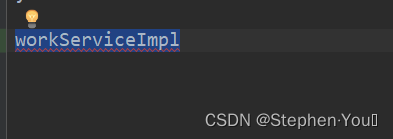
Press the keyboard alt + u , You can see that for the first time, it turns into all lowercase :
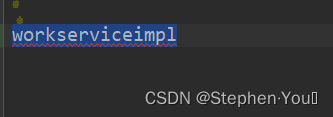
Press again alt + u , See the second turn into all capital :

边栏推荐
- Meta universe infrastructure: analysis of the advantages of Web 3.0 chain33
- keras学习之:获取神经网络中间层的输出结果
- PostgreSQL sequence create alter nextval Curval numerical interval gap
- Network Trimming: A Data-Driven Neuron Pruning Approach towards Efficient Deep Architectures论文翻译/笔记
- Wrong Addition
- Summarize the common high-frequency interview questions of the software testing post
- Network ()
- 2021-11-09
- 「论文笔记」Next-item Recommendations in Short Sessions
- 从Boosting谈到LamdaMART
猜你喜欢

依赖和关联的对比和区别

C# 使用Log4Net记录日志(基础篇)

Machine learning related competition website

System architecture & microservices

WCF introductory tutorial II

Basic knowledge of convolutional neural network

MMOE多目标建模

Regular expression rules and common regular expressions

Crawler - > tpimgspider

China Unicom transformed the Apache dolphin scheduler resource center to realize the one-stop access of cross cluster call and data script of billing environment
随机推荐
程序环境和预处理
记一次路由器频繁掉线问题的分析、解决与发展
Common templates for web development
Open source management system based on ThinkPHP
Oauth2.0 series blog tutorial summary
Taishan Office Technology Lecture: how to calculate page blank (margin)
Come across the sea to see you
DADNN: Multi-Scene CTR Prediction via Domain-Aware Deep Neural Network
PXE efficient batch network installation
Learning Efficient Convolutional Networks Through Network Slimming
Web page basic label
2022.7.22DAY612
PyTorch
:app:checkDebugAarMetadata 2 issues were found when checking AAR metadata: 2 issues were found when
System architecture & microservices
Brief description of hystrix configuration
What is bloom filter in redis series?
Pycharm common shortcut keys
Idea shortcut key
【推荐系统经典论文(十)】阿里SDM模型