当前位置:网站首页>Use JMeter to test services based on websocket protocol
Use JMeter to test services based on websocket protocol
2022-07-19 02:36:00 【Insomnia book】
Use JMeter The test is based on WebSocket Agreed services
One 、WebSocket What is it? ?
Example :WebSocket It is a two-way network communication protocol , And HTTP Different , It uses ws:// or wss:// start . It's a stateful protocol , This means that the connection between the client and the server will remain active , Until the connection is closed by either the client or the server , The connection will terminate at both ends .
Two 、 Why WebSocket
For the first time contact WebSocket People who , They all ask the same questions : We already have HTTP agreement , Why another agreement is needed ? What benefits can it bring ?
The answer is simple , because HTTP There is a flaw in the agreement : Communication can only be initiated by the client .
for instance , We want to know the weather today , Only the client can make a request to the server , The server returns the query result .HTTP The protocol can't make the server actively push information to the client .
This one-way request feature , Doomed if the server has continuous state changes , It is very difficult for the client to know . We can only use " polling ", Every once in a while , Just send out an inquiry , Find out if the server has any new information . Polling is inefficient , It's a huge waste of resources . therefore , Engineers have been thinking , Is there a better way ,WebSocket That's how it was invented .
WebSocket The most important feature of the game is , The server can actively push information to the client , The client can also send information to the server , It's really a two-way equal dialogue , This is a type of server push technology .
3、 ... and 、WebSocket Sampler Simple use
1. install WebSocket Plug ins and dependency packages
Method 1:
open JMeter After the plug-in manager , Click on Available Plugins Options page , Type in the search box WebSocket, Then choose install WebSocket Sampler by Maciej Zaleski plug-in unit 

Method 2: Copy downloaded jar Package to jmeter Of /lib/ext Under the table of contents , And restart jmeter
JMeterWebSocketSamplers-1.2.8.jar
jmeter-websocket-samplers-source
2. Add sampler
WebSocket Sampler How to add components : Choose “ Thread group ” Right click —> add to —> Sampler —> WebSocket Sampler
Add a sampler according to the needs of the scene , Can be added websocket There are seven kinds of samplers :
1)WebSocket Close —— close ws Connect
2)WebSocket Open Connection —— open ws Connect
3)WebSocket Ping/Pong —— ping/pong heartbeat , Check whether the connection still exists
4)WebSocket Sampler
5)WebSocket Single Read Sampler —— Only receive responses ( Message push )
6)WebSocket Single Write Sampler —— Send only requests
7)WebSocket request-response Sampler —— Send request and receive response
The interface is shown in the figure below :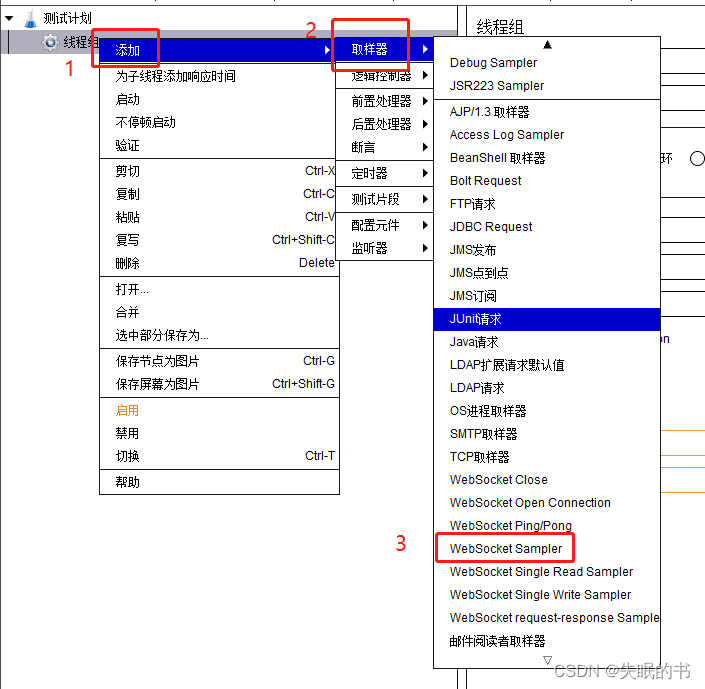
3.WebSocket Sampler Detailed explanation of sampler interface

Description of the options in the interface :
name :WebSocket Sampler The custom name of the component , It's best to see the name and know the meaning .
notes : That is to add some remarks , For the WebSocket Sampler A brief description of the component , For later review .
(1)WebServer
Server Name or IP: The destination server that sent the request IP Address or domain name .
Port Number: The port number after the server address , If yes, fill in , No need to fill in .
(2)Timeout (milliseconds)
Connection: Maximum timeout for link establishment , Unit millisecond . If the link is not established after the timeout is set , be sampler Failure .
Response : The maximum waiting time for a response message , Unit millisecond . After reaching the set time WebSocket Link off .
(3)WebSocket Request
Implementation: Only support RFC6455(v13) ,WebSocket The latest version of the protocol standard .
Protocol: Yes ws And wss Points .ws The prefix is WebSocket Identification of the connection ,wss The prefix is WebSocket Identification of secure connections . Fill in according to the actual situation of the interface you need to access .
Content encoding: Content encoding . It is recommended to write in Chinese UTF-8.
Connection Id: Connect ID.
Path: The path to the access interface .
Ignore SSL certificate errors: Ignore SSL Certificate error .
Streaming connection: choice TCP session Do you want to keep , If you tick the logo, the connection will always exist , If it doesn't tick , Then the link will be closed after the first response .
(4) Send the parameters with the request
Can be filled in key-value Parameters of form .( It doesn't seem to work very well , The request parameters are filled in below Request data In the! )
Request data: Fill in the parameters sent with the request , And HTTP The sampler is similar to , Configure the interface according to the description document of the tested interface .
(5)Web Socket Response: Interface response related settings
Response pattern: The sampler will wait for the message containing the ID and continue to communicate ( Or until timeout, The connection is closed )
Close connection pattern: If the message returned by the server contains filled characters , Just end the conversation .
Proxy Server (currently not supported by Jetty): Edit proxy server information ( Currently does not support Jetty)
Server Name or IP: The server IP Address or domain name .
Port Number: Port number .
Username: user name .
Password: password .
Message Backlog: Define the maximum length of messages returned by the server .
4.WebSocket Sampler Interface example
(1) Edit the information in the sampler 
(2) add to —> Monitor —> Look at the fruit tree 
(3) Run view results
Four 、 Set the sampler sequence mode
Set the sequence of sampler execution , It's usually :
1) Use WebSocket Open Connection, establish ws Connect ;
2) Use WebSocket Single Write Sampler, Request subscription related data ;
3) Use WebSocket Single Read Sampler, Receive message push ;
4) Use WebSocket Ping/Pong, Determine long connection ;
5) Use WebSocket Close, close ws Connect . notes :WebSocket request-response Sampler Both request and response functions , Choose according to your needs .
1.WebSocket Open Connection
Set up ws Related connection information :
2.WebSocket Single Write Sampler
Use an existing connection , Send subscription request :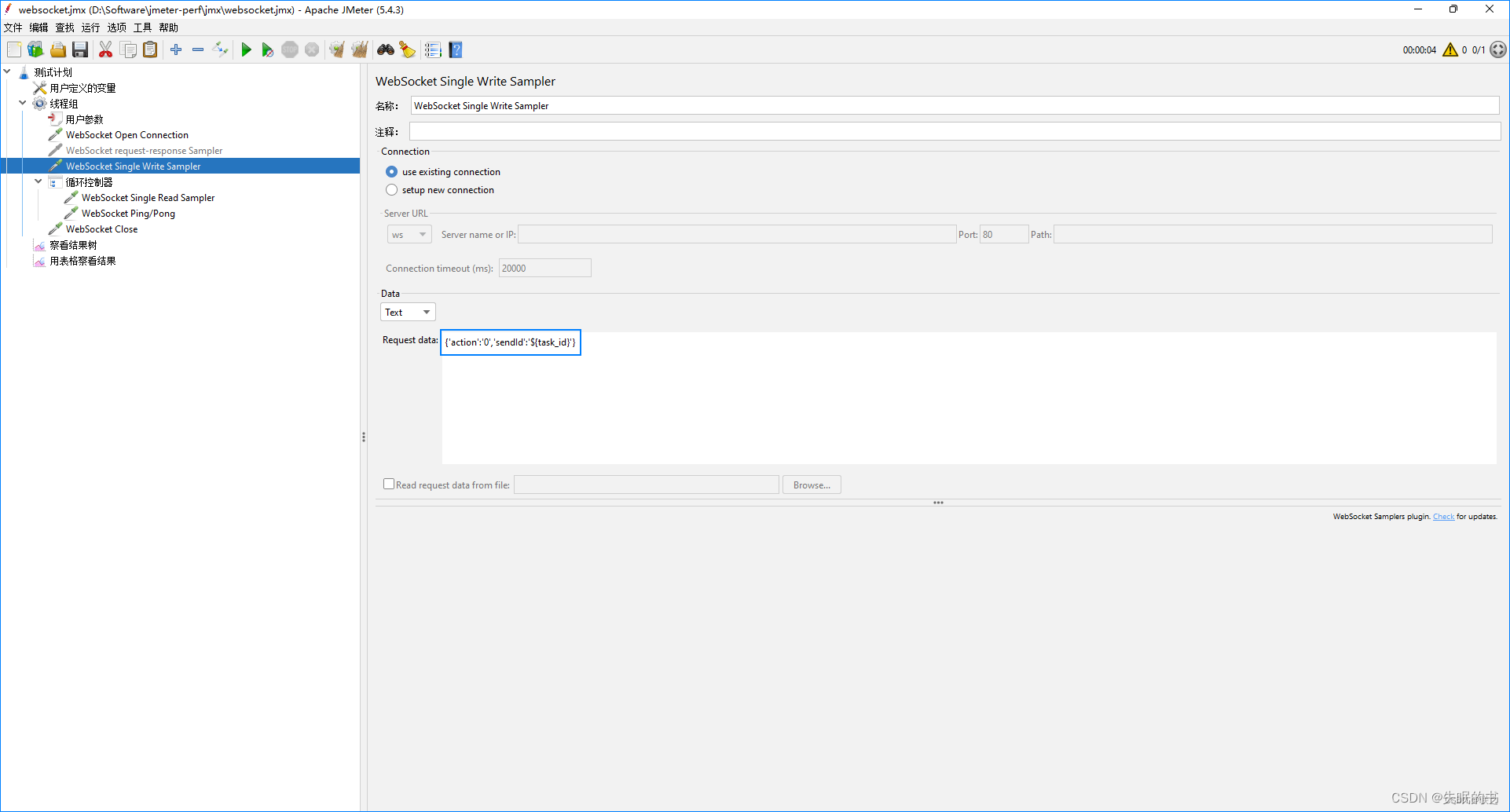
3.WebSocket Single Read Sampler
Use an existing connection , Receive message push :
4.WebSocket Ping/Pong
The heartbeat detection :
5.WebSocket Close
close ws Connect :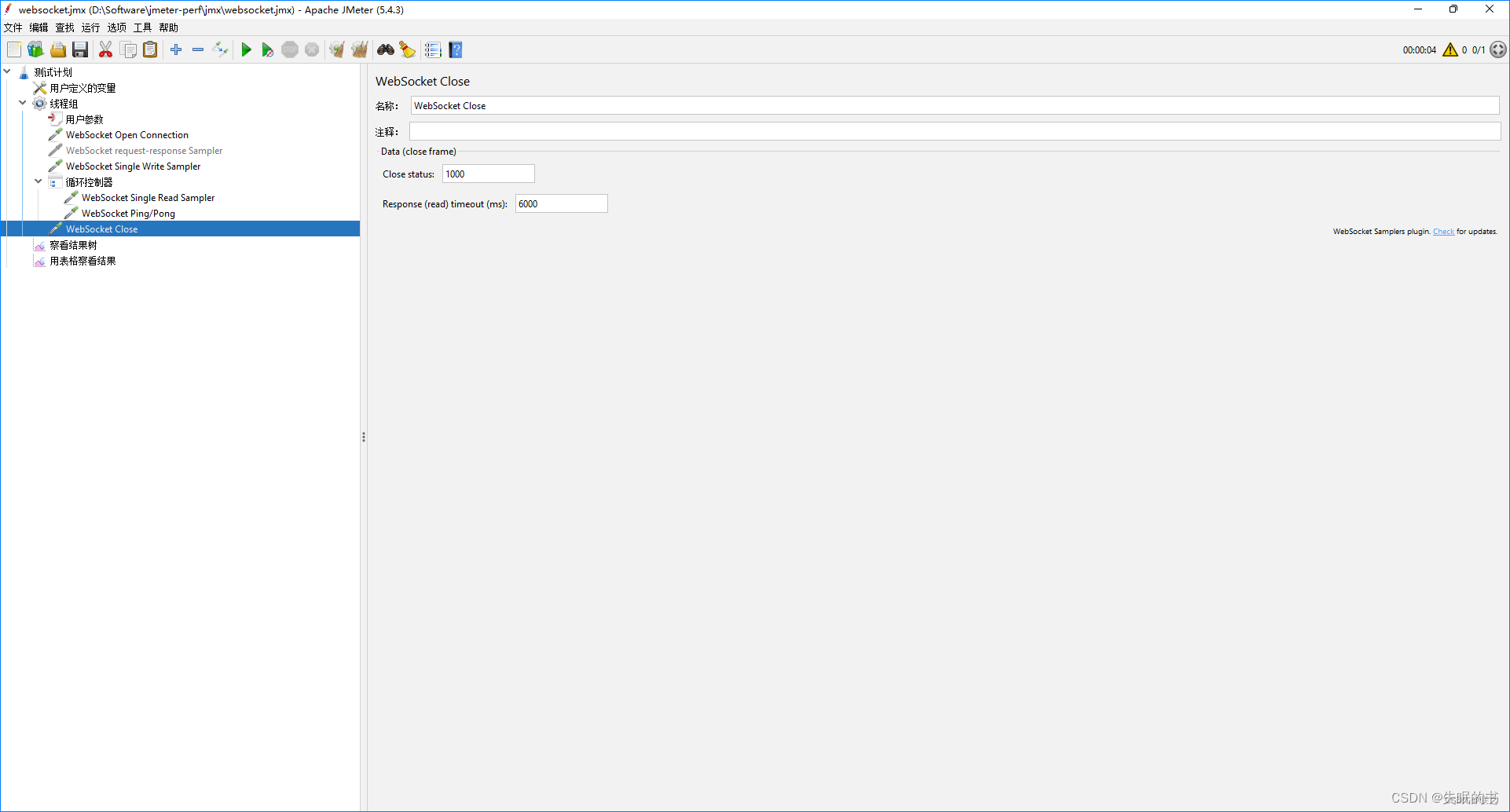
6. function , View the result tree

summary
above , Just the whole content I share with you this time , If you think it's good , Please leave a like ! Of course, I'm looking forward to your reward
If you have any ideas , Welcome to contact me ~
边栏推荐
- [tools] unity quickly starts to make the artifact tilemap of 2D and 2.5D games
- 元宇宙开发者的乐园 解析元宇宙协议Caduceus生态价值
- How to use nmon
- Project Performance Optimization Practice: solve the white screen problem of the home page, customize the loading animation to optimize the first screen effect
- 并发虚拟用户、RPS、TPS的解读
- Post man JSON script to JMX script of JMeter
- 网络一般知识(详)
- 种下一颗种子,十年后长成了参天B+树
- Detailed explanation of caduceus project of metauniverse public chain (I): project concept and technical framework of caduceus metaverse protocol
- How to do a good job of test case review
猜你喜欢

Cocoon breaking and rebirth of 3D NFT: caduceus decentralized edge rendering technology

Buaaos-lab0 experimental report

深入性能测试数据分析

bugku----正则匹配,cookies

Summary of tree and heap knowledge points
3D NFT的破茧重生:Caduceus去中心化边缘渲染技术

SSTI template injection
postman的json脚本转jmeter的jmx脚本
使用JMeter测试基于WebSocket协议的服务

子网划分(详)
随机推荐
性能瓶颈定位XMind
Buaaos-lab0 experimental report
最长上升子序列----优化
已知先序遍历中序遍历,求树的层序遍历
Lecture 2 BTC cryptography principles (notes)
[antv G2] how to add a click event to the line chart (click anywhere to get the value of the point on the line)
[hdrp HD rendering pipeline] create hdrp project and upgrade the built-in pipeline project to hdrp project
STL -- List container (linked list)
种下一颗种子,十年后长成了参天B+树
Server knowledge (details)
JS note 1
3D NFT的破茧重生:Caduceus去中心化边缘渲染技术
[Ruiji takeout ⑩] rough learning of Linux & rough learning of redis
《Visual C#从入门到精通》个人学习整理
SSTI模板注入
"Visual C # from getting started to mastering" personal learning arrangement
Find() (if the name is used by too many people, I will add words)
STL -- stack container
Sigaga
Cocoon breaking and rebirth of 3D NFT: caduceus decentralized edge rendering technology