当前位置:网站首页>Applet media component-1
Applet media component-1
2022-07-18 09:46:00 【InfoQ】
audio
- id audio Unique identifier of the component
- src Resource address to play audio
- loop Loop or not
- controls Show default controls or not
- poster The image resource address of the audio cover on the default control , If controls The property value is false Is set poster Invalid
- name Audio name on default control , If controls The property value is false Is set name Invalid
- author Author name on default control , If controls The property value is false Is set author Invalid
- binderror Triggered when an error occurs error event ,detail = {errMsg:MediaError.code}
- bindplay When it starts / Trigger when playback continues play event
- bindpause Trigger when playback is paused pause event
- bindtimeupdate Triggered when the playback progress changes timeupdate event ,detail = {currentTime, duration}
- bindended Trigger... When playback reaches the end ended event
camera
scope.camera- mode Application mode , Valid only at initialization , Cannot change dynamically
- normal Camera mode
- scanCode Scanning mode
- resolution The resolution of the , Dynamic modification is not supported
- low low
- medium in
- high high
- device-position Camera orientation
- front In front of
- back After
- flash The flash , The value is auto , on, off
- auto Automatically
- on open
- off close
- torch Changliang
- frame-size Specify the desired camera frame data size
- frame-size Optional value
- small Small frame data
- medium Medium size frame data
- large Large frame data
- bindstop The camera is triggered when it terminates abnormally , Such as exiting the backstage
- binderror Trigger when the user is not allowed to use the camera
- bindinitdone Triggered when camera initialization is complete ,e.detail = {maxZoom}
- bindscancode Trigger when scanning code identification is successful , Only in mode="scanCode" Effective when
image
- src Picture resource address
- mode Image clipping 、 Zoom mode
- scaleToFill Zoom mode , Do not keep aspect ratio zooming picture , Stretch the width and height of the picture completely to fill image Elements
- aspectFit Zoom mode , Keep the aspect ratio scaled , Make the long edges of the picture fully visible . in other words , The picture can be displayed completely .
- aspectFill Zoom mode , Keep the aspect ratio scaled , Only make sure that the short side of the picture is fully displayed . in other words , Pictures are usually complete only horizontally or vertically , Intercept will occur in the other direction .
- widthFix Zoom mode , The width does not change , Automatic height change , Keep the aspect ratio of the original image unchanged
- heightFix Zoom mode , The height remains the same , The width changes automatically , Keep the aspect ratio of the original image unchanged
- top Cut pattern , Unscaled picture , Show only the top area of the image
- bottom Cut pattern , Unscaled picture , Only the bottom area of the image is displayed
- center Cut pattern , Unscaled picture , Show only the middle part of the picture
- left Cut pattern , Unscaled picture , Only the left side of the image is displayed
- right Cut pattern , Unscaled picture , Show only the right area of the picture
- top left Cut pattern , Unscaled picture , Only the upper left of the image is displayed
- top right Cut pattern , Unscaled picture , Only the upper right of the image is displayed
- bottom left Cut pattern , Unscaled picture , Only the lower left of the image is displayed
- bottom right Cut pattern , Unscaled picture , Only the lower right part of the image is displayed
- webp Default not resolved webP Format , Only network resources are supported
- lazy-load Picture lazy loading , On the verge of entering a certain range ( Three screens up and down ) It starts to load when
- show-menu-by-longpress Long press the picture display and send it to friends 、 Collection 、 Save the picture 、 Search for 、 Open the business card / Go to group chat / Open the applet ( If the picture contains the corresponding QR code or applet code ) Menu for .
- binderror Trigger when an error occurs ,event.detail = {errMsg}
- bindload Trigger when the picture is loaded ,event.detail = {height, width}
边栏推荐
猜你喜欢

Codeforces Round #802 D. River Locks

Code forces round # 802 B. Palindromic Numbers

Codeforces Round #802 A. Optimal Path

Introduction and usage of NPM in nodejs

盲目用多线程反而容易导致 OOM

【快速下载VsCode】

Centos7 installs MySQL 5.7 through Yum and enables remote access
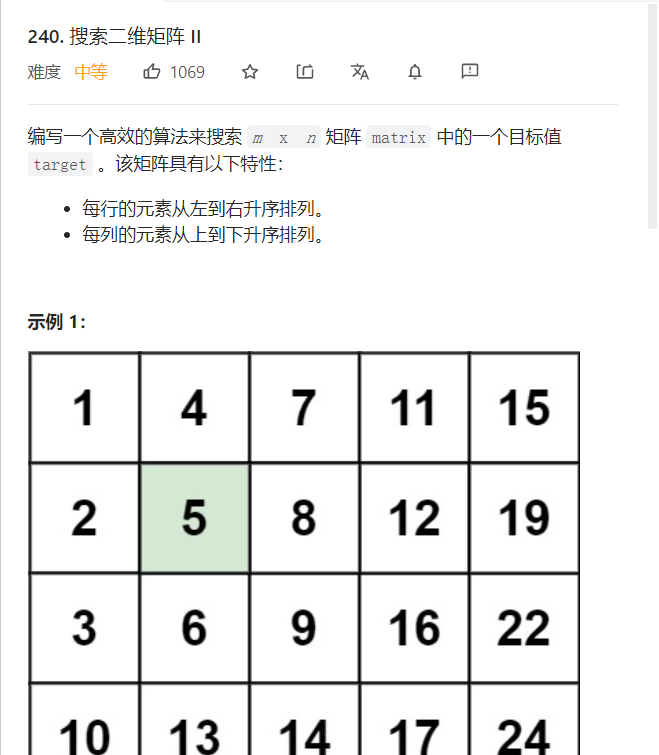
LeetCode-240-搜索二维矩阵Ⅱ

递归函数,求阶乘

Codeforces Round #803 (Div. 2) A. XOR Mixup
随机推荐
Codeforces Round #802 B. Palindromic Numbers
MySQL的主从复制原理是什么
Introduction and usage of NPM in nodejs
Functional, module quality and non functional testing
JUC并发包—Semaphore
LeetCode-240-搜索二维矩阵Ⅱ
Centos7通过Yum安装MySql5.7并开启远程访问
Packet filtering rules
sql语句
[Space & single cell omics] phase 2: combined single cell and bulk transcriptome to identify two epithelial tumor cell states in colorectal cancer, and improved CMS typing
Code forces round # 802 B. Palindromic Numbers
华为云服务器云数据库创建只读过程
Huawei switching technology: BGP basic experiment
华为云Stack南向开放框架,帮助生态伙伴高效入云
Svg loading animation
JUC并发包—CyclicBarrier(循环栅栏)
Nest framework
Scripting rules and variable definitions
京东一面:Redis 如何实现库存扣减操作?如何防止商品被超卖?
The application of digital twins in cities