当前位置:网站首页>浅谈跨域的几种解决方案
浅谈跨域的几种解决方案
2022-07-17 05:13:00 【小辰~】
浅谈跨域的几种解决方案
同源策略
提到跨域,得先了解什么是同源策略,它是浏览器最核心也是最基本的安全功能。在执行Ajax请求时必须满足同源策略,否则浏览器控制台会报类似于如下的错误信息:
Access to XMLHttpRequest at 'http://localhost:8800/test1' from origin 'http://localhost:8801' has been blocked by CORS policy: No 'Access-Control-Allow-Origin' header is present on the requested resource.
同源即协议、域名、端口号三者必须都相同,有任意一个不同则为非同源,在Ajax请求非同源的地址时即为跨域。
跨域的解决方案
前端:http://localhost:8801
后端:http://localhost:8800
1. 前端解决方式
1.1 jsonp等的方式
利用src不受同源策略的影响 ,可以访问其他页面的数据。jsonp由两部分组成,数据与回调函数,其中当收到响应时会点函数触发。
<script defer src="http://localhost:8800/test1?callback=callBack"></script>
<script> var callBack = function (res) {
       console.log(res); } </script>
1.2 vue-cli通过对Axios设置跨域
vue-cli中引入axios:
cnpm install axios --save
然后在main.js中引入axios
import axios from 'axios'

Vue.prototype.$axios = axios
//配置请求路径
axios.defaults.baseURL = '/api/'
接下来在config/index.js中配置proxyTable如下:
dev: {

    proxyTable: {

      '/api/': {

        target:'http://127.0.0.1:8800/', // 请求的第三方接口
        changeOrigin:true, //创建虚拟服务端解决跨域
        pathRewrite:{
      //重写路径
          '^/api/': ''
        }
      }
    },
}
之后编写axios的get请求:
methods: {

   hello () {

     // this.$axios.get('http://localhost:8800/test1')
     //这里的test1即为http://localhost:8800/test1
     this.$axios.get('test1')
       .then(function (resp) {

         alert('成功返回' + resp.data)
         console.log(resp)
       }).catch(function (error) {

         console.log(error)
       })
   }
 }
2. Spring Boot后端解决方式
2.1 @CrossOrigin注解
@CrossOrigin等同于@CrossOrigin("*"),都表示任意地址,具体可使用@CrossOrigin({"http://localhost:8801"})。
在控制层请求接口的方法上加上该注解即可
@CrossOrigin()
@RequestMapping("/test1")
public String test1() {

    System.out.println("请求test1");
    return "test1";
}
2.2 全局配置方式
import org.springframework.context.annotation.Bean;
import org.springframework.context.annotation.Configuration;
import org.springframework.web.cors.CorsConfiguration;
import org.springframework.web.cors.UrlBasedCorsConfigurationSource;
import org.springframework.web.filter.CorsFilter;

/** * @author wyp */
@Configuration
public class CorsConfig {

    @Bean
    public CorsFilter corsFilter() {

        CorsConfiguration config = new CorsConfiguration();
        config.addAllowedOrigin("*");	//所有来源
        config.addAllowedMethod("*");	//所有方法(get、post等)
        config.addAllowedHeader("*");	//所有请求头
        config.setAllowCredentials(true);	//支持Cookie
        UrlBasedCorsConfigurationSource source = new UrlBasedCorsConfigurationSource();
        //为所有路径开启跨域
        source.registerCorsConfiguration("/**",config);
        return new CorsFilter(source);
    }
}
3. Spring Cloud网关组件Gateway
3.1 配置文件的方式
spring:
  cloud:
    gateway:
      globalcors:
        cors-configurations:
          '[/**]':  # 允许跨域访问的资源
            allowedOrigins: "*" # 跨域允许的来源
            allowedMethods:   # 允许的请求方式
              - GET
              - POST
3.2 配置类的方式
package com.xc.config;

import org.springframework.context.annotation.Bean;
import org.springframework.context.annotation.Configuration;
import org.springframework.web.cors.CorsConfiguration;
import org.springframework.web.cors.reactive.CorsWebFilter;
import org.springframework.web.cors.reactive.UrlBasedCorsConfigurationSource;
import org.springframework.web.util.pattern.PathPatternParser;

/** * @author wyp */
@Configuration
public class CorsConfig {

    @Bean
    public CorsWebFilter corsWebFilter() {

        CorsConfiguration config = new CorsConfiguration();
        // 允许的请求头
        config.addAllowedHeader("*");
        // 允许的HTTP方法
        config.addAllowedMethod("*");
        // 允许的来源
        config.addAllowedOrigin("*");

        UrlBasedCorsConfigurationSource source = new UrlBasedCorsConfigurationSource(new PathPatternParser());
        // 允许访问的资源
        source.registerCorsConfiguration("/**",config);

        return new CorsWebFilter(source);
    }
}
4. Nginx的反向代理方式
server {
    listen 8080;
    server_name localhost;
    location / {

        proxy_pass http://localhost:8800;

        # 允许 所有头部 所有域 所有方法
        add_header 'Access-Control-Allow-Origin' '*';
        #add_header 'Access-Control-Allow-Headers' '*';
        #add_header 'Access-Control-Allow-Methods' '*';
        #if ($request_method = 'OPTIONS') {
        #    return 204;
        #}
    }
}


5. 配置谷歌浏览器的方式
先复制一份谷歌浏览器的快捷方式,我们把它就改名为“跨域chrome”,还需要新建一个文件夹,这里新建在E盘命名为“ChromData”,然后右键谷歌浏览器图标打开属性,编辑目标,结尾加入 --disable-web-security --user-data-dir=E:\ChromeData,如下图:
应用后可打开浏览器有如下提示表示修改成功: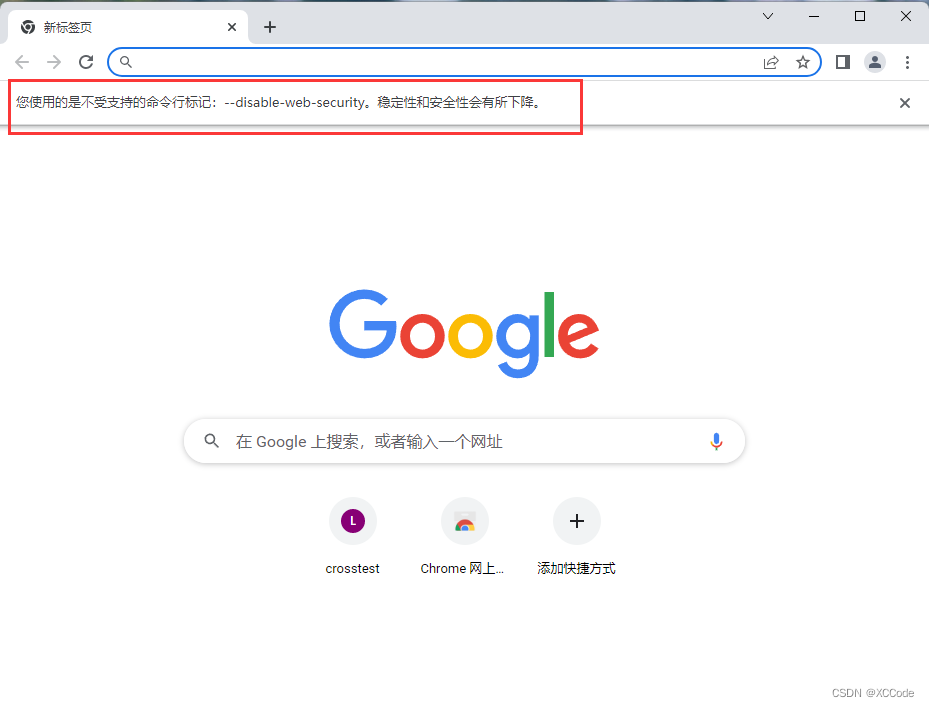
该方式一般用于本地测试时。
边栏推荐
- Ehab the Xorcist (异或性质,构造)
- Chrome浏览器设置 【显示右上角 翻译语言图标】
- HM agent multi section lithium battery charging IC
- Hm9922 switching buck LED constant current driver IC
- golang 多项目工作区搭建
- Loadng class `com.mysql.jdbc.Driver‘. This is deprecated. The new driver class is `com.mysql.cj.jdb
- Tips for using tp4054 charging IC -- used in conjunction with Zhongke Lanxun ab5365b
- 2021-09-15
- 4-channel encoder pulse counter, 8-Channel do, Modbus TCP module
- [transfer] Darwin streaming server core code analysis
猜你喜欢

Wireless charging mouse pad RGB LED lighting wireless charging mouse pad

RestAPI实现自动补全 & 案例实现(搜索框输入进行自动补全)

MySQL Workbench基本使用【创建一个数据库】

Material and application circuit diagram of 0-10V, 4-20mA current voltage to PWM isolation converter

HRA2460D-2w高压电源高压模块-高压---高精度hra2460d-2w

3.7V lithium battery boost to 5v1a, fs2114 boost conversion chip design layout
Loadng class `com.mysql.jdbc.Driver‘. This is deprecated. The new driver class is `com.mysql.cj.jdb

解决Cannot read properties of null (reading ‘pickAlgorithm‘)

2022/07/09 第五小组 丁帅 学习笔记 day02

2022/07/11 第五小组 丁帅 学习笔记 day04
随机推荐
压力应变桥信号处理光电隔离放大器
go语言介绍及应用场景分析
Fs68001 wireless charging SOC chip has simple periphery and schematic diagram of 5W wireless charging scheme
带透明png转换成c数组
js变量提升
Boost dc/dc converter
[BJOI2019] 排兵布阵(分组背包)
Darwin's analytical experience
Baby Ehab Partitions Again(dp,构造,位运算)
3.7V lithium battery boost to 5v1a, fs2114 boost conversion chip design layout
TP4054充电IC使用技巧---配合中科蓝讯AB5365B使用
Wireless charging chip IC
Digital signal isolation module adum1401arwz yadeno in stock
Introduction to basic knowledge of Minio
Analog signal in-depth discussion on the transmission distance of 4-20mA current signal
2022/07/14 learning notes (day07) array
Hm8203 linear two string charging management controller IC
[antdv: Each record in table should have a unique `key` prop,or set `rowKey` to an unique.....
HT7727 HT7730 HT7733 HT7737 HT7750异步DCDC升压IC
Cours de mathématiques de base 2 Fonction Euler, écran linéaire, élargissement de l'Europe