当前位置:网站首页>Tutorial of database system principle and application (020) -- login MySQL
Tutorial of database system principle and application (020) -- login MySQL
2022-07-18 16:06:00 【Rsda DBA_ WGX】
Database system principle and Application Tutorial (020)—— Sign in MySQL
Catalog
- Database system principle and Application Tutorial (020)—— Sign in MySQL
- One 、 Start and stop MySQL service
- 1、Windows Start and stop in the environment MySQL service
- (1) Use the command to start and stop MySQL service
- (2) Use Windows Service manager starts and stops MySQL service
- 2、Linux Start and stop in the environment MySQL service
- (1) stop it MySQL service
- (2) start-up MySQL service
- (3) restart MySQL service
- Two 、MySQL Login command for
- 3、 ... and 、 Use root Account local login MySQL
- Four 、 Use admin Account remote login MySQL
- 5、 ... and 、 sign out MySQL
One 、 Start and stop MySQL service
modify MySQL The configuration file of needs to be restarted MySQL service .
1、Windows Start and stop in the environment MySQL service
(1) Use the command to start and stop MySQL service
step1: open Windows Command line tools , Input net stop mysql You can stop MySQL service . As shown in the figure below .

step2: stay Windows Enter... In the command line tool net start mysql You can start MySQL service . As shown in the figure below .

(2) Use Windows Service manager starts and stops MySQL service
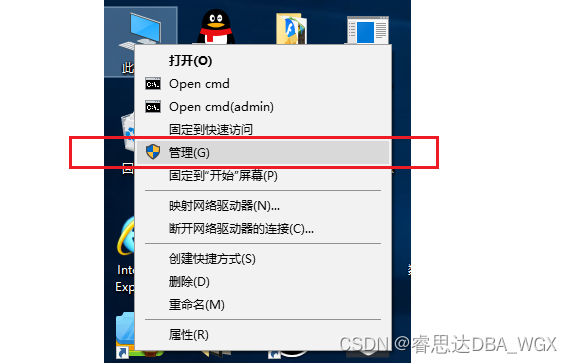
step1 Right click on the desktop 【 This computer 】, Choose... From the shortcut menu that pops up 【 management 】 command . As shown in the figure below .
step2 In the pop-up 【 Computer management 】 Select in window 【 Services and Applications 】, And then click 【 service 】, Find... In the window on the right 【MySQL】 service . Then right-click 【MySQL】 service , Choose... From the shortcut menu that pops up 【 stop it 】 To stop MySQL service , choice 【 start-up 】 Start up MySQL service , choice 【 Restart 】 You can restart directly MySQL service . As shown in the figure below .

2、Linux Start and stop in the environment MySQL service
(1) stop it MySQL service
[[email protected] mysql]# systemctl stop mysqld
(2) start-up MySQL service
[[email protected] mysql]# systemctl start mysqld
(3) restart MySQL service
[[email protected] mysql]# systemctl restart mysqld
Two 、MySQL Login command for
MySQL The syntax of the login command is as follows :
mysql -u user name  -p User password  -h Host name or IP Address  -P Port number

#  explain :
# (1)-u: Sign in MySQL Username ;
# (2)-p: The login password ;
# (3)-h: To log in to  MySQL  The host name of the server or IP Address . If you log in to  MySQL,
#  You can omit this parameter ;IP  The address can use wildcards (%), such as :%  Express all  IP  Address can be logged in ,
# 192.168.1.%  Indicates network segment 【192.168.1】 Users within can log in .
# (4)-P:MySQL  Port number . If you log in to  MySQL, And the port number is the default port , You can omit this parameter .
3、 ... and 、 Use root Account local login MySQL
Login time , If you don't specify a host name , Log in to the local computer by default , Omit port number , Then use 3306 As the default port number .
[[email protected] mysql]# mysql -uroot -p
Enter password:
Welcome to the MySQL monitor.  Commands end with ; or \g.
Your MySQL connection id is 3
Server version: 5.7.25 Source distribution

Copyright (c) 2000, 2019, Oracle and/or its affiliates. All rights reserved.

Oracle is a registered trademark of Oracle Corporation and/or its
affiliates. Other names may be trademarks of their respective
owners.

Type 'help;' or '\h' for help. Type '\c' to clear the current input statement.

mysql>
1、 see MySQL User information
mysql> select host,user from mysql.user;
+-----------+---------------+
| host      | user          |
+-----------+---------------+
| localhost | mysql.session |
| localhost | mysql.sys     |
| localhost | root          |
+-----------+---------------+
3 rows in set (1.27 sec)
2、 Add a remote login user
The command to add a new user is as follows :
grant  jurisdiction  on  database . surface  to ' user name '@' accessible IP Address ' identified by ' password ';

/* explain : (1) jurisdiction : Specify the access rights of the login user . such as  SELECT、CREATE、DELETE、DELETE、ALTER  etc. , have access to  ALL  Grant the user all permissions ; (2) database . surface : You can limit which tables users execute on  SELECT、CREATE、DELETE、DELETE、ALTER  Wait for the operation .  for example :stu.dept  Indicates access to  stu  In the database dept surface ; stu.*  Indicates access to  stu  All... In the database t surface ; *.*  It means that you can access all tables in all databases ; (3) user name @ accessible IP Address : Only users and what users can pass  IP  Address to access , You can use wildcards  %.  for example :'wgx'@'192.168.0.12'  Represent user  wgx  Only through IP The address is  '192.168.0.12'  Computer access ; 'wgx'@'192.168.0.%'  Represent user  wgx  Can pass  '192.168.0.%'  Computer access of network segment ; 'wgx'@'%'  Represent user  wgx  It can be accessed from any computer . (4)identified by: Set access password . */
Add new user admin, The order is as follows :
mysql> grant all on *.* to 'admin'@'192.168.1.%' identified by '123456';
Query OK, 0 rows affected, 1 warning (3.06 sec)

mysql> flush privileges;
Query OK, 0 rows affected (1.22 sec)

mysql> select host,user from mysql.user;
+-------------+---------------+
| host        | user          |
+-------------+---------------+
| 192.168.1.% | admin         |
| localhost   | mysql.session |
| localhost   | mysql.sys     |
| localhost   | root          |
+-------------+---------------+
4 rows in set (0.05 sec)
Four 、 Use admin Account remote login MySQL
MySQL Server's IP The address is :192.168.1.15, As shown below :
[root@mysql ~]# ifconfig
ens33: flags=4163<UP,BROADCAST,RUNNING,MULTICAST>  mtu 1500
        inet 192.168.1.15  netmask 255.255.255.0  broadcast 192.168.1.255
        inet6 fe80::20c:29ff:fe14:8afc  prefixlen 64  scopeid 0x20<link>
        ether 00:0c:29:14:8a:fc  txqueuelen 1000  (Ethernet)
        RX packets 61983  bytes 18445585 (17.5 MiB)
        RX errors 0  dropped 0  overruns 0  frame 0
        TX packets 19532  bytes 1298568 (1.2 MiB)
        TX errors 0  dropped 0 overruns 0  carrier 0  collisions 0

lo: flags=73<UP,LOOPBACK,RUNNING>  mtu 65536
        inet 127.0.0.1  netmask 255.0.0.0
        inet6 ::1  prefixlen 128  scopeid 0x10<host>
        loop  txqueuelen 1  (Local Loopback)
        RX packets 36  bytes 2932 (2.8 KiB)
        RX errors 0  dropped 0  overruns 0  frame 0
        TX packets 36  bytes 2932 (2.8 KiB)
        TX errors 0  dropped 0 overruns 0  carrier 0  collisions 0
Use another machine (192.168.1.5) Sign in MySQL The server , The order is as follows :
mysql -uadmin -h192.168.1.15 -P3306 -p
The login result is shown in the following figure :

5、 ... and 、 sign out MySQL
Use exit or quit Command can exit MySQL.
mysql> quit
Bye

mysql> exit
Bye
边栏推荐
- LCA问题专题
- MRP的基本任务是什么
- 流动性视角中 CeFi 的功与过
- Chapter3美国大选金献项目数据分析
- How apisik integrates with Hydra to build a centralized authentication gateway to help enterprise security
- ELK集群部署(九)之logstash过滤规则
- Playing with "private e-commerce", is the chain 2+1 model worth enterprises' in-depth understanding?
- CF609A USB Flash Drives
- CF514B Han Solo and Lazer Gun
- ARTS_ 202207W1
猜你喜欢

洞悉数据库迷局,2022金仓创新产品发布会召开

社交网络的充分去中心化

From it R & D staff turnover thought

9. 说说hashCode() 和 equals() 之间的关系?

What are the key smart contracts in defi?

Chengdu meetup | distributed database, a new engine for enterprises to reduce costs and increase efficiency

ValueError: The number of FixedLocator locations (7), usually from a call to set_ ticks, does not mat

Renewable finance refi: providing technology and financial system beneficial to the earth

Kubedm install kubernetes 1.15 best practices

465-剑指offer(53-I、53-II、04、50)
随机推荐
Sqoop imports JSON format Chinese garbled code from MySQL
Do you know the meaning of call concurrency in okcc?
ELK集群部署(九)之logstash过滤规则
使用arcpy遇到的那些坑(三)
[training Day1] spy dispatch [minimum spanning tree]
NFT trading platform competition pattern: what is the core competitiveness?
Address assignment of global variables, local variables, static variables and constants
ValueError: The number of FixedLocator locations (7), usually from a call to set_ticks, does not mat
Learn about Max again_ allowed_ packet
JS calculation accuracy and data format
How apisik integrates with Hydra to build a centralized authentication gateway to help enterprise security
軟件測試面試:請說一下你工作中發現的最有價值的bug?
Add value to health and empower the times | xianle Health releases the annual Sustainable Development Report
Autojs learning TTS grabs voice red envelopes
##负载均衡LVS集群详解##
cpu由什么组成
[initial C language] / * detailed explanation of the simulation of character functions and string functions*/
Graphic array calculation module numpy (trigonometric function, rounding function, converting radian to angle, statistical analysis function, median, array sorting, argsort(), lexport())
[live registration] oceanbase in simple terms, issue 7
eoc是什么