当前位置:网站首页>[unity development tips] unity packs the EXE on the PC side and compresses and packs it into an EXE file
[unity development tips] unity packs the EXE on the PC side and compresses and packs it into an EXE file
2022-07-19 02:16:00 【Fantasy world】
Catalog
One :PC Set before end packaging
1. Package output directory structure
3、 ... and . The compressed output directory is exe Single file
1. Click on “ senior → Self compression option ”
One :PC Set before end packaging
1. Add packaging scenario
File>BuildSetting, Add all the scenarios used in the current project into this Scenes in build Inside the interface , Just drag it in , Check all scenarios that need to be packaged 
2. Select the packaging path
Click on Build It will let you choose the packaging output path , It is recommended to create in the root directory of the current project Build Folder as the output path of packaging ,BuildAndRun It starts running after packaging directly , It will also let you choose the path when you pack for the first time


Two . Package successfully
1. Package output directory structure
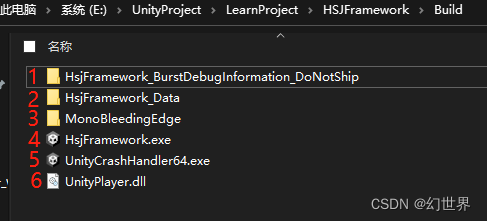
1. One suffix is BurstDebugInformation_DoNotShip Folder , In the early unity There is no such thing in packing , This folder can be ignored and deleted without practical significance , Inside is a txt Text , It is mainly used to help view and debug the current packaging information
2.XX_Data The folder contains unity Some default resources of and some necessary resources of the current project
3.MonoBleedingEdge The folder contains the C# and MonoDevelop library .UnityPlayer.dll Contains the core of the engine , The script library is located in MonoBleedingEdge in . Although running the game / Applications need parts of it , But we can delete “etc” Folder , Only keep EmbedRuntime Folder .
4. The executable file we packaged exe, Start the project and double-click it
5.UnityCrashHandler64.exe It is Unity Crash handler after the release of , When your program crashes, it will report to Unity Send the crash log , Of course, you can delete it ,
6.UnityPlayer.dll unity Library file , It is very important and cannot be deleted
3、 ... and . The compressed output directory is exe Single file
1. Add to compressed file
Add the selected ones in the following figure to the compressed package , And set the name of the last software


2. Other settings
1. Click on “ senior → Self compression option ”

2. Advanced settings
Fill in the run after clicking unity Packed exe name 
3. Set the mode

4. to update

Then click OK to package exe 了

边栏推荐
- Line process of pool components
- 英文商务邮件常用语
- Recursive and recursive learning notes
- STL--vector容器
- 03 design of urban road dedusting and cooling system based on ZigBee
- ENVI_ Idl: read the NO2 column content of all OMI products and calculate the monthly average, quarterly average, annual average + analysis
- gdb+vscode进行调试6——gdb调试多线程命令札记
- Clion installation and ROS development to realize automatic prompt completion
- Aurix development studio installation
- YYDS! The latest distributed core technology notes summarized by Alibaba technical officers have been launched, which can be regarded as a blessing
猜你喜欢

ENVI:(2022年最详细的教程)自定义坐标系

Recursive and recursive learning notes

leetcode力扣经典题目——82.柱形图中的最大矩形

Memory pooling of pooled components
捉虱子的博弈论

VS Code 问题:launch:program‘...\.vscode\launch.exe‘ dose not exist

【Unity面板属性扫盲】导入纹理后设置Texture Import Settings

Engineering compilation: makefile and cmake (I)

Prohibit smart Safari from playing automatically when opening a web page
第1章-多智能体系统
随机推荐
安装websocketpp
LeetCode:动态规划中的0-1背包问题【快来直接套模板啦】
DoubleDQN的理论基础及其代码实现【Pytorch + Pendulum-v0】
MATLAB :Warning: the font “Times” is not available
leetcode力扣经典问题——42.接雨水
VS Code 问题:launch:program‘...\.vscode\launch.exe‘ dose not exist
ENVI_IDL:讀取所有OMI產品的NO2柱含量並計算月均值、季均值、年均值+解析
Line process of pool components
Nacos configuration management
Installing MySQL and JDBC on Windows
Visual Studio 2019-QT调试
Dueling DQN的理论基础及其代码实现【Pytorch + Pendulum-v0】
vscode+ros2环境配置
池式组件之线程池篇
Gdb+vscode debugging -- how to debug the release version
【解决方案】win11中本地组策略编辑器(gpedit.msc)打不开
测试知识准备
Labelme正常启动,但无法打开
YYDS!阿里技术官最新总结的分布式核心技术笔记已上线,堪称福音
搭建Ozzie环境