当前位置:网站首页>[unity3d] toggle of ugui
[unity3d] toggle of ugui
2022-07-18 11:18:00 【little_ fat_ sheep】
1 Toggle Property panel
stay Hierarchy Window right , choice UI In the list Toggle Control , You can create Toggle Control , Check the created Toggle Control , Press keyboard 【T】 key , You can adjust Toggle Size and location of control .

establish Toggle When the control , The system will automatically create 2 individual Image Child controls and 1 individual Text Control , as follows :

- Background:Image Control , Selection box background ;
- Checkmark:Image Control , Check the icon ;
- Label:Text Control , Text description on the right of the selection box .
Toggle The property panel of the control is as follows :

explain :Group Used to specify grouping , Can be applied to check boxes and radio boxes .
2 Toggle Registration events
Click on OnValueChanged Below “+” Number , You can add a response event to the selection box , You can add multiple events .
1) Methods for registering existing components
Click on OnValueChanged Below “+” Number , take Toggle Below Label Drag and drop to OnValueChanged In the panel , choice Text.text, Text settings below "xxxx", as follows :
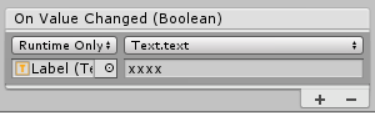
single click Toggle, The text to the right of the selection box will be displayed as “xxxx”, as follows :

2) Register the methods in the script component
to Toggle Controls to add ToggleController The script components are as follows :
ToggleController.cs
using UnityEngine;

public class ToggleController : MonoBehaviour {

	public void OnClick1() {
		Debug.Log("Click1");
	}

	public void OnClick2(string msg) {
		Debug.Log("Click2, msg=" + msg);
	}

	public void OnClick3(bool isOn) {
		Debug.Log("Click3, isOn=" + isOn);
	}
}
Be careful : Method to be registered , At most 1 Parameters , When the parameter is bool Type , Input parameter indicates the selected state of the selection box .
Click on OnValueChanged Below “+” Number , take ToggleController Drag the script component to OnValueChanged In the panel , choice ToggleController.OnClick1 Method ; Click again OnValueChanged Below “+” Number , take ToggleController Drag the script component to OnValueChanged In the panel , choice ToggleController.OnClick2 Method , Below it, enter "xxxx"; Click on OnValueChanged Below “+” Number , take ToggleController Drag the script component to OnValueChanged In the panel , choice ToggleController.OnClick3 Method . as follows :

single click 2 Secondary selection box , Print the log as follows :

3) Register events in the code
to Toggle Controls to add ToggleController The script components are as follows :
ToggleController.cs
using UnityEngine;
using UnityEngine.UI;

public class ToggleController : MonoBehaviour {

	private void Start() {
		Toggle toggle = GetComponent<Toggle>();
		toggle.onValueChanged.AddListener(OnValueChanged);
	}

	public void OnValueChanged(bool isOn) {
		Debug.Log("OnValueChanged, isOn=" + isOn);
	}
}
Be careful :AddListener Method can only add input parameters bool Method of type , You can add multiple methods .
single click 2 Secondary selection box , Print the log as follows :

3 Toggle Group( Select box group )
Toggle Group( Select box group ) Generally used for single or multiple choices .
stay Canvas Next create a Empty object , Renamed as ToggleGroup, Create... Under it 4 individual Toggle Control , And changed his name to Toggle1~Toggle4, as follows :

4 individual Toggle Set up label Respectively one、two、three、four,IsOn Properties are not checked , as follows :

to ToggleGroup Object to add ToggleGroup Components , as follows :
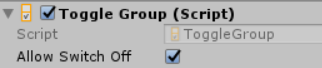
explain :AllowSwitchOff Property is used to set whether or not to select none of the radio boxes .
Choose Toggle1~Toggle4, take ToggleGroup Object drag to Toggle1~Toggle4 Of Group Panel properties , as follows :

Then click the selection box , At most one selection box is selected ( Radio buttons ), as follows :

边栏推荐
- 【MySql】创建MySql账户并授权的正确姿势
- Reading a data driven graph generic model for temporary interaction networks
- C: Free (): thinking about invalid pointer abort (core dump)
- SQLyog无操作一段时间后重新操作会卡死问题(解决办法)
- Emqx server establishes ssl/tls secure connection, one-way and two-way
- 交通灯 单片机课程设计
- We overestimate the value of coding
- Filter
- Valgrind
- 软件质量保证与测试随堂练习
猜你喜欢


随机推荐
Issue record: “No thread for socket” about Memcached
Valgrind
交通灯 单片机课程设计
Digital display of potentiometer based on ADC0832
低代码渲染那些事
ping报文与ICMP报文头
Redis crash debugging
Flink(六)容错机制
JVM problem location tool
我以为的软件项目管理
Redis downtime log analysis
2022-07-15: there are 21 balls at the beginning. A and B take turns to take the ball. A first and B second. Everyone must take no more than 3 balls in their own round. In the end, whoever has an even
Registration form practical skills [continuous update]
Acceptance test experiment based on fitness
TCmalloc学习
socket
Application of singleton mode
【Flink】Flink Connection拒绝:localhost / 127.0.0.1:8081
Linked list - reverse linked list
Filter