当前位置:网站首页>Tracknet usage record: environment configuration
Tracknet usage record: environment configuration
2022-07-18 00:38:00 【Flocculent foam】
First of all , The main configuration requirements come from the description of the open source website of the project , Here, record the pit you stepped on
Project to connect TrackNetV2
New virtual environment
The installation environment of the original author is Ubuntu+Python3.5.2+CUDA10.1, But my computer is win11+Anaconda Environmental Science , The configuration is similar to that of the author .
First, create a corresponding version python A virtual environment . Note that the version corresponds to .python Version is 3.5.2 By default, you have installed Anaconda And be able to cmd Use in
Create directly on the command line :
coda create -n tracknet-gpu python=3.5.2
install CUDA
If you want to use it GPU Reasoning ( Be sure to use GPU,CPU The reasoning speed of is very, very slow ), Then install related package Before you do that, you have to CUDA It's installed correctly .
Due to the use of source code tensorflow To build the network , Needed CUDA The version should correspond to the .
Here is the first important point : The version used by the author is TensorFlow 1.13.1/keras 2.2.4/Opencv 4.1.0/CUDA 10.1 But this configuration is win Measured in the environment cannot be used !
according to Tensorflow The version test data of the official website includes :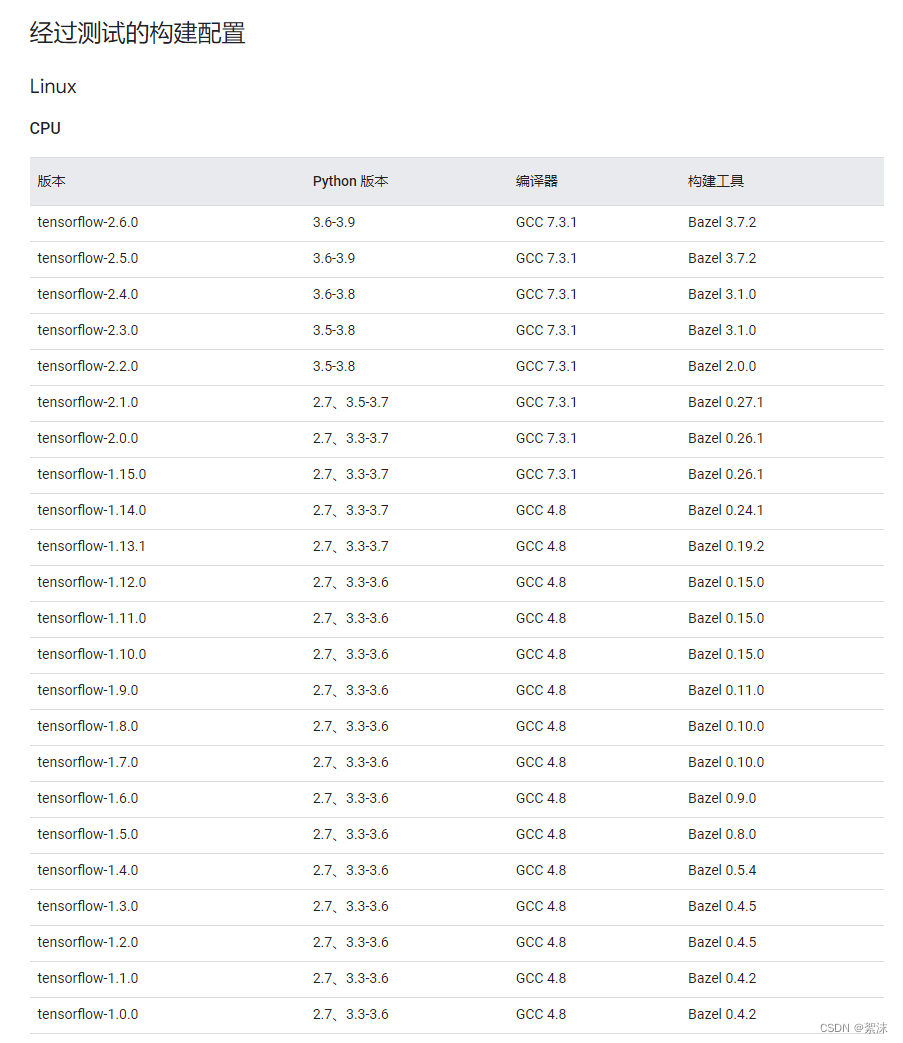

We're going to use tensorflow_gpu-1.13.1, Corresponding CUDA Version is 10.0,cuDNN Version is 7.4
About CUDA Installation has been described in detail in many blogs , Please search for . About installation , It is best to use when the computer has enough storage CUDA Multiple versions coexist , It is convenient for later version switching development .
install Package
The installation command given by the author :
  $ sudo apt-get install git
  $ sudo apt-get install python3-pip
  $ pip3 install pyqt5
  $ pip3 install pandas
  $ pip3 install PyMySQL
  $ pip3 install opencv-python
  $ pip3 install imutils
  $ pip3 install Pillow
  $ pip3 install piexif
  $ pip3 install -U scikit-learn
  $ pip3 install keras
  $ git clone https://nol.cs.nctu.edu.tw:234/open-source/TrackNetv2
We need to change the adaptation here cmd operation . Created before entering tracknet-gpu After environment :
coda install git
pip install pyqt5
pip install tensorflow-gpu==1.13.1
pip install pandas
pip install PyMySQL
pip install opencv-python==4.1.0
pip install imutils
pip install Pillow
pip install piexif
pip install scikit-learn
pip install keras
If you don't surf the Internet scientifically , These packages cannot all be installed .
Curve of national salvation : stay pypi Official website Download the required package , Then on the command line cd Download path to package , And then again pip install You can install locally .
I downloaded the following packages :
Refer to the package name in the picture 、 edition 、 Download the compilation platform to the local , And then install it
It is worth mentioning that :Keras Version and tensorflow The version of is also corresponding .
During the installation process, because python3.5 This version has stopped supporting ,pip There will be warnings during installation , Can be ignored .
The installation process is based on , Put the package given by the author under a good installation condition , One by one installation , Search for any dependent packages you lack 、 download 、 Local installation , Lack of Han make up what . Until all packages are installed .
testing
After installing the environment correctly , Clone the whole project on the project website , Looking for a video to be detected . Test command
python predict.py --video_name=<videoPath> --load_weights=<weightPath>
among videoPath Is the video path to be detected ,weightPath There are two choices :model_33 and model906_30, The previous model is three in one detection , The latter model is three frame three check . What is the difference between the two tests? You can read the author's paper .
The network structure of three in one detection is like this ,9 Dimension input ,1 Dimension output .
The output result after completing the test is CSV file , It contains the frame time point of the frame that recognizes the ball and the coordinate point of the ball .
Overlap the detection data with the original video , You can get the video that marks the ball movement .
python show_trajectory.py <input_video_path> <input_csv_path>
input_video_path Is the video path detected in the previous step ,input_csv_path It is generated after the previous detection csv File path .
边栏推荐
- The most powerful cluster monitoring system, it always ranks first!
- [tutorial] idea plug-in translation translation shortcut keys and translation settings
- 聊天软件项目开发1
- Teach you how to use code to realize SSO single sign on
- Macm1 chip, centos8 virtual machine, mysql8 installation, service up, login error
- Record the first business trip of new programmers
- h5 调起小程序
- 07 BTC mining development related history
- Discussion on traversal order of complete knapsack in DP
- 疑似被Apple招安,PlayCover作者删库跑路
猜你喜欢
![[mathematical modeling summer training] CUMCM calendar year problem classification 2000-2021 digital modeling national competition problem and solution model](/img/42/1a9eb3ceb63e0191e8d19d89db4619.png)
[mathematical modeling summer training] CUMCM calendar year problem classification 2000-2021 digital modeling national competition problem and solution model
![洛谷P3194 [HNOI2008]水平可见直线(计算几何+单调栈)](/img/a8/f2b2a6763bfc9e5f98010ccb57d63f.png)
洛谷P3194 [HNOI2008]水平可见直线(计算几何+单调栈)
![[Huang ah code] Introduction to MySQL - 3. I use select *, and the boss directly rushed me home by train, but I still bought a station ticket](/img/7b/f50c5f4b16a376273ba8cd27543676.png)
[Huang ah code] Introduction to MySQL - 3. I use select *, and the boss directly rushed me home by train, but I still bought a station ticket

Count the age distribution (interval statistics of 5 years old) and draw the age distribution map.

Basic database operations in MySQL

Introduction to Kali system use of hping3

Voice chat source code - voice chat source code development, design and construction

Applet pulls up enterprise wechat group QR code

Typescript 14 starting from 0: built in tool type

How to make a splash screen page
随机推荐
洛谷P3194 [HNOI2008]水平可见直线(计算几何+单调栈)
[Huawei online battle] download and run Huawei's official unity example code, prompting authentication failure and returning error code 100114
Things about caching in software design
034. Code rollback reset current branch to here
Luogu daily three questions -- the next day
[live class] Tencent classroom ----- cloud native tool secondary development training camp based on go language ----- kubernetes operator development
[unity learning 023] object pool Pro
[source code] what is the difference between ArrayList and vector, and the difference of expansion multiple
Today, I went to oppo for an interview and got numb...
【数学建模暑期培训】CUMCM历年题分类 2000-2021年数模国赛赛题及求解模型
Difference between factory mode and strategic mode
MFC control learning: button
Threejs personal notes
[Gu Yue 21 talks] ROS introduction series (2) -- programming implementation of publisher and subscriber + programming implementation of customized topic message
The most powerful cluster monitoring system, it always ranks first!
Difference between QPS and TPS
BeautifulSoap基本使用
[interview question] what is the difference between poll() and remove() in the queue
CF1265E Beautiful Mirrors (概率dp)
【直播课】腾讯课堂------基于GO语言的云原生工具二次开发实战训练营-------Kubernetes Operator开发