当前位置:网站首页>Flink CEP - complex event processing
Flink CEP - complex event processing
2022-07-18 18:54:00 【coding or coded】
List of articles
- Flink CEP - Complex event handling (Complex Event Processing)
- 1. Flink CEP Definition :
- 2. Sample code
- 3. Pattern classification
- 3.1 Individual model
- 3.2 Portfolio model
- 3.2.1 Definition :
- 3.2.2 Continuous conditions ( Continuous strategy ):
- 3.2.2.1 Nearest neighbor condition (Contiguity Conditions)
- 3.2.2.2 Strict neighborhood (Strict Contiguity): next()
- 3.2.2.3 Loose neighbors (Relaxed Contiguity):followedBy()
- 3.2.2.4 Uncertain loose neighbors (Non-Deterministic Relaxed Contiguity):followedByAny()
- 3.2.2.5 Other restrictions : notNext()、notFollowedBy()
- 3.2.2.6 Nearest neighbor condition in cyclic mode :consecutive()、allowCombinations()
- 3.3 Pattern group
- 4. Skip policy after matching
- 5. Pattern (Pattern) Application
Flink Official website : Flink Official website
Reference blog : Alienware^ Blog
Ongoing update ...
Flink CEP - Complex event handling (Complex Event Processing)
1. Flink CEP Definition :
So-called CEP, In fact, that is “ Complex event handling (Complex Event Processing)” Abbreviation ; and Flink CEP, Namely Flink A library for complex event processing (library). What is that “ Complex event handling ” Well ? It can be in the event stream , A specific combination of events is detected and processed , for instance “ Continuous login failed ”, perhaps “ Order payment timeout ” wait . The specific process is , Put the simple events in the event flow , Combine through certain rule matching , This is it. “ Complex events ”; Then, the transformation processing is carried out based on a group of complex events that meet the rules , Get the desired result and output .
Sum up , Complex event handling (CEP) The process can be divided into three steps :
(1) Define a matching rule
(2) Apply matching rules to the event flow , Detect complex events that meet the rules
(3) Handle the detected complex events , Get the result and output it 
2. Sample code
- pom File dependency
<dependency>
  <groupId>org.apache.flink</groupId>
  <artifactId>flink-cep_2.11</artifactId>
  <version>1.13.5</version>
</dependency>
- Sample code
package com.ali.flink.demo.driver.flink_cep;

import cn.hutool.core.util.StrUtil;
import com.ali.flink.demo.bean.UserLoginEventBean;
import com.ali.flink.demo.utils.DataGeneratorImpl005;
import com.ali.flink.demo.utils.FlinkEnv;
import org.apache.flink.api.common.eventtime.SerializableTimestampAssigner;
import org.apache.flink.api.common.eventtime.WatermarkStrategy;
import org.apache.flink.cep.CEP;
import org.apache.flink.cep.PatternSelectFunction;
import org.apache.flink.cep.PatternStream;
import org.apache.flink.cep.pattern.Pattern;
import org.apache.flink.cep.pattern.conditions.SimpleCondition;
import org.apache.flink.streaming.api.datastream.SingleOutputStreamOperator;
import org.apache.flink.streaming.api.environment.StreamExecutionEnvironment;
import org.apache.flink.streaming.api.functions.source.datagen.DataGeneratorSource;
import org.apache.flink.table.api.bridge.java.StreamTableEnvironment;

import java.time.Duration;
import java.util.List;
import java.util.Map;

/** *  Detect users who have failed to log in three consecutive times , And output alarm information  */
public class FlinkCEPPatternOfIndividualPattern {


    public static void main(String[] args) throws Exception {

        StreamExecutionEnvironment env = FlinkEnv.FlinkDataStreamRunEnv();
        env.setParallelism(1);

        StreamTableEnvironment tableEnv = FlinkEnv.getStreamTableEnv(env);

        DataGeneratorSource<UserLoginEventBean> dataGeneratorSource = new DataGeneratorSource<>(new DataGeneratorImpl005());

        //  add to source flow , And set up  watermark
        SingleOutputStreamOperator<UserLoginEventBean> sourceStream = env.addSource(dataGeneratorSource).returns(UserLoginEventBean.class)
                .assignTimestampsAndWatermarks(WatermarkStrategy.<UserLoginEventBean>forBoundedOutOfOrderness(Duration.ofSeconds(2))
                        .withTimestampAssigner(new SerializableTimestampAssigner<UserLoginEventBean>() {

                            @Override
                            public long extractTimestamp(UserLoginEventBean userLoginEventBean, long l) {

                                return userLoginEventBean.getTimestamp();
                            }
                        }));
        //  Print source Stream data
        sourceStream.print("source stream");

        //  Defining patterns , Three consecutive login failures
        Pattern<UserLoginEventBean, UserLoginEventBean> pattern = Pattern.<UserLoginEventBean>begin("first")
                .where(new SimpleCondition<UserLoginEventBean>() {

                    @Override
                    public boolean filter(UserLoginEventBean userLoginEventBean) throws Exception {

                        return StrUtil.equals(userLoginEventBean.getLoginType(), "fail");
                    }
                })
                .next("second")
                .where(new SimpleCondition<UserLoginEventBean>() {

                    @Override
                    public boolean filter(UserLoginEventBean userLoginEventBean) throws Exception {

                        return StrUtil.equals(userLoginEventBean.getLoginType(), "fail");
                    }
                })
                .next("third")
                .where(new SimpleCondition<UserLoginEventBean>() {

                    @Override
                    public boolean filter(UserLoginEventBean userLoginEventBean) throws Exception {

                        return StrUtil.equals(userLoginEventBean.getLoginType(), "fail");
                    }
                });

        //  Apply schema to data flow
        PatternStream<UserLoginEventBean> patternStream = CEP.pattern(sourceStream.keyBy(user -> user.getUserId()), pattern);

        //  Extract the detected result events , Processing to get alarm information
        SingleOutputStreamOperator<String> warningStream = patternStream.select(new PatternSelectFunction<UserLoginEventBean, String>() {

            @Override
            public String select(Map<String, List<UserLoginEventBean>> map) throws Exception {

                UserLoginEventBean firstStream = map.get("first").get(0);
                UserLoginEventBean secondStream = map.get("second").get(0);
                UserLoginEventBean thirdStream = map.get("third").get(0);
                return firstStream.getUserId() + " Three consecutive login failures , The login time is :" + firstStream.getLoginTime() + secondStream.getLoginTime() + thirdStream.getLoginTime();
            }
        });

        warningStream.print("warning Stream");

        env.execute("Flink CEP start");
    }
}

-------------------------- result --------------------------------------
source stream> UserLoginEventBean{
    userId='u2', loginAddress=' nanjing ', loginType='fail', loginTime='2022-07-15 11:22:54', timestamp=1657855374497}
source stream> UserLoginEventBean{
    userId='u3', loginAddress=' Hangzhou ', loginType='fail', loginTime='2022-07-15 11:22:55', timestamp=1657855375512}
source stream> UserLoginEventBean{
    userId='u4', loginAddress=' Hangzhou ', loginType='success', loginTime='2022-07-15 11:22:57', timestamp=1657855377513}
source stream> UserLoginEventBean{
    userId='u2', loginAddress=' Shanghai ', loginType='success', loginTime='2022-07-15 11:22:59', timestamp=1657855379525}
source stream> UserLoginEventBean{
    userId='u1', loginAddress=' Shanghai ', loginType='success', loginTime='2022-07-15 11:23:00', timestamp=1657855380537}
source stream> UserLoginEventBean{
    userId='u1', loginAddress=' Beijing ', loginType='success', loginTime='2022-07-15 11:23:00', timestamp=1657855380538}
source stream> UserLoginEventBean{
    userId='u2', loginAddress=' Shanghai ', loginType='fail', loginTime='2022-07-15 11:23:02', timestamp=1657855382550}
source stream> UserLoginEventBean{
    userId='u4', loginAddress=' Beijing ', loginType='fail', loginTime='2022-07-15 11:23:03', timestamp=1657855383559}
source stream> UserLoginEventBean{
    userId='u1', loginAddress=' Shanghai ', loginType='fail', loginTime='2022-07-15 11:23:03', timestamp=1657855383559}
source stream> UserLoginEventBean{
    userId='u4', loginAddress=' nanjing ', loginType='fail', loginTime='2022-07-15 11:23:05', timestamp=1657855385561}
source stream> UserLoginEventBean{
    userId='u4', loginAddress=' nanjing ', loginType='fail', loginTime='2022-07-15 11:23:07', timestamp=1657855387570}
source stream> UserLoginEventBean{
    userId='u3', loginAddress=' Hangzhou ', loginType='fail', loginTime='2022-07-15 11:23:07', timestamp=1657855387571}
source stream> UserLoginEventBean{
    userId='u1', loginAddress=' Hangzhou ', loginType='fail', loginTime='2022-07-15 11:23:07', timestamp=1657855387571}
source stream> UserLoginEventBean{
    userId='u4', loginAddress=' Shanghai ', loginType='success', loginTime='2022-07-15 11:23:09', timestamp=1657855389572}
warning Stream> u4 Three consecutive login failures , The login time is :2022-07-15 11:23:032022-07-15 11:23:052022-07-15 11:23:07
3. Pattern classification
Pattern (Pattern) In fact, it is to combine a group of simple events into complex events “ Matching rules ”. Because the matching of events in the flow is sequential , Therefore, a matching rule can be expressed as simple events that occur successively , Put together in series in order .
3.1 Individual model
3.1.1 Definition :
Every simple event here is not arbitrarily selected , Also need to have certain conditions and rules ; So we put the matching rules of each simple event , called “ Individual model ”(Individual Pattern).
Each individual pattern is represented by a “ Conjunctions ” Start defining , such as begin、next wait , This is a Pattern A method of an object (begin yes Pattern Class static methods ), One returned Pattern. these “ Conjunctions ” There is one method String Type parameter , This is the only name of the current individual mode , Like here “first”、“second”. When a matching event is detected later , This name will be used to refer to the matching event .
.next("second")
.where(new SimpleCondition<UserLoginEventBean>() {

@Override
     public boolean filter(UserLoginEventBean userLoginEventBean) throws Exception {

         return StrUtil.equals(userLoginEventBean.getLoginType(), "fail");
     }
 })
The individual model requires a “ Filter conditions ”, Used to specify specific matching rules . This condition is usually achieved by calling .where() Method to achieve , The specific filtering logic is through the incoming SimpleCondition Internal .filter() Method to define .
3.1.2 quantifiers :
An individual pattern can be followed by “ quantifiers ”, Used to specify the number of cycles . Individual patterns include “ Single case (singleton) Pattern ” and “ loop (looping) Pattern ”. By default , Individual mode is singleton mode , Match to receive an event ; When the quantifier is defined , It becomes a circular mode , Multiple events can be matched and received . The default matching relationship is “ Loose neighbors ” Relationship .
1) .oneOrMore()
The matching event occurs one or more times , hypothesis a It's an individual model ,a.oneOrMore() It means that it can match 1 One or more a A combination of events . We sometimes use a+ To simply express .
2) .times(times)
Matching events occur a certain number of times (times), for example a.times(3) Express aaa;
3) .times(fromTimes,toTimes)
Specify the range of times matching events occur , The minimum number of times is fromTimes, The maximum number of times is toTimes. for example a.times(2, 4) Can match aa,aaa and aaaa.
4) .greedy()
Can only be used after loop mode , Make the current cycle mode “ greedy ”(greedy), That is, always match as many as possible . for example a.times(2, 4).greedy(), If there is a continuous 4 individual a, Then you'll just aaaa Detect it and deal with it , Anything else 2 individual a Is not a matching event .
5) .optional()
Make the current mode optional , In other words, this matching condition can be satisfied , You can't be satisfied .
For an individual pattern pattern Come on , All quantifiers that can be added later are as follows :
//  A matching event occurs  4  Time
pattern.times(4);
//  A matching event occurs  4  Time , Or not
pattern.times(4).optional();
//  A matching event occurs  2, 3  perhaps  4  Time
pattern.times(2, 4);
//  A matching event occurs  2, 3  perhaps  4  Time , And match as many as possible
pattern.times(2, 4).greedy();
//  A matching event occurs  2, 3, 4  Time , Or not
pattern.times(2, 4).optional();
//  A matching event occurs  2, 3, 4  Time , Or not ; And match as many as possible
pattern.times(2, 4).optional().greedy();
//  A matching event occurs  1  Times or times
pattern.oneOrMore();
//  A matching event occurs  1  Times or times , And match as many as possible
pattern.oneOrMore().greedy();
//  A matching event occurs  1  Times or times , Or not
pattern.oneOrMore().optional();
//  A matching event occurs  1  Times or times , Or not ; And match as many as possible
pattern.oneOrMore().optional().greedy();
//  A matching event occurs  2  Times or times
pattern.timesOrMore(2);
//  A matching event occurs  2  Times or times , And match as many as possible
pattern.timesOrMore(2).greedy();
//  A matching event occurs  2  Times or times , Or not
pattern.timesOrMore(2).optional()
//  A matching event occurs  2  Times or times , Or not ; And match as many as possible
pattern.timesOrMore(2).optional().greedy();
3.1.3 Conditions :
By calling Pattern Object's .where() Method to achieve , It can be divided into simple conditions 、 Iteration conditions 、 Compound condition 、 There are several types of termination conditions . Besides , You can also call Pattern Object's .subtype() Method to limit the subtype of the matching event .
3.1.3.1 Qualify subtypes
call .subtype() Method can add subtype constraints to the current pattern . for example :
pattern.subtype(SubEvent.class);
here SubEvent Is the data type in the stream Event Subtypes of . At this time , Only when the event is SubEvent Type , To meet the current mode pattern Matching conditions for .
3.1.3.2 Simple conditions (Simple Conditions): Only the current event can be processed
Simple conditions are the simplest matching rules , Decide whether to accept the current event only according to its characteristics . This is essentially a filter operation .
In the code, we are .where() Method passes in a SimpleCondition As a parameter .SimpleCondition Is said “ Simple conditions ” The abstract class of , There's a .filter() Method , The only parameter is the current event . So it can be used as FilterFunction To use
.where(new SimpleCondition<UserLoginEventBean>() {

      @Override
      public boolean filter(UserLoginEventBean userLoginEventBean) throws Exception {

           return StrUtil.equals(userLoginEventBean.getLoginType(), "fail");
      }
})
3.1.3.3 Iteration conditions (Iterative Conditions): Compare with previous events
Simple conditions can only be judged based on the current event , The logic that can be handled is relatively limited . in application , We may need to Compare the current event with the previous event , To determine whether to accept the current event . This kind of condition that needs to rely on previous events to make judgment , It's called “ Iteration conditions ”(Iterative Condition).
call ctx.getEventsForPattern(...) You can get all the previously accepted events as possible matches . The cost of invoking this operation may be small or large , So when realizing your condition , Try to use it less .
3.1.3.4 Combination conditions (Combining Conditions)
- Combination conditions , Namely .where() Followed by another .where(). Because I mentioned before , A condition is like a filter operation , So every time I call .where() Methods are equivalent to a filter , Multiple successive calls represent multiple filtering , The final matching event will naturally meet all conditions at the same time . This is equivalent to multiple conditions “ Logic and (AND).
- Logical or of multiple conditions (OR), You can use the .where() Add a .or() To achieve . there .or() Methods and .where() equally , Pass in a IterativeCondition As a parameter , Define an independent condition ; It's the same as before .where() As long as the defined conditions meet one , The current event can be successfully matched .
- Subtype qualification (subtype) It can also be combined with other conditions , Become a combination condition
3.1.3.5 Termination conditions (Stop Conditions)
The termination condition is defined by invoking the schema object .until() Method to achieve , Also pass in a IterativeCondition As a parameter . It should be noted that , The termination condition only relates to oneOrMore() perhaps oneOrMore().optional() Use a combination of . Because in this cycle mode , We don't know if there are any events to match , We have to cache the previously matched events as status and continue to wait , The waiting is endless ; If you keep waiting , More and more cache states , It will eventually run out of memory . So this cycle pattern must have an end , When .until() When the specified conditions are met , Cycle termination , In this way, you can clear the state and free up memory .

3.2 Portfolio model
3.2.1 Definition :
A complete pattern that combines multiple individual patterns , It's called “ Portfolio model ”(Combining Pattern), In order to distinguish from individual patterns, it is sometimes called “ Pattern sequence ”(Pattern Sequence). All combination modes , All have to be one “ Initial mode ” start ; The initial mode must be called Pattern Static method of .begin() To create . A combination pattern has the following forms :
Pattern <Event, ?> pattern = Pattern
			.<Event>begin("start")
			.where(...)
			.next("next")
			.where(...)
			.followedBy("follow")
			.where(...)
			...
3.2.2 Continuous conditions ( Continuous strategy ):
Continuous conditions include : Nearest neighbor condition (Contiguity Conditions), Strict neighborhood (Strict Contiguity), Loose neighbors (Relaxed Contiguity), Uncertain loose neighbors (Non-Deterministic Relaxed Contiguity)
3.2.2.1 Nearest neighbor condition (Contiguity Conditions)
After initial mode , You can append patterns in the order of complex events , Combined into a pattern sequence . The combination between patterns is through some “ Conjunctions ” Method , These conjunctions indicate how close neighbors are between successive events , That's what's called “ Nearest neighbor condition ”(Contiguity Conditions, Also called “ Continuity conditions ”).
3.2.2.2 Strict neighborhood (Strict Contiguity): next()
Matching events appear strictly one after another , There won't be any other events in between . The code corresponds to Pattern Of .next() Method , You can see from the name ,“ next ” Nature is next to .
3.2.2.3 Loose neighbors (Relaxed Contiguity):followedBy()
Loose neighbors only care about the order of events , And relax the of matching events “ distance ” requirement , In other words, there can be other mismatched events between two matching Events . The code corresponds to .followedBy() Method , Obviously, this means “ Follow me ” Can , Do not need to be closely adjacent .
3.2.2.4 Uncertain loose neighbors (Non-Deterministic Relaxed Contiguity):followedByAny()
This neighborhood relationship is more relaxed . So-called “ Indeterminacy ” Events that have been matched before can be reused ; Different complex events matched under this nearest neighbor condition , You can start with the same event , Therefore, the matching results are generally more than the loose nearest neighbor , The code corresponds to .followedByAny() Method .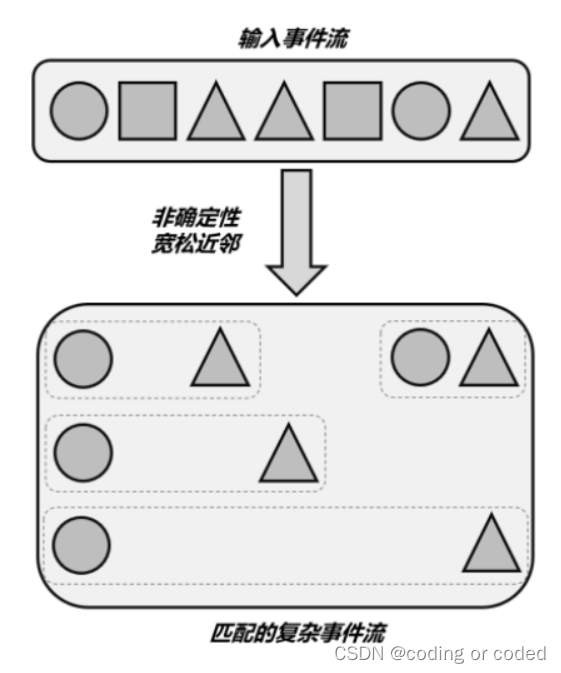
3.2.2.5 Other restrictions : notNext()、notFollowedBy()
In addition to the above mentioned next()、followedBy()、followedByAny() Three nearest neighbor conditions can be expressed respectively , You can also use negative “ Conjunctions ” To combine individual patterns . It mainly includes :
1) .notNext()
Indicates the event after which the previous pattern matches , Can't be followed by an event .
2) .notFollowedBy()
Indicates the event after which the previous pattern matches , There will be no event . Here we need to pay attention to , because notFollowedBy() There is no strict limit ; Stream data keeps coming , We can never guarantee that after “ There will be no event ”. So a pattern sequence cannot be expressed in notFollowedBy() ending , This qualification is mainly used to express “ There will be no event between the two events ”.
//  Strict nearest neighbor condition
Pattern<Event, ?> strict = start.next("middle").where(...);
//  Relaxed nearest neighbor condition
Pattern<Event, ?> relaxed = start.followedBy("middle").where(...);
//  Nondeterministic relaxed nearest neighbor condition
Pattern<Event, ?> nonDetermin = start.followedByAny("middle").where(...);
//  The nearest neighbor condition cannot be strictly
Pattern<Event, ?> strictNot = start.notNext("not").where(...);
//  The nearest neighbor condition cannot be relaxed
Pattern<Event, ?> relaxedNot = start.notFollowedBy("not").where(...);
//  Time constraints
middle.within(Time.seconds(10));
3.2.2.6 Nearest neighbor condition in cyclic mode :consecutive()、allowCombinations()
For cyclic mode ( for example oneOrMore() and times())), The default is loose continuous . If you want to use strict continuity , You need to use consecutive() Method explicitly specifies , If you want to use uncertain loose continuous , You can use allowCombinations() Method .
 // Defining patterns , Three consecutive login failures
Pattern<LoginEvent, ?> pattern = Pattern.<LoginEvent>begin("first")
    .where(new SimpleCondition<LoginEvent>() {
     //  Start with the first login failure event
     	@Override
        public boolean filter(LoginEvent value) throws Exception {

            return value.eventType.equals("fail");
        }
}).times(3).consecutive();
3.3 Pattern group
Define a pattern sequence as begin,followedBy,followedByAny and next Conditions . This pattern sequence is logically treated as a matching condition , And return to a GroupPattern, Can be in GroupPattern Upper use oneOrMore(),times(#ofTimes), times(#fromTimes, #toTimes),optional(),consecutive(),allowCombinations().
Pattern<Event, ?> start = Pattern.begin(
    Pattern.<Event>begin("start").where(...).followedBy("start_middle").where(...)
);

//  Strictly continuous
Pattern<Event, ?> strict = start.next(
    Pattern.<Event>begin("next_start").where(...).followedBy("next_middle").where(...)
).times(3);

//  Loose and continuous
Pattern<Event, ?> relaxed = start.followedBy(
    Pattern.<Event>begin("followedby_start").where(...).followedBy("followedby_middle").where(...)
).oneOrMore();

//  Uncertain loose continuous
Pattern<Event, ?> nonDetermin = start.followedByAny(
    Pattern.<Event>begin("followedbyany_start").where(...).followedBy("followedbyany_middle").where(...)
).optional();


4. Skip policy after matching
For a given pattern , The same event may be assigned to multiple successful matches . In order to control how many matches an event will be allocated , You need to specify a skip strategy AfterMatchSkipStrategy. There are five skip strategies , as follows :
Pattern. < Event > begin("a").where(new SimpleCondition < Event > () {

    @Override
    public boolean filter(Event value) throws Exception {

        return value.user.equals("a");
    }
}).oneOrMore().followedBy("b").where(new SimpleCondition < Event > () {

    @Override
    public boolean filter(Event value) throws Exception {

        return value.user.equals("b");
    }
});
From the above code, we can see that the matching strategy is :a+ b, If a appear 3 Time , Then they are recorded as a1, a2, a3, The matching results are 6 in , Respectively :(a1 a2 a3 b),(a1 a2 b),(a1 b),(a2 a3 b),(a2 b),(a3 b).
4.1 Do not skip strategy :NO_SKIP
call AfterMatchSkipStrategy.noSkip(). This is the default strategy , All possible matches will be output . So the complete... Will be output here 6 A match (a1 a2 a3 b),(a1 a2 b),(a1 b),(a2 a3 b),(a2 b),(a3 b).
4.2 Skip to the next strategy :SKIP_TO_NEXT
call AfterMatchSkipStrategy.skipToNext(). Find one a1 After the start of the maximum match , skip a1 All other matches at the beginning , Straight from the next a2 Start matching . Of course a2 The same is true. Skip other matches . The resulting (a1 a2 a3 b),(a2 a3 b),(a3 b). You can see , This skip strategy is similar to using .greedy() The effect is the same .
4.3 Skip all sub matching policies :SKIP_PAST_LAST_EVENT
call AfterMatchSkipStrategy.skipPastLastEvent(). find a1 Start matching (a1 a2 a3 b) after , Skip all a1 until a3 The match at the beginning , It's equivalent to skipping all these sub matches . The resulting (a1 a2 a3 b), This is the most streamlined skip strategy .
4.4 Skip to the first strategy :SKIP_TO_FIRST
call AfterMatchSkipStrategy.skipToFirst(“a”), Here you pass in a parameter , The first matching event that indicates which pattern to jump to . find a1 Start matching (a1 a2 a3 b) after , Jump to the first one a( That is to say a1) Match for start , It's equivalent to leaving only a1 Start matching . The resulting (a1 a2 a3 b),(a1 a2 b),(a1 b).
4.5 Skip to the last strategy :SKIP_TO_LAST
call AfterMatchSkipStrategy.skipToLast(“a”), Also pass in a parameter , Indicates the last matching event of which pattern to jump to . find a1 Start matching (a1 a2 a3 b) after , Skip all a1、a2 Start matching , Jump to the last a( That is to say a3) Match for start . The resulting (a1 a2 a3 b),(a3 b).

- Set the strategy api file

//  Do not skip strategy :NO_SKIP
.begin("first", AfterMatchSkipStrategy.noSkip())
.begin("first", AfterMatchSkipStrategy.skipToNext())
.begin("first", AfterMatchSkipStrategy.skipPastLastEvent())
.begin("first", AfterMatchSkipStrategy.skipToFirst())
.begin("first", AfterMatchSkipStrategy.skipToLast())

// AfterMatchSkipStrategy.class Method documentation
public static NoSkipStrategy noSkip() {

    return NoSkipStrategy.INSTANCE;
}

public static AfterMatchSkipStrategy skipToNext() {

    return SkipToNextStrategy.INSTANCE;
}

public static SkipPastLastStrategy skipPastLastEvent() {

   return SkipPastLastStrategy.INSTANCE;
}

public static SkipToFirstStrategy skipToFirst(String patternName) {

    return new SkipToFirstStrategy(patternName, false);
}

public static SkipToLastStrategy skipToLast(String patternName) {

    return new SkipToLastStrategy(patternName, false);
}
Be careful
Use SKIP_TO_FIRST/LAST when , There are two options for dealing with situations where no event can be mapped to the corresponding variable name . By default... Is used NO_SKIP Strategy , Another option isThrow an exception. You can use the following options :
AfterMatchSkipStrategy.skipToFirst(patternName).throwExceptionOnMiss()
5. Pattern (Pattern) Application
5.1 Transfer mode (Pattern) Use on data streams , Generate pattern flow (PatternStream)
// DataStream  Definition
DataStream<Event> input = ...
// Pattern  Definition
Pattern<Event, ?> pattern = ...
//  Optional event comparator
EventComparator<Event> comparator = ... //  Optional

PatternStream<Event> patternStream = CEP.pattern(input, pattern, comparator);
Be careful :
1) DataStream The flow type can also be keyed perhaps non-keyed.
2) stay non-keyed Using streaming mode will set your job concurrency to 1.
5.2 Pattern flow (PatternStream) Data processing of
5.2.1 select Method handling
The easiest way to handle matching events , It's from PatternStream Directly extract the matching complex events in , Wrap it into the desired information output , This operation is “ choice ”(select).
5.2.1.1 PatternSelectFunction class
SingleOutputStreamOperator<String> warningStream = patternStream.select(new PatternSelectFunction<UserLoginEventBean, String>() {

    @Override
    public String select(Map<String, List<UserLoginEventBean>> map) throws Exception {

        UserLoginEventBean firstStream = map.get("first").get(0);
        UserLoginEventBean secondStream = map.get("second").get(0);
        UserLoginEventBean thirdStream = map.get("third").get(0);
        return firstStream.getUserId() + " Three consecutive login failures , The login time is :" + firstStream.getLoginTime() + secondStream.getLoginTime() + thirdStream.getLoginTime();
    }
});
PatternSelectFunction yes Flink CEP Provide a function class interface , It will save the detected matching events in a Map in , Corresponding key Is the name of these events . there “ Event name ” It corresponds to the name of each individual pattern defined in the pattern ; The individual model can be a circular model , One name will correspond to multiple events , So finally saved in Map Inside value Is a list of events (List), If the individual pattern is singleton , that List There is only one element in , Call directly .get(0) You can take it out .
If the individual pattern is cyclic ,List There may be multiple elements in . For example, we improved the continuous login failure detection in the quick start case , We can wrap the matched events into String Type of alarm information output , The code is as follows :
Pattern<UserLoginEventBean, UserLoginEventBean> pattern = Pattern
    .<UserLoginEventBean>begin("fail")
    .where(new SimpleCondition<UserLoginEventBean>() {

        @Override
        public boolean filter(UserLoginEventBean userLoginEventBean) throws Exception {

            return StrUtil.equals(userLoginEventBean.getLoginType(), "fail");
        }
     })
     .times(3)
     .consecutive();

PatternStream<UserLoginEventBean> patternStream = CEP.pattern(sourceStream.keyBy(user -> user.getUserId()), pattern);

DataStreamSink<String> warningStream = patternStream.select(new PatternSelectFunction<UserLoginEventBean, String>() {

    @Override
    public String select(Map<String, List<UserLoginEventBean>> map) throws Exception {

        UserLoginEventBean firstStream = map.get("fail").get(0);
        UserLoginEventBean secondStream = map.get("fail").get(1);
        UserLoginEventBean thirdStream = map.get("fail").get(2);
        return firstStream.getUserId() + " Three consecutive login failures , The login time is :" + firstStream.getLoginTime() + secondStream.getLoginTime() + thirdStream.getLoginTime();
    }
}).print("warning Stream");
5.2.1.2 PatternFlatSelectFunction class
PatternStream A similar approach is .flatSelect(), The parameter passed in is one PatternFlatSelectFunction. It can be seen from the name , This is a PatternSelectFunction Of “ flat ” edition ; Internally, we need to implement a flatSelect() Method , It's the same as before select() The difference is that there is no return value , It's an extra collector (Collector) Parameters out, By calling out.collet() Method can send output data multiple times .
// 3.  Select the matching complex events , Then it is packaged into alarm information output
patternStream.flatSelect(new PatternFlatSelectFunction <UserLoginEventBean, String> () {

    @Override
    public void flatSelect(Map <String, List <UserLoginEventBean>> map, Collector <String> out) throws Exception {

        UserLoginEventBean first = map.get("fail").get(0);
        UserLoginEventBean second = map.get("fail").get(1);
        UserLoginEventBean third = map.get("fail").get(2);
        out.collect(first.getUserId()+ "  Three consecutive login failures ! The login time :" + first.getLoginTime() + ", " + second.getLoginTime() + ", " + third.getLoginTime());
    }
}).print("warning Stream");
so PatternFlatSelectFunction More flexible to use , Can completely cover PatternSelectFunction The function of . This one FlatMapFunction And MapFunction The difference is the same .
5.2.2 process Method handling
unfinished , Updating ...
边栏推荐
猜你喜欢

图扑软件构建源网荷储用体系 打造循环经济2.0版本
![ERROR: Could not install packages due to an OSError: [ Errno 2] No such file or directory: ***](/img/81/6f9b7d554e6a47e614107c799229d2.png)
ERROR: Could not install packages due to an OSError: [ Errno 2] No such file or directory: ***

Know JVM

10 suggestions for graduating and going to the programmer's Road (wonderful pictures)

Can optical transceiver solves the long-distance networking problem of taihe'an tx3016c fire host

Use of thingjs

Error :Could not decode ...With “UTF-8“-encoding. Editing not possible
离线安装:如何搭建安全的企业级Harbor服务?内容太过详细。
![[ CTF ]MISC encode](/img/aa/b9ee39d0f175bfba274f75145d9583.png)
[ CTF ]MISC encode
复盘:池化层(Pooling)的反向传播过程,平均池化,最大值池化都是如何反向传播的
随机推荐
Flask response
[KALI]关于kali更新出现“文件尺寸不符”以及“您使用的镜像正在同步中”的解决方法
Offline installation: how to build a secure enterprise class harbor service? The content is too detailed.
[Huang ah code] getting started with MySQL - 1. SQL execution process
Software testing interview questions: briefly describe what is static testing, dynamic testing, black box testing, white box testing α Testing β Testing?
STM32按键外部中断控制LED流水灯-HAL库
ERROR: Could not install packages due to an OSError: [ Errno 2] No such file or directory: ***
Conversion of data types
Translation and interpretation of the paper: learning logic rules for reasoning on knowledge graphs [rnnlogic]
JWT learning
ospf路由管理
02 review multithreading
[Huang ah code] Introduction to MySQL - 3. I use select *, and the boss directly rushed me home by train, but I still bought a station ticket
事务隔离级别
华为设备射频资源管理命令
LeetCode高频题:三个长度为N的无序数组A,B,C,求 A[i] + B[j] + C[k] = 64 的(i , j, k )的组合总数量
论文翻译解读:learning logic rules for reasoning on knowledge graphs【RNNLogic】
自定义类型——结构体
Know JVM
坐标转换实例讲解