当前位置:网站首页>Two JS methods of rolling wheel loading and modal box dragging
Two JS methods of rolling wheel loading and modal box dragging
2022-07-19 05:11:00 【Create splendid -- hand in hand with you】
Two methods of rolling wheel loading :
Common part css And HTML:
*{
				padding: 0px;
				margin: 0px;
			}
			div{
				width: 300px;
				height: 300px;
				overflow-y: scroll;
				padding: 10px;
				border: 10px solid red;
			}
<div class="box">
<p> I am content. <br> I am content. <br> I am content. <br> I am content. <br> I am content. <br> I am content. <br></p>
<p> I am content. <br> I am content. <br> I am content. <br> I am content. <br> I am content. <br> I am content. <br></p>
<p> I am content. <br> I am content. <br> I am content. <br> I am content. <br> I am content. <br> I am content. <br></p>
<p> I am content. <br> I am content. <br> I am content. <br> I am content. <br> I am content. <br> I am content. <br></p>
<p> I am content. <br> I am content. <br> I am content. <br> I am content. <br> I am content. <br> I am content. <br></p>
</div>The first type of rolling wheel loading js Method :
// Get elements
var box = document.querySelector('.box');
// Use monitoring Scroll Events
box.addEventListener('scroll',function(){
// This addition must be placed inside , Because each execution adds
var het=Math.ceil(box.scrollTop)+box.clientHeight;
if(het>=box.scrollHeight){
// Create and add specified content internally
var p = document.createElement('p');
p.innerHTML = ' Hello! ';
box.appendChild(p);
}
})
The second type of rolling wheel loading js Method :
// Get elements
var box = document.querySelector('.box');
// Use monitoring Scroll Events
box.addEventListener('scroll', function() {
if (box.offsetHeight + box.scrollTop > 1000) {
alert(' It's over ');
} else if (box.offsetHeight + box.scrollTop >= box.scrollHeight) {
var p = document.createElement('p');
p.innerHTML = ' Hello! ';
box.appendChild(p);
}
})
notes : The first of the above second method if Statements may not apply aler,( Tips : Can give the specified p Set the font or background color of the label , No need to create p label , When more than 1000 when , Direct display , It's all over , that will do ), If any fans are unknown , You can follow me in private letters , Answer for you ;
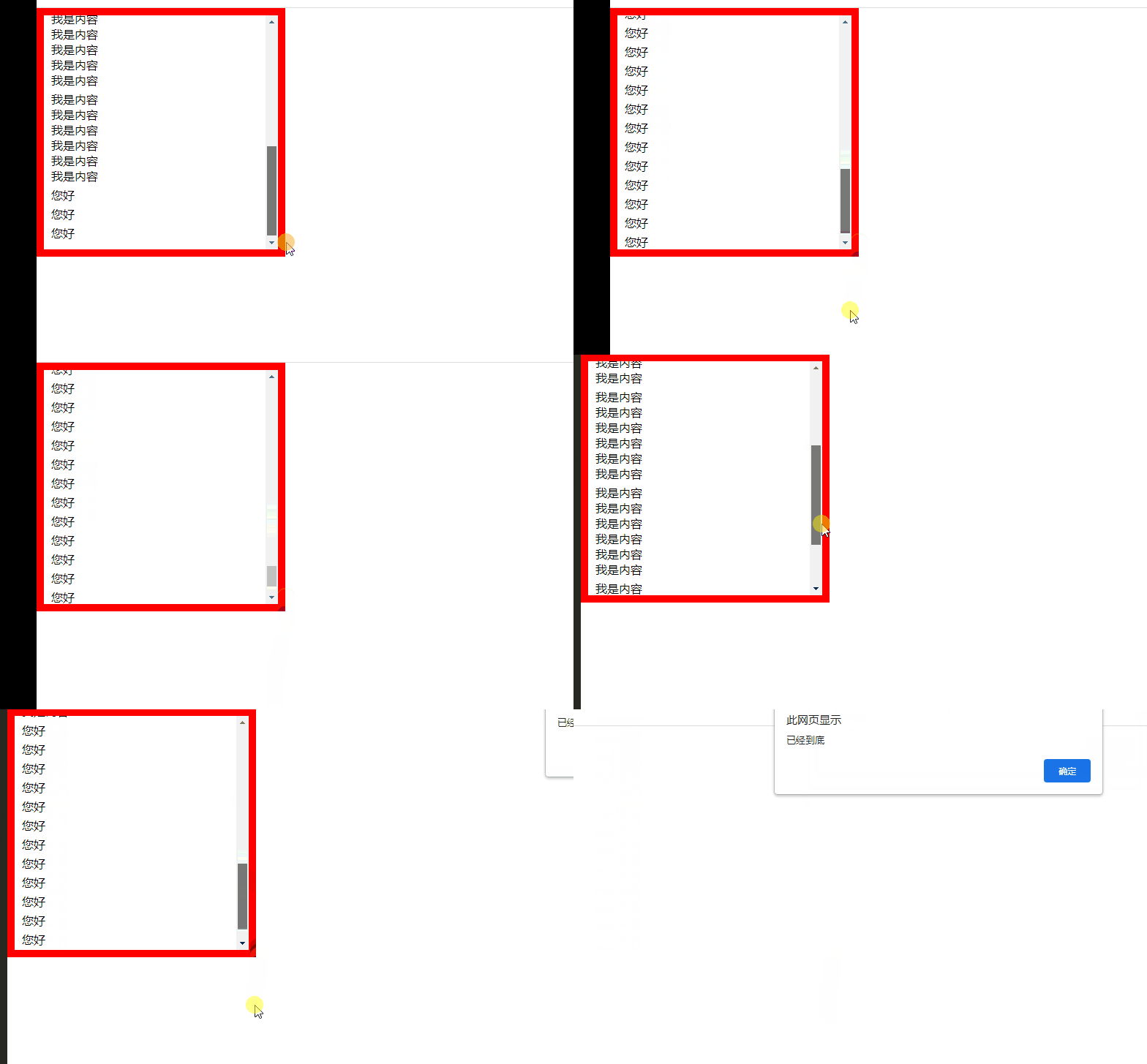
Effect display area :
Drag and drop the modal box to summarize :
offset Offset
offset The translation is the offset , We use offset Series related attributes can dynamically get the location of the element ( The offset )、 Size, etc
offset You can get the style values in any style sheet
offset The values obtained by the series have no units
offsetWidth contain padding + border + width
offsetWidth And so on are read-only properties , Can only get, can't assign
offsetLeft Returns the distance relative to the left border of the parent element , Dynamic
offsetTop Returns the example above the parent element
offset And style difference
offsetWidth Numerical values have no units
offsetWidth contain padding+border+width
offsetWidth Read-only property , Can only get, can't assign
style.width What you get is a string with units , Get only inline styles .
style.width Get does not contain padding and border Value
style.width It's a read-write property , It can be obtained or assigned
summary : Get the location of the element offset , Modify the element attribute value with style
Drag and drop principle
1:mousedown Press the mouse to get the width of the mouse in the login box .
2:mousemove Get the latest when the mouse moves pageX Subtract the mouse in the login box X distance , It's the of the modal box left And top value .
3:mouseup When the mouse is released , remove mousemove event
client summary
adopt client Series of related attributes can dynamically get the border size of the element 、 Element size, etc .
clientTop : The size of the top border of the element
clientLeft : The size of the left border of the element
clientWidth: Include padding, Excluding borders .
clientHeight: Include padding, Excluding borders .
// client Width And we offsetWidth The biggest difference is No borders
var div = document.querySelector('div');
console.log(div.clientWidth);
scroll summary
We use scroll The size of the element can be dynamically obtained by the relevant attributes of 、 Rolling distance, etc .
scrollTop: The upper distance of being rolled , Returns the value , No unit ;
scrollLeft: The left distance to be scrolled , Returns the value , No unit ;
scrollWidth: Returns the actual width of the element , Including the rolling distance , No borders , Return value without unit .
scrollHeight: Returns the actual height of the element , Including the rolling distance , No borders , No unit .
To sum up :
1.offset series It is often used to obtain element positions offsetLeft offsetTop
2.client Often used to get element size clientWidth clientHeight
3.scroll Often used to get the rolling distance scrollTop scrollLeft
4. Notice how far the page scrolls through window.pageXOffset get
The core principle : By timer setInterval() Constantly dispose of containers .
notes : The above conclusion needs the friend of the case , Click to follow , You can confide in me !!!!
边栏推荐
猜你喜欢

实习项目2-主页配置-我的数据模块

Simply and quickly establish a pytorch environment yolov5 target detection model to run (super simple)

关于New_Online_Judge_1081_哥德巴赫猜想的思考

Elment UI usage

es6新增-Symbol数据类型

The code of yolov5 model for pest identification in Title A of the 10th Teddy cup data mining challenge (has been run through, original works, continuously updated)

PCA feature dimensionality reduction of machine learning + case practice

Simple use of directexchange switches.

es6新增-对象部分

vscode终端无法使用解决的办法
随机推荐
IDL 6S查找表
轮播图的两种方法及自动轮播
学习C语言的第6天
The code of yolov5 model for pest identification in Title A of the 10th Teddy cup data mining challenge (has been run through, original works, continuously updated)
vscode终端无法使用解决的办法
无重复字符的最长字串
ModelArts第二次培訓筆記
02_ Movie recommendation (contentbased)_ User portrait
PCA feature dimensionality reduction of machine learning + case practice
[batch] batch delete intermediate folder - personal research script
Installation and fast use of Mongo DB stand-alone version
游玩数据获取与数据分析、数据挖掘 【2022.5.30】
【C语言_学习_考试_复习第三课】ASCII码与C语言概述
【LeetCode——编程能力入门第二天】运算符(位1的个数/整数的各位积和之差)
泰迪杯A题完整版 优化更新(4/23)
这么6的刷题网站你不会没听说过吧?你已经out 了?
Internship project 2 - Homepage configuration - my data module
【C语言—零基础第六课】输入输出语句格式与复合语句
基于RTX30显卡的ArcGIS Pro2.8深度学习环境配置
【LeetCode——编程能力入门第一天】基本数据类型[在区间范围内统计奇数数目/去掉最低工资和最高工资后的工资平均值)