当前位置:网站首页>AE how to make Nebula particle special effects
AE how to make Nebula particle special effects
2022-07-19 12:52:00 【Xi Xu】
1、 New synthesis , Name it “ Nebula ”

2、 Create a new solid color layer ( The two methods )
1) Layers -> newly build -> Pure color

2) stay “ Timeline panel ”/“ Panel monitor ” Right click in the blank -> newly build -> Pure color
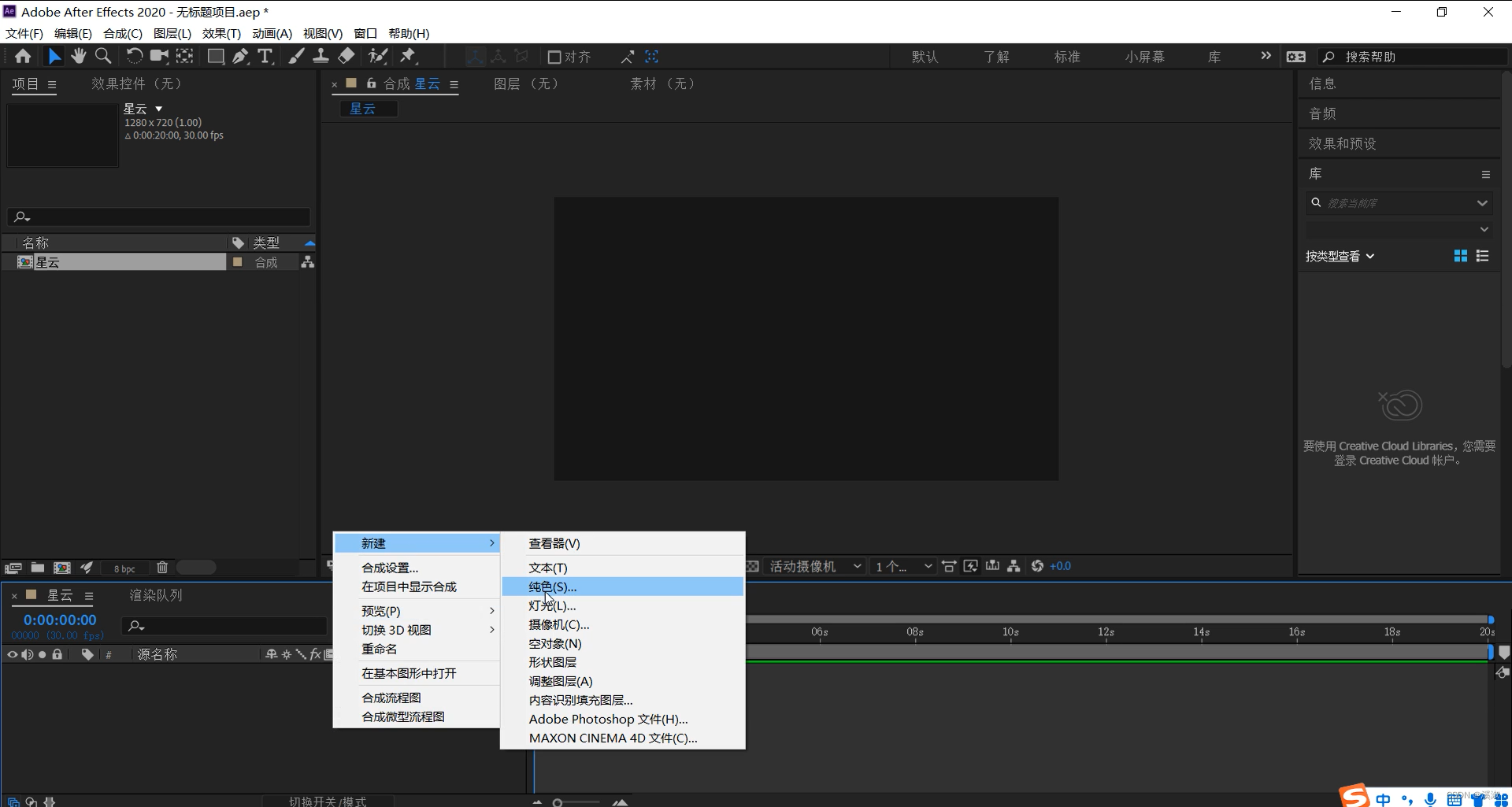
3、 Add to solid color layers “Particular” Special effects ( The two methods )
1) Select the solid color layer -> effect ->RG Trapcode->Particular
 2) Select the solid color layer -> Right mouse click -> effect ->RG Trapcode->Particular
4、 Modify the adjustment “Particular” Parameters in special effects
Set up Emitter(Master) Parameters in :
Emitter Behavior:Explode,Particles/sec:5000,Emitter Type:Sphere,Emitter Size:XYZ Individual,Emitter Size X :1200,Emitter Size Y :0,Emitter Size Z :1200
[ Set the transmitter ( Lord ) Parameters in :
Launch behavior : The outbreak of , The particle / second :5000, Emitter type : spherical , Transmitter size :XYZ individual ,X Transmitter size :1200,Y Transmitter size :0,Z Transmitter size :1200]


Set up Particle(Master) Parameters in :
Life [sec]:10.0,Size:4.5,Size Random:12.0%,color Choose according to your preference ,Blend Mode:Screen
[ Set up the particles ( Lord ) Parameters in :
life [ second ]:10, size :4.5, Random size :12.0%, Color : violet ( Choose according to personal preferences ), Mixed mode : The screen ]

Set up Physics(Master) Parameters in :
Physics Model:Fluid,Fluid Force:Vortex Tube,Buoyancy:0.00,Random Swirl XY:90.00,Swirl Scale:40.00,Vortex Strength:30,Vortex Core Siz:22%
[ Set up physics ( Lord ) Parameters of :
The physical model : Fluid , Fluid force type : Pipe vortex , Buoyancy :0.00,XYZ Random vortex :90.00, Vortex ratio :40.00, Eddy current strength :30, Vortex core size :22%]

Set up Aux System(Master) Parameters in :
Emit:Continuously,Particles/sec:30,Particle Velocity:20.0,Life[sec]:2.5,BlendMode:Screen,
Size:2.5,Size Random:12%,Color From Main:100%
[ Set up the auxiliary system ( Lord ) Parameters of :
launch : continuity , The particle / second :30, Particle velocity :20.0, life [ second ]:2.5, Mixed mode : The screen , size :2.5, Random size :12%, Inherit the primary particle color :100%]


Set up Global Fluid Controls Parameters in :
Fluid Time Factor:0.30,Viscosity:100
[ Set parameters in global fluid control :
Fluid time scaling :0.30, viscosity :100]

5. Add a camera ( The two methods )
1) Layers -> newly build -> The camera

2) stay “ Timeline panel ”/“ Panel monitor ” Right click in the blank -> newly build -> The camera

6、 Moving the camera , The following screen appears

7、 Play to see the effect
边栏推荐
- Att & CK actual combat series - red team actual combat (-)
- Relationship and difference between wav and PCM
- ros(26):ros::Time::now(),ros::Duration,toSec(),toNSec(); Calculate program execution time
- Detailed explanation of RAID disk array, raid classification, advantages and disadvantages
- Opencv:06 morphology
- 運維小白成長記—架構第6周
- mycat 根据字符串范围hash值分库分表
- S32K148_CAN驱动(裸机开发)
- 基于STM32设计的云端健康管理系统(采用阿里云物联网平台)
- Committer identity unknown *** Please tell me who you are...
猜你喜欢

云犀聚焦店播解决方案,加速全球化布局

ATT&CK实战系列——红队实战(—)

通货收缩的市场何时反转?我们该如何操作?2020-03-13

How to invest scientifically and rationally when the global financial crisis strikes? 2020-03-17

GET 请求和 POST 请求的区别与使用示例
Return to risk ratio: the most important indicator of investment opportunities 2020-03-14

Experiment the next day

Deep learning parameter initialization (II) Kaiming initialization with code

Opencv:06 morphology
When will the moon appear
随机推荐
Three minutes to understand the primary key, foreign key, non empty, unique and default constraints in mysql, and how to create a table
Arbitrum Nova release! Create a low-cost and high-speed dedicated chain in the game social field
Database daily question --- day 25: bank account summary II
The difference and use between get request and post request
查看mysql数据表结构的两种方法你会吗?
稳超胜算,历9弥新 | 2022金仓创新产品发布会顺利召开
市场“不确定性”中的投资逻辑 2020-03-18
Stable super odds, 9 years old mixin | 2022 Jincang innovative product launch was successfully held
Competition notes: numpy learning notes
About the "bottom reading" mentality, it makes you exhausted 2020-03-15
go web
二叉树2—对称性递归问题
标签球问题
2022 low voltage electrician examination questions and online simulation examination
MyCat2搭建mysql主从分离
回顾2008年金融危机,做长期主义投资者 2020-03-19
备赛笔记:matplotlib学习笔记a
音频控制常见BUG注意事项
深度梳理:机器学习建模调参方法总结
Enrollment publicity - Jiangnan University