当前位置:网站首页>PostgreSQL在Linux和Windows安裝和入門基礎教程
PostgreSQL在Linux和Windows安裝和入門基礎教程
2022-07-19 15:17:00 【共飲一杯無】
StackOverflow 2022 開發者報告:總體而言,MySQL 依然是最受歡迎的的數據庫。但在專業開發者群體中,PostgreSQL(46.48%)已經超越 MySQL(45.68%)奪得了第一名。看來必須得學一波了啊。

PostgreSQL是一種特性非常齊全的自由軟件的對象-關系型數據庫管理系統(ORDBMS),是以加州大學計算機系開發的POSTGRES,4.2版本為基礎的對象關系型數據庫管理系統。POSTGRES的許多領先概念只是在比較遲的時候才出現在商業網站數據庫中。PostgreSQL支持大部分的SQL標准並且提供了很多其他現代特性,如複雜查詢、外鍵、觸發器、視圖、事務完整性、多版本並發控制等。同樣,PostgreSQL也可以用許多方法擴展,例如通過增加新的數據類型、函數、操作符、聚集函數、索引方法、過程語言等。另外,因為許可證的靈活,任何人都可以以任何目的免費使用、修改和分發PostgreSQL。
今天給大家帶來PostgreSQL安裝和一些基礎教程。
安裝和使用
https://www.runoob.com/postgresql/windows-install-postgresql.html
打開PostgreSQL官網地址:https://www.postgresql.org/,點擊上方的Download。可以看到很多平臺的安裝包,有Linux,macOS,Windows,BSD,Solaris。
Linux 上安裝 PostgreSQL
選擇上方的Linux後可以看到多種Linux平臺,這裏我選擇Red Hat/Rocky/Centos這個,選擇後進入頁面可以看到對應的yum語句。
sudo yum install -y https://download.postgresql.org/pub/repos/yum/reporpms/EL-7-x86_64/pgdg-redhat-repo-latest.noarch.rpm
sudo yum install -y postgresql14-server
sudo /usr/pgsql-14/bin/postgresql-14-setup initdb
sudo systemctl enable postgresql-14
sudo systemctl start postgresql-14

Windows 上安裝 PostgreSQL

選擇Windows版本的下載後,點擊鏈接進入EnterpriseDB網站進行下載https://www.enterprisedb.com/downloads/postgres-postgresql-downloads。
這裏我選擇64比特的Windows系統安裝包進行下載。下載完成後點擊對應的安裝包進行安裝。
選擇對應的安裝比特置。
選擇需要安裝組件。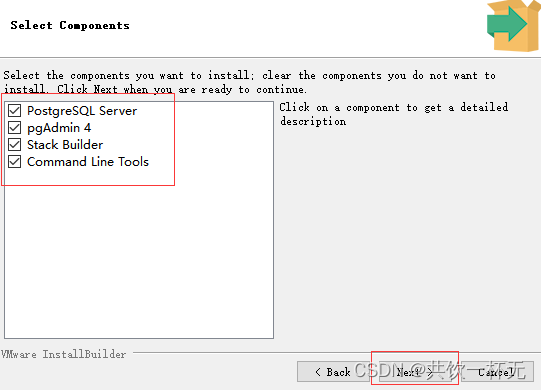
選擇數據庫路徑。
設置超級用戶的密碼,我這裏設置的是zjqzjq。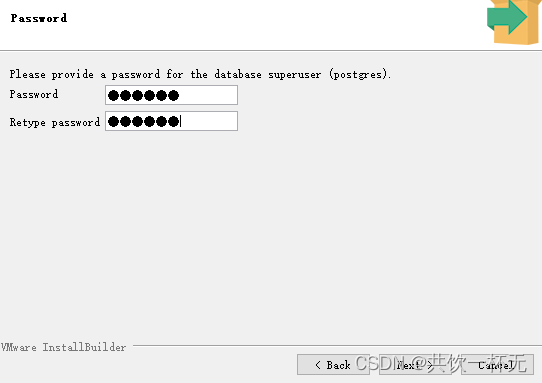
設置端口號,我這裏使用默認的5432。
後續繼續next進行安裝了。
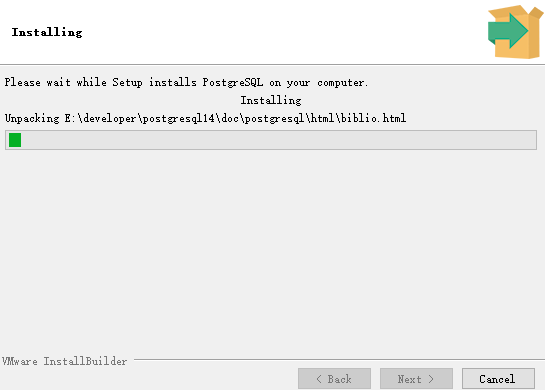
安裝完成後點擊取消勾選,點擊finish完成安裝。
打開pgAdmin4(可以理解成Navicat這種數據庫連接工具。)
進入界面後,點擊左側servers下面的postgresql 14,輸入密碼。
進入後界面如下:
打開SQL shell也可以進入執行相關SQL操作。
前面幾個使用默認的,用戶口令使用上面設置的密碼。
基礎使用
實際操作了下大部分語法和MySQL一樣,可以參考我寫的mysql相關語句和命令匯總:
長文一次說完MySQL常用語句和命令等匯總
也可以參考菜鳥教程的postgresql教程:https://www.runoob.com/postgresql/postgresql-tutorial.html
本文內容到此結束了,
如有收獲歡迎點贊收藏關注️,您的鼓勵是我最大的動力。
如有錯誤疑問歡迎各比特大佬指出。
主頁:共飲一杯無的博客匯總保持熱愛,奔赴下一場山海。

边栏推荐
猜你喜欢
![[gym103660] the 19th Zhejiang University City College Programming Contest vp/s](/img/97/655aa436d42340db4fc12c7c79b863.png)
[gym103660] the 19th Zhejiang University City College Programming Contest vp/s

Leetcode 1296. Divide the array into a set of consecutive numbers (solved)

ICML2022 | 几何多模态对比表示学习

State machine exercise

SBOM (software bill of materials)

3438. Number system conversion

Top domestic experts gathered in Guangzhou to discuss the safety application of health care data

Face technology: the picture of unclear people is repaired into a high-quality and high-definition image framework (with source code download)

08_服务熔断Hystrix

Achieve the effect of software login account by authorizing wechat ~ ~ unfinished
随机推荐
一次函数 T1744 963字符写法
Top domestic experts gathered in Guangzhou to discuss the safety application of health care data
[XSS range 10-14] insert when you see parameters: find hidden parameters and various attributes
Chapter 1 preliminary knowledge
MySQL installation
Icml2022 | geometric multimodal comparative representation learning
Tianqin Chapter 9 after class exercise code
06_服务调用Feign
微信小程序7-云存储
Unix ls
Wechat applet 8 cloud function
JVM common tuning configuration parameters
【Renesas RA6M4开发板之I2C读取mpu6050】
A - Play on Words
csrf防护机制
Redis high frequency interview questions full version
Unix ls
ICML2022 | 几何多模态对比表示学习
CloudBees CI使用Velero进行灾备(DR)概念验证
【xss靶场10-14】见参数就插:寻找隐藏参数、各种属性