当前位置:网站首页>Azkaban installation documentation
Azkaban installation documentation
2022-07-19 12:57:00 【InfoQ】
1 Azkaban Introduce

2 Preparation before construction
2.1 Description of the overall installation process
2.2 Installation version description
2.3 Resource download address
2.4 Description of this installation node
3 Set up the environment
3.1 Preparations before installation
3.1.1 Check java Environmental Science ( All nodes )
[[email protected] flume]# java -version

3.1.2 Check if there is spark(exec node )
[[email protected] ~]# spark-submit --version

3.2 Import azkaban-db Related scripts
- take azkaban-db-0.1.0-SNAPSHOT.tar.gz Upload to /app/src/azkaban

- decompression azkaban-db-0.1.0-SNAPSHOT.tar.gz
[[email protected] ~]# tar -zxvf azkaban-db-0.1.0-SNAPSHOT.tar.gz
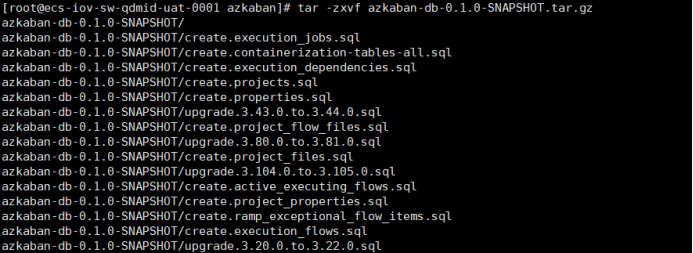

- Execute table creation statement
[[email protected] bin]$ mysql -uazkaban -pAzkaban*123qwe! -h10.60.247.213
mysql> CREATE USER 'azkaban'@'%' IDENTIFIED BY 'azkaban';
mysql> GRANT ALL PRIVILEGES ON *.* TO 'azkaban'@'%';
mysql> FLUSH PRIVILEGES;
mysql> CREATE DATABASE azkaban;
mysql> use azkaban;

mysql>source /app/src/azkaban/azkaban-db-0.1.0-SNAPSHOT/create-all-sql-0.1.0-SNAPSHOT.sql

mysql> show tables;

3.3 install azkaban-exec-server
- take /app/azkaban The directory is assigned to hdfs user , And switch to hdfs
[[email protected] app]# chown -R hdfs:hdfs azkaban/

- take azkaban-exec-server-0.1.0-SNAPSHOT.tar.gz Upload to the node planned in advance , The catalogue is /app/azkaban And unzip azkaban-exec-server-0.1.0-SNAPSHOT.tar.gz
[[email protected] azkaban]# tar -zxvf azkaban-exec-server-0.1.0-SNAPSHOT.tar.gz

- Modify configuration item conf The configuration file under the directory azkaban.properties

# Azkaban Personalization Settings
azkaban.name=Sea
azkaban.label=Beluga Azkaban
azkaban.color=#FF3601
azkaban.default.servlet.path=/index
web.resource.dir=web/
default.timezone.id=Asia/Shanghai
# Azkaban UserManager class
user.manager.class=azkaban.user.XmlUserManager
user.manager.xml.file=conf/azkaban-users.xml
# Loader for projects
executor.global.properties=conf/global.properties
azkaban.project.dir=projects
# Velocity dev mode
velocity.dev.mode=false
# Azkaban Jetty server properties.
jetty.use.ssl=false
jetty.maxThreads=25
jetty.port=19099
# Where the Azkaban web server is located
azkaban.webserver.url=http://10.60.247.50:19099
# mail settings
mail.sender=
mail.host=
# User facing web server configurations used to construct the user facing server URLs. They are useful when there is a reverse proxy between Azkaban web servers and users.
# enduser -> myazkabanhost:443 -> proxy -> localhost:8081
# when this parameters set then these parameters are used to generate email links.
# if these parameters are not set then jetty.hostname, and jetty.port(if ssl configured jetty.ssl.port) are used.
# azkaban.webserver.external_hostname=myazkabanhost.com
# azkaban.webserver.external_ssl_port=443
# azkaban.webserver.external_port=8081
job.failure.email=
job.success.email=
lockdown.create.projects=false
cache.directory=cache
# JMX stats
jetty.connector.stats=true
executor.connector.stats=true
# Azkaban plugin settings
azkaban.jobtype.plugin.dir=plugins/jobtypes
# Azkaban mysql settings by default. Users should configure their own username and password.
database.type=mysql
mysql.port=3306
mysql.host=10.60.247.213
mysql.database=azkaban
mysql.user=azkaban
mysql.password=Azkaban*123qwe!
mysql.numconnections=100
# Azkaban Executor settings
executor.maxThreads=50
executor.flow.threads=30
executor.props.resolve.overrideExisting.enabled=false
- Startup and shutdown
[[email protected] azkaban-exec-server-0.1.0-SNAPSHOT]$ ./bin/start-exec.sh

[[email protected] azkaban-exec-server-0.1.0-SNAPSHOT]$ curl -G "localhost:$(<./executor.port)/executor?action=activate" && echo


[[email protected] azkaban-exec-server-0.1.0-SNAPSHOT]$ ./bin/shutdown-exec.sh

3.4 install azkaban-web-server
- /app/azkaban The directory is assigned to hdfs user , And switch to hdfs user
[[email protected] app]# chown -R hdfs:hdfs azkaban/

- take azkaban-web-server-0.1.0-SNAPSHOT.tar.gz Upload to the node planned in advance , The catalogue is /app/azkaban And unzip azkaban-web-server-0.1.0-SNAPSHOT.tar.gz
[[email protected] azkaban]# tar -zxvf azkaban-web-server-0.1.0-SNAPSHOT.tar.gz

- Generate the key
[[email protected] azkaban-web-server-0.1.0-SNAPSHOT]# keytool -keystore keystore -alias jetty -genkey -keyalg RSA


- Modify configuration item conf The configuration file under the directory azkaban.properties
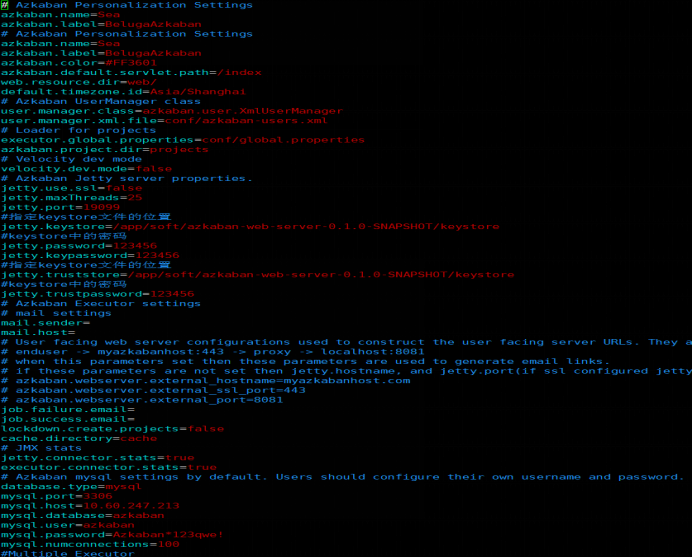
# Azkaban Personalization Settings
azkaban.name=Sea
azkaban.label=BelugaAzkaban
# Azkaban Personalization Settings
azkaban.name=Sea
azkaban.label=BelugaAzkaban
azkaban.color=#FF3601
azkaban.default.servlet.path=/index
web.resource.dir=web/
default.timezone.id=Asia/Shanghai
# Azkaban UserManager class
user.manager.class=azkaban.user.XmlUserManager
user.manager.xml.file=conf/azkaban-users.xml
# Loader for projects
executor.global.properties=conf/global.properties
azkaban.project.dir=projects
# Velocity dev mode
velocity.dev.mode=false
# Azkaban Jetty server properties.
jetty.use.ssl=false
jetty.maxThreads=25
jetty.port=19099
# Appoint keystore The location of the file
jetty.keystore=/app/soft/azkaban-web-server-0.1.0-SNAPSHOT/keystore
#keystore The password
jetty.password=123456
jetty.keypassword=123456
# Appoint keystore The location of the file
jetty.truststore=/app/soft/azkaban-web-server-0.1.0-SNAPSHOT/keystore
#keystore The password
jetty.trustpassword=123456
# Azkaban Executor settings
# mail settings
mail.sender=
mail.host=
# User facing web server configurations used to construct the user facing server URLs. They are useful when there is a reverse proxy between Azkaban web servers and users.
# enduser -> myazkabanhost:443 -> proxy -> localhost:8081
# when this parameters set then these parameters are used to generate email links.
# if these parameters are not set then jetty.hostname, and jetty.port(if ssl configured jetty.ssl.port) are used.
# azkaban.webserver.external_hostname=myazkabanhost.com
# azkaban.webserver.external_ssl_port=443
# azkaban.webserver.external_port=8081
job.failure.email=
job.success.email=
lockdown.create.projects=false
cache.directory=cache
# JMX stats
jetty.connector.stats=true
executor.connector.stats=true
# Azkaban mysql settings by default. Users should configure their own username and password.
database.type=mysql
mysql.port=3306
mysql.host=10.60.247.213
mysql.database=azkaban
mysql.user=azkaban
mysql.password=Azkaban*123qwe!
mysql.numconnections=100
#Multiple Executor
azkaban.use.multiple.executors=true
azkaban.executorselector.filters=StaticRemainingFlowSize,MinimumFreeMemory,CpuStatus
azkaban.executorselector.comparator.NumberOfAssignedFlowComparator=1
azkaban.executorselector.comparator.Memory=1
azkaban.executorselector.comparator.LastDispatched=1
azkaban.executorselector.comparator.CpuUsage=1
- Startup and shutdown
[[email protected] azkaban-web-server-0.1.0-SNAPSHOT]$ ./bin/start-web.sh

[[email protected] azkaban-web-server-0.1.0-SNAPSHOT]$ ./bin/shutdown-web.sh

边栏推荐
- 超声波传感器(CHx01) 学习笔记 Ⅲ - I2C读写操作
- MOF customized product | n-k2ti4o9/g-c3n4/uio-66 ternary composite | paper based au-aginse2-zif-8 Nanocomposite
- 2022 global developer salary exposure: China ranks 19th, with an average annual salary of $23790
- Opencv:06 morphology
- Possible problems in inserting Excel data into MySQL database
- 超声波传感器(CH101&ch201) - Ⅱ
- Uio-66 - (COOH) 2 modified polyamide nanofiltration membrane | zif-8/pvp composite nanofiber membrane | uio-66-nh2 modified polyamide nanofiltration membrane
- R language -- principle of Cox model calibration curve (I) data source
- If you merge cells by Excel, export excelutils
- Committer identity unknown *** Please tell me who you are...
猜你喜欢

OpenCV:06形态学
 [email protected] Support) | uio-66/coso composite | zif-67 nanocrystalline sur"/>
Copper sulfide nanoparticles /zif-8 Composites( [email protected] Support) | uio-66/coso composite | zif-67 nanocrystalline sur

How to invest scientifically and rationally when the global financial crisis strikes? 2020-03-17

Qiyue supplies cumof nanocrystals loaded with methylene blue | femof nanosheets grown in situ on foam nickel | oxide nanowires /zif MOFs sugar gourd like Composites

音频常见端子剖析图---再也不会搞错了

Structure memory alignment, bit segment, union

The difference and use between get request and post request
Do you still need to release the database connection manually with typeorm

标签球问题
Ultrasonic sensor (ch101 & ch201) - Ⅱ

随机推荐
Yu Meimei, Ji Gongdu
学习记录:调用TFTLCD液晶屏
[C language programming 8] branch predictor
通货收缩的市场何时反转?我们该如何操作?2020-03-13
RingBuffer
The difference and use between get request and post request
Differences between get requests and post requests and usage examples
Can you view MySQL data table structure in two ways?
云犀聚焦店播解决方案,加速全球化布局
Competition notes: numpy learning notes
Enrollment publicity - Jiangnan University
Redis逻辑集群创建
Is the career direction of test / development programmers over 35 a turning point in the workplace?
【错误记录/selectpicker】dropdown menu显示位置出现偏移
Lanthanide metal organic skeleton( [email protected] )|Rhodamine 6G modified MOF material | catalase @zif composite | MOF
LeetCode_前缀和_中等_523.连续的子数组和
VMware导入ova/ovf虚拟机文件
Metal organic framework / nitrogen carbide nano sheet (uio-66/hocn) composite | mil-101 loaded Au Pd alloy nanoparticles | chemical reagent MOF customization
ASP. Net collaborative OA office service management platform source code
Ultrasonic sensor (ch101 & ch201) - I