当前位置:网站首页>Anaconda的基本使用
Anaconda的基本使用
2022-07-16 04:54:00 【warm...】
目 录
一、基本使用
1.1 创建环境
1.1.1 基本创建
语法:
conda create -n 环境名
1.1.2 创建指定Python版本环境
语法:
conda create -n 环境名 python=3.7
创建一个环境,环境名为自己想要的命名
1.2 查看环境信息
conda info --envs

(base)为conda默认的环境信息,默认是base环境
yolo5为自创的conda环境,是执行1.1命令的结果
(base)环境是conda默认的设置,当然也可以关闭,执行如下命令关闭
conda config --set auto_activate_base False
source ~/.bashrc
复原执行如下命令
conda config --set auto_activate_base True
source ~/.bashrc
示例: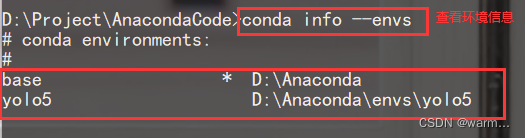
1.3 激活环境
conda activate 环境名
激活环境之后,路径前的base就会转换成你要激活的环境名,如图二
示例:

1.4 安装环境包
进入你创建的环境之后就可以安装你所需要的包了。当你从github上clone下来的项目中包含有requirements.txt时,也可以直接安装该文件中的所有包。
pip install package

或者pip install package -i https://pypi.tuna.tsinghua.edu.cn/simple(清华镜像)
或者pip install package -i  https://pypi.doubanio.com/simple/ (豆瓣镜像)

或者 pip install -r requirements.txt(安装requirements.txt文件中的包)

package指你所要按章的包
1.5 查看环境中所安装的包
pip list
该命令就是显示你当前环境安装的包
1.6 退出当前环境
conda deactivate
该命令为退出当前的环境,执行后可以看到前面的你创建的环境名已经去掉
1.7 删除当前环境
conda remove -n 环境名 --all
1.8 查看conda版本
conda --version

1.9 查看下载源
conda config --show-sources
1.10 修改下载源
# 清华下载源
conda config --add channels https://mirrors.tuna.tsinghua.edu.cn/anaconda/pkgs/free/
conda config --add channels https://mirrors.tuna.tsinghua.edu.cn/anaconda/pkgs/main/

# 中科大镜像源
conda config --add channels https://mirrors.ustc.edu.cn/anaconda/pkgs/main/
conda config --add channels https://mirrors.ustc.edu.cn/anaconda/pkgs/free/
conda config --add channels https://mirrors.ustc.edu.cn/anaconda/cloud/conda-forge/
conda config --add channels https://mirrors.ustc.edu.cn/anaconda/cloud/msys2/
conda config --add channels https://mirrors.ustc.edu.cn/anaconda/cloud/bioconda/
conda config --add channels https://mirrors.ustc.edu.cn/anaconda/cloud/menpo/

# 豆瓣下载源
conda config --add channels http://pypi.douban.com/simple

# 添加下载源后,设置搜索时显示通道地址
conda config --set show_channel_urls yes
1.11 删除下载源
conda config --remove channels 要删除的下载源地址
边栏推荐
猜你喜欢

Chinese garbled code in kettle version 8.2

Feign implements inter service and passes headers when calling

marginalization

Cultural tourism night tour project helps the development of night economy

Idea merges dev branch code into master and so on
Marginalization
![[phantom engine UE] ue5 dynamic Pak resource loading method](/img/0e/5eb6a26b37279458b29fa092ed56f5.png)
[phantom engine UE] ue5 dynamic Pak resource loading method

腾讯员工发帖找对象,表示偏爱程序员!评论火了......丨黑马头条

T100 user defined application instructions (azzi650)

PMP practice once a day | don't get lost in the exam -7.15
随机推荐
Is it safe to open an account for flush stocks? How to buy REITs funds
The principle and implementation of PageRank
SSH based online mall
【虚幻引擎UE】UE5动态PAK资源加载方法
Introduction to T100 interface development steps
Keep an IT training diary 068- a little unbalanced in my heart
清楚临时表、查看临时表占用内存
University epidemic prevention and control system based on jsp+servlet
PMP每日一练 | 考试不迷路-7.14
Matlab manipulator modeling kinematics simulation + trajectory planning
Detailed steps for T100 to develop a new two gear program
Matlab机械臂建模运动学仿真+轨迹规划
xxx.whl is not a supported wheel on this platfo解决办法
【gbase】修改字段的varchar长度
【品牌专场】跨越 X 突破,音视频聚力新机遇
Solution -- Exploration
T100debug operation record
MySQL的DML(数据操纵语言)
Binary search tree BST
Audio focus arbitration strategy