当前位置:网站首页>【Antv G2】折线图如何添加点击事件(点击任意位置即可获取折线上点的值)
【Antv G2】折线图如何添加点击事件(点击任意位置即可获取折线上点的值)
2022-07-17 00:14:00 【yulamz】
需求分析
最近接到一个需求,要求在折线图上点任意位置,就可以获取到用户当前看到的tooltip里的信息。拿到用户当前所看到的日期之后,再发送请求获取该时间点一些其他的数据展示出来。如果有玩基金或者股票投资的同学相信对这种场景并不陌生。
这个需求的本质就是给折线图添加点击事件,只是我在网络上搜索了一下,大部分人总结的方案都是只有点击折线的圆形折点才能触发,这样的操作对于用户来说可能是过于苛刻了。所以,我下面总结了一下点击折线图任意位置都可触发点击事件的方案。
预期效果
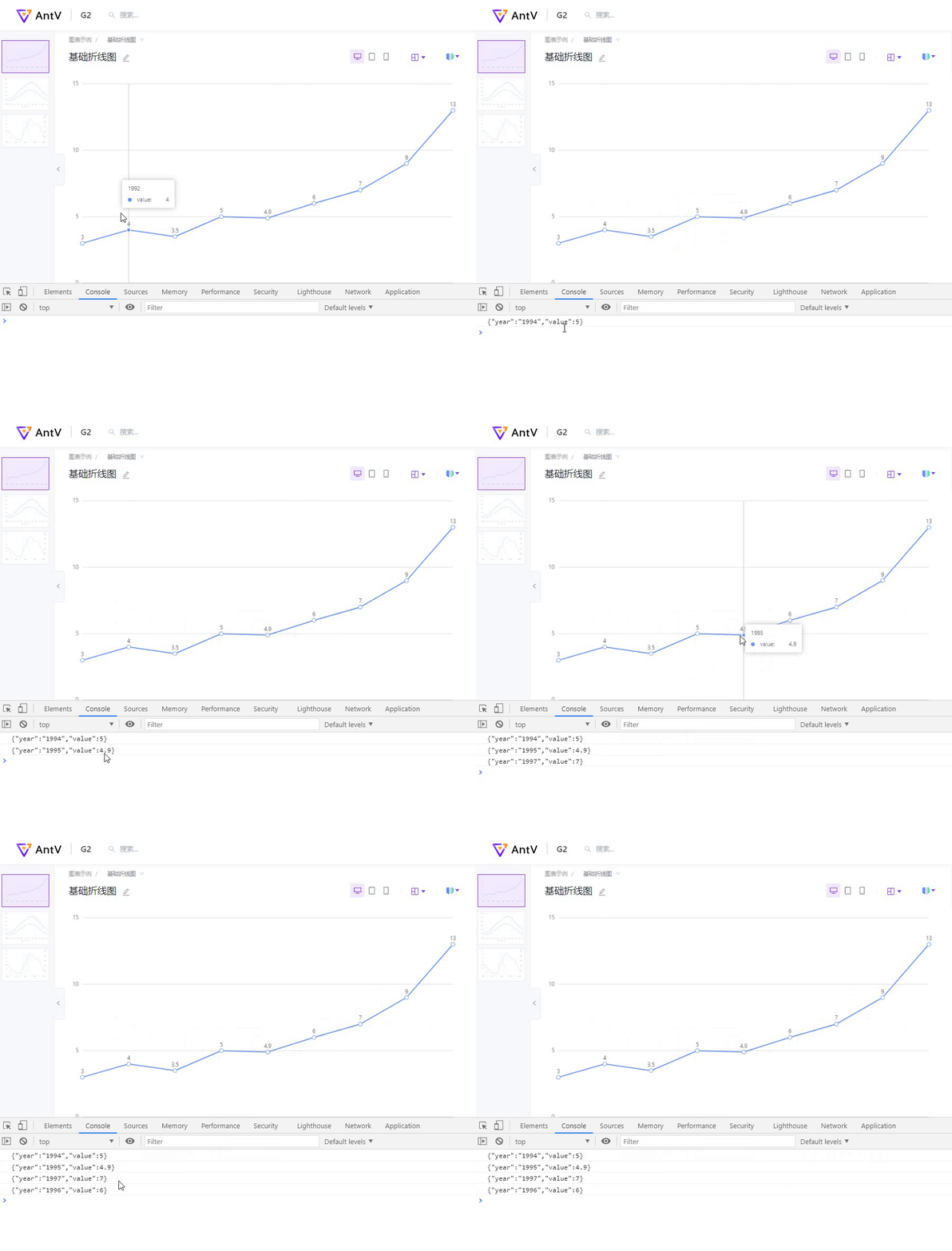
在Antv G2的官网上找了一个基础折线图,实现的效果如下:鼠标移动到画布任意位置,tooltip都能显示出相关信息。点击鼠标时,可以拿到当前tooltip显示的信息。
实现思路
- 用户的鼠标在折线图上移动时,监听tooltip的变化,通过一个变量记录tooltip的当前值。
对应的事件名称:tooltip:change - 利用G2提供的组合事件,监听折线图的绘图区被 click 的时候。此时,拿到tooltip的当前值做任意你需要的操作即可。
对应的事件名称:plot:click
代码演示
import {
     Chart } from '@antv/g2';

const data = [
  {
     year: '1991', value: 3 },
  {
     year: '1992', value: 4 },
  {
     year: '1993', value: 3.5 },
  {
     year: '1994', value: 5 },
  {
     year: '1995', value: 4.9 },
  {
     year: '1996', value: 6 },
  {
     year: '1997', value: 7 },
  {
     year: '1998', value: 9 },
  {
     year: '1999', value: 13 },
];
const chart = new Chart({

  container: 'container',
  autoFit: true,
  height: 500,
});

let hoverData = {
    }; // new Add -- 如果是在vue中使用,把该变量定义在data中即可

chart.data(data);
chart.scale({

  year: {

    range: [0, 1],
  },
  value: {

    min: 0,
    nice: true,
  },
});

chart.tooltip({

  showCrosshairs: true, // 展示 Tooltip 辅助线
  shared: true,
});

chart.line().position('year*value').label('value');
chart.point().position('year*value');

// new Add -- 监听 tooltip:change 事件
chart.on('tooltip:change', ev => {

  // 自己可以在控制台打印一下ev,看下里面的结构,找到自己所需要的信息
  hoverData = ev.data.items[0].data;
})

// new Add -- 监听绘图区plot的点击事件
chart.on('plot:click', ev => {

  // 当用户在画布上点击时,这个时候用户看到tooltip上的数据其实已经被存在了hoverData里。拿到hoverData,相当于你拿到了折线上相关点的数据,之后再有什么需求都可以实现啦!
  console.log(JSON.stringify(hoverData));
})

chart.render();
边栏推荐
- Leetcode 198:House Robber
- Build Ozzie environment
- 笔记一之IDL基础内容:常用数据类型_创建数组_类型转换_print输出_基本运算_关系运算
- Gdb+vscode for debugging 7 - how to debug when there is a segmentation default/ segment error in the program?
- ENVI_ Idl: read the NO2 column content of all OMI products and calculate the monthly average, quarterly average, annual average + analysis
- 保留两位小数,并向上取值
- [hdrp HD rendering pipeline] create hdrp project and upgrade the built-in pipeline project to hdrp project
- 【工具篇】Unity2D人物控制器,控制2D玩家移动跳跃,四方向和水平方向
- ENVI_IDL: 读取文本文件并输出为Geotiff格式+简单均值插值
- Aurix development studio installation
猜你喜欢

ENVI_ Idl: read the NO2 column content of all OMI products and calculate the monthly average, quarterly average, annual average + analysis

leetcode力扣经典问题——42.接雨水

池式组件之线程池篇

STL--queue容器

ENVI_ Idl: batch process the re projection of MODIS swath data and output it to GeoTIFF format + detailed analysis

ENVI:(2022年最详细的教程)自定义坐标系

成信大ENVI_IDL第三周课堂内容1:读取OMI数据(HDF5文件)以及输出+解析

DoubleDQN的理论基础及其代码实现【Pytorch + Pendulum-v0】
ENVI_IDL:批量处理Modis Swath数据的重投影并输出为Geotiff格式+详细解析

ENVI_ Idl: batch Reproject MODIS swath products and specify the range output as GeoTIFF format + parsing
随机推荐
ENVI_IDL:讀取所有OMI產品的NO2柱含量並計算月均值、季均值、年均值+解析
成信大ENVI_IDL第二周课后作业:提取n个点的气溶胶厚度+详细解析
Gdb+vscode for debugging 2 - GDB breakpoint related
安装websocketpp
[tools] Application of SQLite local database in unity3d
[unity Editor Extension] the pre-processing and post-processing pictures of unity assets are automatically transferred to sprite2d
(附word操作以及视频讲解)使用ARCGIS进行地图配准_投影变换_普通地图制作_专题地图制作
Oozie integrated sqoop
STL--vector容器
LeetCode:动态规划中的多重背包问题【一个模板解决所有~】
Cookie和Session的区别
【Unity面板属性扫盲】导入纹理后设置Texture Import Settings
MATLAB :Warning: the font “Times” is not available
搭建map-reduce开发环境
Lecture 2 BTC cryptography principles (notes)
软件测试技术期中测试小结|软件测试基础&执行测试&测试设计和开发
二叉树的遍历
动态规划问题 - 小兵向前冲
Recursive and recursive learning notes
STL--string容器