当前位置:网站首页>JDBC connection to MySQL database
JDBC connection to MySQL database
2022-07-19 03:06:00 【Tatakai!!!】
List of articles
JDBC
Be careful : Omit many knowledge points , Prefer to practice , Please check the official documents for more information !
JDBC Quick start
idea Shortcut key :
ctrl + shift + alt + s—— Open project structure management ( Setting module, etc )
- Create a new empty project
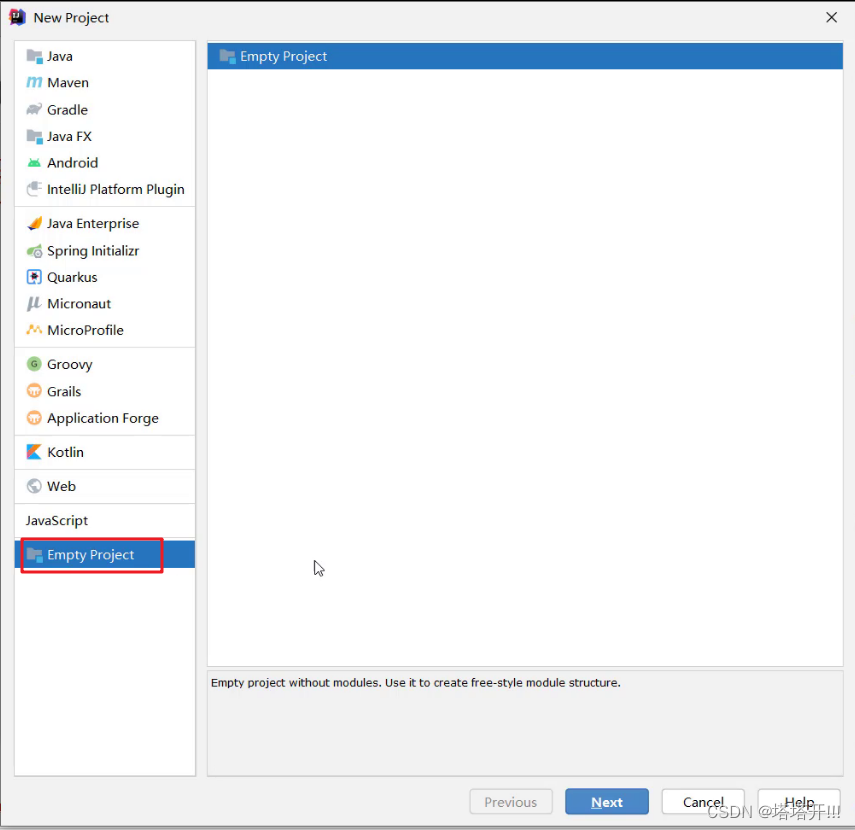
- Define the name of the project , And specify the location

- Set up the project ,JDK edition 、 Compiled version
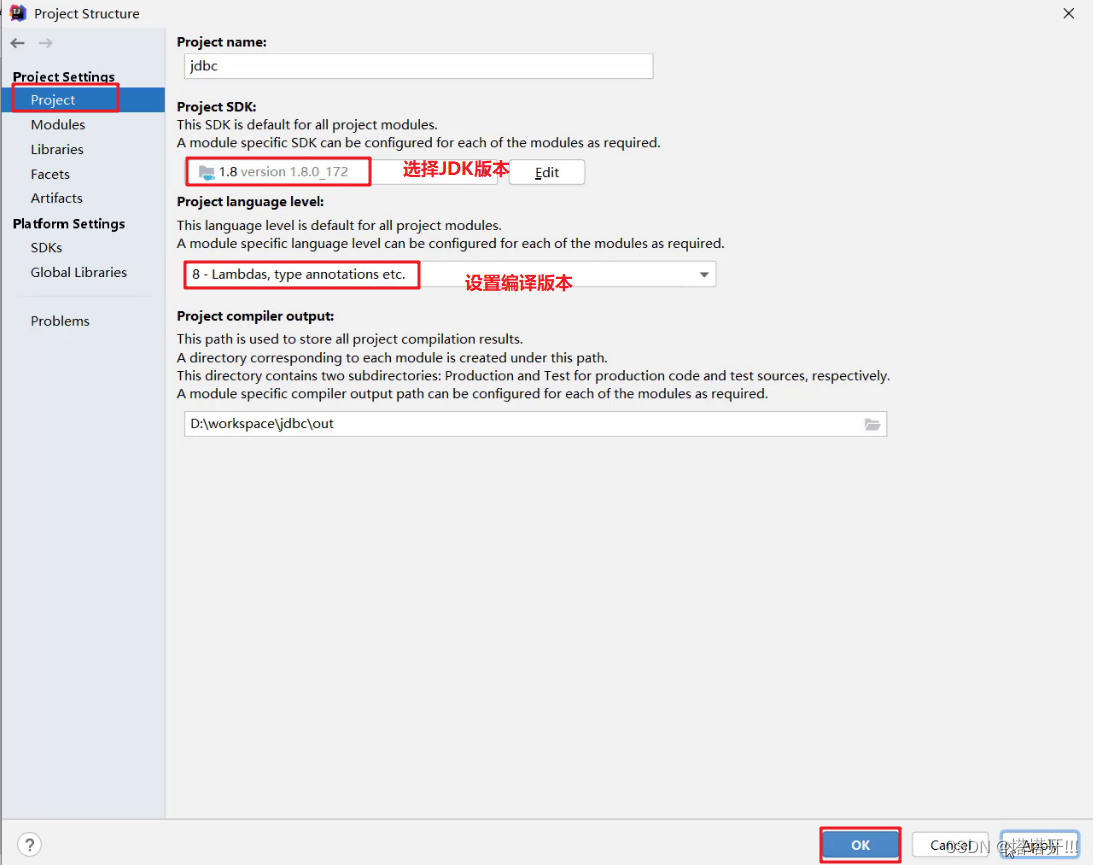
- Create a module , Specify the name and location of the module

Import driver package
take mysql The driver package is placed under the module lib Catalog ( Name at will ) Next , And put the jar Add package as library file

- When adding as a library file , There are three options
- Global Library : Global availability
- Project Library : The project works
- Module Library : Module valid

- stay src Create a class

Pay special attention to
MySQL8 and 8 Before:
- Some differences when registering drivers ,8 Then add
cj- To write
urlThe difference between
Here is given 8 Later template :
        // 1. Registration drive
        Class.forName("com.mysql.cj.jdbc.Driver");
        //2. For a link (mysql8 Subsequent connections )
        String url = "jdbc:mysql://127.0.0.1:3306/db1?useUnicode=true&characterEncoding=utf8&useSSL=false&serverTimezone=Asia/Shanghai";
        String username = "root";
        String password = "root";
        Connection conn = DriverManager.getConnection(url,username,password);
Quick start code :
package com.test.jdbc;

import com.mysql.cj.x.protobuf.MysqlxDatatypes;

import java.sql.Connection;
import java.sql.DriverManager;
import java.sql.Statement;

public class JDBCDemon {

    public static void main(String[] args) throws Exception{

        // 1. Registration drive
        Class.forName("com.mysql.cj.jdbc.Driver");
        //2. For a link (mysql8 Subsequent connections )
        String url = "jdbc:mysql://127.0.0.1:3306/db1?useUnicode=true&characterEncoding=utf8&useSSL=false&serverTimezone=Asia/Shanghai";
        String username = "root";
        String password = "root";
        Connection conn = DriverManager.getConnection(url,username,password);

        //3. Definition sql
        String sql = "update account set money = 100 where id = 1";

        //4.  Access to perform sql The object
        Statement stmt = conn.createStatement();

        //5.  perform sql
        int count = stmt.executeUpdate(sql);

        //6.  Processing results
        System.out.println(count);

        //7.  Release resources
        conn.close();
        stmt.close();

    }
}
Configure with configuration file :

The configuration file :
- among , The configuration file is declared in the src Under the table of contents :【jdbc.properties】
Just copy the previous one and change it !

    @Test
    public void test2() throws Exception{

        // 1. Load profile
        Properties properties = new Properties();
        properties.load(JDBCDemon.class.getClassLoader().getResourceAsStream("jdbc.properties"));
        //2.  Read configuration file
        String username = properties.getProperty("username");
        String password = properties.getProperty("password");
        String url = properties.getProperty("url");
        String driver = properties.getProperty("driver");
        //3.  load ( register ) drive
        Class.forName(driver);
        //4. Get database connection object
        Connection conn = DriverManager.getConnection(url,username,password);

        //5. Definition sql
        String sql = "update account set money = 20 where id = 1";

        //6.  Access to perform sql The object
        Statement stmt = conn.createStatement();

        //7.  perform sql
        int count = stmt.executeUpdate(sql);

        //6.  Processing results
        System.out.println(count);

        //8.  Release resources
        conn.close();
        stmt.close();
    }
}
Database transactions
Let's review MySQL Operation of transaction management :
- Open transaction : BEGIN; perhaps START TRANSACTION;
- Commit transaction : COMMIT;
- Roll back the transaction : ROLLBACK;
MySQL The default is to automatically commit transactions
Next learn JDBC Methods of transaction management .
Connection A few words define 3 Corresponding methods :
Open transaction

Participate in autoCommit Indicates whether the transaction is automatically committed ,true Represents an automatic commit transaction ,false Indicates that the transaction is committed manually . To start a transaction, you need to set this parameter to false.
Commit transaction

- Roll back the transaction

Transaction processing :
Once the data is submitted , You can't roll back .
When does data mean submission ?
- When a connection object is created , The default is to commit transactions automatically : One at a time SQL When the sentence is , If it works , It will automatically submit to the database , Instead of rolling back .
- ** Close database connection , The data will be submitted automatically .** If multiple operations , Each operation uses its own separate connection , There is no guarantee that the transaction . That is, multiple operations of the same transaction must be under the same connection .
DBUtils In order to make multiple SQL Statement is executed as a transaction :
- call Connection Object's setAutoCommit(false); To cancel the auto commit transaction
- Of all the SQL After the statements are executed successfully , call commit(); Method commit transaction
- In the event of an exception , call rollback(); Method to roll back the transaction
If at this time Connection Not shut down , It can also be reused , You need to restore its auto commit state setAutoCommit(true). Especially when using database connection pool technology , perform close() Before the method , It is recommended that the auto commit state be restored .
【 Case study 】
package com.test.jdbc;

import java.sql.Connection;
import java.sql.DriverManager;
import java.sql.Statement;

/** * JDBC API  Detailed explanation :Connection */
public class JDBCDemo3_Connection {


    public static void main(String[] args) throws Exception {

        // 1. Registration drive
        Class.forName("com.mysql.cj.jdbc.Driver");
        //2. For a link (mysql8 Subsequent connections )
        String url = "jdbc:mysql://127.0.0.1:3306/db1?useUnicode=true&characterEncoding=utf8&useSSL=false&serverTimezone=Asia/Shanghai";
        String username = "root";
        String password = "root";
        Connection conn = DriverManager.getConnection(url,username,password);

        //3.  Definition sql
        String sql1 = "update account set money = 2 where id = 1";
        String sql2 = "update account set money = 3 where id = 2";

        //4.  Access to perform sql The object of  Statement
        Statement stmt = conn.createStatement();

        try {

            // ============ Open transaction ==========
            conn.setAutoCommit(false);
            //5.  perform sql
            int count1 = stmt.executeUpdate(sql1);// Rows affected
            //6.  Processing results
            System.out.println(count1);
            int i = 3/0;
            //5.  perform sql
            int count2 = stmt.executeUpdate(sql2);// Rows affected
            //6.  Processing results
            System.out.println(count2);

            // ============ Commit transaction ==========
            // The program runs here , Indicates that there are no problems , Then you need to commit the transaction
            conn.commit();
        } catch (Exception e) {

            // ============ Roll back the transaction ==========
            // When an exception occurs, the program will execute to this place , At this point, the transaction needs to be rolled back
            conn.rollback();
            e.printStackTrace();
        } finally {

            //==== Recover every time DML Automatic submission function of operation ===
            conn.setAutoCommit(true);
            //7.  Release resources
            stmt.close();
            conn.close();
        }

    }
}
result : Although the first SQL Execution succeeded , But when something goes wrong , Throw and the transaction rolls back , Therefore, the data in the database has not changed
Be careful : One conn Corresponding to a transaction !
ResultSet
ResultSet( Result set object ) effect :
- Encapsulates the SQL The result of the query statement .
And executed DQL Statement will return the object , Corresponding execution DQL The method of statement is as follows :
ResultSet executeQuery(sql): perform DQL sentence , return ResultSet object
So we need to start with ResultSet Get the data we want from the object .ResultSet Object provides methods to manipulate query result data , as follows :
boolean next()
- Move the cursor forward one line from the current position
- Judge whether the current line is a valid line
Method return value description :
- true : Effective navigation , There is data in the current row
- false : Invalid line , There is no data in the current row
xxx getXxx( Parameters ): get data
- xxx : data type ; Such as : int getInt( Parameters ) ;String getString( Parameters )
- Parameters
- int Parameters of type : Number of columns , from 1 Start
- String Parameters of type : Column name
【 Case study 】:
- demand : Inquire about account Account table data , Encapsulated in the Account In the object , And store it in ArrayList Collection

- Code implementation
Account Object code :
package com.test.jdbc;

public class Account {

    private Integer id;
    private String name;
    private int money;
    public Account() {


    }
    public Account(Integer id, String name, int money) {

        this.id = id;
        this.name = name;
        this.money = money;
    }

    public Integer getId() {

        return id;
    }

    public void setId(Integer id) {

        this.id = id;
    }

    public String getName() {

        return name;
    }

    public void setName(String name) {

        this.name = name;
    }

    public int getMoney() {

        return money;
    }

    public void setMoney(int money) {

        this.money = money;
    }

    @Override
    public String toString() {

        return "Account{" +
                "id=" + id +
                ", name='" + name + '\'' +
                ", money=" + money +
                '}';
    }
}
Test code :
 /** *  Inquire about account Account table data , Encapsulated in the Account In the object , And store it in ArrayList Collection  * 1.  Defining entity classes Account * 2.  Query data , Package to Account In the object  * 3.  take Account Objects in ArrayList Collection  */
	@Test
    public void testAccountTable() throws Exception{

        //  Load profile
        Properties properties = new Properties();
        properties.load(JDBCDemon.class.getClassLoader().getResourceAsStream("jdbc.properties"));
        //  Read configuration file
        String username = properties.getProperty("username");
        String password = properties.getProperty("password");
        String url = properties.getProperty("url");
        String driver = properties.getProperty("driver");
        //  The load driver
        Class.forName(driver);
        // Get the connection
        Connection conn = DriverManager.getConnection(url,username,password);

        // Definition sql
        String sql = "select * from account";
        //  Access to perform sql The object
        Statement stmt = conn.createStatement();
        //  perform sql
        ResultSet rs = stmt.executeQuery(sql);

        //  Create set
        List<Account> list = new ArrayList<>();

        while(rs.next()){

            //  establish account object
            Account account = new Account();
            //  get data
            int id = rs.getInt("id");
            String name = rs.getString("name");
            int money = rs.getInt("money");

            //  assignment
            account.setId(id);
            account.setName(name);
            account.setMoney(money);

            //  Deposited in the collection
            list.add(account);
        }
        // result
        System.out.println(list);

        //  Release resources
        conn.close();
        stmt.close();
    }
Use PreparedStatement
Use PreparedStatement Access to perform sql The object :
- Cache faster
- There will be no Statement Acquired
SQLInjection problem
【 Case study 】: Simulate user login function
 public void testLogin() throws Exception{

        //  Load profile
        Properties properties = new Properties();
        properties.load(JDBCDemon.class.getClassLoader().getResourceAsStream("jdbc.properties"));

        // Read configuration file
        String username = properties.getProperty("username");
        String password = properties.getProperty("password");
        String url = properties.getProperty("url");
        String driver = properties.getProperty("driver");
        // The load driver
        Class.forName(driver);
        // Get the connection
        Connection conn = DriverManager.getConnection(url,username,password);

        //  Received the user name entered by the user   and   password
        String u_name = " Zhang San ";
        String u_pwd = "123456";
        // String pwd = "' or '1' = '1";  It won't happen again SQL Injection problem

        // Definition sql
        String sql = "select * from user where name = ? and pwd = ?";

        // Access to perform sql The object (pstmt object )
        PreparedStatement pstmt = conn.prepareStatement(sql);

        // Set up ? Value
        pstmt.setString(1, u_name);
        pstmt.setString(2, u_pwd);

        // perform sql
        ResultSet rs = pstmt.executeQuery();

        //  Determine whether the login is successful
        if(rs.next()){
    //  Explain that there are data
            System.out.println(" Login successful ");
        }else{

            System.out.println(" Login failed ");
        }

        // Release resources
        conn.close();
        pstmt.close();
    }
Database connection pool
1 Introduction to database connection pool
Database connection pool is a container , To be responsible for the distribution of 、 Manage database connections (Connection)
It allows applications to reuse an existing database connection , Instead of building a new ;
Release database connection with idle time exceeding the maximum idle time to avoid missing database connection caused by no free database connection
benefits
- Resource reuse
- Improve system response speed
- Avoid missing database connections
Before we used the connection in our code, we didn't use it to create one Connection object , It will be destroyed after use . This repeated creation and destruction process is particularly time-consuming and time-consuming .
After the database uses the database connection pool , You can reach Connection Reuse of objects , Here's the picture

Connection pool is to create some connections at the beginning (Connection) Objects stored . When users need to connect to the database , You don't need to create your own connection , You only need to get a connection from the connection pool for use , Return the connection object to the connection pool after use ; In this way, we can reuse resources , It also saves time for frequent connection creation and connection destruction , Thus, the response speed of the system is improved .
2 Database connection pool implementation
Standard interface :DataSource
official (SUN) Database connection pool standard interface provided , This interface is implemented by a third-party organization . This interface provides the function of obtaining connection :
Connection getConnection()Then you don't need to pass
DriverManagerObject acquisitionConnectionobject , But through the connection pool (DataSource) obtainConnectionobject .Common database connection pool
- DBCP
- C3P0
- Druid
Now we use more Druid, Its performance will be better than the other two .
Druid( Druid )
Druid Connection pool is an open source database connection pool project of Alibaba
Powerful , Excellent performance , yes Java One of the best database connection pools in language
3 Driud Use
- Import jar package druid-1.1.12.jar
- Define configuration file
- Load profile
- Get database connection pool object
- Get the connection
Now realize... Through code , First of all, we need to druid Of jar The package is placed under the project lib And add it as a library file

The project structure is as follows :

Write the configuration file as follows :
And before jdbc.properties almost .
url=jdbc:mysql://127.0.0.1:3306/db1?useUnicode=true&characterEncoding=utf8&useSSL=false&serverTimezone=Asia/Shanghai
username=root
password=root
driver=com.mysql.cj.jdbc.Driver
#  Initialize the number of connections
initialSize=5
#  maximum connection
maxActive=10
#  Maximum waiting time
maxWait=3000
Use druid The code for is as follows :
package com.test.jdbc.druid;

import com.alibaba.druid.pool.DruidDataSourceFactory;

import javax.sql.DataSource;
import java.sql.Connection;
import java.util.Properties;

public class DruidDemo {

    public static void main(String[] args) throws Exception{

        //1. Import jar package
        //2. Define configuration file druid.properties
        //3. Load profile
        Properties prop = new Properties();
        prop.load(DruidDemo.class.getClassLoader().getResourceAsStream("druid.properties"));
        //4. Get connection pool object
        DataSource dataSource = DruidDataSourceFactory.createDataSource(prop);

        //5. Get database connection object ( Before jdbc yes DriverManager Acquired )
        Connection conn = dataSource.getConnection();
        System.out.println(conn);// After obtaining the connection, you can continue to do other operations , Similar before jdbc Operation on Database   Definition sql sentence , perform ....
        // [email protected]

        //.....
    }
}
Comprehensive case exercises
Shortcut key :
- Quickly supplement types when creating objects :
alt + enter- Show replacement :
alt + l- Vertical multiline editing :
alt + Left mouse button
1 demand
Complete the addition, deletion, modification and query of commodity brand data
- Inquire about : Query all the data
- add to : Add brand
- modify : according to id modify
- Delete : according to id Delete
2 Case realization
2.1 Environmental preparation
Database table
tb_brand-- Delete tb_brand surface drop table if exists tb_brand; -- establish tb_brand surface create table tb_brand ( -- id Primary key id int primary key auto_increment, -- The brand name brand_name varchar(20), -- Company name company_name varchar(20), -- Sort field ordered int, -- Description information description varchar(100), -- state :0: Ban 1: Enable status int ); -- Add data insert into tb_brand (brand_name, company_name, ordered, description, status) values (' The three little squirrels ', ' Three squirrels Co., Ltd ', 5, ' It's delicious but not hot ', 0), (' Huawei ', ' Huawei Technology Co., Ltd ', 100, ' Huawei is committed to bringing the digital world to everyone 、 Every family 、 Every organization , Building an intelligent world of interconnection of all things ', 1), (' millet ', ' Xiaomi Technology Co., Ltd ', 50, 'are you ok', 1);
- homework Under bag Brand object type
package com.test.jdbc.homework;

public class Brand {

    // id  Primary key
    private Integer id;
    //  The brand name
    private String brandName;
    //  Company name
    private String companyName;
    //  Sort field
    private Integer ordered;
    //  Description information
    private String description;
    //  state :0: Ban  1: Enable
    private Integer status;

    public Brand() {

    }

    public Brand(Integer id, String brandName, String companyName, Integer ordered, String description, Integer status) {

        this.id = id;
        this.brandName = brandName;
        this.companyName = companyName;
        this.ordered = ordered;
        this.description = description;
        this.status = status;
    }

    public Integer getId() {

        return id;
    }

    public void setId(Integer id) {

        this.id = id;
    }

    public String getBrandName() {

        return brandName;
    }

    public void setBrandName(String brandName) {

        this.brandName = brandName;
    }

    public String getCompanyName() {

        return companyName;
    }

    public void setCompanyName(String companyName) {

        this.companyName = companyName;
    }

    public Integer getOrdered() {

        return ordered;
    }

    public void setOrdered(Integer ordered) {

        this.ordered = ordered;
    }

    public String getDescription() {

        return description;
    }

    public void setDescription(String description) {

        this.description = description;
    }

    public Integer getStatus() {

        return status;
    }

    public void setStatus(Integer status) {

        this.status = status;
    }

    @Override
    public String toString() {

        return "Brand{" +
                "id=" + id +
                ", brandName='" + brandName + '\'' +
                ", companyName='" + companyName + '\'' +
                ", ordered=" + ordered +
                ", description='" + description + '\'' +
                ", status=" + status +
                '}';
    }
}
2.2 Query all
    /** *  Query all  * 1.SQL:select * from tb_brand; * 2. Parameters : Unwanted  * 3. result :List<Brand> */
    @Test
    public void testSelectAll() throws Exception{

        //  Load profile , Connection pool , Get the database connection object
        Properties prop = new Properties();
        prop.load(BrandTest.class.getClassLoader().getResourceAsStream("druid.properties"));
        DataSource dataSource = DruidDataSourceFactory.createDataSource(prop);
        Connection conn = dataSource.getConnection();

        //  Definition SQL sentence
        String sql = "select * from tb_brand";
        //  obtain pstmt object
        PreparedStatement pstm = conn.prepareStatement(sql);
        //  Set parameters : nothing
        //  perform SQl
        ResultSet rs = pstm.executeQuery();
        List<Brand> list = new ArrayList<>();
        // Processing results :List<Bran> Fengzhuang brand object , Deposit in List Collection

        while(rs.next()){

            //  get data
            int id = rs.getInt("id");
            String brandName = rs.getString("brand_name");
            String companyName = rs.getString("company_name");
            int ordered = rs.getInt("ordered");
            String description = rs.getString("description");
            int status = rs.getInt("status");

            //  Encapsulate information into objects
            Brand brand = new Brand(id, brandName, companyName, ordered, description, status);

            //  Join the collection
            list.add(brand);
        }
        System.out.println(list);

        //  Release resources
        conn.close();
        rs.close();
        pstm.close();

    }
2.3 Add data
    /** *  Add data  * 1.SQL: insert into tb_brand(brand_name, company_name, ordered, description, status) * values(?,?,?,?,?); * 2. Parameters : need , except id Parameter information of data other than (id Self growth ) * 3. result :boolean */
    @Test
    public void testInsert() throws Exception{


        //  Receive the parameters submitted by the page
        String brandName = " Fragrant ";
        String companyName = " Fragrant ";
        int ordered = 10;
        String description = " Three circles around the earth ";
        int status = 1;
        int id = 4;//

        //  Load profile , Connection pool , Get the database connection conn object
        Properties prop = new Properties();
        prop.load(BrandTest.class.getClassLoader().getResourceAsStream("druid.properties"));
        DataSource dataSource = DruidDataSourceFactory.createDataSource(prop);
        Connection conn = dataSource.getConnection();
        //  Definition SQL sentence
        String sql = "insert into tb_brand(brand_name, company_name, ordered, description, status)\n" +
                " values(?,?,?,?,?);";

        //  obtain pstmt object
        PreparedStatement psmt = conn.prepareStatement(sql);
        //  Set parameters :?
        psmt.setString(1, brandName);
        psmt.setString(2, companyName);
        psmt.setInt(3, ordered);
        psmt.setString(4, description);
        psmt.setInt(5, status);
        //  perform SQl
        int i = psmt.executeUpdate();

        //  Processing results
        System.out.println(i > 0);

        //  Release resources
        conn.close();
        psmt.close();

    }
2.4 Modifying data
    /** *  Modifying data  * 1.SQL: * update tb_brand * set brand_name = ?, * company_name= ?, * ordered = ?, * description = ?, * status = ? * where id = ? * * 2. Parameters : need  * 3. result :boolean */
    @Test
    public void testUpdate() throws Exception{


        //  Receive the parameters submitted by the page
        String brandName = " Fragrant ";
        String companyName = " Fragrant ";
        int ordered = 1000;
        String description = " Three circles around the earth ";
        int status = 1;
        int id = 4;// id There is no need for us to modify

        //  Load profile , Connection pool , Get the database connection conn object
        Properties prop = new Properties();
        prop.load(BrandTest.class.getClassLoader().getResourceAsStream("druid.properties"));
        DataSource dataSource = DruidDataSourceFactory.createDataSource(prop);
        Connection conn = dataSource.getConnection();
        //  Definition SQL sentence
        String sql = " update tb_brand\n" +
                " set brand_name = ?,\n" +
                " company_name= ?,\n" +
                " ordered = ?,\n" +
                " description = ?,\n" +
                " status = ?\n" +
                " where id = ?";

        //  obtain pstmt object
        PreparedStatement psmt = conn.prepareStatement(sql);
        //  Set parameters :?
        psmt.setString(1, brandName);
        psmt.setString(2, companyName);
        psmt.setInt(3, ordered);
        psmt.setString(4, description);
        psmt.setInt(5, status);
        psmt.setInt(6, id);
        //  perform SQl
        int i = psmt.executeUpdate();

        //  Processing results
        System.out.println(i > 0);

        //  Release resources
        conn.close();
        psmt.close();

    }
2.5 Delete data
    /** *  according to id Delete data  * 1.SQL: delete from tb_brand where id = ?; * 2. Parameters : need ,id * 3. result :boolean */
    @Test
    public void testDeleteById() throws Exception{

        //  Receive the parameters submitted by the page
        int id = 4;

        //  Load profile , Connection pool , Get the database connection conn object
        Properties prop = new Properties();
        prop.load(BrandTest.class.getClassLoader().getResourceAsStream("druid.properties"));
        DataSource dataSource = DruidDataSourceFactory.createDataSource(prop);
        Connection conn = dataSource.getConnection();
        //  Definition SQL sentence
        String sql = "delete from tb_brand where id = ?;";

        //  obtain pstmt object
        PreparedStatement psmt = conn.prepareStatement(sql);
        //  Set parameters :?
        psmt.setInt(1, id);

        //  perform SQl
        int i = psmt.executeUpdate();

        //  Processing results
        System.out.println(i > 0);

        //  Release resources
        conn.close();
        psmt.close();

    }
Reference learning :
边栏推荐
- 【剑指Offer】31-35题(判断一个序列是否是栈的出栈序列之一,层序打印二叉树以及分行打印、每行逆着打印),判断序列是否是二叉搜索树的后序遍历路径,二叉树找一条权值为K的路径,复制复杂链表
- HCIA static comprehensive experiment
- [MCU simulation] (XIII) instruction system logic operation instruction shift instruction
- 05-中央处理器
- while 循环
- 【单片机仿真】(十八)控制转移类指令 — 空操作指令
- 【单片机仿真】(十一)指令系统逻辑运算指令 — 逻辑与指令ANL、逻辑或指令ORL
- [MCU simulation] (XVI) control transfer instructions - unconditional transfer instructions, conditional transfer instructions
- Code demonstration of fcos face detection model in openvino
- Learning network foundation
猜你喜欢
Mysql优化之索引

2002 - Can‘t connect to server on ‘127.0.0.1‘ (36)

After 4 years of developing two-sided meituan, we finally lost: the interview question of volatile keyword function and principle

SysTick定时器的基础学习以及手撕代码
04_服务注册Eureka

【NoSQL】NoSQL之redis配置与优化(简单操作)

05_服务调用Ribbon
Snapshot: data snapshot (data disclosure method)

HCIA summary

RESNET learning notes
随机推荐
2002 - Can‘t connect to server on ‘127.0.0.1‘ (36)
MySQL master-slave replication + read write separation
半年时间的思考
【单片机仿真】(五)寻址方式 — 立即寻址与寄存器间接寻址
Advanced usage of the responsibility chain pattern
Full virtualization and semi virtualization
[regression prediction] lithium ion battery life prediction based on particle filter with matlab code
MySQL storage engine details
Systick timer basic learning and hand tearing code
BiSeNetV2-面部分割
人脸检测几种方法
3. Asynctool framework principle source code analysis
[single chip microcomputer simulation] (XII) instruction system logic operation instruction - logic XOR instruction XRL, accumulator clear 0 and reverse instruction
[MCU simulation] (XIV) instruction system bit operation instructions - bit data transmission instructions MOV, bit variable modification instructions
Configure VLAN and use OSPF protocol for layer 3 switches
4年开发二面美团最终败给:volatile关键字作用和原理这道面试题
显而易见的事情
ubuntu清除cuda缓存
【MySQL】数据查询操作(select语句)
[MCU simulation] (IX) instruction system - add, ADDC, sub, Inc, Dec, Da of arithmetic operation instructions