当前位置:网站首页>Bottomsheetdialogfragment imitation Tiktok comment box
Bottomsheetdialogfragment imitation Tiktok comment box
2022-07-19 05:39:00 【Who stole my little mouth】
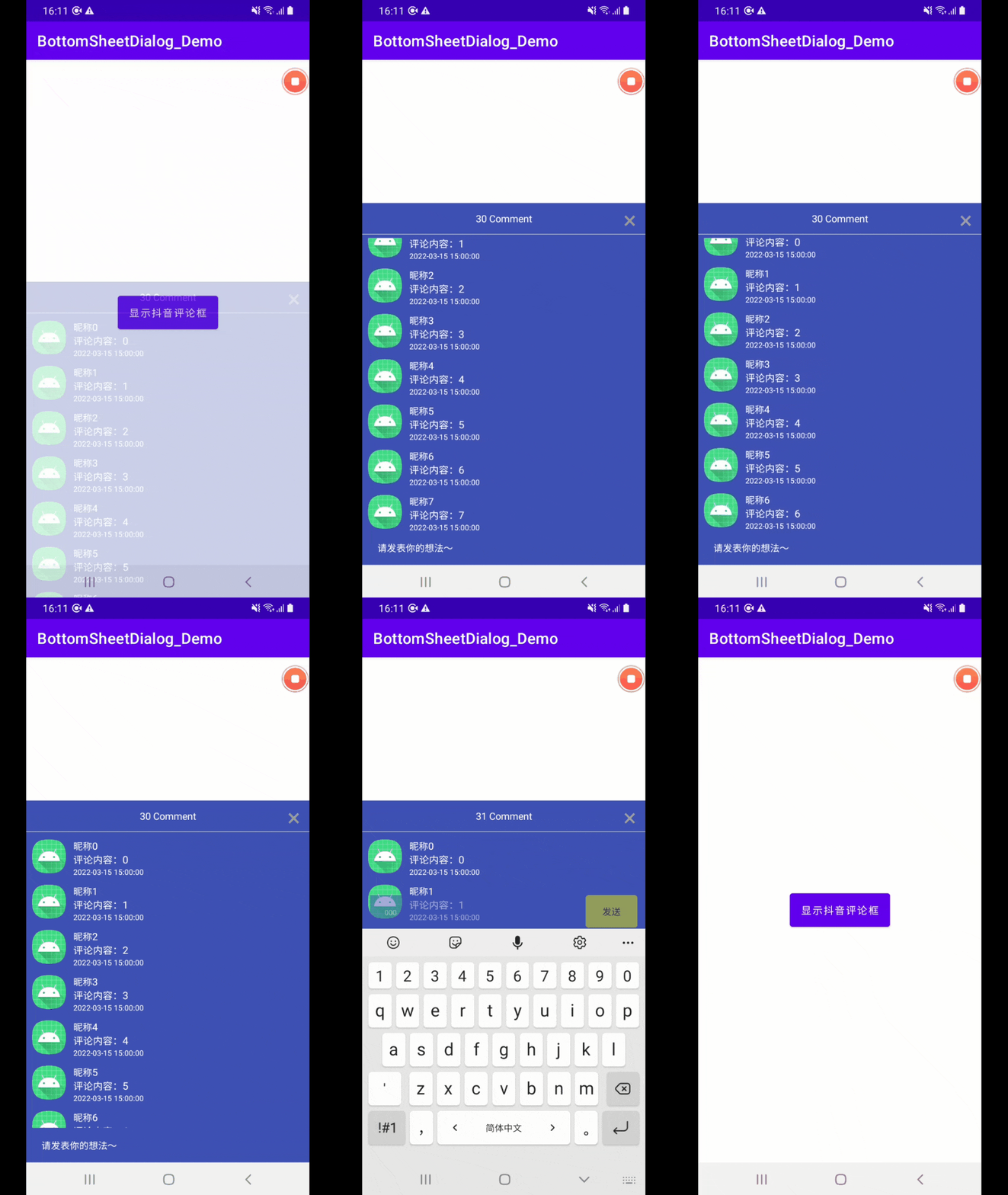
Examples without renderings are simply nonsense
BottomSheetDialogFragment
BottomSheetDialogFragment Inherited from AppCompatDialogFragment, The official interpretation is the modal bottom table , yes DialogFragment A version of , It uses BottomSheetDialog, Instead of floating dialogs .BottomSheetDialogFragment Compared with other dialog boxes, it has the following advantages :
- Have your own life cycle ;
- The whole page can be folded 、 Deployment and destruction ;
- Flexible use of custom styles .
Go straight to the code
CommentBottomSheetDialogFragment.java
/**
 *  Comment box
 */
public class CommentBottomSheetDialogFragment extends BottomSheetDialogFragment implements View.OnClickListener {

    // data
    private List<CommentsInfo> commentsInfos = new ArrayList<>();

    //adapter
    private VideoShowCommentAdapter commentAdapter;

    //recyclerView
    RecyclerView mLvComment;

    // Total comments
    TextView mTvDialogCommentCount;

    // Behavior components BottomSheetBehavior
    BottomSheetBehavior<ViewGroup> behavior;

    @Override
    public void onCreate(@Nullable Bundle savedInstanceState) {
        super.onCreate(savedInstanceState);
        // prohibit dialog Don't be bounced by the soft keyboard
        setStyle(DialogFragment.STYLE_NORMAL, android.R.style.Theme_Black_NoTitleBar_Fullscreen);
    }

    @NonNull
    @Override
    public Dialog onCreateDialog(@Nullable Bundle savedInstanceState) {
        // because BottomSheetDialog The default style background is shaded , If you need customization , The first step is as follows
        // Set up BottomSheetDialog The overall style is transparent
        setStyle(BottomSheetDialogFragment.STYLE_NORMAL, R.style.TransBottomSheetDialogStyle);
        // Create a layout
        Dialog dialog = super.onCreateDialog(savedInstanceState);
        View view = LayoutInflater.from(getContext()).inflate(R.layout.video_show_comment_layout, null, false);
        mLvComment = view.findViewById(R.id.lv_video_show_comment);
        mTvDialogCommentCount = view.findViewById(R.id.tv_video_show_comment_dialog_comment);

        // Click event
        view.findViewById(R.id.tv_close_comment_dialog).setOnClickListener(v -> dismiss());
        view.findViewById(R.id.txt_video_comment).setOnClickListener(this);

        // Click external to close
        dialog.setCanceledOnTouchOutside(true);
        dialog.setContentView(view);
        //BottomSheetDialog The background is white . If modification is needed ,setContentView after , Set up view The layout style is transparent , Then set the background in the layout
        ((View) view.getParent()).setBackgroundColor(getResources().getColor(android.R.color.transparent));

        // Set the width to half of the screen
        ViewGroup parent = (ViewGroup) view.getParent();
        behavior = BottomSheetBehavior.from(parent);
        behavior.setPeekHeight(getScreenHeight(getActivity()) / 3 * 2);

        // Slide down to hide
        behavior.setHideable(true);

        // Here, the maximum width is set to be half of the screen , If you do not set the following code , Sliding up will directly fill the full screen
        ViewGroup.LayoutParams layoutParams = parent.getLayoutParams();
        layoutParams.height = getScreenHeight(getActivity()) / 3 * 2;
        parent.setLayoutParams(layoutParams);

        // Initialization data
        initData();

        // Go back to the screen
        return dialog;
    }

    /**
     *  Load logical processing
     */
    private void initData() {
        // Build comment adapter
        commentAdapter = new VideoShowCommentAdapter(getContext());
        mLvComment.setLayoutManager(new LinearLayoutManager(getContext()));
        mLvComment.setAdapter(commentAdapter);
        // Comment on item Click events for
        commentAdapter.setListener(position -> Toast.makeText(getActivity(), " Click. ", Toast.LENGTH_SHORT).show());

        // If the data is not empty
        if (commentsInfos != null && commentsInfos.size() > 0) {
            mTvDialogCommentCount.setText(new StringBuilder().append(commentsInfos.size()).append(" ").append(getActivity().getString(R.string.string_comment)));
        } else {
            mTvDialogCommentCount.setText(new StringBuilder("0 ").append(getString(R.string.string_comment)));
        }
        // Assign a value to adapter
        commentAdapter.setCommentsInfos(commentsInfos);
    }

    /**
     *  Receive the data transmitted by the interface
     * @param infos
     */
    public void setDatas(List<CommentsInfo> infos) {
        commentsInfos = infos;
        // Refresh
        if(null != commentAdapter){
            // Send the data to the adapter , Refresh the display
            commentAdapter.setCommentsInfos(commentsInfos);
            commentAdapter.notifyDataSetChanged();
        }
    }

    @Override
    public void onClick(View v) {
        switch (v.getId()){
            case R.id.txt_video_comment:
                OtherDialog.showVideoCommentDialog(getActivity(), text -> {
                    // Manually process data length +1. Achieve the effect of silent loading
                    setCount(true);
                    // Get the content of the comment , Return to activity Handle
                    onGetContentListener.onGetContent(text);
                });
                break;
        }
    }

    /**
     *  Set the specific data
     * @param isChange   If true, Explain the comments , direct +1     If false when , It indicates that the new comment failed to call the interface ( Please call this interface , Pass on false), Or use the original data source
     */
    public void setCount(boolean isChange) {
        mTvDialogCommentCount.setText(isChange ?
                new StringBuilder().append(commentsInfos.size() + 1)
                        .append(" ")
                        .append(getActivity().getString(R.string.string_comment))
                :
                new StringBuilder().append(commentsInfos.size())
                        .append(" ")
                        .append(getActivity().getString(R.string.string_comment))
        );
    }

    /**
     *  Get screen height
     * @param activity
     * @return
     */
    public int getScreenHeight(Context activity) {
        return getScreenSize(activity).y;
    }

    /**
     *  Get screen height
     * @param activity
     * @return
     */
    private Point getScreenSize(Context activity) {
        Display display = ((Activity)activity).getWindowManager().getDefaultDisplay();
        Point size = new Point();
        display.getSize(size);
        return size;
    }

    // Click event
    public interface OnGetContentListener {
        void onGetContent(String content);
    }
    private OnGetContentListener onGetContentListener;
    public void setGetContentListener(OnGetContentListener onGetContentListener) {
        this.onGetContentListener = onGetContentListener;
    }

}
notes : This is the display interface of the comment box
OtherDialog.java
public class OtherDialog {

    /**
     *  Video show comment pop-up
     * @param context  Context
     */
    public static void showVideoCommentDialog(Context context, OnGetContentListener listener){
        Dialog dialog = new Dialog(context, R.style.video_comment_style);
        // Layout of dialog
        View view = LayoutInflater.from(context)
                .inflate(R.layout.dialog_video_comment_layout, null);
        // Comment input box
        PPEditTextView mInputContent = view.findViewById(R.id.et_input_comment);
        // When the keyboard is destroyed ,dialog close
        mInputContent.setOnBackKeyEventListener(() -> {
            new Handler().postDelayed(() -> dialog.dismiss(), 200);
            return true;
        });
        // Send events
        view.findViewById(R.id.tv_send_comment).setOnClickListener(v -> {
            String commentContent = mInputContent.getText().toString().trim();
            if(TextUtils.isEmpty(commentContent)){
                Toast.makeText(context, " Comment content cannot be empty ", Toast.LENGTH_SHORT).show();
            }else{
                if(listener != null){
                    listener.onText(commentContent);
                }
                dialog.dismiss();
                // The input box is empty
                mInputContent.setText("");
            }
        });

        // Get focus
        mInputContent.setFocusable(true);
        mInputContent.setFocusableInTouchMode(true);
        mInputContent.requestFocus();

        // Set the layout to dialog
        dialog.setContentView(view);
        dialog.setCanceledOnTouchOutside(true);

        // Get current Activity The form in which you are
        Window dialogWindow = dialog.getWindow();
        // Set the properties of the form
        WindowManager.LayoutParams lp = dialogWindow.getAttributes();
        lp.width = WindowManager.LayoutParams.MATCH_PARENT;
        // Set up dialog Pop up from the middle
        dialogWindow.setGravity(Gravity.BOTTOM);
        // Give properties to the form
        dialogWindow.setAttributes(lp);
        // Return to the dialog
        dialog.show();
    }

}
notes : This is for comment dialog box , It uses customized EditText. Used to monitor the display and hiding of soft keyboard
Enclosed demo Source code .
Source code : Source code, please click here
If you can't download the source code , You can add wechat , The mobile number is below .
Q:486789970(QQ It's rarely used nowadays )
V:18588400509( If you are in a hurry , You can add wechat directly )
email:[email protected]
If there are any questions , Welcome to your guidance . And connect with each other , Hope to learn from each other through articles .
--- Caicai's handwriting
边栏推荐
- replace限制文本框只能输入数字,数字和字母等的正则表达式
- Use Flink SQL to transfer market data 1: transfer VWAP
- 微信小程序的页面导航
- MYSQL基本语法字典
- Spark核心编程(4)--Spark运行架构
- 5. Spark core programming (1)
- 3.东软跨境电商数仓项目架构设计
- 【Bug解决】org.apache.ibatis.type.TypeException: The alias ‘xxxx‘ is already mapped to the value ‘xxx‘
- Time difference calculation
- 【函数的效率】
猜你喜欢
The future of data Lakehouse - Open

软件过程与管理复习(九)

递归的应用

Minor problems of GCC compiling C language in ubantu

Unable to determine Electron version. Please specify an Electron version

LiveData浅析

微信小程序密码显示隐藏(小眼睛)

How can the thread pool be monitored to help developers quickly locate online errors?
Spark core programming (4) -- spark operation architecture
5.1 business data acquisition channel construction of data acquisition channel construction
随机推荐
jvm学习
MySQL--存储和游标
利用IDE打jar包
svg绘制曲线
Mysql逗号分隔的数据进行分行
ETL tool -- kettle realizes simple data migration
12.数据仓库搭建之ADS层搭建
Common components of wechat applet
Operation of C language files
常量与常量指针
MySQL学习笔记(5)——JOIN联表查询,自连接查询,分页和排序,子查询与嵌套查询
C语言的高级操作
ES6 adds -let and const (disadvantages of VaR & let and const)
D3.V3.js数据可视化 -- 力导向图之图片和提示
Pointer function of C language
Preorder, middle order and postorder traversal of binary tree
SQL time comparison
回顾我的第一份工作求职之旅
C语言的指针函数
【函数的效率】