当前位置:网站首页>V831 - apriltag tag identification
V831 - apriltag tag identification
2022-07-18 17:35:00 【Me and nano】
V831
List of articles
Preface
AprilTag Tag tracking is a commonly used visual tag ,V831 It also has this function .
One 、AprilTag Mark tracking ranging
Look at the code first
#!/usr/bin/python3
from maix import display, camera

f_x = (6 / 5.76) * 240 #  The focal length of the lens is 6MM, photosensitive cmos What's your length 5.76mm,240 Pixels are the length of the screen
f_y = (6 / 3.24) * 240 #  The focal length of the lens is 6MM, photosensitive cmos The width of 3.24mm,240 Pixels are the width of the screen

c_x = 240 * 0.5  #  Half the screen resolution
c_y = 240 * 0.5  #  Half the screen resolution

while True:
    t = camera.capture()
    mks = t.find_apriltags(families = 16,fx = f_x,fy = f_y,cx = c_x,cy = c_y)
    for mk in mks:
      x_tran = mk['x_translation']
      y_tran = mk['y_translation']
      z_tran = mk['z_translation']
      # Family information
      fam = mk['family']
      # Outline data
      x, y, w, h, id  =  mk['x'], mk['y'], mk['w'], mk['h'], mk['id']
      # Inner frame data
      x1,y1 = mk['corners'][0]   # Access the list of dictionaries
      x2,y2 = mk['corners'][1]
      x3,y3 = mk['corners'][2]
      x4,y4 = mk['corners'][3]
      z1,z2 = mk['centroid']
      # Virtual distance
      length = (x_tran*x_tran + y_tran*y_tran + z_tran*z_tran)**0.5

      # Draw frame
      t.draw_rectangle(x, y, x + w, y + h, color=(0, 0, 255), thickness = 2)
      # Print ID
      t.draw_string(int(x + w*0.15) , int(y + h*0.15) , str(id), scale = 4.0, color = (255, 0, 0), thickness = 3)
      # Draw the inner frame
      t.draw_line(x1, y1, x2, y2, color = (0, 255, 0), thickness = 3)
      t.draw_line(x2, y2, x3, y3, color = (0, 255, 0), thickness = 3)
      t.draw_line(x3, y3, x4, y4, color = (0, 255, 0), thickness = 3)
      t.draw_line(x4, y4, x1, y1, color = (0, 255, 0), thickness = 3)

      if(fam == 16):
        t.draw_string(x, y-20, "TAG36H11", scale = 1.0, color = (255, 0, 0), thickness = 2)

      t.draw_string(x, y+h+15, str(int(length * 3.0649 - 2))+" cm", scale = 1.0, color = (255, 0, 0), thickness = 2)

    display.show(t)
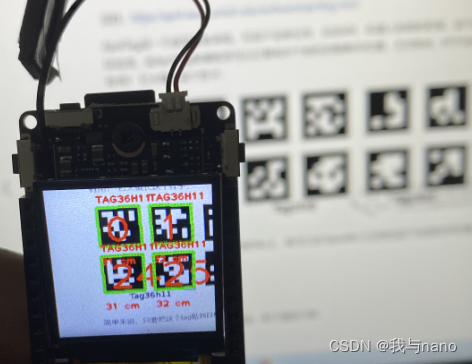
If you want to obtain the coordinates of the four points of the label, you only need to obtain the key value in the dictionary as corners The value in the list of , And want to get the outline ( Blue box ) You only need to get the key value in the dictionary as x , y , w , h The value of , Finally, just like the operation in the code .
The key values of the dictionary are as follows : ‘x’ , ‘y’ , ‘w’ , ‘h’ , ‘id’ , ‘family’ , ‘centroid’ , ‘corners’ , ‘x_translation’ , ‘y_translation’ , ‘z_translation’ , ‘decision_margin’ , ‘hamming’ , ‘goodness’ , ‘x_rotation’ , ‘y_rotation’ , ‘z_rotation’.
Introduce the meaning of several key values .‘x’ , ‘y’ , ‘w’ , ‘h’ The values returned by the key values are the upper left corner of the outer frame x Coordinates and y Coordinates and the length and width of the outer frame . Pay special attention to the key value ‘corners’ It returns a list , The values in the list represent the coordinates of the four vertices of the inner box .
In this code, the principle of ranging is also similar to small hole imaging , You can see the previous ranging blog about how to use it , I know this value is not very accurate ( It may be due to tracking and ranging ), I will optimize this ranging algorithm later .
Two 、 AprilTag Obtain angle information and display of three-dimensional coordinates
Also look at the code first
#!/usr/bin/python3
from maix import display, camera
import math

f_x = (6 / 5.76) * 240 #  The focal length of the lens is 6MM, photosensitive cmos What's your length 5.76mm,240 Pixels are the length of the screen
f_y = (6 / 3.24) * 240 #  The focal length of the lens is 6MM, photosensitive cmos The width of 3.24mm,240 Pixels are the width of the screen

c_x = 240 * 0.5 #  Half the screen resolution
c_y = 240 * 0.5 #  Half the screen resolution

while True:
    t = camera.capture()
    mks = t.find_apriltags(families = 16,fx = f_x,fy = f_y,cx = c_x,cy = c_y)
    for mk in mks:

      # Inner frame data
      x1,y1 = mk['corners'][0]   # Access the list of dictionaries
      x2,y2 = mk['corners'][1]
      x3,y3 = mk['corners'][2]
      x4,y4 = mk['corners'][3]

      # Get angle information
      x_rol = mk['x_rotation']
      y_rol = mk['y_rotation']
      z_rol = mk['z_rotation']
      # Draw the inner frame
      t.draw_line(x1, y1, x2, y2, color = (0, 255, 0), thickness = 3)
      t.draw_line(x2, y2, x3, y3, color = (0, 255, 0), thickness = 3)
      t.draw_line(x3, y3, x4, y4, color = (0, 255, 0), thickness = 3)
      t.draw_line(x4, y4, x1, y1, color = (0, 255, 0), thickness = 3)

      # Displays the current angle
      t.draw_string(2, 2, "X rotation is: "+str(int(180*x_rol/3.14))+" Angle", scale = 1.0, color = (0, 0, 255), thickness = 1)    #90° ~ 270°   Directly opposite is 180°. Up and down
      t.draw_string(2, 15, "Y rotation is: "+str(int(180*y_rol/3.14))+" Angle", scale = 1.0, color = (0, 0, 255), thickness = 1)   #0° ~ 90°,270° ~ 360°    Directly opposite is 0°.  about
      t.draw_string(2, 30, "Z rotation is: "+str(int(180*z_rol/3.14))+" Angle", scale = 1.0, color = (0, 0, 255), thickness = 1)   #0° ~ 360°    Directly opposite is 0°.  Clockwise rotation increases

      # Picture frame in the lower right corner
      t.draw_string(140, 120, "Space", scale = 1.0, color = (125, 0, 0), thickness = 2)
      t.draw_rectangle(140, 140, 235, 235, color=(128, 128, 128), thickness=2)

      # Draw a three-dimensional coordinate system
      t.draw_line(180, 200, int(180 - 40 * math.sin(z_rol)), int(240 - 40 * math.cos(z_rol) + 40 * math.cos(x_rol)), color = (255, 0, 0), thickness = 3)
      t.draw_line(180, 200, int(140 + 40 * math.cos(z_rol) + 40 * math.cos(y_rol)), int(200 - 40 * math.sin(z_rol)), color = (0, 255, 0), thickness = 3)
      t.draw_line(180, 200, int(180 + 40 * math.sin(y_rol)),int(200 - 40 * math.sin(x_rol)), color = (0, 0, 255), thickness = 3)

    display.show(t)
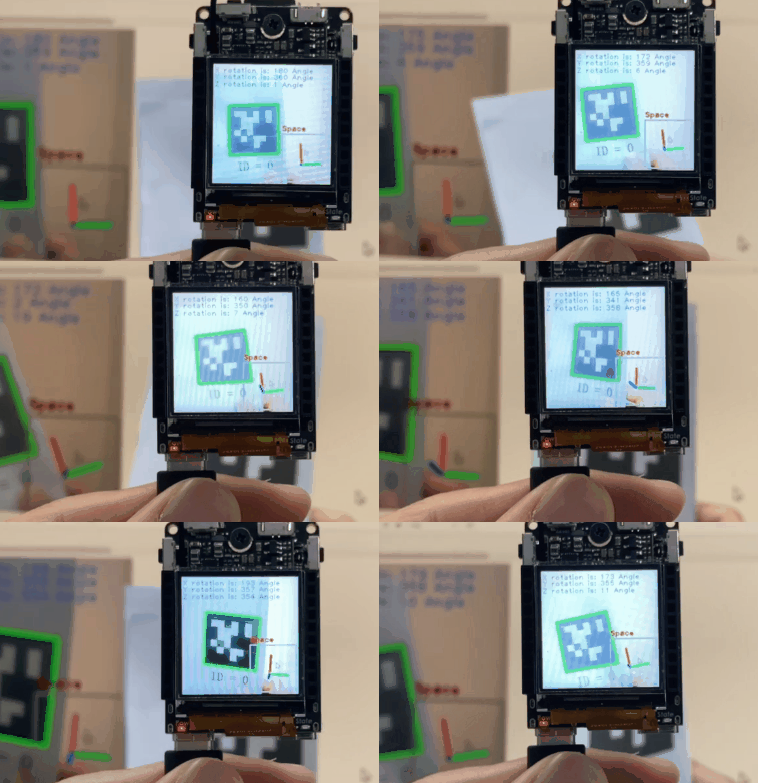
If you want to get the angle information of the label, you only need to get the key values in the dictionary are x_rotation,y_rotation,z_rotation The value of , It should be pointed out that the obtained value is radian , If you need to convert it into an angle, you need to use the radian to angle formula . Multiply the obtained radian by 180 Divided by 3.14 that will do (3.14 Two decimal places of PI are selected ).
x_rotation The value range after changing to angle is [90°,270°] When facing the label, it is displayed as 180° , Changes as the label moves back and forth . y_rotation The value range after changing to angle is [0°,90°]U[270°,360°] When facing the label, it is displayed as 0° , Changes when the label moves left and right .z_rotation The value range after changing to angle is [0°,360°] When facing the label, it is displayed as 0° , Changes as the label rotates .
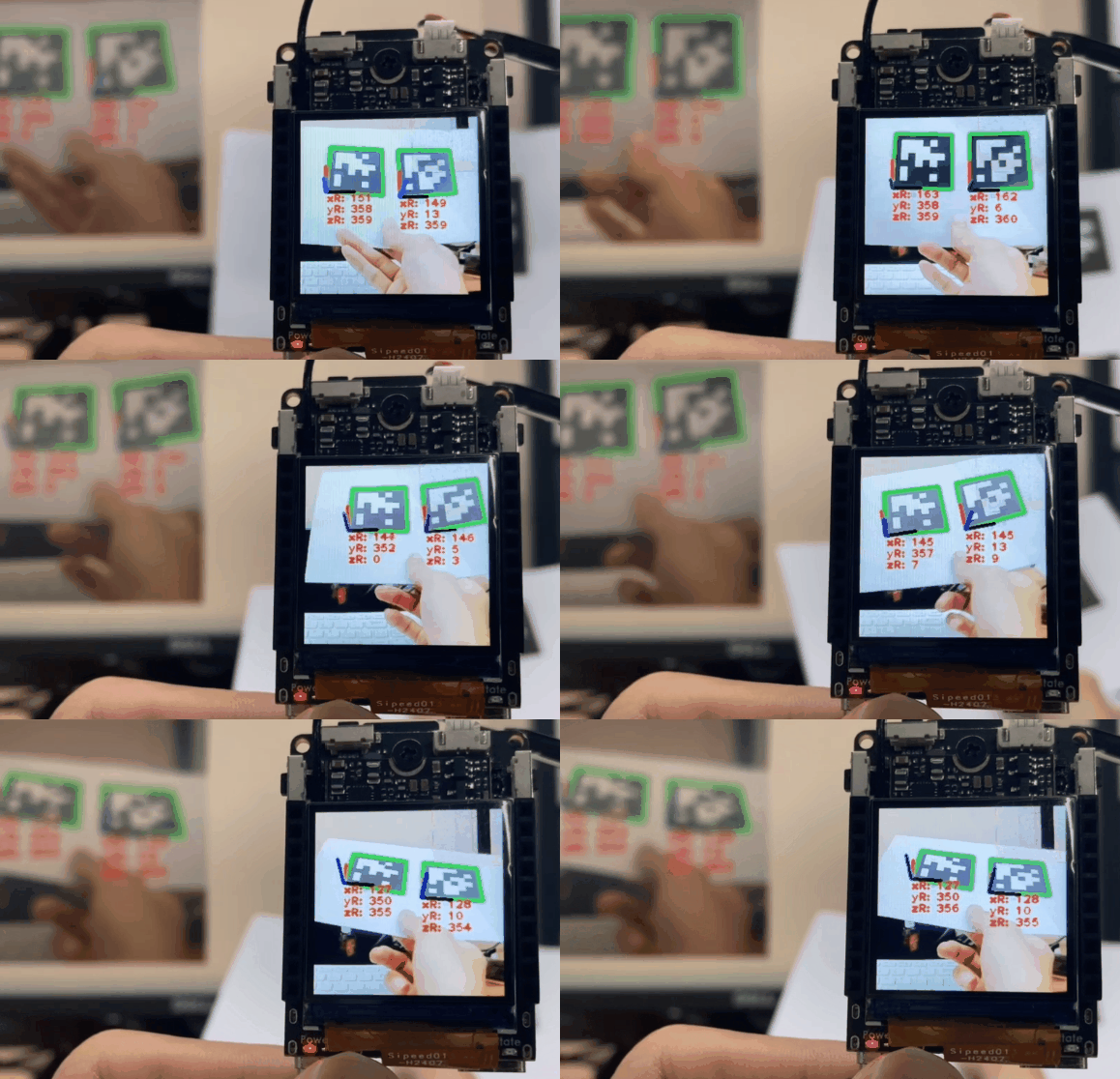
3、 ... and 、AprilTag Display of multiple three-dimensional coordinates
from maix import display, camera
import math

f_x = (6 / 5.76) * 240
f_y = (6 / 3.24) * 240

c_x = 240 * 0.5
c_y = 240 * 0.5

while True:
    t = camera.capture()
    mks = t.find_apriltags(families = 16,fx = f_x,fy = f_y,cx = c_x,cy = c_y)
    for mk in mks:

      # Inner frame data
      x1,y1 = mk['corners'][0]   # Access the list of dictionaries
      x2,y2 = mk['corners'][1]
      x3,y3 = mk['corners'][2]
      x4,y4 = mk['corners'][3]

      x_rol = mk['x_rotation']
      y_rol = mk['y_rotation']
      z_rol = mk['z_rotation']
      # Draw the inner frame
      t.draw_line(x1, y1, x2, y2, color = (0, 255, 0), thickness = 3)
      t.draw_line(x2, y2, x3, y3, color = (0, 255, 0), thickness = 3)
      t.draw_line(x3, y3, x4, y4, color = (0, 255, 0), thickness = 3)
      t.draw_line(x4, y4, x1, y1, color = (0, 255, 0), thickness = 3)


      t.draw_string(x4, y4, "xR: "+str(int(180*x_rol/3.14)), scale = 1.0, color = (255, 0, 0), thickness = 2)    #90° ~ 270°   Directly opposite is 180°. Up and down
      t.draw_string(x4, y4 + 15, "yR: "+str(int(180*y_rol/3.14)), scale = 1.0, color = (255, 0, 0), thickness = 2)   #0° ~ 90°,270° ~ 360°    Directly opposite is 0°.  about
      t.draw_string(x4, y4 + 30, "zR: "+str(int(180*z_rol/3.14)), scale = 1.0, color = (255, 0, 0), thickness = 2)   #0° ~ 360°    Directly opposite is 0°.  Clockwise rotation increases

      t.draw_line(x4, y4, int(x4 - 40 * math.sin(z_rol)), int(y4 + 40 - 40 * math.cos(z_rol) + 40 * math.cos(x_rol)), color = (255, 0, 0), thickness = 3)
      t.draw_line(x4, y4, int(x4 - 40 + 40 * math.cos(z_rol) + 40 * math.cos(y_rol)), int(y4 - 40 * math.sin(z_rol)), color = (0, 0, 0), thickness = 3)
      t.draw_line(x4, y4, int(x4  + 40 * math.sin(y_rol)),int(y4 - 40 * math.sin(x_rol)), color = (0, 0, 255), thickness = 3)
    display.show(t)
summary
Feeling plus one jy-901 gyroscope ,V831 Can play his function infinitely .
边栏推荐
- Postgresql源码(8)Xlog初始化
- The new book is on the market | C language classic textbook supporting "exercise solutions", and the original book has been printed a total of 100000+
- Architecture layering of standard web system of Architecture Series
- Computer PC and s7-200smart PLC are not in the same network segment. How to establish communication connection?
- 一周精彩内容分享(第12期)重复
- HCIA-R&S自用笔记(9)数据转发过程、单播/多播/组播
- 图片验证,滑块验证解决
- MongoDB慢查询与索引
- Web性能测试工具之ab入门篇
- 元宇宙、NFT数字藏品是什么?
猜你喜欢
IDEA解决内存不足 low memory(亲测好用)

V831——IO口的使用

Computer PC and s7-200smart PLC are not in the same network segment. How to establish communication connection?
![[harmonyos] [arkui] Hongmeng ETS method tabs+tabcontent realizes the bottom navigation bar](/img/a8/f719815c31f3c5a9e9fdfee49ee19d.png)
[harmonyos] [arkui] Hongmeng ETS method tabs+tabcontent realizes the bottom navigation bar

五 其它目标和通用选项的介绍
An excellent graphical tool for information collection maltego

第一届中国数字藏品大会顺利召开
面试官:为什么 Redis 要有哨兵?我该怎么回答?

HCIA-R&S自用笔记(10)VRP基础、命令、远程管理

Analysis of websocket hijacking
随机推荐
Vim使用学习以及ideaVim(持续补充)
常用英文学术论文写作词汇与表达
一 kernel编译系统概述
Basic permission management of Gerrit
The new book is on the market | C language classic textbook supporting "exercise solutions", and the original book has been printed a total of 100000+
PostgreSQL source code (7) xlog format
如何在Kubernetes平台上搭建云IDE Theia
leetcode专项 动态规划入门
新书上市 | C 语言经典教材配套“习题解答”,原书累计印数 10 万 +
How to count the data in the game
SAP Fiori Launchpad 上看不到任何 tile 应该怎么办?
V831——IO口的使用
How to build cloud ide Theia on kubernetes platform
w806开发板驱动ov2640读取jpeg图片1600x1200分辨率
我回来了
HCIA-R&S自用笔记(8)IP地址基础、子网掩码、子网划分
醋酸氯霉素的实验室程序&参考文献
Rapport mondial sur le développement de l'industrie de l'enseignement professionnel 2022
npm WARN config global `--global`, `--local` are deprecated. Use `--location=global` instead.
How to design PCB chip heat dissipation pad?