当前位置:网站首页>如何解决8080端口被占用
如何解决8080端口被占用
2022-07-16 12:00:00 【萱萱不会秃头】

大家在eclipse中运行程序的过程中可能会出现图上所出现的状况,那么如何解决8080端口被占用的情况呢?
①首先Windows+R打开cmd

②在cmd输入netstat -ano 找到8080端口号所对应的PID 8988
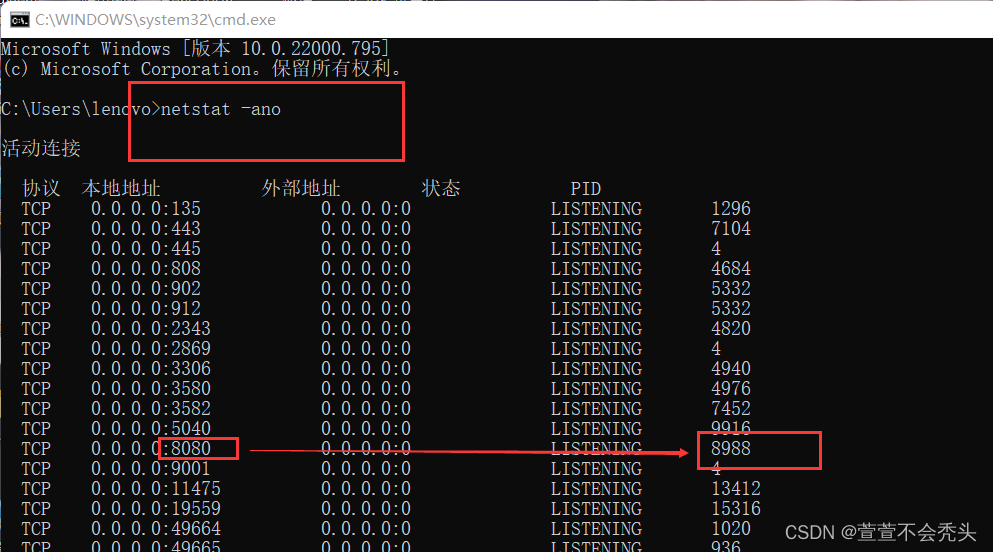
③ 打开任务管理器,到详细信息,找到PID为8988的进程结束此任务

这样端口占用问题就迎刃而解啦
边栏推荐
- leetcode专项 动态规划入门
- 图片验证,滑块验证解决
- 美称未对俄农产品“设障” 俄议员批美国是危机“始作俑者”
- Diabetes genetic risk testing challenge -toggle 30 days of ML
- [quick application] there are many words in the text component. How to solve the problem that the div style next to it will be stretched
- ETCD数据库源码分析——etcdserver bootstrap去除v2store
- Njupt "Xin'an numeral base" Chapter 11 introduction to problem solving
- Web性能测试工具之ab入门篇
- IPFs record
- 初次上路如何提问 - 自学必备技能(附直播回放)
猜你喜欢





随机推荐
How to build cloud ide Theia on kubernetes platform
新书上市 | C 语言经典教材配套“习题解答”,原书累计印数 10 万 +
Stc8h development (XIV): I2C drive rx8025t high-precision real-time clock chip
浅析websocket劫持
【CVA估值训练营】如何快速读懂上市公司年报(第一讲)
HCIA-R&S自用笔记(9)数据转发过程、单播/多播/组播
1.8 classes and objects
Safely terminate the operation of 2nodeos
一 kernel编译系统概述
交换
安全的终止2nodeos的运行
Sff1602-mhchxm diode sff1602
第一届中国数字藏品大会顺利召开
Error in v-on handler: “ReferenceError: Toast is not defined“
MongoDB慢查询与索引
因果学习将开启下一代AI浪潮?九章云极DataCanvas正式发布YLearn因果学习开源项目
六 makefile.build的分析
Pytest+allure custom report
IDEA解决内存不足 low memory(亲测好用)
pytest+allure定制报告