当前位置:网站首页>C # network application programming, experiment 7: asynchronous programming practice
C # network application programming, experiment 7: asynchronous programming practice
2022-07-18 23:00:00 【Nanpengyou】
List of articles
Asynchronous programming exercise
Through this experiment , Be familiar with and master the definition of tasks 、 Create and execute , And task cancellation and status acquisition .
1、 Create a WPF Application project
2、 take App.xaml Medium Application.Resources The content of this section is changed to
<Application x:Class="WpfApp1.App"
             xmlns="http://schemas.microsoft.com/winfx/2006/xaml/presentation"
             xmlns:x="http://schemas.microsoft.com/winfx/2006/xaml"
             xmlns:local="clr-namespace:WpfApp1"
             StartupUri="MainWindow.xaml">
    <Application.Resources>
        <Style x:Key="LabelStyle" TargetType="Label">
            <Setter Property="FontSize" Value="14"/>
            <Setter Property="HorizontalContentAlignment" Value="Center"/>
            <Setter Property="HorizontalAlignment" Value="Center" />
            <Setter Property="Background" Value="AliceBlue"/>
        </Style>
        <Style x:Key="BorderStyle" TargetType="Border">
            <Setter Property="Height" Value="35"/>
            <Setter Property="VerticalAlignment" Value="Center"/>
            <Setter Property="Background" Value="AliceBlue"/>
        </Style>
    </Application.Resources>
</Application>

3、 modify MainWindow.xaml And code hiding classes
MainWindow.xaml
<Window x:Class="WpfApp1.MainWindow"
        xmlns="http://schemas.microsoft.com/winfx/2006/xaml/presentation"
        xmlns:x="http://schemas.microsoft.com/winfx/2006/xaml"
        xmlns:d="http://schemas.microsoft.com/expression/blend/2008"
        xmlns:mc="http://schemas.openxmlformats.org/markup-compatibility/2006"
        xmlns:local="clr-namespace:WpfApp1"
        mc:Ignorable="d"
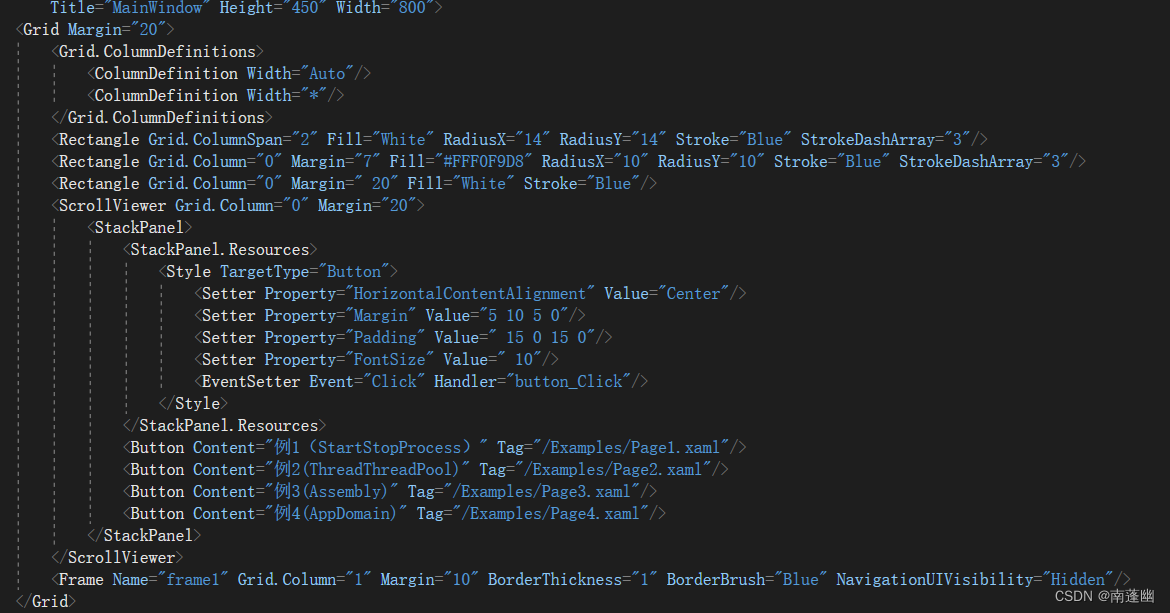
        Title="MainWindow" Height="450" Width="800">
    <Grid Margin="20">
        <Grid.ColumnDefinitions>
            <ColumnDefinition Width="Auto"/>
            <ColumnDefinition Width="*"/>
        </Grid.ColumnDefinitions>
        <Rectangle Grid.ColumnSpan="2" Fill="White" RadiusX="14" RadiusY="14" Stroke="Blue" StrokeDashArray="3"/>
        <Rectangle Grid.Column="0" Margin="7" Fill="#FFF0F9D8" RadiusX="10" RadiusY="10" Stroke="Blue" StrokeDashArray="3"/>
        <Rectangle Grid.Column="0" Margin=" 20" Fill="White" Stroke="Blue"/>
        <ScrollViewer Grid.Column="0" Margin="20">
            <StackPanel>
                <StackPanel.Resources>
                    <Style TargetType="Button">
                        <Setter Property="HorizontalContentAlignment" Value="Center"/>
                        <Setter Property="Margin" Value="5 10 5 0"/>
                        <Setter Property="Padding" Value=" 15 0 15 0"/>
                        <Setter Property="FontSize" Value=" 10"/>
                        <EventSetter Event="Click" Handler="button_Click"/>
                    </Style>
                </StackPanel.Resources>
                <Button Content=" example 1(StartStopProcess)" Tag="/Examples/Page1.xaml"/>

            </StackPanel>
        </ScrollViewer>
        <Frame Name="frame1" Grid.Column="1" Margin="10" BorderThickness="1" BorderBrush="Blue" NavigationUIVisibility="Hidden"/>
    </Grid>
</Window>
MainWindow.cs primary coverage
using System;
using System.Collections.Generic;
using System.Linq;
using System.Text;
using System.Threading.Tasks;
using System.Windows;
using System.Windows.Controls;
using System.Windows.Data;
using System.Windows.Documents;
using System.Windows.Input;
using System.Windows.Media;
using System.Windows.Media.Imaging;
using System.Windows.Navigation;
using System.Windows.Shapes;

namespace WpfApp1
{

    /// <summary>
    /// MainWindow.xaml  Interaction logic of
    /// </summary>
    public partial class MainWindow : Window
    {

        Button oldButton = new Button();
        public MainWindow()
        {

            InitializeComponent();
        }
        private void button_Click(object sender, RoutedEventArgs e)
        {

            Button btn = e.Source as Button;
            btn.Foreground = Brushes.Black;
            oldButton.Foreground = Brushes.Black;
            oldButton = btn;
            frame1.Source = new Uri(btn.Tag.ToString(), UriKind.Relative);
        }
    }
}

Page4.xml
<Page x:Class="WpfApp1.Examples.Page4"
      xmlns="http://schemas.microsoft.com/winfx/2006/xaml/presentation"
      xmlns:x="http://schemas.microsoft.com/winfx/2006/xaml"
      xmlns:mc="http://schemas.openxmlformats.org/markup-compatibility/2006"
      xmlns:d="http://schemas.microsoft.com/expression/blend/2008"
      xmlns:local="clr-namespace:WpfApp1.Examples"
      mc:Ignorable="d"
      d:DesignHeight="300" d:DesignWidth="300"
      Title="Page4">

    <DockPanel Background="White">
        <Border DockPanel.Dock="Top"  Style="{StaticResource BorderStyle}">
            <TextBlock Text="Task.Run Basic usage of method " Style="{StaticResource TitleStyle}"></TextBlock>
        </Border>
        <Border DockPanel.Dock="Bottom" Style="{StaticResource BorderStyle}">
            <StackPanel Orientation="Horizontal" HorizontalAlignment="Center">

                <Button x:Name="btnStart" Width="60"
                        Content=" Start the task " Click="BtnStart_Click" Margin="0,0,0,0.2"/>
                <Button x:Name="btnStop"  Margin="20,0,0,0" Width="60"
                    Content=" Terminate task " Click="BtnStop_Click"/>
            </StackPanel>


        </Border>
        <ScrollViewer>
            <StackPanel Background="White" TextBlock.LineHeight="20">
                <TextBlock x:Name="textBlock1" Margin="0 10 0 0" TextWrapping="Wrap" />
            </StackPanel>

        </ScrollViewer>

    </DockPanel>
</Page>
Pag4.cs
using System;
using System.Collections.Generic;
using System.Linq;
using System.Text;
using System.Threading.Tasks;
using System.Windows;
using System.Windows.Controls;
using System.Windows.Data;
using System.Windows.Documents;
using System.Windows.Input;
using System.Windows.Media;
using System.Windows.Media.Imaging;
using System.Windows.Navigation;
using System.Windows.Shapes;

namespace WpfApp1.Examples
{

    /// <summary>
    /// Page4.xaml  Interaction logic of
    /// </summary>
    public partial class Page4 : Page
    {

        private System.Threading.CancellationTokenSource cts;
        private MyTasks t = new MyTasks();

        public Page4()
        {

            InitializeComponent();
            MyHelps.ChangeState(btnStart, true, btnStop, false);
        }

        private  void BtnStop_Click(object sender, RoutedEventArgs e)
        {

            cts.Cancel();
            MyHelps.ChangeState(btnStart,true,btnStop,false);
        }

        private async void BtnStart_Click(object sender, RoutedEventArgs e)
        {

            MyHelps.ChangeState(btnStart, false, btnStop, true);
            cts = new System.Threading.CancellationTokenSource();
            textBlock1.Text = " Start the mission ......";
            try
            {

                await Task.Run(() => t.Method1(), cts.Token);
                textBlock1.Text += "\n Mission 1 completion of enforcement ";
                var sum = await Task.Run(() => t.Method2(), cts.Token);
                textBlock1.Text += "\n Mission 2( Calculation 1 To 1000 And ) The result is :"+sum;
                var a = await Task.Run(() => t.Method3(39, 8), cts.Token);
                textBlock1.Text += string.Format("\n Mission 3( seek 39 Divide 8 The quotient and the remainder of ) The result is :{0},{1}\n", a.Item1, a.Item2);
                while (true)
                {

                    textBlock1.Text += await Task.Run(() => t.Method1("a"),cts.Token);
                    textBlock1.Text += await Task.Run(() => t.Method1("b"),cts.Token);
                }


            }
            catch(OperationCanceledException)
            {

                textBlock1.Text += "\n The mission was cancelled ";
            }


        }
    }
}
Running results


Through this experiment , Be familiar with and master the definition of tasks 、 Create and execute , And task cancellation and status acquisition
边栏推荐
- C # - adding thread, loading case of progress bar, adding video effect for the first time
- 安全测试之逻辑漏洞
- Sklearn linear regression fitting first-order term function
- Kaggle file download (weights, inference files...)
- openstack 相关博客
- leetcode--242. 有效的字母异位词
- Chapter 3 business function development (check the details of market activities)
- 416.分割等和子集·背包问题·动态规划
- [development of large e-commerce projects] cache distributed lock redisson concise & integration lock redisson resolve deadlock read / write lock lock lock semaphore-44
- Remove the k-bit number [greedy thought & monotonic stack implementation]
猜你喜欢

Overflow valve Rexroth zdb10vp2-4x/315v

10 minutes to customize the pedestrian analysis system, detection and tracking, behavior recognition, human attributes all in one

Solution to Chinese garbled code in response results of burpsuite tool

Database design pattern of multi tenant SaaS
leetcode--49字母异位词分组
![[basic service] [database] MySQL master-slave replication deployment and configuration](/img/6d/0ad81ae080153fc2e50dc60c39e1bd.png)
[basic service] [database] MySQL master-slave replication deployment and configuration

派克Parker比例阀D1FVE50BCVLB

Germany Rexroth proportional valve 4wrpeh6c5b40l-3x/m/24f1

About products | how to plan products?

C语言自定义类型:结构体,枚举,联合
随机推荐
SIEMENS模块6DD1661-0AE1
sklearn线性回归拟合一次项函数
No cl.exe solution found
(赛后补题)(伟大的dfs)K - Counting Time
Kaggle file download (weights, inference files...)
3D point cloud course (IV) -- clustering and model fitting
Summary of the preparation process of employee management system
3D point cloud course (I) -- Introduction to point cloud Foundation
【图片编辑小软件】FastStone Photo Resizer支持批量转换和批量重命名
快速完全删除node_modules
Error: the solution of diamond operator is not supported in -source 1.6
Logical loopholes in security testing
NASA took the first clear picture of the moment after the big bang
[play with es] es batch / full import data
Remember once, ants were abused on all sides. The water was too deep. Have you built the ferry across the river?
leetcode--242. 有效的字母异位词
10分钟自定义搭建行人分析系统,检测跟踪、行为识别、人体属性All-in-One
伺服阀moogD634-374C
日志收集方案EFK
产品测评师工作重复繁琐怎么办?能实现自动化吗?