当前位置:网站首页>Use of mongodb
Use of mongodb
2022-07-19 07:48:00 【guizi0809】
One 、 View all databases
command :show dbs
Use show dbs Command view database , There are currently three databases , Respectively :admin、config、local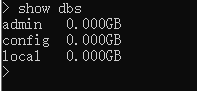
Two 、 Create database
command :use dataBaseName
Let's create user Database, for example 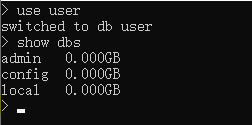
When we check the database, we find that it has not been created user This database .
If you want to create this database successfully , You must insert a data .
You can't insert data directly into the database , You can only go to the assembly collections Insert data .
Create a set and insert data with dot syntax .
 command :db.collectionName.insert({
    })
We created student aggregate , And insert a piece of data . When viewing the database again , Find out user Database created successfully 
3、 ... and 、 View all collections of the current database
command :show collections

Four 、 Table operations - newly added
 command :db.collectionName.insert({
    })
We go on student Add new data to the set , Assemble in sql Is also called table 
5、 ... and 、 Table operations - Inquire about
a. Check all records
db.student.find()
b. Query records with specified conditions , from find The first parameter of the method determines
Inquire about name For the record of Monkey King
db.student.find({
    name: ' The Monkey King '})
Inquire about name For Sunwukong and age by 20 The record of
db.student.find({
    name: ' The Monkey King ', age: 20})
Inquire about age Greater than 20 The record of
db.student.find({
    age: {
    $gt: 20}})
Inquire about age Less than 20 The record of
db.student.find({
    age: {
    $lt: 20}})
Inquire about age Greater than or equal to 20 The record of
db.student.find({
    age: {
    $gte: 20}})
Inquire about age Less than or equal to 20 The record of
db.student.find({
    age: {
    $lte: 20}})
Inquire about age Greater than or equal to 20 And less than or equal to 30 The record of
db.student.find({
    age: {
    $gte: 20. $lte: 30}})
Regular matching queries , It is generally used for specific condition query or fuzzy query , For example, inquire the record of surname sun
db.student.find({
    name: /^ Grandchildren /})
Or query , Inquire about age=20 or age=25 The record of
db.student.find({
    $or: [{
    age: 20}, {
    age: 25}]})
c. The query results only show the specified columns , from find The second parameter of the method determines , Only name Column sum age Column
db.student.find({
    }, {
    name: 1, age: 1})
d. The query results are arranged in ascending or descending order by the specified column ( 1 Ascending , -1 Descending )
db.student.find().sort({
    age: 1})
e. Limit the number of queries , If the first five records are displayed
db.student.find().limit(5)
f. Query the records after the specified quantity , Such as query 2 Next record
db.student.find().skip(2)
The query in 5-10 Between the records , Can be used for pagination ,limit yes pageSize,skip What's the page *pageSize
db.student.find().limit(10).skip(5)
g. Look up the first record
db.student.findOne()
#  amount to
db.student.find().limit(1)
h. Number of query records
db.student.find({
    age: {
    $gte: 25}}).count()
#  If you want to return the number of records after the limit , To use  count(true)
db.student.find({
    age: {
    $gte: 25}}).count(true)
6、 ... and 、 Table operations - modify
Modify use update Method , The first parameter is the query parameter , The second parameter is the modified content .
Such as : Find the name Zhugeliang , Change the age to 100 year .
db.student.update({
    name: ' Zhugeliang '}, {
    $set:{
    age: 100}})
#  Modify the first record found by default , If you need to modify multiple records that meet the query parameters
db.student.update({
    name: ' Zhugeliang '}, {
    $set:{
    age: 100}}, {
    multi: true})
If not $set, Replace complete . The second parameter will completely replace the record queried by the first parameter .
db.student.update({
    name: ' Zhugeliang '}, {
    age: 100})
Such as : Find the name Zhugeliang , Add age to the original basis 100 year .
db.student.update({
    name: ' Zhugeliang '}, {
    $inc:{
    age: 100}})
7、 ... and 、 Table operations - Delete
#  Delete all queried records by default
db.student.remove({
    name: ' Zhugeliang '})
#  If you only want to delete the first queried record
db.student.remove({
    name: ' Zhugeliang '}, {
    justOne: true})
8、 ... and 、 Delete databases and collections
1. Delete database
use first use Switch to the specified database , Then use the following command to delete the current database
db.dropDatabase()
2. Delete the collection ( surface )
# db.xxx Collection name .drop()
db.student.drop()
边栏推荐
- Flink entry to practice - phase I (cluster installation & use)
- 微信OAuth2.0 登录流程以及安全性分析
- 60. Clear cache
- INSTALL_ PARSE_ FAILED_ MANIFEST_ MALFORMED
- Alien Slackware
- 1669. 合并两个链表(两个链表的合并)
- How can FD apply the vector diagnostic tool chain?
- Telnet installation
- Configuration and use of cookies and sessions
- pytorch随记(5)
猜你喜欢




随机推荐
How can FD apply the vector diagnostic tool chain?
FreeBSD 12 changing the background of the startup interface
导出文件or下载文件
PCIe bus architecture high performance data preprocessing board / K7 325t FMC interface data acquisition and transmission card
Redis details
Practical tutorial: application of canoe in CAN bus test
一文带你了解SOA接口测试
Hypothesis testing
实时数据仓库-从0到1实时数据仓库设计&实现(SparkStreaming3.x)
小怿和你聊聊V2X测试系列之 如何实现C-V2X HIL测试(2022版)
Spark introduction to proficient - external part (operation and maintenance and simple operation of standaone cluster)
MySql02 函数substr mod 视图view
MySql
js数组交集、差集和并集
预测销售XGBoost
利用PCA来简化数据
Introduction & use of Maxwell
@How can conditionalonmissingbean cover beans in third-party components
60. Clear cache
What is the difference between SD NAND and nandflash?