当前位置:网站首页>Hcip ppp/hdlc, gre/mgre experiments
Hcip ppp/hdlc, gre/mgre experiments
2022-07-18 16:16:00 【Wuhao9_】

AR1:
<Huawei>sys
Enter system view, return user view with Ctrl+Z.
[Huawei]sys R1
[R1]int g0/0/0
[R1-GigabitEthernet0/0/0]ip add 192.168.1.1 24
Jul 10 2022 19:18:15-08:00 R1 %%01IFNET/4/LINK_STATE(l)[0]:The line protocol IP
on the interface GigabitEthernet0/0/0 has entered the UP state.
[R1-GigabitEthernet0/0/0]ip pool p0
Info: It's successful to create an IP address pool.
[R1-ip-pool-p0]netbios-type
[R1-ip-pool-p0]network 192.168.1.0 mask 24
[R1-ip-pool-p0]gateway-list 192.168.1.1
[R1-ip-pool-p0]dns-list 192.168.1.255
[R1-ip-pool-p0]q
[R1]dhcp enable
Info: The operation may take a few seconds. Please wait for a moment.done.
[R1]int g0/0/0
[R1-GigabitEthernet0/0/0]dhcp select global
[R1-GigabitEthernet0/0/0]q
[R1]int s4/0/0
[R1-Serial4/0/0]ip add 15.0.0.1 24
[R1-Serial4/0/0]

AR2:
<Huawei>sys
Enter system view, return user view with Ctrl+Z.
[Huawei]sys R2
[R2]int g0/0/0
[R2-GigabitEthernet0/0/0]ip add 192.168.2.1 24
Jul 10 2022 19:26:01-08:00 R2 %%01IFNET/4/LINK_STATE(l)[0]:The line protocol IP
on the interface GigabitEthernet0/0/0 has entered the UP state.
[R2-GigabitEthernet0/0/0]q
[R2]dhcp enable
Info: The operation may take a few seconds. Please wait for a moment.done.
[R2]ip policy-based-route
[R2]ip pool p0
Info: It's successful to create an IP address pool.
[R2-ip-pool-p0]netbios-type
[R2-ip-pool-p0]network 192.168.2.0 mask 24
[R2-ip-pool-p0]gateway-list 192.168.2.1
[R2-ip-pool-p0]dns-list 192.168.2.255
[R2-ip-pool-p0]int g0/0/0
[R2-GigabitEthernet0/0/0]dhcp select global
[R2-GigabitEthernet0/0/0]int s4/0/0
[R2-Serial4/0/0]ip add 25.0.0.1 24
[R2-Serial4/0/0]

AR3:
<Huawei>sys
Enter system view, return user view with Ctrl+Z.
[Huawei]sys R3
[R3]int g0/0/0
[R3-GigabitEthernet0/0/0]ip add 192.168.3.1 24
Jul 10 2022 19:29:58-08:00 R3 %%01IFNET/4/LINK_STATE(l)[0]:The line protocol IP
on the interface GigabitEthernet0/0/0 has entered the UP state.
[R3-GigabitEthernet0/0/0]int s4/0/0
[R3-Serial4/0/0]ip add 35.0.0.1 24
[R3-Serial4/0/0]q
[R3]dhcp enable
Info: The operation may take a few seconds. Please wait for a moment.done.
[R3]ip pool po
Info: It's successful to create an IP address pool.
[R3-ip-pool-po]network 192.168.3.0 mask 24
[R3-ip-pool-po]gateway-list 192.168.3.1
[R3-ip-pool-po]dns-list 192.168.3.255
[R3-ip-pool-po]int g0/0/0
[R3-GigabitEthernet0/0/0]dhcp select global
AR4
<Huawei>sys
Enter system view, return user view with Ctrl+Z.
[Huawei]sys R4
[R4]dh
[R4]dhcp en
[R4]dhcp enable
Info: The operation may take a few seconds. Please wait for a moment.done.
[R4]ip po
[R4]ip policy-based-route
[R4]ip pool p0
Info: It's successful to create an IP address pool.
[R4-ip-pool-p0]network 192.168.4.0 mask 24
[R4-ip-pool-p0]gateway-list 192.168.4.1
[R4-ip-pool-p0]dns-list 192.168.4.255
[R4-ip-pool-p0]int g0/0/0
[R4-GigabitEthernet0/0/0]ip add 45.0.0.1 24
[R4-GigabitEthernet0/0/0]
Jul 10 2022 19:36:24-08:00 R4 %%01IFNET/4/LINK_STATE(l)[2]:The line protocol IP
on the interface GigabitEthernet0/0/0 has entered the UP state.
[R4-GigabitEthernet0/0/0]int g0/0/1
[R4-GigabitEthernet0/0/1]ip add 192.168.4.1 24
[R4-GigabitEthernet0/0/1]
Jul 10 2022 19:36:37-08:00 R4 %%01IFNET/4/LINK_STATE(l)[3]:The line protocol IP
on the interface GigabitEthernet0/0/1 has entered the UP state.
[R4-GigabitEthernet0/0/1]dhcp select global
[R4-GigabitEthernet0/0/1]q
[R4]
AR5
<Huawei>sys
Enter system view, return user view with Ctrl+Z.
[Huawei]sys R5
[R5]int s3/0/0
[R5-Serial3/0/0]ip add 15.0.0.2 24
[R5-Serial3/0/0]
Jul 10 2022 19:45:06-08:00 R5 %%01IFNET/4/LINK_STATE(l)[0]:The line protocol PPP IPCP on the interface Serial3/0/0 has entered the UP state.
[R5-Serial3/0/0]int s3/0/1
[R5-Serial3/0/1]ip add 25.0.0.2 24
[R5-Serial3/0/1]
Jul 10 2022 19:45:25-08:00 R5 %%01IFNET/4/LINK_STATE(l)[1]:The line protocol PPP IPCP on the interface Serial3/0/1 has entered the UP state.
[R5-Serial3/0/1]int s4/0/1
[R5-Serial4/0/1]ip add 35.0.0.2 24
[R5-Serial4/0/1]
Jul 10 2022 19:45:40-08:00 R5 %%01IFNET/4/LINK_STATE(l)[2]:The line protocol PPP IPCP on the interface Serial4/0/1 has entered the UP state.
[R5-Serial4/0/1]int g0/0/0
[R5-GigabitEthernet0/0/0]ip add 45.0.0.2 24
[R5-GigabitEthernet0/0/0]
Jul 10 2022 19:45:56-08:00 R5 %%01IFNET/4/LINK_STATE(l)[3]:The line protocol IP on the interface GigabitEthernet0/0/0 has entered the UP state.
[R5-GigabitEthernet0/0/0]int l0
[R5-LoopBack0]ip add 5.5.5.1 24
[R5-LoopBack0]
Write the default on each router
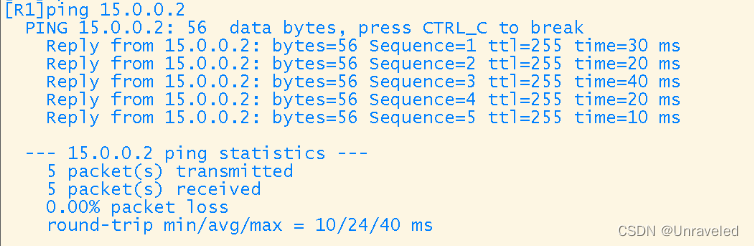
[r1]ip route-static 0.0.0.0 0 15.0.0.2
[r2]ip route-static 0.0.0.0 0 25.0.0.2
[r3]ip route-static 0.0.0.0 0 35.0.0.2
[r4]ip route-static 0.0.0.0 0 45.0.0.2
R1 and R5 Of PAP Certified and R5 Is the main certification party
R1
<R1>sys
Enter system view, return user view with Ctrl+Z.
[R1]aaa
[R1-aaa]local-user wp password cipher 123456 —— Add users
Info: Add a new user.
[R1-aaa]local-user wp service-type ppp
[R1-aaa]q
[R1]int s4/0/0
[R1-Serial4/0/0]ppp au
[R1-Serial4/0/0]ppp authentication-mode pap —— Enter the interface to start the authentication mode
R2
<R5>sys
Enter system view, return user view with Ctrl+Z.
[R5]int s3/0/0
[R5-Serial3/0/0]ppp pap lo
[R5-Serial3/0/0]ppp pap local-user wp pa
[R5-Serial3/0/0]ppp pap local-user wp password ci
[R5-Serial3/0/0]ppp pap local-user wp password cipher 123456
R2 And R5 Of CHAP authentication , also R5 Main certifier
<R2>sys
Enter system view, return user view with Ctrl+Z.
[R2]aaa
[R2-aaa]local-user wp password cipher 123456
Info: Add a new user.
[R2-aaa]local-user wp service-type ppp
[R2-aaa]int s4/0/0
[R2-Serial4/0/0]ppp authentication-mode chap
<R5>sys
Enter system view, return user view with Ctrl+Z.
[R5]int s3/0/1
[R5-Serial3/0/1]ppp ch
[R5-Serial3/0/1]ppp chap u
[R5-Serial3/0/1]ppp chap user wp
[R5-Serial3/0/1]ppp cha
[R5-Serial3/0/1]ppp chap pa
[R5-Serial3/0/1]ppp chap password ci
[R5-Serial3/0/1]ppp chap password cipher 123456
[R5-Serial3/0/1]
R3 On R5 Used between HDLC encapsulation
[R3]int s4/0/0
[R3-Serial4/0/0]lin
[R3-Serial4/0/0]link-protocol hd
[R3-Serial4/0/0]link-protocol hdlc
Warning: The encapsulation protocol of the link will be changed. Continue? [Y/N]:y
Jul 10 2022 20:03:22-08:00 R3 %%01IFNET/4/CHANGE_ENCAP(l)[0]:The user performed the configuration that will change the encapsulation protocol of the link and then selected Y.
[R3-Serial4/0/0]
[R3-Serial4/0/0]
Jul 10 2022 20:03:22-08:00 R3 %%01PPP/4/PHYSICALDOWN(l)[1]:On the interface Serial4/0/0, PPP link was closed because the status of the physical layer was Down.
[R3-Serial4/0/0]
Jul 10 2022 20:03:22-08:00 R3 %%01IFNET/4/LINK_STATE(l)[2]:The line protocol PPP on the interface Serial4/0/0 has entered the DOWN state.
[R3-Serial4/0/0]
Jul 10 2022 20:03:22-08:00 R3 %%01IFNET/4/LINK_STATE(l)[3]:The line protocol PPP IPCP on the interface Serial4/0/0 has entered the DOWN state.
[R3-Serial4/0/0]
<R5>sys
Enter system view, return user view with Ctrl+Z.
[R5]int s4/0/1
[R5-Serial4/0/1]lin
[R5-Serial4/0/1]link-protocol hd
[R5-Serial4/0/1]link-protocol hdlc
Warning: The encapsulation protocol of the link will be changed. Continue? [Y/N]:y
Jul 10 2022 20:07:38-08:00 R5 %%01IFNET/4/CHANGE_ENCAP(l)[0]:The user performed the configuration that will change the encapsulation protocol of the link and then selected Y.
[R5-Serial4/0/11]
[R5-Serial4/0/1]q
RIP
R1:
[R1]rip
[R1-rip-1]ne
[R1-rip-1]network 192.168.1.0
[R1-rip-1]ne
[R1-rip-1]network 123.0.0.0
[R1-rip-1]
R2:
[R2]rip
[R2-rip-1]ne
[R2-rip-1]network 192.168.2.0
[R2-rip-1]network 123.0.0.0
[R2-rip-1]
R3:
[R3]rip
[R3-rip-1]ne
[R3-rip-1]network 192.168.3.0
[R3-rip-1]ne
[R3-rip-1]network 123.0.0.0
[R3-rip-1]
R4:
[R4]rip
[R4-rip-1]ne
[R4-rip-1]network 192.168.4.0
[R4-rip-1]
MGRE Environment building
MGRE used 192.168.5.0/24
R1
<R1>sys
Enter system view, return user view with Ctrl+Z.
[R1]int t0/0/0
[R1-Tunnel0/0/0]ip add 192.168.5.1 24
[R1-Tunnel0/0/0]tu
[R1-Tunnel0/0/0]tunnel-protocol gr
[R1-Tunnel0/0/0]tunnel-protocol gre p2
[R1-Tunnel0/0/0]tunnel-protocol gre p2mp
[R1-Tunnel0/0/0]so
[R1-Tunnel0/0/0]source 15.0.0.1
Jul 10 2022 22:20:44-08:00 R1 %%01IFNET/4/LINK_STATE(l)[0]:The line protocol IP on the interface Tunnel0/0/0 has entered the UP state.
[R1-Tunnel0/0/0]
[R1-Tunnel0/0/0]ne
[R1-Tunnel0/0/0]nh
[R1-Tunnel0/0/0]nhrp ne
[R1-Tunnel0/0/0]nhrp network-id 100
[R1-Tunnel0/0/0]
R2
<R2>sys
Enter system view, return user view with Ctrl+Z.
[R2]int t0/0/0
[R2-Tunnel0/0/0]ip add 192.168.5.2 24
[R2-Tunnel0/0/0]tu
[R2-Tunnel0/0/0]tunnel-protocol gr
[R2-Tunnel0/0/0]tunnel-protocol gre p2
[R2-Tunnel0/0/0]so
[R2-Tunnel0/0/0]source s4/0/0
Jul 10 2022 22:23:25-08:00 R2 %%01IFNET/4/LINK_STATE(l)[0]:The line protocol IP on the interface Tunnel0/0/0 has entered the UP state.
[R2-Tunnel0/0/0]
[R2-Tunnel0/0/0]nh
[R2-Tunnel0/0/0]nhrp ne
[R2-Tunnel0/0/0]nhrp network-id 100
[R2-Tunnel0/0/0]nh
[R2-Tunnel0/0/0]nhrp en
[R2-Tunnel0/0/0]nhrp entry 192.168.5.1 15.0.0.1 re
[R2-Tunnel0/0/0]nhrp entry 192.168.5.1 15.0.0.1 register
[R2-Tunnel0/0/0]
R2 and R3 Empathy

see NHRP Information collection
R1 For the central site ;R1,R4 From point to point GRE
AR1
[R1]int t0/0/1
[R1-Tunnel0/0/1]ip add 192.168.6.1 24
[R1-Tunnel0/0/1]tu
[R1-Tunnel0/0/1]tunnel-protocol gr
[R1-Tunnel0/0/1]tunnel-protocol gre
[R1-Tunnel0/0/1]so
[R1-Tunnel0/0/1]source 15.0.0.1
[R1-Tunnel0/0/1]de
[R1-Tunnel0/0/1]description 45.0.0.1
[R1-Tunnel0/0/1]
AR4
[R4]int t0/0/1
[R4-Tunnel0/0/1]ip add 192.168.6.2 24
[R4-Tunnel0/0/1]tu
[R4-Tunnel0/0/1]tunnel-protocol g
[R4-Tunnel0/0/1]tunnel-protocol gre
[R4-Tunnel0/0/1]so
[R4-Tunnel0/0/1]source 45.0.0.1
[R4-Tunnel0/0/1]de
[R4-Tunnel0/0/1]description 15.0.0.1
[R4-Tunnel0/0/1]
The entire private network is based on RIP Network wide accessibility
AR1:
[R1]rip
[R1-rip-1]v 2
[R1-rip-1]network 192.168.1.0
[R1-rip-1]network 192.168.5.0
[R1-rip-1]network 192.168.6.0
AR2:
<R2>sys
Enter system view, return user view with Ctrl+Z.
[R2]rip
[R2-rip-1]v 2
[R2-rip-1]network 192.168.2.0
[R2-rip-1]network 192.168.5.0
[R2-rip-1]q
AR3:
<R3>sys
Enter system view, return user view with Ctrl+Z.
[R3]rip
[R3-rip-1]v 2
[R3-rip-1]network 192.168.2.0
[R3-rip-1]network 192.168.5.0
[R3-rip-1]network 192.168.3.0
[R3-rip-1]
AR4:
[R4]rip
[R4-rip-1]v 2
[R4-rip-1]ne
[R4-rip-1]network 192.168.4.0
[R4-rip-1]network 192.168.6.0
[R4-rip-1]
all PC Set up private IP As source IP, You can visit R5 Loopback
For all edge router interfaces NAT transformation
R1
[R1]acl 2000
[R1-acl-basic-2000]ru
[R1-acl-basic-2000]rule per
[R1-acl-basic-2000]rule permit so
[R1-acl-basic-2000]rule permit source 192.168.1.0 0.0.0.255
[R1-acl-basic-2000]int s4/0/0
[R1-Serial4/0/0]na
[R1-Serial4/0/0]nat ou
[R1-Serial4/0/0]nat outbound 2000
[R1-Serial4/0/0]
R2
[R2]acl 2000
[R2-acl-basic-2000]ru
[R2-acl-basic-2000]rule per
[R2-acl-basic-2000]rule permit so
[R2-acl-basic-2000]rule permit source 192.168.2.0 0.0.0.255
[R2-acl-basic-2000]int s4/0/0
[R2-Serial4/0/0]na
[R2-Serial4/0/0]nat ou
[R2-Serial4/0/0]nat outbound 2000
[R2-Serial4/0/0]q
R3
[R3]acl 2000
[R3-acl-basic-2000]ru
[R3-acl-basic-2000]rule per
[R3-acl-basic-2000]rule permit s
[R3-acl-basic-2000]rule permit source 192.168.3.0 0.0.0.255
[R3-acl-basic-2000]int s4/0/0
[R3-Serial4/0/0]na
[R3-Serial4/0/0]nat ou
[R3-Serial4/0/0]nat outbound 2000
[R3-Serial4/0/0]q
R4
<R4>sys
Enter system view, return user view with Ctrl+Z.
[R4]acl
[R4]acl 2000
[R4-acl-basic-2000]ru
[R4-acl-basic-2000]rule per
[R4-acl-basic-2000]rule permit ?
fragment Check fragment packet
none-first-fragment Check the subsequence fragment packet
source Specify source address
time-range Specify a special time
vpn-instance Specify a VPN-Instance
<cr> Please press ENTER to execute command
[R4-acl-basic-2000]rule permit s
[R4-acl-basic-2000]rule permit source 192.168.4.0 0.0.0.255
[R4-acl-basic-2000]int g0/0/0
[R4-GigabitEthernet0/0/0]na
[R4-GigabitEthernet0/0/0]nat ?
outbound Specify net address translation
server Specify NAT server
static Specify static NAT
[R4-GigabitEthernet0/0/0]nat ou
[R4-GigabitEthernet0/0/0]nat outbound 2000
[R4-GigabitEthernet0/0/0]q

边栏推荐
- Elk cluster deployment (IV) deployment logstash
- 洞悉数据库迷局,2022金仓创新产品发布会召开
- 基于多尺度残差密集块和块连接级联U-Net的真实图像去噪
- Several calling methods of Oracle stored procedure
- 数据库系统原理与应用教程(021)—— MySQL 的数据库操作
- CompressAI:基于pytorch的图像压缩框架使用
- RSS上手教程:聚合自己的信息收集渠道,RSSHub、FreshRSS、NetNewsWire
- 【生物信息学】外泌体miRNA成长训练营(14天)
- Logback different packages (business logs) are output to different log files
- Add value to health and empower the times | xianle Health releases the annual Sustainable Development Report
猜你喜欢

OSPF的5个数据包、LSA信息
高等数学---第八章隐函数偏导数与全微分
![[vsctf2022]web topic recurrence](/img/6f/56a9ec14ec699e427e9e21ee48c9eb.png)
[vsctf2022]web topic recurrence

Renewable finance refi: providing technology and financial system beneficial to the earth
重邮SYDTEK实习(一): 4k和BLE profile烧录

Graphic array calculation module numpy (trigonometric function, rounding function, converting radian to angle, statistical analysis function, median, array sorting, argsort(), lexport())
C language training address book (static and dynamic versions)
【重识云原生】第四章云网络4.9.4.2节——智能网卡实现

Power buckle ----- gemstones and stones

Sword finger offer 09 Implementing queues with two stacks

随机推荐
[QNX Hypervisor 2.2用户手册]8.2 Guest退出
ELK集群部署(七)之ELK集群启动顺序
NFT players' consensus segmentation: money, community and culture
ELK集群部署(十)之ELK服务化
Self-Signed SSL证书创建和使用
Take Celsius as a negative textbook to teach you how to judge the quality of products and avoid investment risks
1388.3n pizza dynamic planning
Which is the most suitable price system for the three cloud rendering platforms (I)
Several calling methods of Oracle stored procedure
Elk service of elk cluster deployment (10)
bbox center-size representation and corners representation
CompressAI:基于pytorch的图像压缩框架使用
One of the reasons why deepin wine qq/ wechat Chinese is displayed as a box
[recursion] square filling (backtracking method)
ELK集群部署(五)之部署FileBeat
Sqoop imports JSON format Chinese garbled code from MySQL
RSS上手教程:聚合自己的信息收集渠道,RSSHub、FreshRSS、NetNewsWire
9. Talk about the relationship between hashcode() and equals()?
玩转“私域电商”,链动2+1模式值得企业深入了解吗?
HCIP - GRE/MGRE、OSPF