当前位置:网站首页>好看的(动态)Jay迷自制动态专辑卡片(正面和背面不同)和歌词页面
好看的(动态)Jay迷自制动态专辑卡片(正面和背面不同)和歌词页面
2022-07-17 00:02:00 【~~码到成功】
总体效果如图:
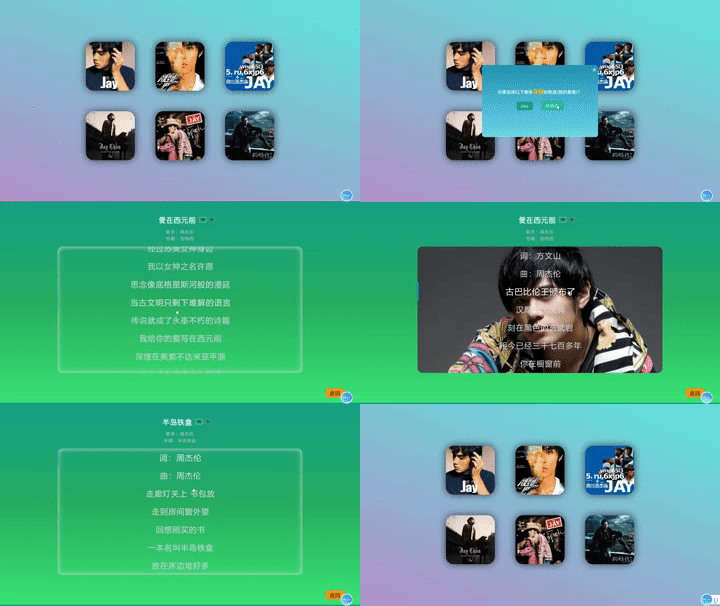
部分截图:
翻转卡片


歌词页面
页面只用到了前端基础 HTML/CSS/JQ(原生的,没用到框架)
前后卡片翻转:
用到了css的 transform 属性:
.front,.back{
    border-radius: 30px;
    position: absolute;
    top: 0;
    left: 0;
    width: 100%;
    height: 100%;
    -webkit-perspective: 1000;
    backface-visibility: hidden;
    -webkit-transition: all 1.5s;
    -moz-transition: all 1.5s;
    -ms-transition: all 1.5s;
    -o-transition: all 1.5s;

}


#back-b1 {
    position: relative;
    transform: rotateY(-180deg);
    -webkit-transform: rotateY(-180deg);
}
.item:hover #front-f1 {
    transform: rotateY(-180deg);
    -webkit-transform: rotateY(-180deg);

}

.item:hover #back-b1 {
    transform: rotateY(-360deg);
    -webkit-transform: rotateY(-360deg);
}


#back-b2 {
    position: relative;
    transform: rotateX(180deg);
    -webkit-transform: rotateX(180deg);
}
.item:hover #front-f2 {
    transform: rotateX(180deg);
    -webkit-transform: rotateX(180deg);
}

.item:hover #back-b2 {
    transform: rotateX(360deg);
    -webkit-transform: rotateX(360deg);
}
代码:
内容比较多,部分代码如下(代码写得不好,有错请指正):
<!DOCTYPE html>
<html lang="en">
<head>
    <meta charset="UTF-8">
    <meta http-equiv="X-UA-Compatible" content="IE=edge">
    <meta name="viewport" content="width=device-width, initial-scale=1.0">
    <title>Jay</title>
    <link rel="stylesheet" href="../css/style2.css">
    <script src="http://code.jquery.com/jquery-1.8.3.min.js"></script>
</head>
<body>
    <div class="container">

        <div class="up">

            <div class="item" onclick="show1()">
                <div class="front" id="front-f1">
                    <img class="img1" src="../img/front/01.jpg">
                </div>
                <div class="back" id="back-b1">
                    <img class="img2" src="../img/back/02.jpg" >
                </div>
            </div>

            <div class="item" onclick="show2()">
                <div class="front" id="front-f2">
                    <img class="img1" src="../img/front/03.jpg">
                </div>
                <div class="back" id="back-b2">
                    <img class="img2" src="../img/back/04.jpg">
                </div>
            </div>

            <div class="item" onclick="show3()">
                <div class="front" id="front-f3">
                    <img class="img1" src="../img/front/05.jpg">
                </div>
                <div class="back" id="back-b3">
                    <img class="img2" src="../img/back/06.jpg">
                </div>
            </div>
        </div>

        <div class="down">
            <div class="item" onclick="show4()">
                <div class="front" id="front-f4">
                    <img class="img1" src="../img/front/07.jpg">
                </div>
                <div class="back" id="back-b4">
                    <img class="img2" src="../img/back/08.jpg">
                </div>
            </div>
            <div class="item" onclick="show5()">
                <div class="front" id="front-f5">
                    <img class="img1" src="../img/front/09.jpg">
                </div>
                <div class="back" id="back-b5">
                    <img class="img2" src="../img/back/10.jpg">
                </div>
            </div>
            <div class="item" onclick="show6()">
                <div class="front" id="front-f6">
                    <img class="img1" src="../img/front/11.jpg">
                </div>
                <div class="back" id="back-b6">
                    <img class="img2" src="../img/back/12.jpg">
                </div>
            </div>
        </div>
    </div>
    <div class="main" id="main1">
        <span class="close" onclick="show1()">×</span>
        <div class="content">
            <span class="qt">你要选择以下哪张<span class="zj">专辑</span>的歌曲(我的最爱)?</span>
            <div class="al">
                <button id="jay">Jay</button>
                <button id="ftx">范特西</button>
            </div>
        </div>
    </div>

    <div class="main" id="main2">
        <span class="close" onclick="show2()">×</span>
        <div class="content">
            <span class="qt">你要选择以下哪张<span class="zj">专辑</span>的歌曲(我的最爱)?</span>
            <div class="al">
                <button id="bdkj">八度空间</button>
                <button id="yhm">叶惠美</button>
            </div>
        </div>
    </div>

    <div class="main" id="main3">
        <span class="close" onclick="show3()">×</span>
        <div class="content">
            <span class="qt">你要选择以下哪张<span class="zj">专辑</span>的歌曲(我的最爱)?</span>
            <div class="al">
                <button id="xzzjl">寻找周杰伦</button>
                <button id="qlx">七里香</button>
            </div>
        </div>
    </div>

    <div class="main" id="main4">
        <span class="close" onclick="show4()">×</span>
        <div class="content">
            <span class="qt">你要选择以下哪张<span class="zj">专辑</span>的歌曲(我的最爱)?</span>
            <div class="al">
                <button id="bdkj">十一月的肖邦</button>
                <button id="yhm">依然范特西</button>
            </div>
        </div>
    </div>

    <div class="main" id="main5">
        <span class="close" onclick="show5()">×</span>
        <div class="content">
            <span class="qt">你要选择以下哪张<span class="zj">专辑</span>的歌曲(我的最爱)?</span>
            <div class="al">
                <button id="bdkj">我很忙</button>
                <button id="yhm">魔杰座</button>
            </div>
        </div>
    </div>

    <div class="main" id="main6">
        <span class="close" onclick="show6()">×</span>
        <div class="content">
            <span class="qt">你要选择以下哪张<span class="zj">专辑</span>的歌曲(我的最爱)?</span>
            <div class="al">
                <button id="bdkj">跨时代</button>
                <button id="yhm">十二新作</button>
            </div>
        </div>
    </div>

    <script>
        function show1(){
            document.querySelector('#main1').classList.toggle('active')
        }
        function show2(){
            document.querySelector('#main2').classList.toggle('active')
        }
        function show3(){
            document.querySelector('#main3').classList.toggle('active')
        }
        function show4(){
            document.querySelector('#main4').classList.toggle('active')
        }
        function show5(){
            document.querySelector('#main5').classList.toggle('active')
        }
        function show6(){
            document.querySelector('#main6').classList.toggle('active')
        }

        $(function(){
            $("#jay").click(function(){
                location.href="../one/1/index.html";
            })
            $("#ftx").click(function(){
                location.href="../one/2/index.html";
            })

            $("#bdkj").click(function(){
                location.href="../two/1/index.html";
            })
            $("#yhm").click(function(){
                location.href="../two/2/index.html";
            })

            $("#xzzjl").click(function(){
                location.href="../three/1/index.html";
            })
            $("#qlx").click(function(){
                location.href="../three/2/index.html";
            })

            $("#").click(function(){
                location.href="../four/1/index.html";
            })
            $("#").click(function(){
                location.href="../four/2/index.html";
            })

            $("#").click(function(){
                location.href="../five/1/index.html";
            })
            $("#").click(function(){
                location.href="../five/2/index.html";
            })

            $("#").click(function(){
                location.href="../six/1/index.html";
            })
            $("#").click(function(){
                location.href="../six/2/index.html";
            })
        })

    </script>
</body>
</html>
翻转卡片的CSS代码:
* {
  margin: 0;
  padding: 0;
  letter-spacing: 2px;
  color: #ffffff;
}
body {
  height: 93vh;
  background-image: linear-gradient(180deg, #16a085, #27ae60, #3ae374);
}
.container {
  margin: 0 auto;
  width: 1050px;
  border-radius: 20px;
}
.container .content {
  background-color: transparent;
  border-radius: 10px;
  flex: 1;
  text-align: center;
  margin: 50px 50px 0 50px ;
  height: 615px;
}
.container .content .Title .title {
  font-size: 27px;
  color: white;
  font-family: YouYuan;
  font-weight: bold;
  cursor: pointer;
}
.container .content .Title .title::before {
  transition: all 1.5s;
  content: "";
  color: transparent;
}
.container .content .Title .title:hover::before {
  content: "";
  color: red;
}
.container .content .Title .icon {
  margin-left: 5px;
}
.container .content .Title .icon img {
  width: 13px;
  height: 13px;
  border: 2px solid grey;
  border-radius: 5px;
  padding: 2px 6px;
  transition: all 1s;
  -webkit-transition: all 1s;
  cursor: pointer;
}
.container .content .Title .icon #vip {
  border: 2px solid #d9cd82;
}
.container .content .Title .icon img:hover {
  border: 2px solid #fff;
  filter: invert(100%) sepia(0%) saturate(0%) hue-rotate(933deg) brightness(103%) contrast(103%);
}
.container .content .intro {
  margin-top: 20px;
}
.container .content .intro .singer {
  display: block;
  color: #b2bec3;
}
.container .content .intro .album {
  margin-top: 5px;
  display: block;
  color: #b2bec3;
}
.container .content .intro .singer,
.container .content .intro .album {
  cursor: pointer;
}
.container .content .intro .singer:hover,
.container .content .intro .album:hover {
  color: #ecf0f1;
}
.container .content .lyric {
  margin: 20px 0;
  max-height: 80%;
  overflow: auto;
  box-shadow: 0 0 20px gainsboro inset;
  border-radius: 20px;
}
.container .content .lyric p {
  line-height: 70px;
  font-size: 30px;
  color: #ced4da;
  transition: all 0.5s;
  cursor: pointer;
  border-left: 5px solid transparent;
}
.container .content .lyric p:hover {
  color: #f8f9fa;
  font-size: 32px;
  border-left: 5px solid #0984e3;
}
.lyric::-webkit-scrollbar {
  display: none;
}
.body::-webkit-scrollbar {
  display: none;
}
.return {
  position: absolute;
  bottom: 0;
  right: 0;
  margin-right: 60px;
  margin-bottom: 30px;
}
.return a {
  text-decoration: none;
  font-size: 20px;
  border-radius: 10px;
  border: 0;
  color: #000;
  background-color: #f39c12;
  padding: 5px 15px;
  transition: all 0.5s;
}
.return a:hover {
  background-color: #16a085;
  color: #ccc;
}
.main {
  border-radius: 10px;
  position: fixed;
  top: -100%;
  left: 50%;
  visibility: hidden;
  transform: translate(-50%, -50%);
  width: 450px;
  height: 280px;
}
.main.active {
  top: 50%;
  visibility: visible;
  background: linear-gradient(to bottom, #3CA55C, #B5AC49);
  color: white;
}
.close {
  position: absolute;
  right: 0;
  margin-right: 5px;
  font-size: 25px;
  transition: all 0.5s;
  cursor: pointer;
}
.close:hover {
  color: red;
}
#content {
  width: 100%;
  height: 100%;
}
.like {
  position: fixed;
  top: 50%;
  left: 50%;
  transform: translate(-50%, -50%);
  font-size: 26px;
  font-weight: bold;
  font-family: YouYuan;
}
.outdiv {
  height: 50px;
  overflow: hidden;
  display: flex;
  justify-content: center;
  align-items: center;
}
.outdiv .play-control {
  height: 50px;
  width: 950px;
  box-sizing: border-box;
  background-color: #40c057;
  padding: 0 15px;
  display: flex;
  flex-direction: row;
  justify-content: center;
  align-items: center;
  border-radius: 15px;
}
.outdiv .play-control span {
  color: #7048e8;
}
.outdiv .play-control .playbtn {
  float: left;
  margin-right: 10px;
  font-size: 25px;
  color: #da77f2;
}
.outdiv .play-control .playbtn i {
  width: 18.75px;
  cursor: pointer;
}
.outdiv .play-control .progressBar {
  width: 75%;
  margin: 0 15px;
  display: flex;
  align-items: center;
}
.outdiv .play-control .progressBar .progressBasr-pass {
  width: 0;
  height: 5px;
  background: #f59f00;
  float: left;
  border-top-left-radius: 20px;
  border-bottom-left-radius: 20px;
}
.outdiv .play-control .progressBar .circle {
  width: 12px;
  height: 12px;
  border-radius: 50%;
  background-color: #7048e8;
}
.outdiv .play-control .progressBar .progressBar-remain {
  width: 100%;
  height: 5px;
  background-color: #adb5bd;
  float: left;
  border-top-right-radius: 20px;
  border-bottom-right-radius: 20px;
}
(我是后端的,前端代码只会基础,内容比较冗余,有错误或者更好的实现方法请指正)
边栏推荐
- war或jar使用Resource或ClassPathResource加载classpath下文件失败
- Swagger
- TCP和UDP的区别
- War or jar failed to load the file under classpath using resource or classpathresource
- 【Liunx】发布Jar包、日志动态查看、查看程序进程、结束程序
- UVA11362 Phone List 题解
- 在mysql数据库插入中文值出现的乱码解决
- [Clickhouse] calculation of weeks
- Redis command
- BeanFactory 和 ApplicationContext的区别
猜你喜欢
![[natural language processing] [multimodal] multimodal overview: visual language pre training model](/img/4a/24be4efe9b0347033a9615cf54ceb5.png)
[natural language processing] [multimodal] multimodal overview: visual language pre training model

Computer Graphics From Scratch - Chapter 3

高等数学---第八章多元函数微分学---多元函数的极值与最值

64 bit interrupt assembly cannot be used

从22顶会看对比学习在推荐的应用
并查集
![[MariaDB] start service, stop service and check status](/img/e7/7fa801d7c6ce91569375652a5b751c.png)
[MariaDB] start service, stop service and check status
![[Linux] release jar package, dynamically view logs, view program progress, and end programs](/img/ae/4e1e2ab160acf388372cd684d62c5d.png)
[Linux] release jar package, dynamically view logs, view program progress, and end programs
![[gradle] quick configuration](/img/3a/6f627ac826d466f4a17e694289ffcf.png)
[gradle] quick configuration

12. 整数转罗马数字 ●●
随机推荐
[Shader implémente l'effet Wave Shader chapitre 1]
【日常训练】剑指 Offer II 041. 滑动窗口的平均值
Redis command
2022.7.1
面试官:怎么不用定时任务实现关闭订单?
By voting for the destruction of STI by Dao, seektiger is truly community driven
在mysql數據庫插入中文值出現的亂碼解决
一小时搭建属于属于自己的博客系统网站
BeanFactory 和 ApplicationContext的区别
MySQL常用命令
【Gradle】快速配置
Leetcode 242: valid Letter ectopic words
openpyxl 绘制雷达图
Photoshop网页设计教程
ROS 通信机制进阶
Briefly talk about two interview questions encountered recently
Common linked list questions and their go implementation
Switch and router technology: link aggregation, spanning tree protocol STP and spanning tree protocol configuration
【MariaDB】启动服务、停止服务、查看状态
Mysql的索引为什么使用B+树而不使用跳表?