当前位置:网站首页>单例模式的应用
单例模式的应用
2022-07-15 23:15:00 【谢三公主】
【实验目的】
- 掌握单例模式(Singleton)的特点
- 分析具体问题,请分别使用四种安全单例模式进行设计。
【实验内容和要求】
例2.6关于一个单位的互联网连接问题的软件设计中,单利模式部分采用的是标准单例模式,现在要求改变其设计,使用线性安全的单例模式。重新设计并且编写代码实现该互联网连接问题。具体要求以及代码实现参见光盘中的实验部分。
【模式代码】
1饿汉式
2 双重检测
代码部分1:
package bbb;

import java.awt.*;
import java.awt.event.*;
import javax.swing.*;

/*==================================================*/
// This is a sigleton class, only one instance of the class can be created.
// To use this class, you cannot use constructor because it has been
// claimed private. You can only use the static method getInstance(),
// which, in case if the instance doesent exist, will create and return an
// instance of LogonGUI to the client class. otherwise, if an instance of
// LogonGUI has already been created before, this method will just
// return that instance to the client class.
/*==================================================*/
public class SingleLogonGUI extends JFrame {

   public static final String LOGON = "Log On";
   public static final String EXIT = "Exit";
   private String USERNM="mikesun";
   private String PASSWD = "opensesame";
   private JTextField txtUser;
   private JTextField txtPassWord;
 // private static SingleLogonGUI instance = null;
   private volatile static SingleLogonGUI instance = null;
   private JTextField txtInstruction;

   private SingleLogonGUI() {

	    super("SingleLogonGUI - Singleton");
	    initializeGUI();
    }

   public static SingleLogonGUI getInstance() {

	                if (instance == null) {

	                   synchronized (SingleLogonGUI.class) {

	                      if (instance == null) {

	                    	  instance = new SingleLogonGUI();
	                    }
	                  }
	              }
	              return instance;
	          }


   public void initializeGUI()  {

      JLabel lblUsrName = new JLabel("User Name");
      JLabel lblPassWord = new JLabel("Password");
      txtUser = new JTextField(USERNM);
      txtPassWord = new JTextField(PASSWD);
      JButton btnLogon = new JButton(LOGON);
      btnLogon.setMnemonic(KeyEvent.VK_S);
      JButton btnExit = new JButton(EXIT);
      btnExit.setMnemonic(KeyEvent.VK_X);
      ButtonHandler vf = new ButtonHandler();
      btnLogon.addActionListener(vf);
      btnExit.addActionListener(vf);
      JPanel buttonPanel = new JPanel();
      GridBagLayout gridbag = new GridBagLayout();
      buttonPanel.setLayout(gridbag);
      GridBagConstraints gbc = new GridBagConstraints();

      buttonPanel.add(lblUsrName);
      buttonPanel.add(txtUser);
      buttonPanel.add(lblPassWord);
      buttonPanel.add(txtPassWord);
      buttonPanel.add(btnLogon);
      buttonPanel.add(btnExit);
      gbc.insets.top = 5;
      gbc.insets.bottom = 5;
      gbc.insets.left = 5;
      gbc.insets.right = 5;
      gbc.gridx = 0;
      gbc.gridy = 0;
      gridbag.setConstraints(lblUsrName, gbc);
      gbc.anchor = GridBagConstraints.WEST;
      gbc.gridx = 1;
      gbc.gridy = 0;
      gridbag.setConstraints(txtUser, gbc);
      gbc.gridx = 0;
	  gbc.gridy = 1;
	  gridbag.setConstraints(lblPassWord, gbc);
	  gbc.anchor = GridBagConstraints.WEST;
	  gbc.gridx = 1;
	  gbc.gridy = 1;
      gridbag.setConstraints(txtPassWord, gbc);
      gbc.anchor = GridBagConstraints.EAST;
      gbc.insets.left = 2;
      gbc.insets.right = 2;
      gbc.insets.top = 40;
      gbc.gridx = 0;
      gbc.gridy = 6;
      gridbag.setConstraints(btnLogon, gbc);
      gbc.anchor = GridBagConstraints.WEST;
      gbc.gridx = 1;
      gbc.gridy = 6;
      gridbag.setConstraints(btnExit, gbc);

      Container contentPane = getContentPane();
      contentPane.add(buttonPanel, BorderLayout.CENTER);
      txtInstruction = new JTextField();
      txtInstruction.setBackground(Color.pink);

      contentPane.add( txtInstruction, BorderLayout.NORTH);
      setSize(320, 200);
      setVisible(true);
   }
   public boolean isValideCustomer() {

	  String usr = txtUser.getText();
	  String pwd = txtPassWord.getText();
	  if(usr.equals(USERNM) && pwd.equals(PASSWD))
            return true;
      else
      	    return false;
   }
   private void issueWarning(){

         txtInstruction.setText("Invalide user name or password.");
	}
   private void issueSuccess(){

	     txtInstruction.setText("You have been successfully connected to the web.");
	}
   class ButtonHandler implements ActionListener  {

      public void actionPerformed(ActionEvent e) {

         if (e.getActionCommand().equals(EXIT)) {

            System.exit(1);
         }
         if (e.getActionCommand().equals(LOGON)) {

			 boolean isValideCus = isValideCustomer();
             if(isValideCus == false){
     //logon failed
                 issueWarning();
			 }
             else{
     //logon successfully
				 issueSuccess();
		     }
      }
    }
  }
}// end of class
代码部分2:
package bbb;

import java.awt.*;
import java.awt.event.*;
import javax.swing.*;

public class ClientUI extends JFrame{

   private static final String CONNECT = "Create Connection";
   private static final String EXIT = "Exit";
   private JTextField txtInstruction;
   private SingleLogonGUI  objLogon = null;

   public ClientUI() {

      super("ClientUI - Singleton Pattern");
      JButton btnConnect = new JButton(CONNECT);
      JButton btnExit = new JButton(EXIT);
      btnConnect.setMnemonic(KeyEvent.VK_S);
      btnExit.setMnemonic(KeyEvent.VK_X);

      ButtonHandler vf = new ButtonHandler();
      btnConnect.addActionListener(vf);
      btnExit.addActionListener(vf);
      JPanel buttonPanel = new JPanel();
      buttonPanel.setBackground(Color.green);
      buttonPanel.add(btnConnect);
      buttonPanel.add(btnExit);

      txtInstruction = new JTextField("Click to get a connection");
      txtInstruction.setBackground(Color.green);
      Container contentPane = getContentPane();
      contentPane.setLayout(new BorderLayout());
      contentPane.add(buttonPanel, "South");
      contentPane.add(txtInstruction, "Center");
      setSize(320, 120);
      setVisible(true);
   }
   private void issueWarning(){

       txtInstruction.setText("Error. You cannot start a second connection.");
	}
   class ButtonHandler implements ActionListener {

      public void actionPerformed(ActionEvent e) {

         if (e.getActionCommand().equals(EXIT)) {

            System.exit(1);
         }
         else if (e.getActionCommand().equals(CONNECT)) {

			 if(objLogon == null)
			      objLogon = SingleLogonGUI.getInstance();
			 else
			 	  issueWarning();
      }
    }
  }
  public static void main(String[]  args) {

	     ClientUI connection = new  ClientUI();
  }
}// end of class
3 静态内部类
代码1
package bbb;

import java.awt.*;
import java.awt.event.*;
import javax.swing.*;

/*==================================================*/
// This is a sigleton class, only one instance of the class can be created.
// To use this class, you cannot use constructor because it has been
// claimed private. You can only use the static method getInstance(),
// which, in case if the instance doesent exist, will create and return an
// instance of LogonGUI to the client class. otherwise, if an instance of
// LogonGUI has already been created before, this method will just
// return that instance to the client class.
/*==================================================*/
public class SingleLogonGUI extends JFrame {

   public static final String LOGON = "Log On";
   public static final String EXIT = "Exit";
   private String USERNM="mikesun";
   private String PASSWD = "opensesame";
   private JTextField txtUser;
   private JTextField txtPassWord;
 // private static SingleLogonGUI instance = null;
   private volatile static SingleLogonGUI instance = null;
   private JTextField txtInstruction;

 //静态内部类
 	private static class SingletonHolder {

 		//静态初始化器机制初始化本数据(保证了同步控制,线程安全)
 		private static SingleLogonGUI instance = new SingleLogonGUI();
 }


   private SingleLogonGUI() {

	    super("SingleLogonGUI - Singleton");
	    initializeGUI();
    }

   public static SingleLogonGUI getInstance() {


	              return SingletonHolder.instance;
	          }


   public void initializeGUI()  {

      JLabel lblUsrName = new JLabel("User Name");
      JLabel lblPassWord = new JLabel("Password");
      txtUser = new JTextField(USERNM);
      txtPassWord = new JTextField(PASSWD);
      JButton btnLogon = new JButton(LOGON);
      btnLogon.setMnemonic(KeyEvent.VK_S);
      JButton btnExit = new JButton(EXIT);
      btnExit.setMnemonic(KeyEvent.VK_X);
      ButtonHandler vf = new ButtonHandler();
      btnLogon.addActionListener(vf);
      btnExit.addActionListener(vf);
      JPanel buttonPanel = new JPanel();
      GridBagLayout gridbag = new GridBagLayout();
      buttonPanel.setLayout(gridbag);
      GridBagConstraints gbc = new GridBagConstraints();

      buttonPanel.add(lblUsrName);
      buttonPanel.add(txtUser);
      buttonPanel.add(lblPassWord);
      buttonPanel.add(txtPassWord);
      buttonPanel.add(btnLogon);
      buttonPanel.add(btnExit);
      gbc.insets.top = 5;
      gbc.insets.bottom = 5;
      gbc.insets.left = 5;
      gbc.insets.right = 5;
      gbc.gridx = 0;
      gbc.gridy = 0;
      gridbag.setConstraints(lblUsrName, gbc);
      gbc.anchor = GridBagConstraints.WEST;
      gbc.gridx = 1;
      gbc.gridy = 0;
      gridbag.setConstraints(txtUser, gbc);
      gbc.gridx = 0;
	  gbc.gridy = 1;
	  gridbag.setConstraints(lblPassWord, gbc);
	  gbc.anchor = GridBagConstraints.WEST;
	  gbc.gridx = 1;
	  gbc.gridy = 1;
      gridbag.setConstraints(txtPassWord, gbc);
      gbc.anchor = GridBagConstraints.EAST;
      gbc.insets.left = 2;
      gbc.insets.right = 2;
      gbc.insets.top = 40;
      gbc.gridx = 0;
      gbc.gridy = 6;
      gridbag.setConstraints(btnLogon, gbc);
      gbc.anchor = GridBagConstraints.WEST;
      gbc.gridx = 1;
      gbc.gridy = 6;
      gridbag.setConstraints(btnExit, gbc);

      Container contentPane = getContentPane();
      contentPane.add(buttonPanel, BorderLayout.CENTER);
      txtInstruction = new JTextField();
      txtInstruction.setBackground(Color.pink);

      contentPane.add( txtInstruction, BorderLayout.NORTH);
      setSize(320, 200);
      setVisible(true);
   }
   public boolean isValideCustomer() {

	  String usr = txtUser.getText();
	  String pwd = txtPassWord.getText();
	  if(usr.equals(USERNM) && pwd.equals(PASSWD))
            return true;
      else
      	    return false;
   }
   private void issueWarning(){

         txtInstruction.setText("Invalide user name or password.");
	}
   private void issueSuccess(){

	     txtInstruction.setText("You have been successfully connected to the web.");
	}
   class ButtonHandler implements ActionListener  {

      public void actionPerformed(ActionEvent e) {

         if (e.getActionCommand().equals(EXIT)) {

            System.exit(1);
         }
         if (e.getActionCommand().equals(LOGON)) {

			 boolean isValideCus = isValideCustomer();
             if(isValideCus == false){
     //logon failed
                 issueWarning();
			 }
             else{
     //logon successfully
				 issueSuccess();
		     }
      }
    }
  }
}// end of class
代码2
package bbb;

import java.awt.*;
import java.awt.event.*;
import javax.swing.*;

public class ClientUI extends JFrame{

   private static final String CONNECT = "Create Connection";
   private static final String EXIT = "Exit";
   private JTextField txtInstruction;
   private SingleLogonGUI  objLogon = null;

   public ClientUI() {

      super("ClientUI - Singleton Pattern");
      JButton btnConnect = new JButton(CONNECT);
      JButton btnExit = new JButton(EXIT);
      btnConnect.setMnemonic(KeyEvent.VK_S);
      btnExit.setMnemonic(KeyEvent.VK_X);

      ButtonHandler vf = new ButtonHandler();
      btnConnect.addActionListener(vf);
      btnExit.addActionListener(vf);
      JPanel buttonPanel = new JPanel();
      buttonPanel.setBackground(Color.green);
      buttonPanel.add(btnConnect);
      buttonPanel.add(btnExit);

      txtInstruction = new JTextField("Click to get a connection");
      txtInstruction.setBackground(Color.green);
      Container contentPane = getContentPane();
      contentPane.setLayout(new BorderLayout());
      contentPane.add(buttonPanel, "South");
      contentPane.add(txtInstruction, "Center");
      setSize(320, 120);
      setVisible(true);
   }
   private void issueWarning(){

       txtInstruction.setText("Error. You cannot start a second connection.");
	}
   class ButtonHandler implements ActionListener {

      public void actionPerformed(ActionEvent e) {

         if (e.getActionCommand().equals(EXIT)) {

            System.exit(1);
         }
         else if (e.getActionCommand().equals(CONNECT)) {

			 if(objLogon == null)
			      objLogon = SingleLogonGUI.getInstance();
			 else
			 	  issueWarning();
      }
    }
  }
  public static void main(String[]  args) {

	     ClientUI connection = new  ClientUI();
  }
}// end of class
4 枚举类
代码1:
package bbb;

import java.awt.*;
import java.awt.event.*;
import javax.swing.*;

/*==================================================*/
// This is a sigleton class, only one instance of the class can be created.
// To use this class, you cannot use constructor because it has been
// claimed private. You can only use the static method getInstance(),
// which, in case if the instance doesent exist, will create and return an
// instance of LogonGUI to the client class. otherwise, if an instance of
// LogonGUI has already been created before, this method will just
// return that instance to the client class.
/*==================================================*/
public class SingleLogonGUI extends JFrame {

   public static final String LOGON = "Log On";
   public static final String EXIT = "Exit";
   private String USERNM="mikesun";
   private String PASSWD = "opensesame";
   private JTextField txtUser;
   private JTextField txtPassWord;
 // private static SingleLogonGUI instance = null;
   private volatile static SingleLogonGUI instance = null;
   private JTextField txtInstruction;

//
   private SingleLogonGUI() {

	    super("SingleLogonGUI - Singleton");
	    initializeGUI();
    }

   /** * 枚举类型是线程安全的,并且只会装载一次 */
   private enum Singleton{

       INSTANCE;

       private final SingleLogonGUI instance;

       Singleton(){

           instance = new SingleLogonGUI();
       }

       private SingleLogonGUI getInstance(){

           return instance;
       }
   }


   public static SingleLogonGUI getInstance() {


	   return Singleton.INSTANCE.getInstance();

	          }


 //
   public void initializeGUI()  {

      JLabel lblUsrName = new JLabel("User Name");
      JLabel lblPassWord = new JLabel("Password");
      txtUser = new JTextField(USERNM);
      txtPassWord = new JTextField(PASSWD);
      JButton btnLogon = new JButton(LOGON);
      btnLogon.setMnemonic(KeyEvent.VK_S);
      JButton btnExit = new JButton(EXIT);
      btnExit.setMnemonic(KeyEvent.VK_X);
      ButtonHandler vf = new ButtonHandler();
      btnLogon.addActionListener(vf);
      btnExit.addActionListener(vf);
      JPanel buttonPanel = new JPanel();
      GridBagLayout gridbag = new GridBagLayout();
      buttonPanel.setLayout(gridbag);
      GridBagConstraints gbc = new GridBagConstraints();

      buttonPanel.add(lblUsrName);
      buttonPanel.add(txtUser);
      buttonPanel.add(lblPassWord);
      buttonPanel.add(txtPassWord);
      buttonPanel.add(btnLogon);
      buttonPanel.add(btnExit);
      gbc.insets.top = 5;
      gbc.insets.bottom = 5;
      gbc.insets.left = 5;
      gbc.insets.right = 5;
      gbc.gridx = 0;
      gbc.gridy = 0;
      gridbag.setConstraints(lblUsrName, gbc);
      gbc.anchor = GridBagConstraints.WEST;
      gbc.gridx = 1;
      gbc.gridy = 0;
      gridbag.setConstraints(txtUser, gbc);
      gbc.gridx = 0;
	  gbc.gridy = 1;
	  gridbag.setConstraints(lblPassWord, gbc);
	  gbc.anchor = GridBagConstraints.WEST;
	  gbc.gridx = 1;
	  gbc.gridy = 1;
      gridbag.setConstraints(txtPassWord, gbc);
      gbc.anchor = GridBagConstraints.EAST;
      gbc.insets.left = 2;
      gbc.insets.right = 2;
      gbc.insets.top = 40;
      gbc.gridx = 0;
      gbc.gridy = 6;
      gridbag.setConstraints(btnLogon, gbc);
      gbc.anchor = GridBagConstraints.WEST;
      gbc.gridx = 1;
      gbc.gridy = 6;
      gridbag.setConstraints(btnExit, gbc);

      Container contentPane = getContentPane();
      contentPane.add(buttonPanel, BorderLayout.CENTER);
      txtInstruction = new JTextField();
      txtInstruction.setBackground(Color.pink);

      contentPane.add( txtInstruction, BorderLayout.NORTH);
      setSize(320, 200);
      setVisible(true);
   }
   public boolean isValideCustomer() {

	  String usr = txtUser.getText();
	  String pwd = txtPassWord.getText();
	  if(usr.equals(USERNM) && pwd.equals(PASSWD))
            return true;
      else
      	    return false;
   }
   private void issueWarning(){

         txtInstruction.setText("Invalide user name or password.");
	}
   private void issueSuccess(){

	     txtInstruction.setText("You have been successfully connected to the web.");
	}
   class ButtonHandler implements ActionListener  {

      public void actionPerformed(ActionEvent e) {

         if (e.getActionCommand().equals(EXIT)) {

            System.exit(1);
         }
         if (e.getActionCommand().equals(LOGON)) {

			 boolean isValideCus = isValideCustomer();
             if(isValideCus == false){
     //logon failed
                 issueWarning();
			 }
             else{
     //logon successfully
				 issueSuccess();
		     }
      }
    }
  }
}// end of class
代码2
package bbb;

import java.awt.*;
import java.awt.event.*;
import javax.swing.*;

public class ClientUI extends JFrame{

   private static final String CONNECT = "Create Connection";
   private static final String EXIT = "Exit";
   private JTextField txtInstruction;
   private SingleLogonGUI  objLogon = null;

   public ClientUI() {

      super("ClientUI - Singleton Pattern");
      JButton btnConnect = new JButton(CONNECT);
      JButton btnExit = new JButton(EXIT);
      btnConnect.setMnemonic(KeyEvent.VK_S);
      btnExit.setMnemonic(KeyEvent.VK_X);

      ButtonHandler vf = new ButtonHandler();
      btnConnect.addActionListener(vf);
      btnExit.addActionListener(vf);
      JPanel buttonPanel = new JPanel();
      buttonPanel.setBackground(Color.green);
      buttonPanel.add(btnConnect);
      buttonPanel.add(btnExit);

      txtInstruction = new JTextField("Click to get a connection");
      txtInstruction.setBackground(Color.green);
      Container contentPane = getContentPane();
      contentPane.setLayout(new BorderLayout());
      contentPane.add(buttonPanel, "South");
      contentPane.add(txtInstruction, "Center");
      setSize(320, 120);
      setVisible(true);
   }
   private void issueWarning(){

       txtInstruction.setText("Error. You cannot start a second connection.");
	}
   class ButtonHandler implements ActionListener {

      public void actionPerformed(ActionEvent e) {

         if (e.getActionCommand().equals(EXIT)) {

            System.exit(1);
         }
         else if (e.getActionCommand().equals(CONNECT)) {

			 if(objLogon == null)
			      objLogon = SingleLogonGUI.getInstance();
			 else
			 	  issueWarning();
      }
    }
  }
  public static void main(String[]  args) {

	     ClientUI connection = new  ClientUI();
  }
}// end of class
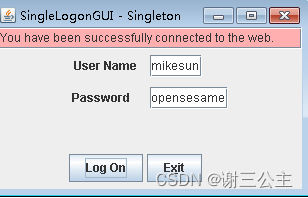
【运行截图】
1饿汉式

2 双重检测
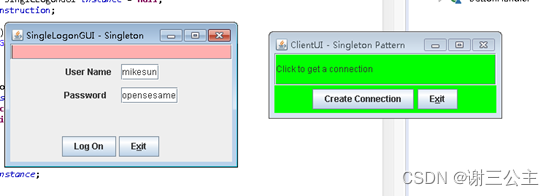
3 静态内部类
4 枚举类
边栏推荐
猜你喜欢

Acl+ant comprehensive case (7.15)

npm ERR! cb() never called 处理办法
OLED时钟

There is only one day left to prepare for the examination of Guangxi Second Construction Engineering Co., Ltd. the first three pages of the examination of second-class cost engineer came and raised sc

Kbpc2510w-asemi welding machine special rectifier bridge kbpc2510w

C 语言基础双指针移除元素解法

Buckle practice - 14 simplified path
LeetCode_ 113_ Path sum II

Heartless sword Chinese translation of Michael's definition of algebra

Original error was: DLL load failed while importing _ multiarray_ Umath: the specified module cannot be found
随机推荐
数据治理项目调研环节思考
OLED时钟
Written at the end of the recruitment of Huazhong University of science and technology
第17章 OAuth2LoginAuthenticationWebFilter 源码解析
正大期货目前开预留4的主账户需要什么条件?信息面
class path resource [xxx.properties] cannot be opened because it does not exist
交通灯 单片机课程设计
Is it safe to open an account for flush stock
Excerpt of new features in PHP version - php8.0x
skywalking测试环境部署实战
以太网开发与测试,这一步你做对了吗 (3)
PHP版本新特性摘選 - PHP8.0X
The best time to buy and sell stocks
0715 iron ore fell 10%
基于ADC0832的电位器数值显示
编程语言学习和使用的观点
Introduction to istio component mixer
【Unity3D】UGUI之Toggle
2022-07-15:一开始有21个球,甲和乙轮流拿球,甲先、乙后, 每个人在自己的回合,一定要拿不超过3个球,不能不拿。 最终谁的总球数为偶数,谁赢。 请问谁
你没有抓住 Promises 的要点