当前位置:网站首页>Initial flask
Initial flask
2022-07-19 01:24:00 【Wbig】
initial Flask frame
1. Flask Introduction to the framework
1.1 Why use Flask
because Flask It's a lightweight framework , Have rich expansion , You can add corresponding functions to the application . stay web Framework is more popular
2. Flask Construction of project environment
2.1 Creating a virtual environment
The virtual environment is created for later installation Flask And the libraries it needs are not confused with other libraries .
2.1.1 Configure virtual environment
File --> settings --> project Project name --> project interpreter

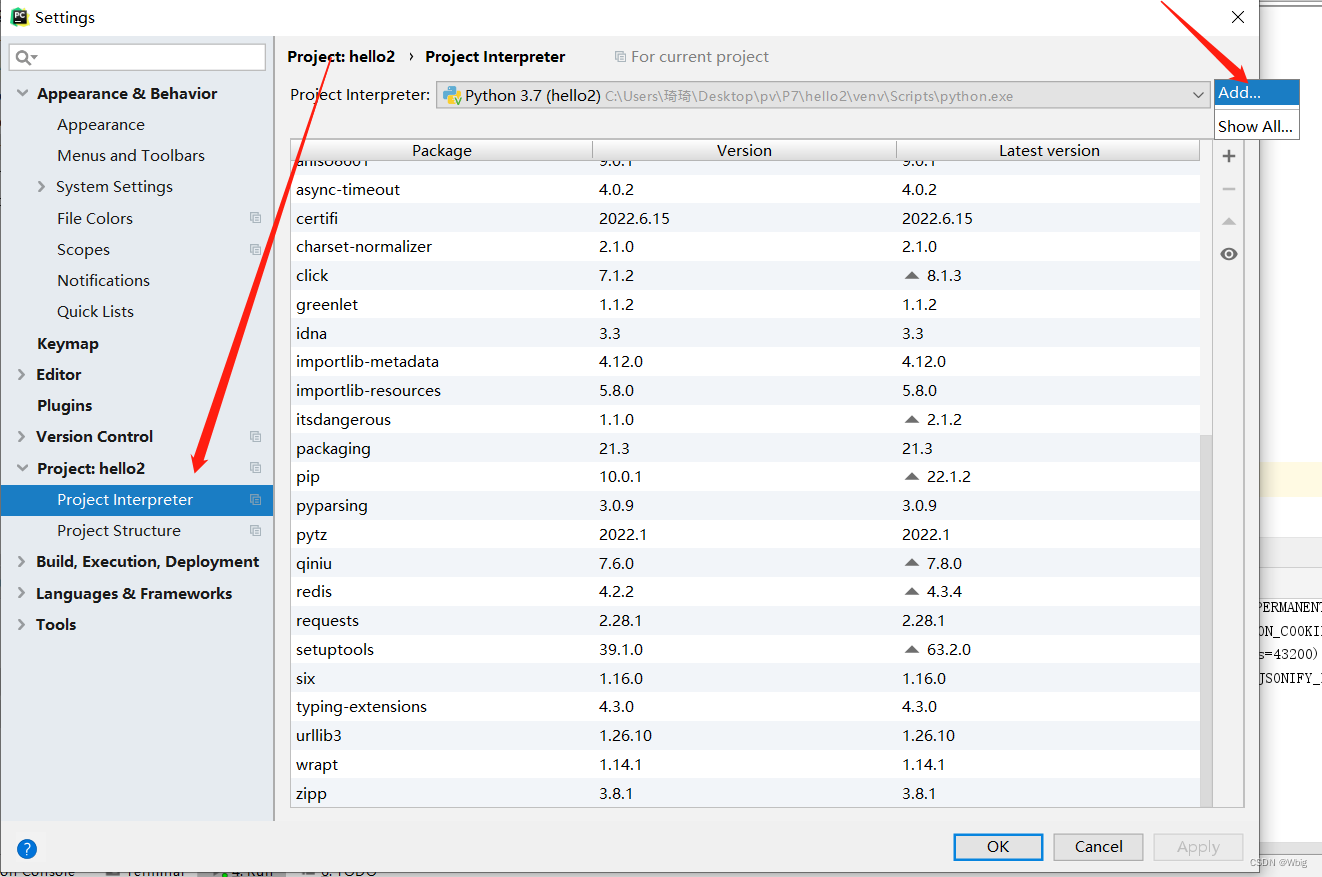
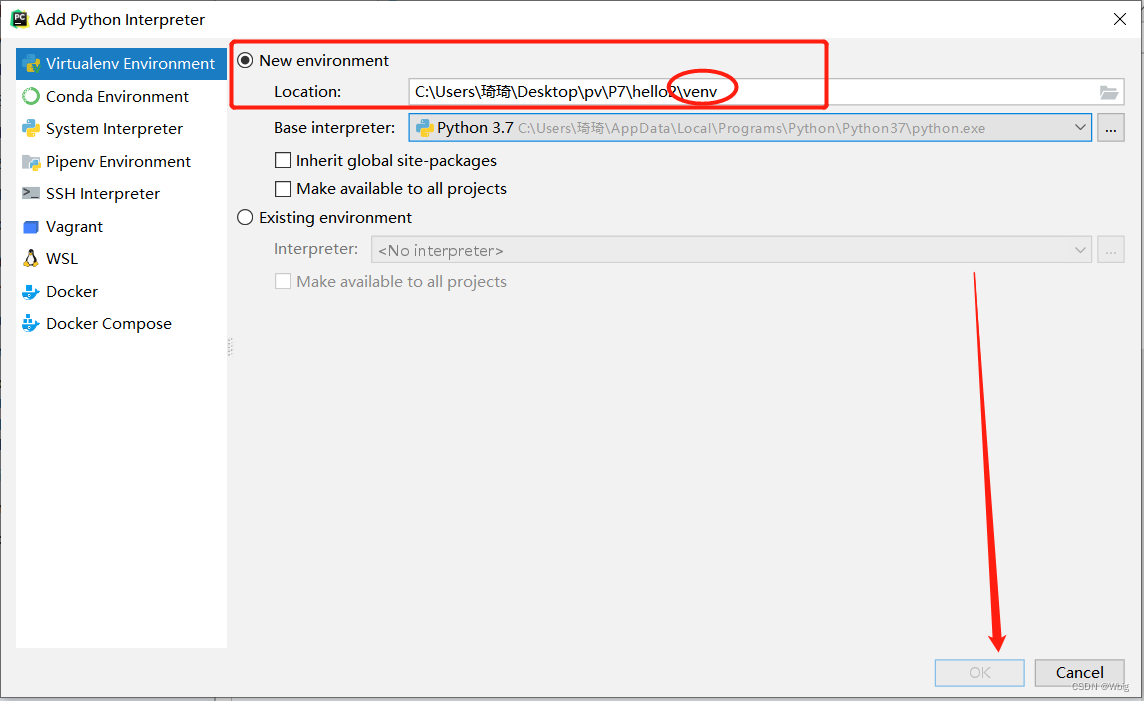

When there is venv Appears in front of the folder and the running Terminal path (venv)

2.1.2 If not venv, Then activate
have a look venv In file , Are there any documents 
If not, the reconstruction project will be carried out again according to the above steps
Some words , Start activation
First step : Enter the first venv Of scripts Next
cd venv/scripts

After entering , Input activate, Then there is the following .
Then go back to the root directory of the project
cd ../..
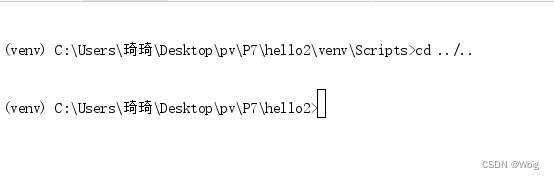
If not yet , enter deactivate Quit , Reactivate
2.2 install Flask And related libraries
Write all the required libraries and version numbers into a text document , Drag this text document into PyCharm, Execute at the terminal
pip install -r file name
appear successfully It's a successful installation 
3. Preliminary demonstration Flask
#  Guide pack
from flask import Flask
#  Instantiation Flask object  __name__  Current package name
app = Flask(__name__)
#  Use decorators   Configure the routing
@app.route("/hello")
#  The view function
def hello():
    return "hello"
#  function
if __name__ == '__main__':
    app.run()
4. Flask To configure
4.1 Load... From the configuration object
Create one at the project root settings Folder , Create... Under folder config file , Write under the file
#  Configuration class
class DefaultConfig:
    #  Attribute names must be all uppercase
    NAME = "zhangsan"
    DEBUG = True   #  Set to Ture Can automatically load , Automatically refresh
Create... In the project root directory hello2.py file
#  Guide pack
from flask import Flask
#  Import configuration class
from settings.config import DefaultConfig
#  Instantiation Flask object  __name__  Current package name
app = Flask(__name__)
#  Load the configuration file from the object
app.config.from_object(DefaultConfig)
print(app.config)
#  Use decorators   Configure the routing
@app.route("/hello")
#  The view function
def hello():
    return "hello"
#  function
if __name__ == '__main__':
    app.run()
4.2 Load from the configuration file
Create one at the project root setting.py The file of , Write under the file
AGE = 18
stay hello2.py Written in a file
#  Guide pack
from flask import Flask
#  Instantiation Flask object  __name__  Current package name
app = Flask(__name__)
#  Load configuration items from the file
app.config.from_pyfile("setting.py")
print(app.config)
#  Use decorators   Configure the routing
@app.route("/hello")
#  The view function
def hello():
    return "hello"
#  function
if __name__ == '__main__':
    app.run()
4.3 Load configuration from environment variables
Create a configuration file under a file , Copy the file path 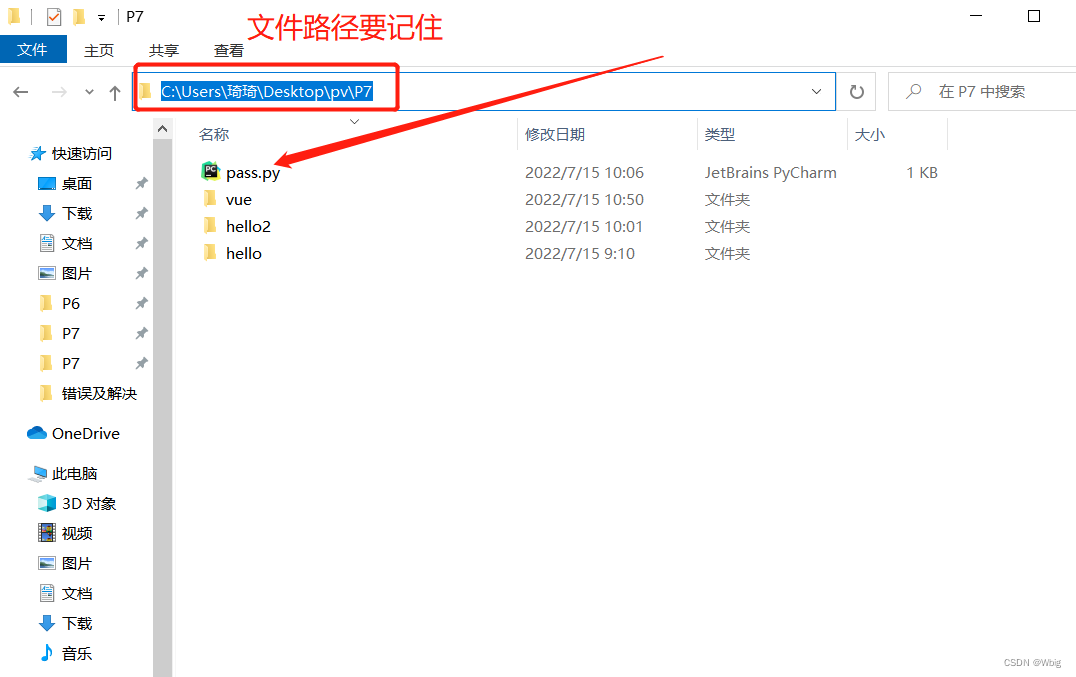
stay pycharm Add variable path in 

stay hello2.py It's in the file
#  Guide pack
from flask import Flask
#  Instantiation Flask object  __name__  Current package name
app = Flask(__name__)
#  Load the configuration file from the environment variable
app.config.from_envvar("password")
print(app.config)
#  Use decorators   Configure the routing
@app.route("/hello")
#  The view function
def hello():
    return "hello"
#  function
if __name__ == '__main__':
    app.run()
4.4 The difference between the three
- Load configuration from object : Flexible configuration , High reusability , But it's not safe. , Use when there is no sensitive information
- Load configuration from file : Reusability is not good , It's not safe either , But the official recommended usage
- Load from environment variable : A relatively safe , It is conducive to configuring sensitive information , Recommended
5. Factory mode
Factory mode : Provide a “ engineering ”, Let it create an object , The client calls with some parameters , Then return the result .
Simple example of factory mode :
#  Write an interface class
class Animal():
    def do_say(self):
        pass
class Cat(Animal):
    def do_say(self):
        print("miao,miao")

class Dog(Animal):
    def do_say(self):
        print("wang,wang")

class Forest():
    def say(self,animal_type):
        eval(animal_type)().do_say()

if __name__ == '__main__':
    a = input(" Please enter the type of animal (Cat or Dog):")
    print(" The data received is :",a)
    Forest().say(a)
6.APP encapsulation
Separate the executed statement from the statement to be created , Import in the executed file , call
Example :
Create a create_app.py file , Write the created statement in the file
from flask import Flask
# establish flask object
def create_app():
   flask_app = Flask(__name__)
   print(" I was called ")
   return flask_app
stay app.py Write the statement to be executed in the file
# Import
from create_app import create_app
# Instantiation
app = create_app()
print(app)
if __name__ == '__main__':
   app.run()
7.Flask route
Use decorators to configure routes , The parameters are
url route
method Access method
endpoint Routing alias
from create_app import create_app
from flask import url_for
app = create_app()
print(app)

# endpoint  Routing alias   You don't specify
@app.route("/hello",methods=["get","post"],endpoint="aaa")
def hello():
    return "hello"

@app.route("/path")
def get_path():
    u = url_for("aaa")
    print(u)
    return u

if __name__ == '__main__':
    app.run()
8. start-up Flask project


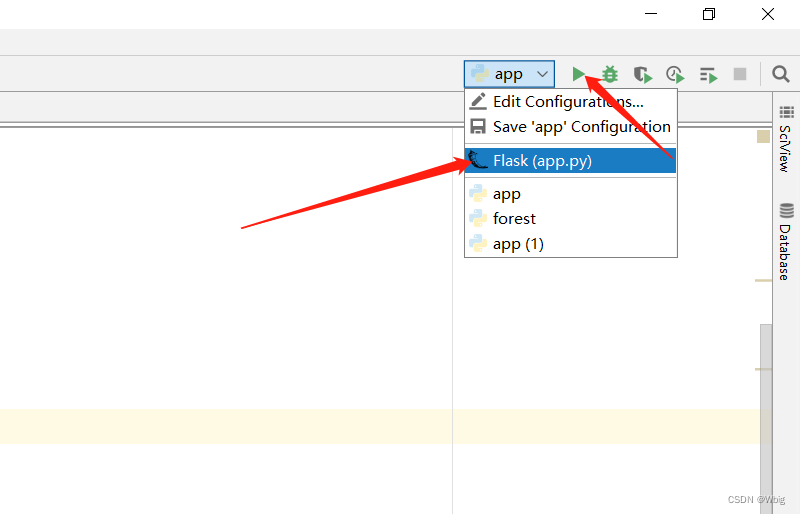
appear http://127.0.0.1:5000 The word "success" is success
边栏推荐
猜你喜欢


![堆叠注入之[强网杯 2019]随便注](/img/94/9069ed79e994e3c2e96c3cd1f816ee.png)


随机推荐
渗透测试信息收集总结
torch中矢量的计算方式
Oracle 数据库启用归档日志模式和归档日志删除和生成频率
KQ data layer
Introduction to MySQL DLJD Lao Du
Eye of depth III - (7)] mathematics: application of SVD decomposition
Pytorch使用nn实现softmax回归
Mathématiques 03 dérivées et différentielles (à compléter)
Day12-关联序列化处理
三种激活函数(Relu,Sigmoid,tanh)与多层感知机
脚本后台运行时候将日志从控制台重定向到自己命名的文件
学习STM32F103时涉及的C语言知识汇总(仅链接)
Recording multiple environments at a time leads to code bugs
Calculation method of vector in torch
记录定时任务中调用feign接口认证不通过的一次bug
Oracle database startup and shutdown steps
Redis数据类型
Add, delete, modify and check the connection between the two tables
1.互联网基础
Record a bug that failed to pass the authentication of calling feign interface in the scheduled task