当前位置:网站首页>C#网络应用编程,实验4:线程管理练习
C#网络应用编程,实验4:线程管理练习
2022-07-16 13:18:00 【南蓬幽】
文章目录
实验4:线程管理练习
1、通过本实验,熟悉和掌握Thread类、ThreadPool类以及WPF中多线程的使用。
2、复习C#中lambda表达式和委托
1、创建一个WPF应用程序项目
2、将App.xaml中的Application.Resources节内容改为
<Application x:Class="WpfApp1.App"
             xmlns="http://schemas.microsoft.com/winfx/2006/xaml/presentation"
             xmlns:x="http://schemas.microsoft.com/winfx/2006/xaml"
             xmlns:local="clr-namespace:WpfApp1"
             StartupUri="MainWindow.xaml">
    <Application.Resources>
        <Style x:Key="LabelStyle" TargetType="Label">
            <Setter Property="FontSize" Value="14"/>
            <Setter Property="HorizontalContentAlignment" Value="Center"/>
            <Setter Property="HorizontalAlignment" Value="Center" />
            <Setter Property="Background" Value="AliceBlue"/>
        </Style>
        <Style x:Key="BorderStyle" TargetType="Border">
            <Setter Property="Height" Value="35"/>
            <Setter Property="VerticalAlignment" Value="Center"/>
            <Setter Property="Background" Value="AliceBlue"/>
        </Style>
    </Application.Resources>
</Application>

3、修改MainWindow.xaml及代码隐藏类
MainWindow.xaml
<Window x:Class="WpfApp1.MainWindow"
        xmlns="http://schemas.microsoft.com/winfx/2006/xaml/presentation"
        xmlns:x="http://schemas.microsoft.com/winfx/2006/xaml"
        xmlns:d="http://schemas.microsoft.com/expression/blend/2008"
        xmlns:mc="http://schemas.openxmlformats.org/markup-compatibility/2006"
        xmlns:local="clr-namespace:WpfApp1"
        mc:Ignorable="d"
        Title="MainWindow" Height="450" Width="800">
    <Grid Margin="20">
        <Grid.ColumnDefinitions>
            <ColumnDefinition Width="Auto"/>
            <ColumnDefinition Width="*"/>
        </Grid.ColumnDefinitions>
        <Rectangle Grid.ColumnSpan="2" Fill="White" RadiusX="14" RadiusY="14" Stroke="Blue" StrokeDashArray="3"/>
        <Rectangle Grid.Column="0" Margin="7" Fill="#FFF0F9D8" RadiusX="10" RadiusY="10" Stroke="Blue" StrokeDashArray="3"/>
        <Rectangle Grid.Column="0" Margin=" 20" Fill="White" Stroke="Blue"/>
        <ScrollViewer Grid.Column="0" Margin="20">
            <StackPanel>
                <StackPanel.Resources>
                    <Style TargetType="Button">
                        <Setter Property="HorizontalContentAlignment" Value="Center"/>
                        <Setter Property="Margin" Value="5 10 5 0"/>
                        <Setter Property="Padding" Value=" 15 0 15 0"/>
                        <Setter Property="FontSize" Value=" 10"/>
                        <EventSetter Event="Click" Handler="button_Click"/>
                    </Style>
                </StackPanel.Resources>
                <Button Content="例1(StartStopProcess)" Tag="/Examples/Page1.xaml"/>

            </StackPanel>
        </ScrollViewer>
        <Frame Name="frame1" Grid.Column="1" Margin="10" BorderThickness="1" BorderBrush="Blue" NavigationUIVisibility="Hidden"/>
    </Grid>
</Window>
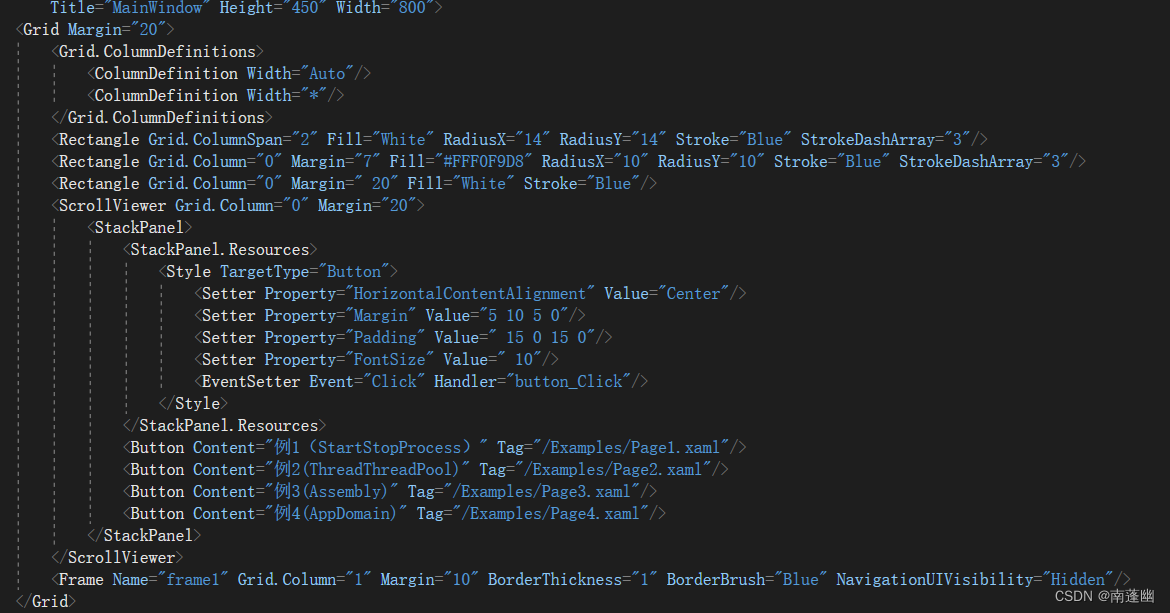
MainWindow.xaml.cs主要内容
using System;
using System.Collections.Generic;
using System.Linq;
using System.Text;
using System.Threading.Tasks;
using System.Windows;
using System.Windows.Controls;
using System.Windows.Data;
using System.Windows.Documents;
using System.Windows.Input;
using System.Windows.Media;
using System.Windows.Media.Imaging;
using System.Windows.Navigation;
using System.Windows.Shapes;

namespace WpfApp1
{

    /// <summary>
    /// MainWindow.xaml 的交互逻辑
    /// </summary>
    public partial class MainWindow : Window
    {

        Button oldButton = new Button();
        public MainWindow()
        {

            InitializeComponent();
        }
        private void button_Click(object sender, RoutedEventArgs e)
        {

            Button btn = e.Source as Button;
            btn.Foreground = Brushes.Black;
            oldButton.Foreground = Brushes.Black;
            oldButton = btn;
            frame1.Source = new Uri(btn.Tag.ToString(), UriKind.Relative);
        }
    }
}

Page2.xaml
<Page x:Class="WpfApp1.Examples.Page2"
      xmlns="http://schemas.microsoft.com/winfx/2006/xaml/presentation"
      xmlns:x="http://schemas.microsoft.com/winfx/2006/xaml"
      xmlns:mc="http://schemas.openxmlformats.org/markup-compatibility/2006"
      xmlns:d="http://schemas.microsoft.com/expression/blend/2008"
      xmlns:local="clr-namespace:WpfApp1.Examples"
      mc:Ignorable="d"
      d:DesignHeight="300" d:DesignWidth="300"
      Title="Page2">

    <DockPanel Background="White">
        <Label DockPanel.Dock="Top" Content="Thread和ThreadPool基本用法"
               Style="{StaticResource LabelStyle}"/>
        <Border DockPanel.Dock="Bottom" Style="{StaticResource BorderStyle}">
            <StackPanel Orientation="Horizontal" HorizontalAlignment="Center">
                <Button Name="btnStart" Width="70"
                        Content="启动任务" Click="btnStart_Click"/>
                <Button Name="btnStop" Margin="20 0 0 0" Width="70"
                        Content="停止任务" Click="btnStop_Click"/>
            </StackPanel>
        </Border>
        <TextBlock x:Name="textBlock1" Height="237" TextWrapping="Wrap" Text="" VerticalAlignment="Top"/>

    </DockPanel>
</Page>

Page2.xaml.cs
using System;
using System.Collections.Generic;
using System.Linq;
using System.Text;
using System.Threading;
using System.Threading.Tasks;
using System.Windows;
using System.Windows.Controls;
using System.Windows.Data;
using System.Windows.Documents;
using System.Windows.Input;
using System.Windows.Media;
using System.Windows.Media.Imaging;
using System.Windows.Navigation;
using System.Windows.Shapes;

namespace WpfApp1.Examples
{

    /// <summary>
    /// Page2.xaml 的交互逻辑
    /// </summary>
    public partial class Page2 : Page
    {

        public Page2()
        {

            InitializeComponent();
            Helps.ChangeState(btnStart, true, btnStop, false);
        }

        private void btnStop_Click(object sender, RoutedEventArgs e)
        {

            MyClass.IsSTop = true;
            Helps.ChangeState(btnStart, true, btnStop, false);

        }

        private void btnStart_Click(object sender, RoutedEventArgs e)
        {

            Helps.ChangeState(btnStart, false, btnStop, true);
            MyClass.IsSTop = false;
            textBlock1.Text = "";
            MyClass c = new MyClass(textBlock1);
            MyData state = new MyData {
     Message = "a", Info = "\n线程1已终止" };
            Thread thread1 = new Thread(c.MyMethod);
            thread1.IsBackground = true;
            thread1.Start(state);
            state = new MyData {
     Message = "b", Info = "\n线程2已终止" };
            Thread thread2 = new Thread(c.MyMethod);
            thread2.IsBackground = true;
            thread2.Start(state);
            state = new MyData {
     Message = "c", Info = "\n线程3已终止" };
            ThreadPool.QueueUserWorkItem(new WaitCallback(c.MyMethod), state);
            state = new MyData {
     Message = "d", Info = "\n线程4已终止" };
            ThreadPool.QueueUserWorkItem(new WaitCallback(c.MyMethod), state);


        }
    }
    public class MyClass
    {

        public static volatile bool IsSTop;
        TextBlock textBlock1;
        public MyClass(TextBlock textBlock1)
        {

            this.textBlock1 = textBlock1;
        }
        public void MyMethod(object obj)
        {

            MyData state = obj as MyData;
            while (IsSTop==false)
            {

                AddMessage(state.Message);
                Thread.Sleep(1000);
            }
            AddMessage(state.Info);
        }
        private void AddMessage(string s)
        {

            textBlock1.Dispatcher.Invoke(() =>
            {

                textBlock1.Text += s;

            });

        }
    }
    public class MyData
    {

        public string Info {
     get; set; }
        public string Message {
     get; set; }
    }
}

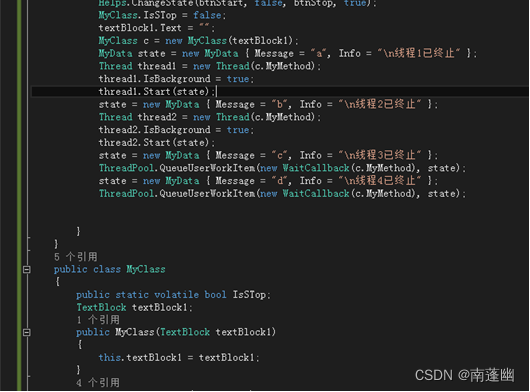

新建Helps类
using System;
using System.Collections.Generic;
using System.Linq;
using System.Text;
using System.Threading.Tasks;
using System.Windows.Controls;

namespace WpfApp1.Examples
{

    class Helps
    {

        public static void ChangeState(Button btnStart,bool isStart,Button btnStop,bool isStop)
        {

            btnStart.IsEnabled = isStart;
            btnStop.IsEnabled = isStop;

        }
    }
}

运行结果

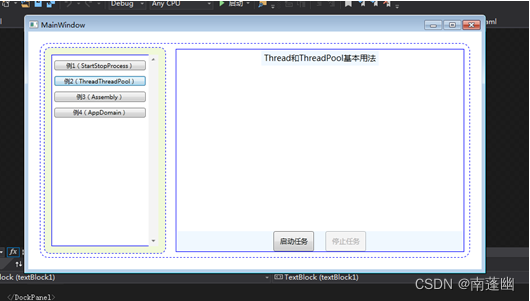


在实验3的基础上实现了实验4
通过本实验,即熟悉和掌握了线程管理Thread类、线程池ThreadPool类以及
WPF中多线程的使用,又复习C#中lambda表达式和委托。
边栏推荐
- 可爱的小猫咪
- SAP ABAP CDS view 视图的 Replacement 技术介绍
- 27 introduction to Scala, basic data types, methods and functions
- 发论文!AI,机器学习,CV大佬科研项目招生!
- 守护线程及应用场景
- What should I do if I can't see any tiles on SAP Fiori launchpad?
- 近期群友遇到的软件测试面试题分享
- Native input['file'] uploads the same file, and onchange problem records will not be triggered repeatedly
- 【技术碎片】基于指数扩散二分搜索的重名文件重命名后缀
- Welcome to grafanafans interest group
猜你喜欢

module ‘sklearn.datasets‘ has no attribute ‘fetch_mldata‘

20220715 国内Conda不fq安装Pytorch最新版本的方法

进程【详细总结】
![18. 四数之和(15加强版)【ans.add(Arrays.asList(nums[i], nums[j], nums[l], nums[r]))】](/img/61/8f5504eb22507ef6e3e910e21b44c2.png)
18. 四数之和(15加强版)【ans.add(Arrays.asList(nums[i], nums[j], nums[l], nums[r]))】

Py之lime:lime库的简介、安装、使用方法之详细攻略

(手工)【sqli-labs46、47】order by 注入、报错回显、POST注入、数字/字符型

一文教你学会怎么设计测试用例

开箱:阿里技术人在读什么书?

Instance Noise A trick for stabilising GAN training
Uniapp wechat applet selects chat log file upload
随机推荐
京东金融,你到底是坏,还是码农裁多了??
在线问题反馈模块实战(四):封装通用字段类
网络爬虫爬取b站励志弹幕并生成词云(精心笔记总结)
【SQL注入】order by 注入:联合盲注、报错、堆叠注入
【Leetcode】232. 用栈实现队列
ECCV 2022 | open source for generative knowledge distillation of classification, detection and segmentation
Quick completion guide of manipulator (zero five): resources related to manipulator
Boost create folder
Native input['file'] uploads the same file, and onchange problem records will not be triggered repeatedly
Pay equal attention to quality and efficiency, test left shift power block storage technology research and development
层出不穷的终端设备适配需求下 未来的响应式Web设计长什么样?
Unity游戏文件大,如何缩小游戏文件
log4j日志配置
LeetCode每日一题(947. Most Stones Removed with Same Row or Column)
[dynamic programming]dp19 longest common subsequence (I) - medium
将c语言文件打包成exe可执行程序
七月集训(第16天) —— 队列
Dataset:White Wine Quality白葡萄酒品质数据集的简介、下载、使用方法之详细攻略
UOS安装MariaDB
T-无限的路