cause : The company asked me to find one on the Internet ubuntu Upper Redis Management tools , Found a circle , How to say heshile , The articles searched are basically the same , The content is biased towards introduction , Then I thought about writing an article about evaluation , Let us make better choices .
Although they are all visualization tools , But some focuses are slightly different .
If Windows Not yet Redis, You can look at those developed abroad
One 、 Introduce
1、 Tools to participate in the evaluation
This time, the evaluation of
Free tools
There are the following :
Another-Redis-Desktop-Manager
Redis Desktop Manager 0.9.3 This version is free
Idea Medium Redis Simple plug-in unit
In fact, besides , There are also many visual management tools , Such as FastoNoSQL( charge ), in addition Mac Upper Red、
( free ) Tools .
But because I didn't Mac The computer , There is no evaluation in this regard , I'm very sorry .
2、 Direction of evaluation
Two 、 Evaluation begins
2.1、
Redis Plus
A brief introduction ,Redis Plus yes Gitee An open source software developed by Chinese people on , be based on javafx11 Development , Support windows and liunx System , free , But at present, developers have stopped maintenance and version update . There is no announcement to continue the iteration . The latest update is 2019 year , Is available , But if it is used for production needs , It is not recommended to use .
main interface UI

Connect to the page
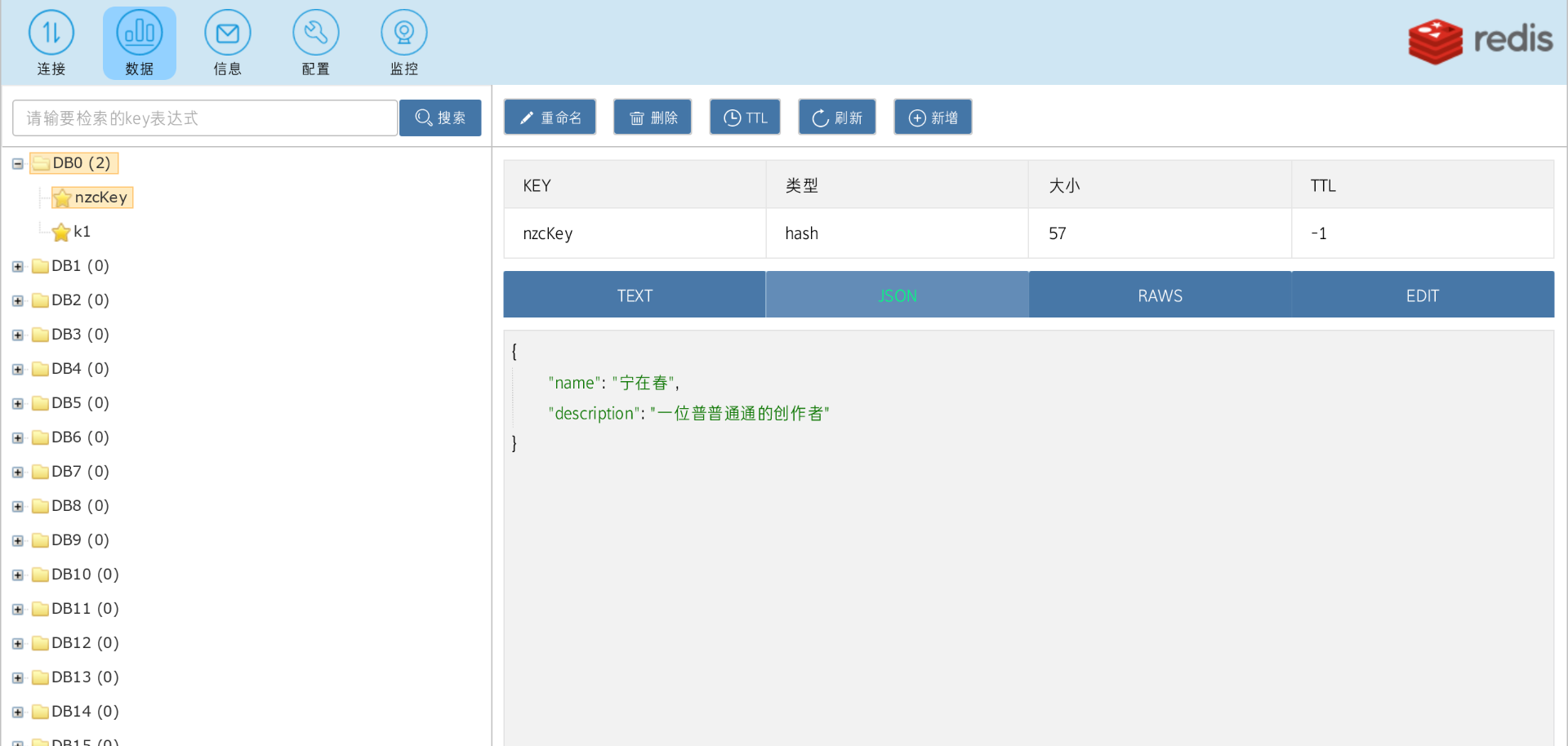
There is support here SSH Connect , But I didn't evaluate this . Do not blame it. . The evaluation of cluster mode is later .(ji)

Three formats of data viewing are supported, namely :TEXT、JSON、RAWS
In addition, you can directly modify the data here ,
I will Redis Test the existing data types in , among ordinary key-value、List、HashMap、Set and Zset, in addition about geo The data is also good . But for redis 5.0 Later Stream Is not supported .

Command input window 、 Memory monitoring and configuration file modification are slightly rough , Of course, there is no problem with simple use .

summary
advantage :
shortcoming :
If you just use visualization software to view Redis Database situation , So what's the problem .
2.2、
Another-Redis-Desktop-Manager
Briefly : Open source software , free , Developed by Chinese people , Support windows、liunx、Mac Three ends
Those who are interested can order star
Interface UI Support bright 、 Diablo has two themes , Support multiple languages at the same time
Support multiple connection modes
stay Redis Plus in Don't support Stream , It is also supported here
You can also click see , Get a better viewing experience
You can also see here , It supports the viewing of more data formats , This is done perfectly .
Memory monitoring 、 Configuration file viewing and setting automatic refresh
But click on this , And found a Memory analysis
Command mode prompts
summary
advantage :
shortcoming :
Conclusion : This is a very recommended software , Whether from the interface UI, Or use experience , It makes users very comfortable , And from some parts of it, we can see the intentions and ambitions of developers . Hope to see it go further
2.3、
QuickRedis
Briefly : free 、 Open source software 、 Developed by Chinese people 、 Support Windows & Mac OS X & Linux 、 Support multi-mode connection
Interface UI & Connect

Command line mode , Press tab Key can display the help document of the command , But there is no command prompt
see
Support json Data format view 、 Table style view , Support Folder management connection .
I won't support it Stream Data view
There is no other memory analysis 、 Monitoring logs and other miscellaneous things . An adjective
Simplicity
summary :
advantage :
shortcoming :
Conclusion : This software is more suitable for personal use by developers , Simplicity , Sometimes we don't need to pay so much attention to memory usage , Just focus on application layer development , Less monitoring pages , It's not impossible . If it is the operation and maintenance personnel , This one may be a little simpler .
2.4、
Redis Desktop Manager 0.9.3
Briefly : It is now charged 、 Long iteration time 、redis Big brother in visual management tools
I use what I downloaded before 2020 Version of , Several versions higher than the link I put in the article , But at present, you can't connect to the cloud server without paying . This is very disappointing .
Because of me windows Upper Redis The version is 3.0 It's impossible to measure Stream such 5.0+ Characteristics of , This step saves , The other is that it charges , I may not be so serious about it .
Interface
I won't support it JSON Format data is viewed in a tree
There are logs

summary
advantage :
shortcoming :
Conclusion : Not recommended , The rich man said otherwise .
2.5、
Idea Medium Redis Simple plug-in unit
Briefly :Idea Plug in , free ( The rest are charged ), Embedded in IDE, More convenient
Click... After downloading the plug-in setting—>Other Settings, Then configure a connection .

Then a... Will appear in the sidebar NoSql The button , Click to see the following page
After opening , Double click directly on the data to open the modification , Very convenient
In addition to viewing and modifying functions , Other words , I haven't found it yet .
summary
Conclusion : It's worth recommending , Because when individuals are developing , In fact, you don't need to pay attention all the time redis The situation of , When checking , Mostly debug It's time .
2.6、
Redis Assistant
Briefly : Toll collection software ( The price is OK )、 With probation 3-7 God 、 Developed by Chinese people
Interface UI
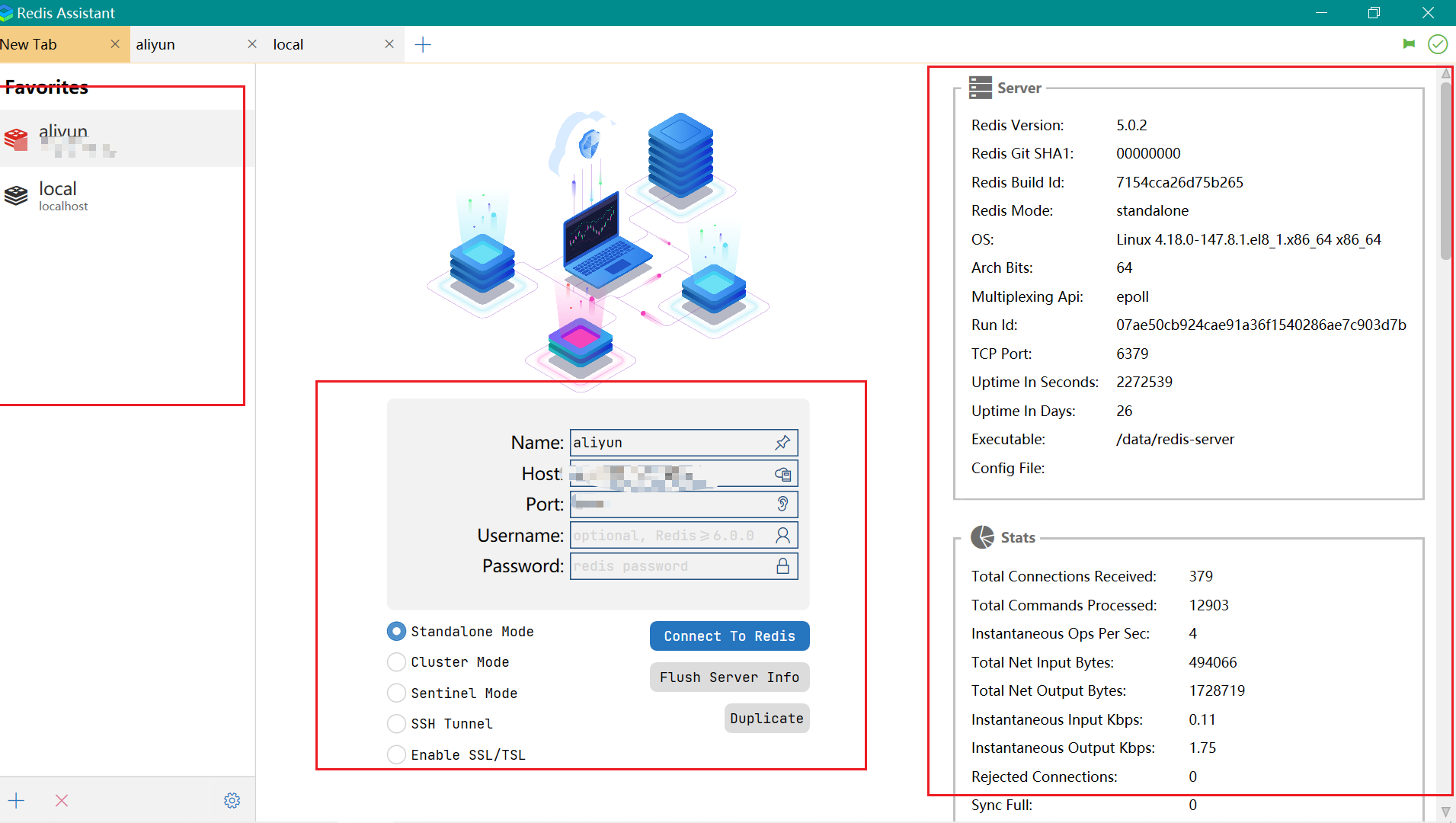
User interface
Support lua Script

Command line mode , There is no code prompt or supplement
Editing is very convenient , After clicking, you can modify it directly on the side of the display
However, it is not supported Stream View type data
summary
advantage :
shortcoming :
Conclusion : The use experience is very good , It's worth recommending , Interface UI It's also very comfortable , My favorite little friend , I can support it , Open source is not easy .
2.7、
Redis Insight
Briefly : The background is more orthodox , Is a Redis Visual management tools developed by cloud service providers , Support multi system installation , Also have web edition , Support docker Deploy 、k8s Deployment, etc. , It's also free software
Connection interface UI & main interface UI & There are dark colors and two themes , You can set it manually
Support Stream Data type view , You can also view Redis Basic information of the service ,

Support the view of message subscription

You can view it on the page Slow log , The relevant configuration depends on yourself .

Command mode , There are two places to open , And there are code prompts ,


Add :redis lnsight It can also be used docker Deploy , Use online web The version is right redis For viewing and management .
docker install redis Insight
summary
advantage :
shortcoming :
Conclusion : This software is quite good in all aspects , It also has its own characteristics , At the same time, developers are Redis The orthodox background , There is a professional maintenance team , More stable , I think it's safe to eat .
3、 ... and 、 Evaluation summary
This article is my personal true feelings and narration , Does not mean that other developers , At the same time, it does not represent any author of the above software .
According to my experience today , What I like most is
Another-Redis-Desktop-Manager
, It's done very well in all aspects , Just the questions I mentioned , Tell me if there is a possibility that it is already in the author's plan .
Pursue stability , I recommend
Redis Insight
, And it can be counted as an official product , There is a professional development and maintenance team , The customer base is also large , I think it's OK .
If you just want to check it during development Redis Of key It's worth it , There are no special needs , I think idea It's also good to download the plug-in in .
Four 、 Something to say
If you can , I hope you can give the above open source software a point
star
, I hope open source software can do better and better , I also hope that open source authors can develop better and better , It's not worth mentioning such a remark at the end of the article .
remember : On a whim, I wrote such an evaluation article , On the one hand, when I was looking , Failed to find a reliable blog , On the other hand, I want to try this kind of article .
Add : The software evaluated in this article , All are downloaded and used by me .

原网站版权声明
本文为[InfoQ]所创,转载请带上原文链接,感谢
https://yzsam.com/2022/200/202207170001528237.html


![[MySQL] Error 1130 problem solution](/img/75/6fcb13bbfa4f75615a1e7c2e317ca9.png)