当前位置:网站首页>R language - color selection and setting
R language - color selection and setting
2022-07-18 15:39:00 【I'm pumpkin】
R Language color selection and setting
In the use of R When drawing colors , You have to choose for a long time every time , Sometimes I forget the relevant records , I hereby summarize some commonly used .
1、R base Color version
1.1 R base Color
R The common color code is enough for the color setting in the language ,RGB Format 、16 Base format , Or use relevant color characters .
Refer to the link below to choose the color , But this one only displays characters .
http://www.stat.columbia.edu/~tzheng/files/Rcolor.pdf
In addition, I saw a blog full of colors , Relevant color codes are recorded :
https://blog.csdn.net/bone_ace/article/details/47362619

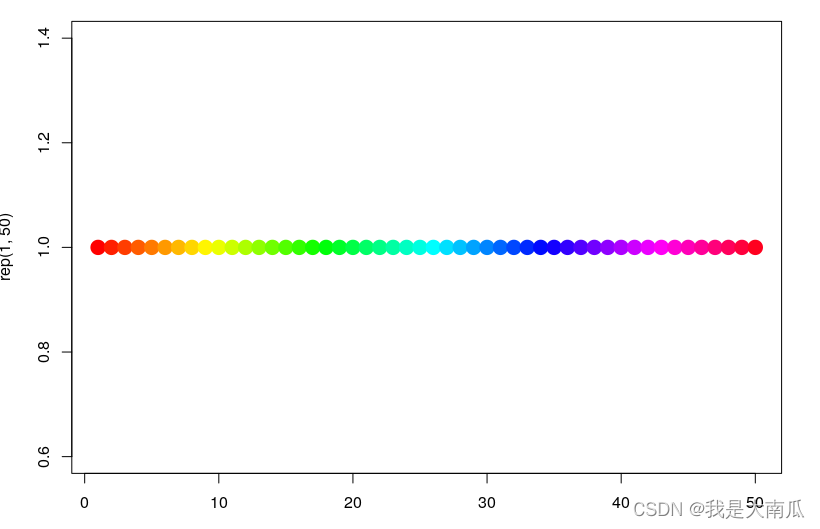
When we call multiple colors, we can use rainbow():
plot(rep(1,50),col=rainbow(50), pch=19,cex=2)
1.2 R ggplot Default color inversion
ggplot Default color matching and color flipping (reversed colors),scale_color_hue and scales In bag hue_pal()(n) :
library(gridExtra) ##  Typesetting picture
library(ggplot2) ## ggplot mapping
library(scales) ##  call hue_pal function

##  Reference resources
https://stackoverflow.com/questions/45868625/how-to-reverse-the-default-color-palette-for-ggplot2
##  The next two have the same effect , Default scale_color_hue(direction = 1)
p1 <- ggplot(iris, aes(x=Sepal.Length, y=Sepal.Width, color=Species))+
  geom_point(size=2) + theme_bw()
p2 <- ggplot(iris, aes(x=Sepal.Length, y=Sepal.Width, color=Species)) +
  geom_point(size=2) + theme_bw() + scale_color_hue(direction = 1)
 ## direction = -1  Will make the color reverse .
##  You need to adjust the starting point to make the reverse color order consistent , Use  h.start=90
p3 <- ggplot(iris, aes(x=Sepal.Length, y=Sepal.Width, color=Species))+
  geom_point(size=2)+  scale_color_hue(direction = -1, h.start=90) + theme_bw()


# Get the colors with 3 classes
cols <- hue_pal()(3)

# Plot the data and reverse the color
p4 <- ggplot(iris, aes(x=Sepal.Length, y=Sepal.Width, color=Species)) +
  geom_point(size=2) + scale_color_manual(values = rev(cols)) + theme_bw()

grid.arrange(p1, p2,p3,p4,
             ncol = 2, nrow = 2)
As you can see from the diagram , The color setting of the picture above is opposite to the setting below , Default base R Use the color inversion in rev(cols) that will do .
2、R Color Pack RColorBrewer
Actually , The color above can already meet our color selection needs , But when choosing color matching , We may not match , Cause the picture to look strange .
therefore , It is wiser to use some developed themes :
library(RColorBrewer)
par(mar=c(3,4,2,2))
display.brewer.all()
br_pal <- brewer.pal(11,"RdYlBu")  ##  Extract the color value of a certain color
br_pal
[1] "#A50026" "#D73027" "#F46D43" "#FDAE61" "#FEE090" "#FFFFBF" "#E0F3F8" "#ABD9E9" "#74ADD1"
[10] "#4575B4" "#313695"
The three color sets in the following figure correspond to :sequential、qualitative、diverging
In addition, these colors can be found on interactive websites colorbrewer2 Search for , Website colorbrewer2(https://colorbrewer2.org) It also includes the following three different modes (sequential、qualitative、diverging), There are different options to query and select color codes .
Besides , The following is also a R Packages can be selected , But this depends on your choice , Enter the following command , A clickable selection box will appear , Not very convenient .
library("colorspace")
pal <- choose_palette()

3、R Color Pack wesanderson、viridis、ggsci
3.1 wesanderson package
## github Address
https://github.com/karthik/wesanderson
require(wesanderson)
names(wes_palettes)
 [1] "BottleRocket1"  "BottleRocket2"  "Rushmore1"      "Rushmore"       "Royal1"
 [6] "Royal2"         "Zissou1"        "Darjeeling1"    "Darjeeling2"    "Chevalier1"
[11] "FantasticFox1"  "Moonrise1"      "Moonrise2"      "Moonrise3"      "Cavalcanti1"
[16] "GrandBudapest1" "GrandBudapest2" "IsleofDogs1"    "IsleofDogs2"

col = wes_palette("Zissou1", 10, type = "continuous")

height = 1:10
barplot(height, border = "white",col=wes_palette("Zissou1", 10, type = "continuous"),space = 0)

3.2 viridis package
##  Reference link
https://cran.r-project.org/web/packages/viridis/vignettes/intro-to-viridis.html
require(viridis)
Here is viridis Several color themes of the bag , It can be used as a common color list Input :
viridis(10) ## viridis  Topic extraction 10 One color
inferno(10) ## inferno  Topic extraction 10 One color
plot(1:10, col=viridis(10),cex=4,pch=20)

ggplot You can also use this color theme directly scale_color_viridis and scale_fill_viridis:
p <- ggplot(mtcars, aes(wt, mpg))
p + geom_point(size=4, aes(colour = factor(cyl))) +
    scale_color_viridis(discrete=T,option = "inferno") +
    theme_bw()
3.3 ggsci package
ggsci It should be only ggplot Color matching :
##  Reference resources ggsci link
https://cran.r-project.org/web/packages/ggsci/vignettes/ggsci.html
4、R Function to generate multiple continuous colors
Sometimes you need to use multiple colors ,eg,50 When it comes to color ,, Default rainbow Color doesn't like , At this time, you can consider function generation .
4.1 wesanderson and viridis Function to generate multiple consecutive colors
require(wesanderson)
wes_palette("Zissou1", 5, type = "discrete")
wes_palette("Zissou1", 50, type = "continuous")

require(viridis)
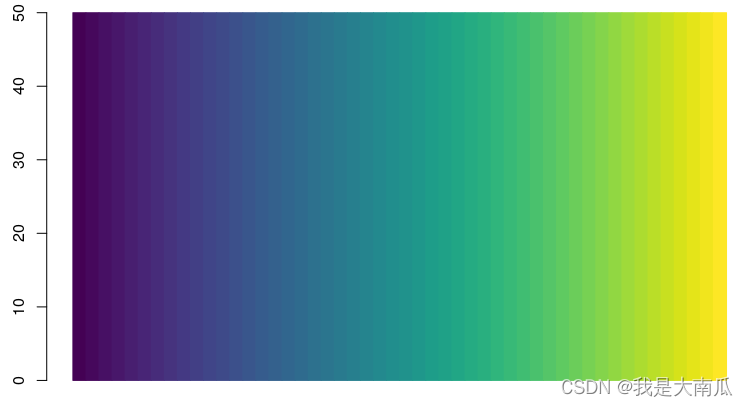
viridis(50)
 [1] "#440154FF" "#46085CFF" "#471064FF" "#48176AFF" "#481F70FF" "#482576FF" "#472C7AFF" "#46337EFF"
 [9] "#443983FF" "#423F85FF" "#404588FF" "#3E4A89FF" "#3C508BFF" "#39568CFF" "#365C8DFF" "#34618DFF"
[17] "#31668EFF" "#2F6B8EFF" "#2D718EFF" "#2B758EFF" "#297A8EFF" "#277F8EFF" "#25848EFF" "#23898EFF"
[25] "#218E8DFF" "#20928CFF" "#1F978BFF" "#1E9D89FF" "#1FA187FF" "#21A685FF" "#25AB82FF" "#29AF7FFF"
[33] "#30B57CFF" "#38B977FF" "#40BD72FF" "#4AC16DFF" "#55C568FF" "#5FCA61FF" "#6BCD5AFF" "#77D153FF"
[41] "#84D44BFF" "#91D742FF" "#9FDA3AFF" "#ACDC30FF" "#BADE28FF" "#C8E020FF" "#D6E21AFF" "#E4E419FF"
[49] "#F1E51DFF" "#FDE725FF"
barplot(rep(50,50),col=viridis(50),space=0,border = viridis(50))
4.2 Use colorRampPalette Get multiple consecutive colors
The above function can put some diverged colors Transform to multiple consecutive values , For example, the following RColorBrewer In the function package "Spectral" Only for 11 The most colors , When using continuous pheatmap In the middle of the day , These colors are not enough .
here , have access to colorRampPalette function .
## colorRampPalette The function is system base R The function in , Can be called directly
colfunc<-colorRampPalette(brewer.pal(11,"Spectral"))
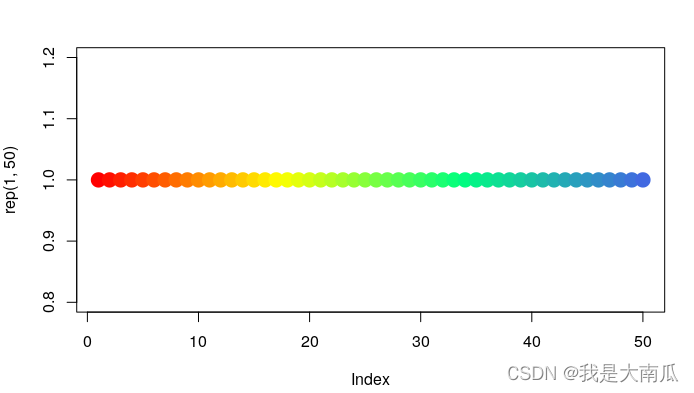
colfunc<-colorRampPalette(c("red","yellow","springgreen","royalblue"))
plot(rep(1,50),col=(colfunc(50)), pch=19,cex=2)  ##  take 50 One color , The color picture is shown below
color=colfunc(50) ##  Fetch 50 Continuous color transformation
The above records only .
- http://blog.csdn.net/bone_ace/article/details/47362619 ( All colors )
- http://www.stat.columbia.edu/~tzheng/files/Rcolor.pdf ( All colors )
- https://r-graph-gallery.com/38-rcolorbrewers-palettes.html (RColorBrewer)
- https://colorbrewer2.org/#type=qualitative&scheme=Set3&n=12(colorbrewer2 Website )
- https://www.nceas.ucsb.edu/sites/default/files/2020-04/colorPaletteCheatsheet.pdf
- https://stackoverflow.com/questions/45868625/how-to-reverse-the-default-color-palette-for-ggplot2 ( Default ggplot Color reversal )
边栏推荐
- Writing is more natural and comparable to the original factory experience. Nanka pencil capacitive pen is handy
- 基于poll实现聊天室
- Get to know your NFT again
- [source code] tensorboard visualizes MNIST recognition training process
- Domestic postman tool, easy to use!
- Minuterie haute performance
- 通过制定愿景克服数字化转型挑战
- Comprehensive evaluation method
- 爱科荣获2022年红点奖:设计概念奖
- Summary of domestic open source mirror websites
猜你喜欢

C language -- the implementation of common string functions

Advanced pointer (V) -- callback function

redis 配置,集群安装与扩容

Small target detection 1_ Focal loss

CV2. Setmousecallback() displays the pixel value and position of the mouse click image

Lscale theme emlog background management panel theme source code

RMAN detailed tutorial (II) -- backup, inspection, maintenance, recovery

mysql字段类型选用

Enable sandbox function and use in win10
PostgreSQL is now installed
随机推荐
Chapter 3: runtime data area - independent space
metaRTC5.0实现webrtc版IPC
架构基础篇
Detailed explanation of the decision table method of common test case design methods
Free SSL certificate application and deployment practice
Full link voltage test: preparations for the test
86 touch switch / desk fan / air conditioner / smart home / home appliances, etc., low power consumption, high anti-interference, 3-key, 3-way, 3-way touch ic-vk3603 esop8, stable performance and adju
C语言——常用字符串函数的实现
Realize chat room based on epoll (including timer to handle customer connection status)
Do you know the shell foundation often asked in interviews?
[source code] tensorboard visualizes MNIST recognition training process
Calculate the Euclidean distance between the row vectors of two matrices
Codeforces Round #806 (Div. 4)
[C language elementary level] function learning report
全链路压测 :测试要做的准备工作
ESRI launches indoor positioning system for facility routing
RGB图像上的密文--违规数据隐藏
mysql字段类型选用
Overcome the challenges of digital transformation by developing a vision
VS2019 16.8 “消失“的团队资源管理器