当前位置:网站首页>Switch and router technology: static route configuration and DHCP and VLAN configuration on the router
Switch and router technology: static route configuration and DHCP and VLAN configuration on the router
2022-07-17 22:59:00 【Invite the wind to intoxicate the moon】
Catalog
One 、 Static routing configuration
review
1、 Static routing
- It is manually configured by the administrator , It's one way , inflexibility
2、 Default route
- A kind of static routing , A special . It's right IP When the destination address in the packet cannot find another route that exists , The route selected by the router . All packets whose destination is not in the router's routing table will use the default routing . This route is usually connected to another router , The router also processes packets : If you know how to route this packet , Then the packet will be forwarded to a known route ; otherwise , Packets are forwarded to the default route , To reach another router . Every forwarding , Routing increases the distance of one hop .
1、 Static routing
ip route Target network ( Target network segment “ The network address of the target ") Subnet mask of the target Next hop address ( The interface of the next router IP Address ) Or send it to the local interface of the next router ( That is, the interface's own , This interface points to the next route )
ip route 192.168.10.0 255.255.255.0 192.168.30.2
ip route 192.168.10.0 255.255.255.0 f0/1
2、 Default route
ip route 0.0.0.0 0.0.0.0 192.168.30.2
ip route 0.0.0.0 0.0.0.0 f0/1
3、 View routing entries
Cisco :
show ip route
Comprehensive experiment :
Experimental apparatus : Three 2911 Router , Two sets of PC, Connect with lightning
The experimental requirements :
requirement 1:PC0 visit PC1 Step up , Through three routers
requirement 2:PC1 visit PC0 Go down , Through two routers
1、 According to the parameters in the figure below , Set it up first PC Of IP, Here, you can set it in the graphical interface
ps: The default gateway , Also called default gateway , That is, the router and PC Connected interface IP Address . Default gateway (Default Gateway) It is a device connected between subnet and extranet , It's usually a router . When a computer sends a message , According to the destination address of the message , Determine whether the target host is in the local subnet through the subnet mask , If the target host is in the local subnet , Then you can send it directly . If the target is not in the local subnet, the information is sent to the default gateway / Router , The router forwards it to other networks , Find further target hosts .
2、 Then set up the router IP Parameters , At this time, use the command line to set
ps: Figures in the above figure and g0/0 Your address is wrong , Should be 192.168 Of , instead of 192.169 Of , Just change it yourself
3、 stay r1 Configure static routing on
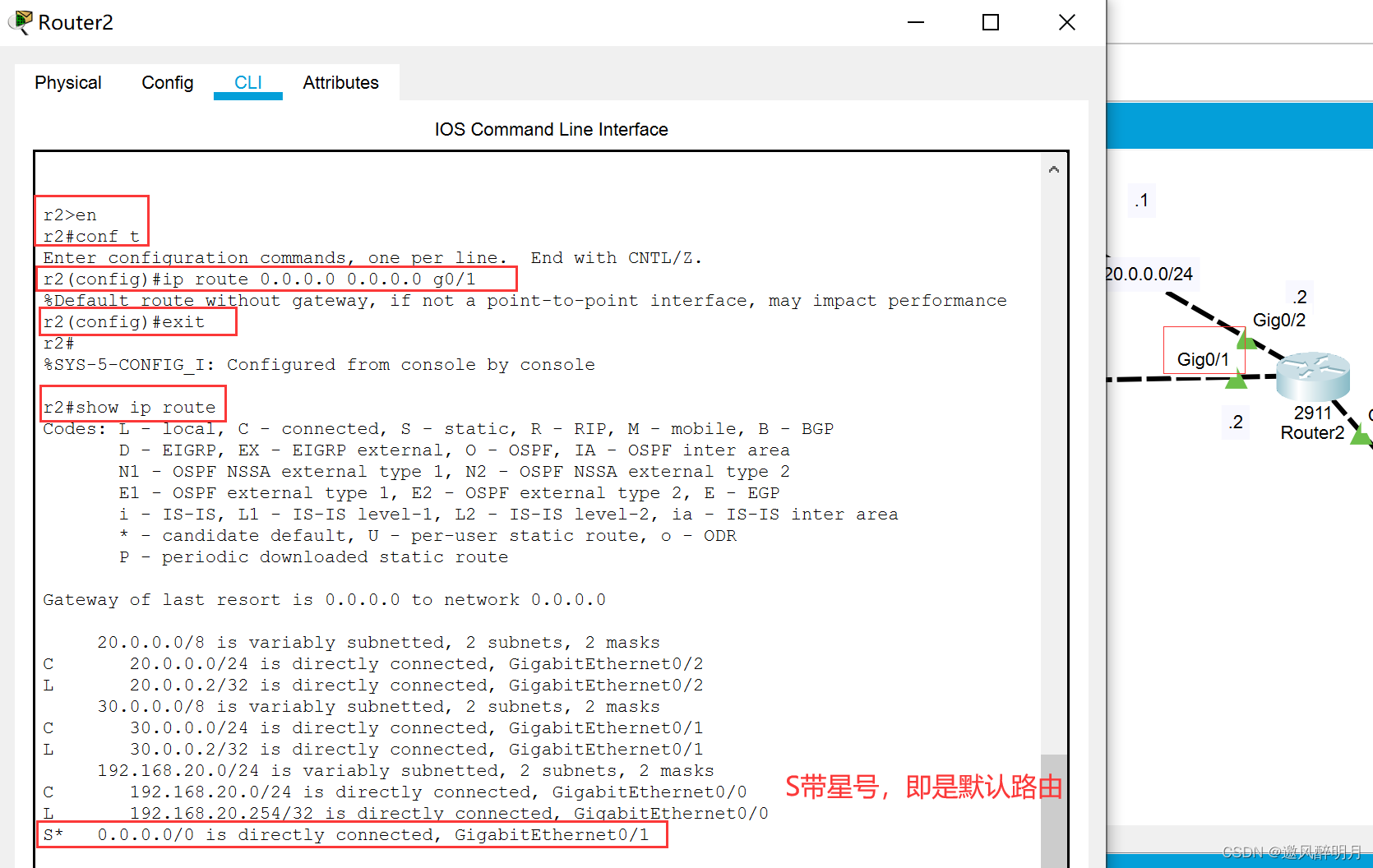
It can be usedshow ip routeSee if the configuration is successful
4、 stay r0 Configure static routing on
5、 At this time, the message can be delivered PC1 了 , Now the design returns PC0 The path of . First in R2 Set the default route , Direction of transmission R1
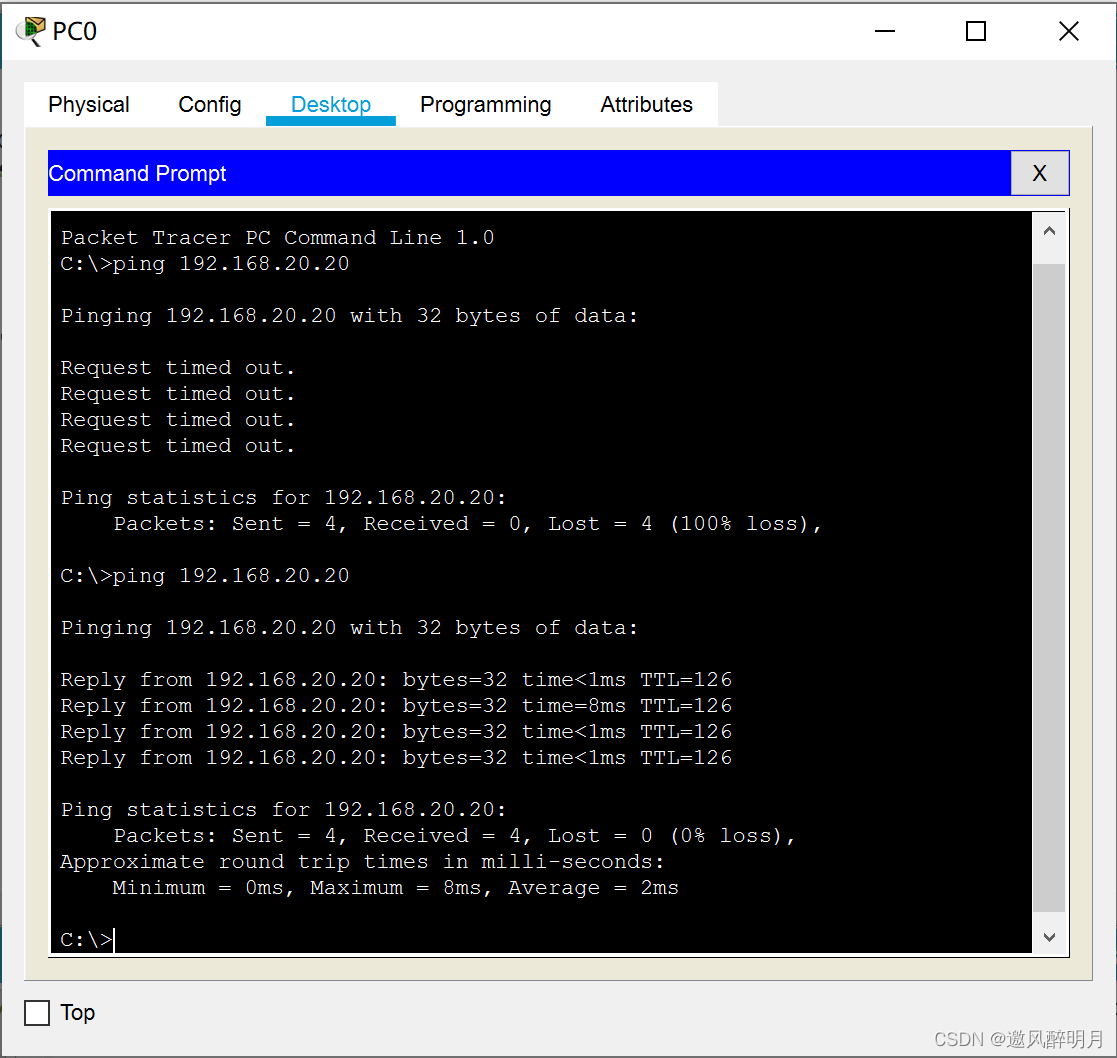
6、 Go toping 192.168.20.20, for the first time ping It didn't work , The second time it worked



7、 You can also use simulation mode , Graphically view the distance of the message 

Two 、 Configuration on router DHCP
Purpose : So that the client can be provided by the router DHCP The service gets IP Address
DHCP: Dynamic Host Configuration Protocol
Mainly for clients TCP/IP Parameters :IP Address 、 Subnet mask 、 gateway 、DNS Server address
1、 Ideas
- Definition DHCP Address pool
(1) The name of the pool
r0(config)#ip dhcp pool zixin
(2) Specify the assigned network range : Network address and subnet mask 、
r0(dhcp-config)#network 192.168.10.0 255.255.255.0
(3) Specify the default gateway
r0(dhcp-config)#default-router 192.168.10.254
(4) Appoint DNS Server address
r0(dhcp-config)#dns-server 114.114.114.114
- Specify the reserved address
Reserved address , That is, the address taken out for standby
r0(config)#ip dhcp excluded-address 192.168.10.1 192.168.10.50
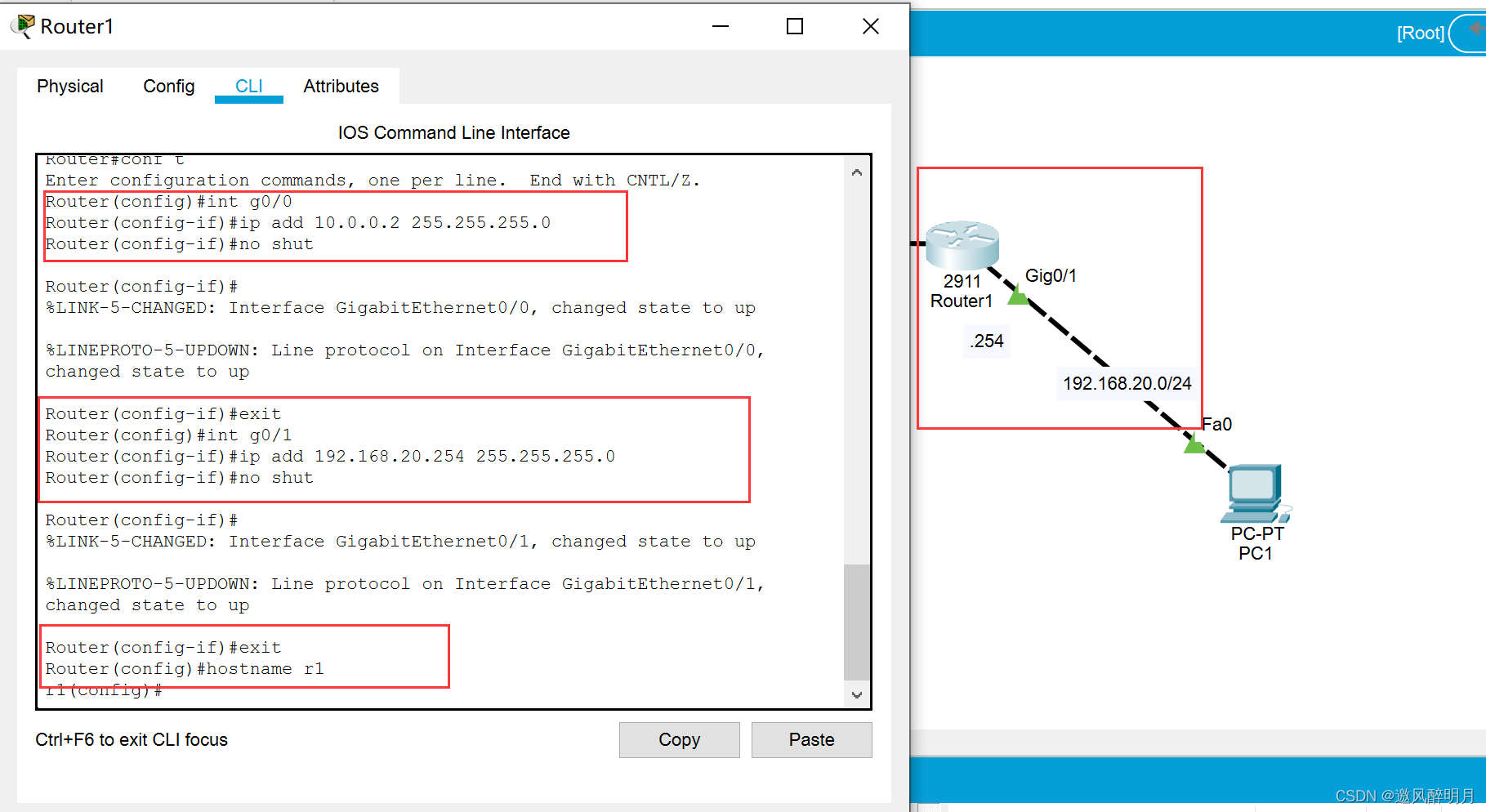
1、 As shown in the following figure , Configure the interface of the router IP
Code samples :Router(config)#int g0/0Router(config-if)#ip add 10.0.0.2 255.255.255.0Router(config-if)#no shut
2、 Configure static routing on the router
There's only one direction , Why set up static routes ? Because although only one direction can be forwarded , But as long as the routing table has no routing information , It will not be forwarded .
First in r0 On the configuration :r0(config)#ip route 192.168.20.0 255.255.255.0 g0/1
View after configuration :r0#show ip route
Go again r1 On the configuration :r1(config)#ip route 192.168.10.0 255.255.255.0 g0/0
View after configuration :r1#show ip route
3、 In the router r0 Middle configuration DHCP
The name of the address pool :r0(config)#ip dhcp pool zixin
Specify the assigned network range : Network address and subnet mask :r0(dhcp-config)#network 192.168.10.0 255.255.255.0
Specify the default gateway :r0(dhcp-config)#default-router 192.168.10.254
Appoint DNS Server address :r0(dhcp-config)#dns-server 114.114.114.114( Our experiment did not dns, So casually matched )
Specify the reserved address :r0(config)#ip dhcp excluded-address 192.168.10.1 192.168.10.50
4、 stay PC0 Graphical page acquisition in DHCP
5、 above 3、4 The operation of r1 Once again
6、 stay PC0 in pingPC1:ping 192.168.20.101
For the first time, three did not ping success , Second full ping success




3、 ... and 、 Virtual LAN VLAN
- It is mainly used in switches
- A switch is connected to a broadcast domain by default , Because by default, all interfaces belong to the same vlan Of , Default vlan 1, So it is in the same broadcast domain
1、 Purpose
- Divide the broadcast area , Different broadcast domains cannot communicate , If you want to communicate , At this time, you need to use routing
- Enhance network security
- Divide the broadcast domain into different areas , Namely different vlan, Simplify network management

2、vlan The type of
- static state vlan
Based on port partition , Need management to configure , establish vlan And add the interface to vlan - dynamic wlan
Less use . be based on MAC The address will automatically be the same type MAC Add the address to the same VLANT
3、 static state vlan
- vlan The scope of the ( Cisco equipment ). If it's Huawei equipment , There will be differences .
A total of 4096 individual vlan 0~4095
0 ,4095 Retain
Default vlan 1
Ethernet vlan 2~1001
Extended Ethernet vlan 1025~4094 - Configure static vlan
(1) establish vlan
Law 1 :
Create directly in global mode :vlan 2
View the created in privileged mode vlan:show vlan brief
Law two :
stay vlan Create in the database :
Enter the first :vlan database
after :vlan 2
(2) Add the interface to vlan
You need to specify the mode of the interface
Add a single interface :
Switch(config)#int f0/10
Switch(config-if)#switchport mode access
Switch(config-if)#switchport access vlan 2
Multiple interfaces are added :
 Switch(config)#int range f0/20-24
 Switch(config-if-range)#switchport mode access
Switch(config-if-range)#switchport access vlan 3
Comprehensive experiment :
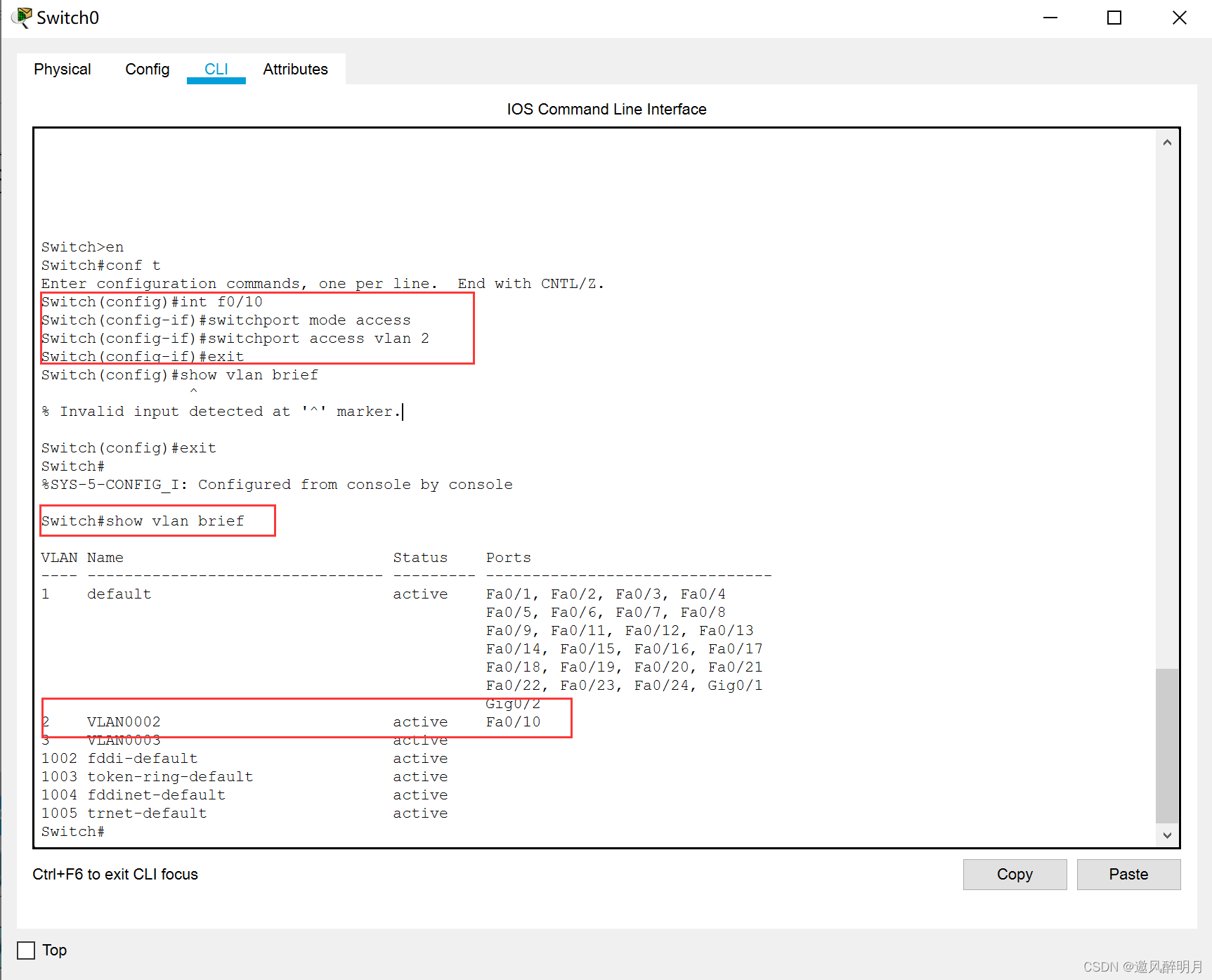
1、 Cisco builds a new one 2960 Switch , And create and view in the switch vlan
2、 A single interface is added vlan 2:
3、 Multiple interfaces are added vlan 3:



- Other configuration commands
View specified vlan:show vlan id 2
Delete : Enter in global modeno vlan 2
By creating vlan, Add different hosts to the corresponding vlan after , Under the same switch , identical vlan You can communicate directly , Different vlan Unable to communicate directly
边栏推荐
- 2022年了,我该如何入门智能家居
- TFTLCD 薄膜晶体管液晶显示器——探索者为例
- [MySQL] MySQL groups statistical data by year / month / day / week
- How to start MySQL?
- 关于NLP自监督学习,面试时被问崩溃了!
- AttributeError: module ‘torchvision. transforms‘ has no attribute ‘Scale‘
- Market Research and investment forecast report of aluminum diethylphosphinate in China (2022 Edition)
- Government organizations improve the efficiency, transparency and control of information management through content management
- Hisilicon universal platform construction: online debugging 2ssh migration deployment
- Set集合
猜你喜欢

面向流批一体的 Flink Runtime 新进展

陆面生态水文模拟与多源遥感数据同化与Noah-MP模型

Proxmox VE 7.2 使用qemu-img转换磁盘格式

通信方式——FSMC

Postman interface test tool

Ardunio开发——中断Interrupt机制

一行代码制作数据分析交叉表,太便捷了

Wireless sensor network -- hardware design of wireless sensor network
![[recognize cloud Nativity] Chapter 4 cloud network section 4.9.4.1 - overview of smart NIC solutions](/img/58/06961183acb766e65722ecbe7cc20f.png)
[recognize cloud Nativity] Chapter 4 cloud network section 4.9.4.1 - overview of smart NIC solutions

C language emptying input residual content
随机推荐
Flink 在众安保险金融业务的应用
[debug] vs exe runs "the application cannot start normally (0xc000007b)"
陆面生态水文模拟与多源遥感数据同化与Noah-MP模型
Postman接口测试工具
What is Oracle's user and authority system?
Force deduction solution summary 745 prefix and suffix search
小技巧——xftp设置默认本地文件夹
[pypdf2] merge PDF, rotate, zoom, crop, encrypt and decrypt, add watermark
动画优化
Information system project manager must recite the core examination points (42) SWOT analysis method
Graphic array calculation module numpy (specify numerical type, numerical type, two-dimensional array index, two-dimensional array slice index, array remodeling, array addition, deletion, modification
scratch绘制多变的正方形 电子学会图形化编程scratch等级考试四级真题和答案解析2022年6月
Understanding and operation of array
MySQL - start MySQL with error. Net start MySQL with system error 5. access denied
Set集合
AccessClient插件在苹果电脑闪退
NLP learning | first acquaintance with NLP
【mysql】mysql分别按年/月/日/周分组统计数据
Maatnesite/excel import and export in laravel
Mysql—事务:一篇掌握