当前位置:网站首页>STM32 state machine programming example - full automatic washing machine (Part 2)
STM32 state machine programming example - full automatic washing machine (Part 2)
2022-07-26 03:49:00 【Code farmer loves learning】
Last article , Through state machine programming , The logic control of the automatic washing machine is realized , And display each status through serial port printing .
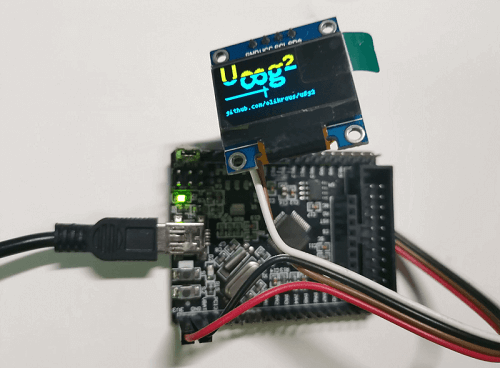
This article , In order to feel the operation of the state machine more intuitively , Use 0.96 " OLED To display various statuses , And match the corresponding dynamic icons to reflect the various states of the washing machine .
Let's see the demonstration effect first :https://www.bilibili.com/video/BV1xT411E7pY

1 OLED Picture shows
In order to be convenient in OLED Display text and pictures on , Some graphic libraries can help us display , What we use here is U8g2 Graphics library .
1.1 U8g2 Library migration
U8g2 Library in STM32 Transplantation on , The previous article has already introduced , For the specific migration process, please refer to this :
After successful transplantation , You can use test routines to verify U8g2 Display effect of Library .
1.2 Picture shows
Compare pictures with words , It can show more rich content , Therefore, this article shows the working state of the washing machine through simple monochrome pictures .
U8g2 The library displays pictures , have access to u8g2_DrawXBM function , You need to convert the image into an array first .
You can use this online web page to convert image data :https://tools.clz.me/image-to-bitmap-array
Here you can use your favorite pictures , To display , For example, I selected the washing machine icon with different water volume to display the current water volume of the washing machine , Use the alternate display of multiple pictures to produce the animation effect of washing machine cleaning .

2 More status outputs
OLED The screen should show the working state of the washing machine , You need to get the specific working state of the state machine . Here are some customized data needed for presentation , Form a structure , The state machine is running , Modify each member variable , then OLED Get these data at the end , Show it again .
typedef struct
{

	WASHER_STATUS washerStatus; /* The working state of the washing machine */
	int targetWaterLevel;       /* Target water level of washing machine */
	int targetWashTimes;        /* Target cleaning times of washing machine */
	int remainingTime;          /* The remaining working time of the washing machine ( Not used yet )*/
	int curWaterLevel;          /* The current water level of the washing machine */
	bool hasNewData;            /* Is there any new data ( Used to tell OLED Whether to refresh the display )*/
}WASHER_OUTPUT_DATA;
about OLED The display logic of , Here is after each cycle of the state machine , Call the following program logic to show :
void show_washer_status(WASHER_OUTPUT_DATA washerOutPutData)
{

	if (washerOutPutData.hasNewData)
	{

		WASHER_STATUS s = washerOutPutData.washerStatus;
		printf("u8g2 get status:%d(%s)\r\n", s, washer_status_name[s]);
		switch(s)
		{

			case WS_INIT: showWasherInit(&u8g2, washerOutPutData); break;
			case WS_IDLE: showWasherIdle(&u8g2, washerOutPutData); break;
			case WS_ADD_WATER: showWasherAddWater(&u8g2, washerOutPutData); break;
			case WS_WASH: showWasherWash(&u8g2, washerOutPutData); break;
			case WS_DRAIN_WATER: showWasherDrainWater(&u8g2, washerOutPutData); break;
			case WS_SPIN_DRY: showWasherSpinDry(&u8g2, washerOutPutData); break;
			case WS_PAUSE: showWasherPause(&u8g2, washerOutPutData); break;
			case WS_DONE: showWasherDone(&u8g2, washerOutPutData); break;
			default: break;
		}
	}
}
When new data is generated in this round of state cycle , Then according to the main state of the state machine , Respectively display the pictures or animations in the corresponding state .
For example, adding water , According to the current water level , Constantly update the water level shown in the picture :
void drawCurWaterLevel(u8g2_t *u8g2, int level)
{

	switch(level)
	{

		case 0: u8g2_DrawXBM(u8g2,64, 16, 48, 48, pic_water_0); break;
		case 1: u8g2_DrawXBM(u8g2,64, 16, 48, 48, pic_water_1); break;
		case 2: u8g2_DrawXBM(u8g2,64, 16, 48, 48, pic_water_2); break;
		case 3: u8g2_DrawXBM(u8g2,64, 16, 48, 48, pic_water_3); break;
		case 4: u8g2_DrawXBM(u8g2,64, 16, 48, 48, pic_water_4); break;
		case 5: u8g2_DrawXBM(u8g2,64, 16, 48, 48, pic_water_5); break;
		case 6: u8g2_DrawXBM(u8g2,64, 16, 48, 48, pic_water_6); break;
		case 7: u8g2_DrawXBM(u8g2,64, 16, 48, 48, pic_water_7); break;
		default: break;
	}
}

void showWasherAddWater(u8g2_t *u8g2, WASHER_OUTPUT_DATA data)
{

	char strStatus[14] = "AddWater";
	u8g2_ClearBuffer(u8g2);
    u8g2_SetFont(u8g2,u8g2_font_ncenB10_tr);
	u8g2_DrawStr(u8g2,0,15,strStatus);

	drawCurWaterLevel(u8g2, data.curWaterLevel);

	u8g2_SendBuffer(u8g2);
}
For the structure of the main program , It's the same as the last one , Just added OLED Display of :
int main(void)
{

	delay_init();	    	 // Delay function initialization
	LED_Init();		  	// Initialization and LED Connected hardware interface
	oled_init();

	KEY_Init();
	uart_init(115200);
	TIM3_Int_Init(500-1,7200-1); // Call the timer to make 50ms Create an interrupt

	printf("hello\r\n");

	while(1)
	{

		washer_run_loop();

		WASHER_OUTPUT_DATA data = get_washer_output_data();

		show_washer_status(data);

		delay_ms(100);
	}
}
Every time the state machine runs a cycle , Get the specific status data , And then use OLED Show the specific status data .
3 Concrete demonstration
Let's compare this state diagram , Experiment to test the execution of state machine .

- Normal laundry process
Do not consider suspending this state , After the washing machine starts , Experience in turn Free 、 Add water 、 cleaning 、 Drainage 、 spin-dry These processes are over , If the cleaning count is set, I don't know 1 Time , be Add water 、 cleaning 、 Drainage this 3 Each action will be executed by the corresponding number of times .
- Pause and continue in the laundry process
In the running state of the washing machine : Add water 、 cleaning 、 Drainage 、 spin-dry , By the pause button , You can pause the execution of these States , At this time, the status opportunity runs in pause mode , Press again to continue ( Pause / A button to continue ), Will continue to perform laundry work .
- After suspension, modify the water volume or times before continuing
In the washing process , If you want to Modify the amount or times of laundry , You can pause the operation of the washing machine by pressing the pause button , Then press the water level or number button , Switch the state machine from the suspended state to the idle state first , After adjusting the water level or times , Go on , The washing program will continue to run according to the new setting parameters .
For example, the original cleaning water level is 3, The cleaning times are 1, Press pause when adding water for the first cleaning , Then modify the cleaning parameters , For example, the water level is set to 5, The number is set to 2, After continuing , It will enter the state of adding water again , And fill the water level to 5 after , Keep cleaning , And clean 2 End of pass .
notes : This state machine still has room for further optimization , such as :
- Water will only be added , This round of cleaning will not discharge . For example, the first set water level is 5, In addition to 3 Time , Pause and change to 2, After continuing , If it is judged to be greater than the target water level, it will directly start cleaning , It will not be decided by the water level 3 Then drain to the water level 2 Wash again
- Any cleaning state ( Add water 、 cleaning 、 Drainage ) Press pause to adjust the water level , Go on , By default, it will jump to the new cleaning cycle with water , If it is in the drainage state , After adjusting the water level , The water has not been ranked this time , Just add water again and start washing , Not quite reasonable
above 3 Demonstration effect of three test methods , You can compare and watch the demonstration video :
https://www.bilibili.com/video/BV1xT411E7pY
4 summary
This article is based on the state machine programming example of the previous full-automatic washing machine , Added OLED To update the intuitive display of the working state of the washing machine , And pass 3 A test scenario to show the execution of the washing machine working state machine .
边栏推荐
- 电商运营小白,如何快速入门学习数据分析?
- leetcode-202.快乐数
- Oracle 11g "password delayed verification" feature
- Zkevm: summary of zkevm and L1 by Mina's CEO
- Three ways of redis cluster
- Navicat连接云端服务器上的MySQL数据库
- 资深报表开发经验总结:明白这一点,没有做不好的报表
- General test case writing specification
- Graduation season & harvest season, leave your beautiful moments
- 6-40v input fixed 5V 3.3V output 1.1a current 23-5 package
猜你喜欢
bond网络模式配置

C language functions (2)

在 Istio 服务网格内连接外部 MySQL 数据库

微信小程序实现音乐播放器(4)(使用pubsubjs实现页面间通信)

Moco V2: further upgrade of Moco series
开源许可证的传染性问题浅析

Failed to install the hcmon driver
Tactile intelligent sharing-rk3568 application in scenic spot navigation robot

How to choose sentinel vs hystrix?
电商运营小白,如何快速入门学习数据分析?
随机推荐
Dracoo Master天龙卡牌大师
LDP related knowledge points
php 保存数组到文件 var_export、serialize
Kbpc1510-asemi large chip 15A rectifier bridge kbpc1510
KBPC1510-ASEMI大芯片15A整流桥KBPC1510
9-20v input peak charging current 3A dual lithium switch type charging chip sc7102
php 查找 session 存储文件位置的方法
Sersync/lsync real-time synchronization
Chinese database oceanbase was selected into the Forrester translational data platform report
基于SSM选课信息管理系统
Leetcode-462. make the array elements equal with the minimum number of moves
One stop monitoring of the software and hardware infrastructure of the whole university, and Suzhou University replaces PostgreSQL with time series database
Where can Lora and nb-iot be used
Bing(必应)搜索,为什么用户越来越多?
Network model and protocol
资深报表开发经验总结:明白这一点,没有做不好的报表
多商户商城系统功能拆解15讲-平台端会员标签
Testing is not valued? Senior: you should think in another position
What is the problem of the time series database that has been developed for 5 years?
让百度收录,爬虫自己网站