当前位置:网站首页>GraphQL初识
GraphQL初识
2022-07-17 00:28:00 【你好y】
1、GraphQL介绍

2、graphQL与restful对比

- restful用不同的url区分资源,graphql用类型区分资源
3、示例
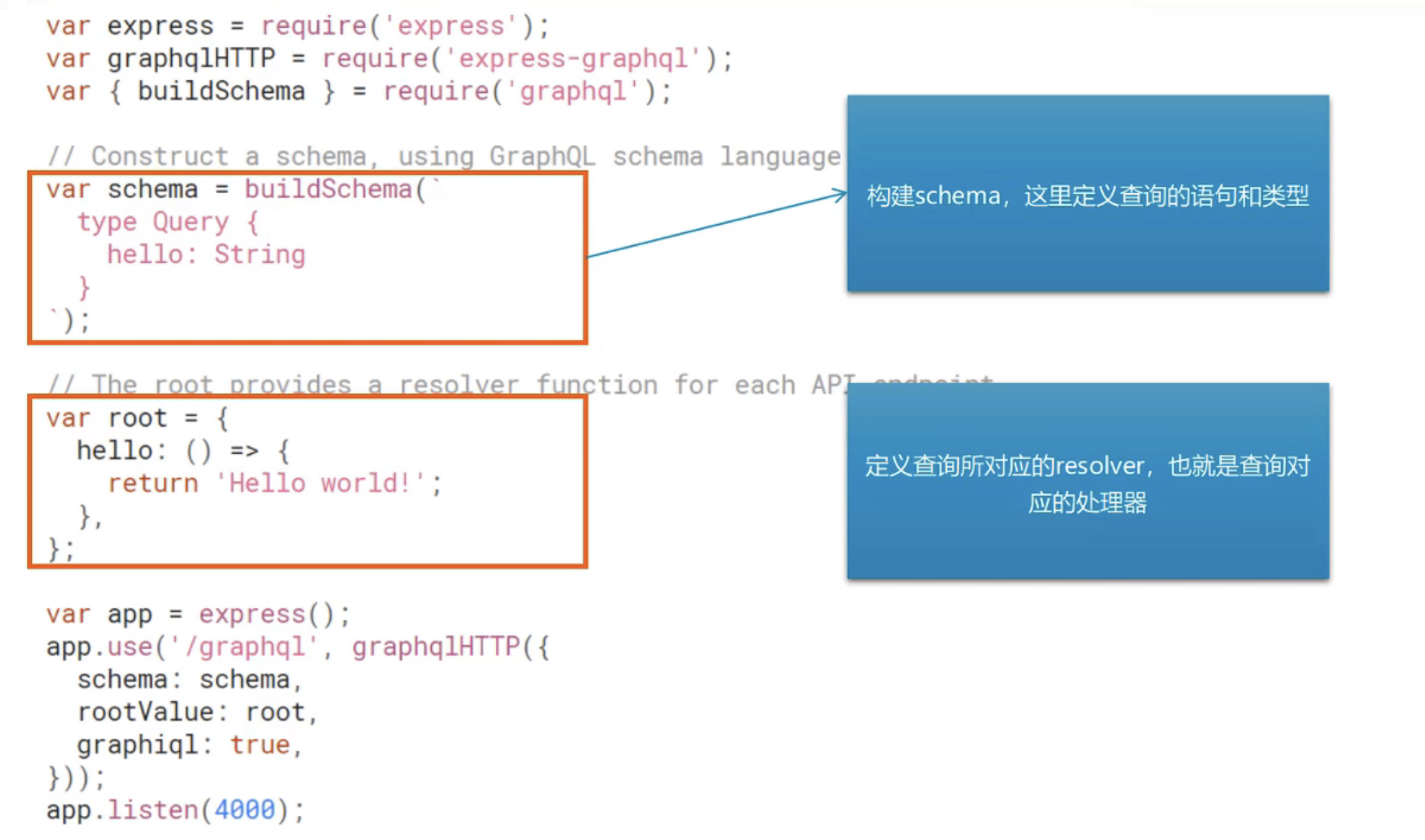
graphiql:是否启用graphiql的调试界面,上线之后要改为false
nodemon自动监视
代码
var express = require('express');
var {
     graphqlHTTP } = require('express-graphql');
var {
     buildSchema } = require('graphql');

// Construct a schema, using GraphQL schema language
var schema = buildSchema(` type Account{ name:String age:Int sex:String department:String } type Query { hello: String accountName:String age: Int account: Account } `);

// The root provides a resolver function for each API endpoint
var root = {

  hello: () => {

    return 'Hello world!';
  },
  accountName:()=>{

    return '张明';
  },
  age:()=>{

    return 21;
  },
  account:()=>{

    return {

      name:'赵四',
      age:1,
      sex:'男',
      department:'科技园'
    }
  }
};

var app = express();
app.use('/graphql', graphqlHTTP({

  schema: schema,
  rootValue: root,
  graphiql: true,
}));
app.listen(4000);
console.log('Running a GraphQL API server at http://localhost:4000/graphql');
访问http://localhost:4000/graphql

4、参数类型与参数传递
基本参数类型
基本类型: String, Int, Float, Boolean和ID。可以在shema声明的时候直接使用。
️ID是字符串类型要求唯一
[类型]代表数组,例如: [Int]代表 整型数组
和js传递参数一样,小括号内定义形参,但是注意:参数需要定义类型。
!(叹号)代表参数不能为空。
type Query [
rollDice(numDice: Int!, numSides: Int): [Int]
]
//返回int类型的数组
代码示例:
var express = require('express');
var {
     graphqlHTTP } = require('express-graphql');
var {
     buildSchema } = require('graphql');
// Construct a schema, using GraphQL schema language
var schema = buildSchema(` type Query{ getClassMates(classNo:Int!):[String] } `);
// The root provides a resolver function for each API endpoint
var root = {

    getClassMates({
     classNo}){

        const obj={

            31:['张和','利马','王刘'],
            61:['张莉丝','很健康','一哦']
        }
        return obj[classNo];
    }
  };

  var app = express();
  app.use('/graphql', graphqlHTTP({

    schema: schema,
    rootValue: root,
    graphiql: true,
  }));
  app.listen(4000);
  console.log('Running a GraphQL API server at http://localhost:4000/graphql');

自定义参数类型
GraphQL允许用户自定义参数类型,通常用来描述要获取的资源的属性。
示例
type Account{

    name:String
    age:Int
    sex:String
    department:String
    salary(city:String):Int
  }
type Query{

  account(name:String):Account
}
代码
var express = require('express');
var {
     graphqlHTTP } = require('express-graphql');
var {
     buildSchema } = require('graphql');
// Construct a schema, using GraphQL schema language
var schema = buildSchema(` type Account{ name:String age:Int sex:String department:String salary(city:String):Int } type Query{ getClassMates(classNo:Int!):[String] account(username:String):Account } `);
// The root provides a resolver function for each API endpoint
var root = {

    getClassMates({
     classNo}){

        const obj={

            31:['张和','利马','王刘'],
            61:['张莉丝','很健康','一哦']
        }
        return obj[classNo];
    },
    account({
     username}){

        const name=username;
        const sex='男';
        const age=9;
        const department='开发部';
        const salary=({
     city})=>{

            if(city=='北京' || city=='上海'){

                return 10000;
            }
            return 3000;
        }
        return {

            name,
            sex,
            age,
            department,
            salary
        }
    }
  };

  var app = express();
  app.use('/graphql', graphqlHTTP({

    schema: schema,
    rootValue: root,
    graphiql: true,
  }));
  app.listen(4000);
  console.log('Running a GraphQL API server at http://localhost:4000/graphql');

5、GraphQL Clients
如何在客户端访问graphql的接口?

6、使用Mutations修改数据
查询使用query,修改数据使用Mutation

input代表输入类型,type代表查询类型
只需要插入或者更新的时候还是要写Query的,因为GraphQL要求必须有Query
传入参数的类型是input不是type
代码示例:
var express = require('express');
var {
     graphqlHTTP } = require('express-graphql');
var {
     buildSchema } = require('graphql');

// Construct a schema, using GraphQL schema language
var schema = buildSchema(` input AccountInput{ name:String age:Int sex:String department:String } type Account{ name:String age:Int sex:String department:String } type Mutation{ createAccount(input:AccountInput):Account updateAccount(id:ID!,input:AccountInput):Account } type Query{ accounts:[Account] } `);

const fakeDb={
    };


// The root provides a resolver function for each API endpoint
//定义查询对应的处理器
var root = {

    accounts(){

        var arr=[];
        for(const key in fakeDb){

            arr.push(fakeDb[key]);
        }
        return arr;
    },
  createAccount({
     input}){

        //相当于数据库的更新
        fakeDb[input.name]=input;
        //返回保存结果
        return fakeDb[input.name];
  },

  updateAccount({
     id,input}){

    //相当于数据库的更新
    const updateAccount=Object.assign({
    },fakeDb[id],input);
    fakeDb[id]=updateAccount;
    //返回保存的结果
    return updateAccount;
  }
};

var app = express();
app.use('/graphql', graphqlHTTP({

  schema: schema,
  rootValue: root,
  graphiql: true,
}));
app.listen(4000);
console.log('Running a GraphQL API server at http://localhost:4000/graphql');

控制台示例
query{

  accounts{

    name
    age
    sex
    department
  }
}

# mutation{

#   createAccount(input:{

#     name:"阿斯顿",
#     age:100,
#     sex:"男",
#     department:"文化部"
#   }){

#     name
#     age
#     sex
#     department
#   }
# }

# mutation{

#   updateAccount(id:"阿斯顿",input:{

#     age:88
#   }){

#     age
#   }
# }
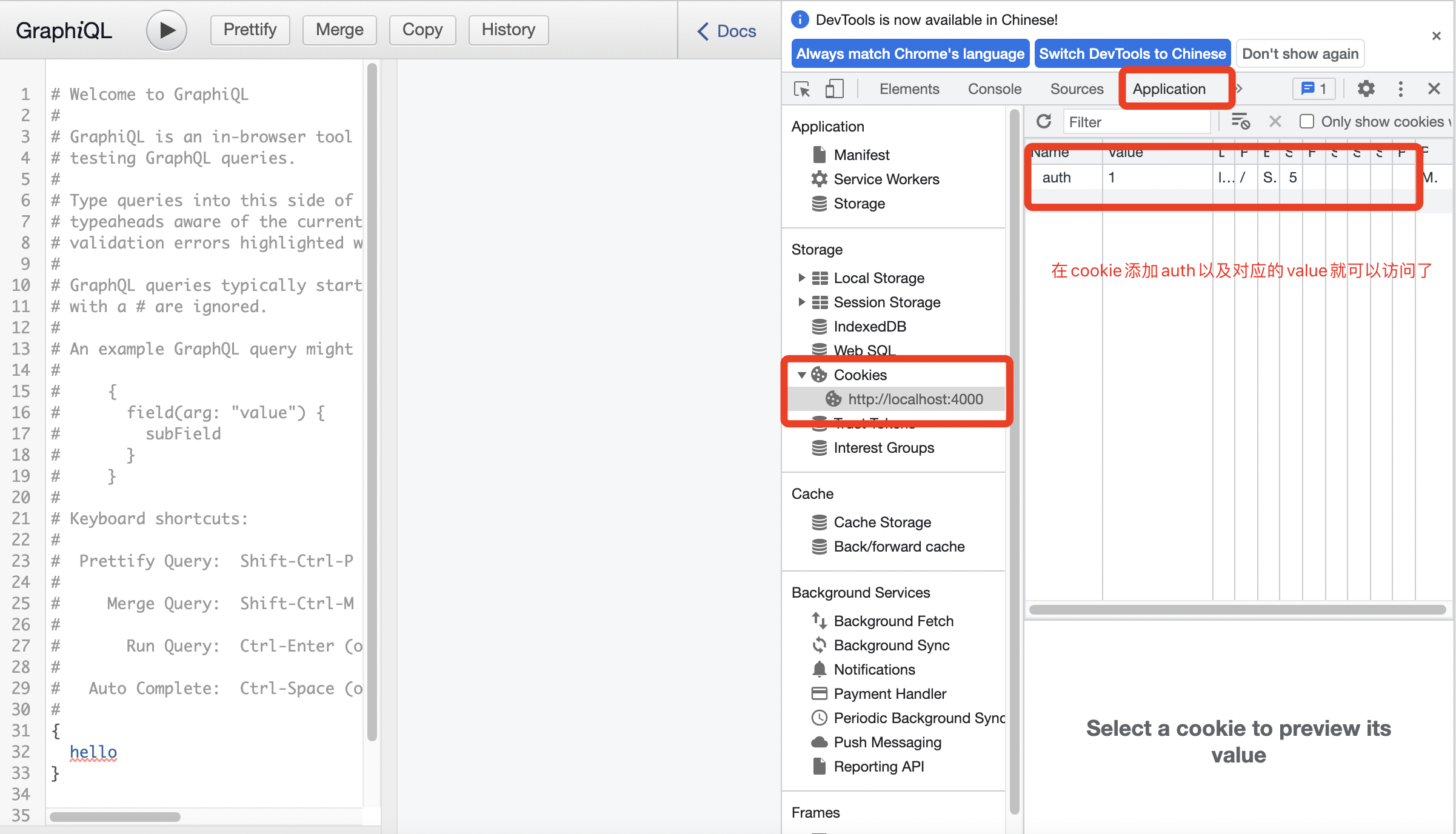
7、认证和中间件
代码示例
const middleware=(req,res,next) => {

    if(req.url.indexOf('/graphql') !== -1 && req.headers.cookie.indexOf('auth') === -1){

        res.send(JSON.stringify({

            error:"您没有权限访问这个接口"
        }));
        return;
    }
    next();
};

app.use(middleware);

8、Constructing Types
1、使用GraphQLObjectType定义type(类型)
方便以后维护,因为字符串以后出问题不知道问题具体在哪里

2、使用它GraphQLObjectType定义query(查询)

3、创建shema

代码示例:
原来的
var express = require('express');
var {
     graphqlHTTP } = require('express-graphql');
var {
     buildSchema, graphql, GraphQLInt } = require('graphql');
var schema = buildSchema(` type Account{ name:String age:Int sex:String department:String } type Query{ account(username:String):Account } `);
// The root provides a resolver function for each API endpoint
var root = {

    account({
     username}){

        const name=username;
        const sex='男';
        const age=9;
        const department='开发部';
        return {

            name,
            sex,
            age,
            department,
            salary
        }
    }
  };

var app = express();


app.use('/graphql', graphqlHTTP({

  schema: schema,
  rootValue: root,
  graphiql: true,
}));
app.listen(4000);
console.log('Running a GraphQL API server at http://localhost:4000/graphql');
使用ConstructingTypes
var express = require('express');
var {
     graphqlHTTP } = require('express-graphql');
var graphql = require('graphql');


//定义返回值类型
var AccountType=new graphql.GraphQLObjectType({

    name:'Account',
    fields:{

        name:{
    type:graphql.GraphQLString},
        age:{
    type:graphql.GraphQLInt},
        sex:{
    type:graphql.GraphQLString},
        department:{
    type:graphql.GraphQLString}
    }
});

var queryType=new graphql.GraphQLObjectType({

    name:'Query',
    fields:{

        account:{

            type:AccountType,
            args:{

                username:{
    type:graphql.GraphQLString}
            },
            //方法的实现
            resolve:function(_,{
     username}){

                const name=username;
                const sex='男';
                const age=18;
                const department='开发部';
                return{

                    name,
                    age,
                    sex,
                    department
                }

            }
        }
    }
});

var schema = new graphql.GraphQLSchema({
    query: queryType});

var app = express();

app.use('/graphql', graphqlHTTP({

  schema: schema,
  graphiql: true,
}));
app.listen(4000);
console.log('Running a GraphQL API server at localhost:4000/graphql');

边栏推荐
- [PHP] tp6 multi table connection query
- 关于XML文件(六)-与JSON的区别
- 功能测试真的没有出路了吗?10k封顶从来不是开玩笑的.....
- [regression prediction] lithium ion battery life prediction based on particle filter with matlab code
- 5. Is the asynctool framework flawed?
- DDD 超越 MVC了吗
- About XML file (VI) - the difference between JSON and XML file
- HCIA_ Nat experiment
- 人脸关键点检测
- OpenVINO中的FCOS人脸检测模型代码演示
猜你喜欢

TCP three handshakes and four disconnects

DHCP principle and configuration

Letv a plus de 400 employés? Le jour de l'immortel sans patron, les autorités ont répondu...

Summary of the most complete methods of string interception in Oracle

Mysql多表查询

一个优酷VIP会员帐号可以几个人用的设备同时登录如何共享多人使用优酷会员账号?

ELK日志分析系统
![[face recognition] face recognition based on histogram histogram with matlab code](/img/a6/ae776d084a207647501ca951e32000.png)
[face recognition] face recognition based on histogram histogram with matlab code

JDBC连接Mysql数据库

【NoSQL】redis高可用和持久化
随机推荐
仿射变换实现
Learning network foundation
【单片机仿真】(二十一)DB(Define Byte)— 定义字节
Detailed explanation of dynamic compression and static compression of gzip
责任链模式的高级用法
微信小程序--Taro框架实际开发中的问题汇总
mysqldump: [Warning] Using a password on the command line interface can be insecure.
Oracle gets the last and first data (gets the first and last data by time)
Binary installation kubernetes 1.23.2
你能用到的Mysql常用命令
C language foundation day4 array
Mysql优化之索引
人脸检测几种方法
快照:数据快照(数据兜底方式)
MySQL master-slave replication + read write separation
Multi layer packet structure and TCP triple handshake
ENSP static routing experiment
【单片机仿真】(八)指令系统 — 数据传送指令
Rip comprehensive experiment
ncnn Mat矩阵类